
Razer Kishi Ultra vs Backbone Pro: Which Phone Gaming Controller Suits You?
Two full-size mobile grips take different routes to cloud, remote-play and controller-compatible games: one prioritises a direct wired connection, whilst the other doubles as a Bluetooth controller for more screens.

We link to the exact model on Amazon UK. Prices change often, so check the live price before you buy. As an Amazon Associate we earn from qualifying purchases.
The decision between the Razer Kishi Ultra and Backbone Pro is not really about finding a generic phone grip. Both are large, console-style controllers built for people who want more substantial sticks, triggers and handles than compact telescopic pads provide. The meaningful split is simpler: choose the Kishi Ultra for a permanently wired, phone-first setup with Android and Windows haptics; choose the Backbone Pro if you also want a rechargeable Bluetooth controller for tablets, PCs and compatible smart TVs.
Meet the Contenders: What Each Grip Is Trying to Be

See Backbone Pro on Amazon UK
Check today's price & availability on Amazon UK

See Razer Kishi Ultra on Amazon UK
Check today's price & availability on Amazon UK
Razer's Kishi Ultra arrived in April 2024 as an oversized USB-C telescopic controller. It has no Bluetooth radio and no internal battery. Instead, it connects directly to the phone, iPad mini, Android tablet or compatible PC through USB-C, taking its power from the device it is attached to. That approach makes it comparatively straightforward: fit the device, connect the USB-C port and play. Its 15W pass-through port can charge the host device during a session.
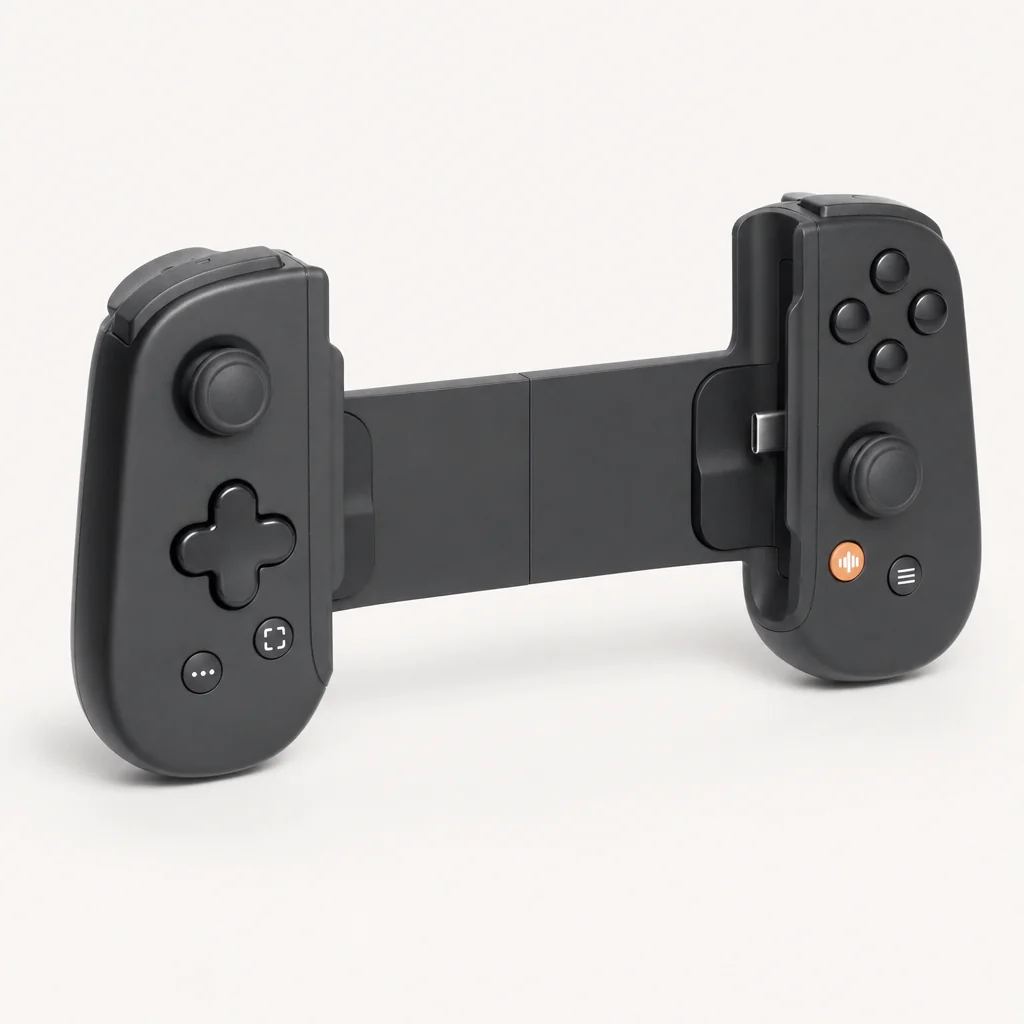
Backbone introduced the standard Backbone Pro in May 2025, with US shipments beginning later that month. The Pro is still a telescopic USB-C phone controller when a handset is fitted, but its proposition is broader. It also works over Bluetooth Low Energy, has a rechargeable battery rated for up to 40 hours of wireless play, and can move between compatible devices through Backbone's FlowState system. In practical terms, it can leave the phone grip role behind and become a conventional wireless controller for a tablet, laptop or television setup.
The Backbone Pro name covers more than one finish. The standard black model, Backbone Pro | XBOX Edition and Backbone Pro XBOX 25th Anniversary Edition use the same confirmed Pro-platform controls and connectivity. The Xbox Edition launched on 12 November 2025 with translucent green styling and a month of Xbox Game Pass Ultimate. The 25th Anniversary Edition was announced in August 2026 as a $159.99 blind-box preorder in Crystal Clear, Iconic Blue or Bold Orange; fulfilment was due to begin on 20 October 2026.
That family distinction matters because the Xbox-labelled versions should not be treated as performance upgrades. The confirmed differences are styling and bundle content, not a faster wireless connection, different sticks or additional inputs. UK buyers should therefore choose an Xbox version because they prefer the aesthetic or value the included Game Pass offer, rather than expecting a different controller underneath.
Ergonomics and Build: Full-Size Feel vs Lighter Carry
Neither controller is a small accessory to forget in a jacket pocket. Their large grips and full-size controls are central to their appeal, particularly for longer cloud sessions or shooters where a compact mobile pad can feel cramped. The difference is that Backbone has kept the Pro meaningfully lighter and less bulky, whilst Razer has prioritised the feel of a split console controller around a phone or small tablet.
| Physical specification | Razer Kishi Ultra | Backbone Pro |
|---|---|---|
| Weight | 266g | 203g |
| Collapsed / contracted width | 244.8mm | 180.7mm |
| Expanded width | 334.8mm | 280.7mm |
| Height | 110.8mm | 101.1mm |
| Depth | 64.3mm | 49.8mm |
| Phone connection | USB-C | USB-C |
| 3.5mm headset jack | Yes | Yes |
| Buy | Check price | Check price |
The 63g gap means the Kishi Ultra is around 31% heavier than the Backbone Pro. On paper, that can sound modest. In a handheld configuration, it is more noticeable because the controller's mass is added to an already substantial phone or iPad mini. The Kishi's 334.8mm maximum width also reflects its ability to accommodate the iPad mini 6th generation, iPad mini A17 Pro and Android tablets up to roughly eight inches. This is a real advantage for somebody who plays on more than a phone and wants the controls clamped directly around a small tablet.
Backbone Pro is still much larger than the original Backbone One, but its 203g weight, 49.8mm depth and 180.7mm contracted width make it more manageable in a bag. Engadget and other reviewers described its enlarged grips as a notable comfort improvement over the smaller Backbone One. It is the better fit for someone who travels with a phone controller regularly but does not want the larger Kishi Ultra occupying the same space as a compact keyboard.
The practical fit question
Choose the Kishi Ultra if fitting an iPad mini or a small Android tablet directly between the grips is part of the plan. Choose the Backbone Pro if a tablet is more likely to sit on a stand, with the controller used wirelessly in front of it. Both approaches create a console-like layout, but only one keeps the tablet physically in the grip.
Razer also states that the Kishi Ultra works with many popular cases, although fit still depends on the case thickness and whether its USB-C opening provides enough clearance. Backbone includes adapters for selected phone and case combinations. A very thick or unusually shaped case remains something to check before buying either controller, because USB-C alignment is fundamental to their wired handheld mode.
For day-to-day setup, that makes the Kishi Ultra the more immediate option: attach the compatible device and use its direct USB-C connection. Backbone Pro is equally straightforward when used around a USB-C phone, but wireless use adds the separate controller battery and host connection to manage. That extra flexibility is valuable when the phone is not the screen, yet it is unnecessary complexity for a player whose controller will always remain attached to one handset.
Sticks, Triggers and Buttons: Where the Hall Effect Story Gets Complicated
Both controllers use Hall Effect analogue triggers. That is useful because the trigger travel is measured magnetically rather than through a traditional contact mechanism. It is also important not to overstate what this covers: Hall Effect triggers are not the same thing as Hall Effect thumbsticks, and neither product has confirmed Hall Effect sticks.
| Control feature | Razer Kishi Ultra | Backbone Pro |
|---|---|---|
| Thumbsticks | Full-size analogue sticks with anti-friction rings | Full-size ALPS analogue joysticks |
| Hall Effect triggers | Yes | Yes |
| Hall Effect thumbsticks | No confirmed Hall Effect specification | No; ALPS sticks |
| Additional remappable controls | Two L4/R4 multifunction bumpers | Two customisable rear buttons |
| Button remapping | Yes, in Razer Nexus | Yes, in Backbone App |
| Stick dead-zone adjustment | Yes, in Razer Nexus | Yes, in Backbone App |
| Trigger sensitivity / dead-zone adjustment | Not confirmed; Razer Nexus confirms general stick dead-zone adjustment, not a separately confirmed trigger-specific control | Yes, in Backbone App |
Razer's sticks are full-size and use anti-friction rings, which is part of why reviewers regularly compared the Kishi Ultra's feel to a conventional controller rather than a compact mobile attachment. Backbone's full-size ALPS sticks received similarly positive comments for their scale and comfort. However, the long-term stick-drift concern is not removed by either product. Buyers who specifically want magnetically sensed thumbsticks should not assume the word "Pro", large sticks or Hall Effect triggers means that feature is included.
Razer Kishi Ultra action controls
Mecha-tactile action buttons and an eight-way mecha-tactile D-pad give Kishi Ultra a deliberately clicky, positive control feel. Several reviews also described those buttons as fairly loud.
Backbone Pro rear buttons
The two customisable rear buttons are placed for fingers resting behind the grips. They can reduce the need to leave a stick during aiming or racing inputs, although comfort depends on hand size.
Useful app-level tuning
Both manufacturers provide remapping and dead-zone controls, which is helpful when a game's default layout does not suit your grip or when a stick needs a less sensitive centre zone.
For twitchy games
Either grip gives you two additional configurable controls beyond the core face buttons, triggers and shoulder buttons. The distinction is their placement, not the number available.
For cloud gaming and remote play, stick feel is usually more consequential than face-button branding. Both controllers provide the larger controls that make long sessions in titles such as shooters, driving games and action RPGs easier than they are on a touchscreen. The Kishi Ultra's wired-only construction gives it a simpler latency story, whilst Backbone Pro lets you decide between its wired mode and a more convenient wireless setup.
Rumble, Glow and Sound: The Sensory Extras
The Kishi Ultra has features the Backbone Pro does not attempt to match. Razer Sensa HD Haptics are supported on Android 12 or later and Windows 11, while Razer specifically excludes iOS from haptic support. The effect is intended to provide enhanced feedback in compatible games and applications rather than merely reproducing a standard controller rumble motor. It is a meaningful perk for Android and PC players, but it should not influence an iPhone purchase.
Kishi Ultra also has Razer Chroma RGB lighting. The available effects include Wave, Spectrum Cycling and Static. This is entirely optional from a gameplay perspective, but it gives the controller a more overt gaming-hardware identity. Backbone Pro instead has an orange status and Backbone-button indicator, without a confirmed RGB lighting system.
Razer Kishi Ultra sensory advantages
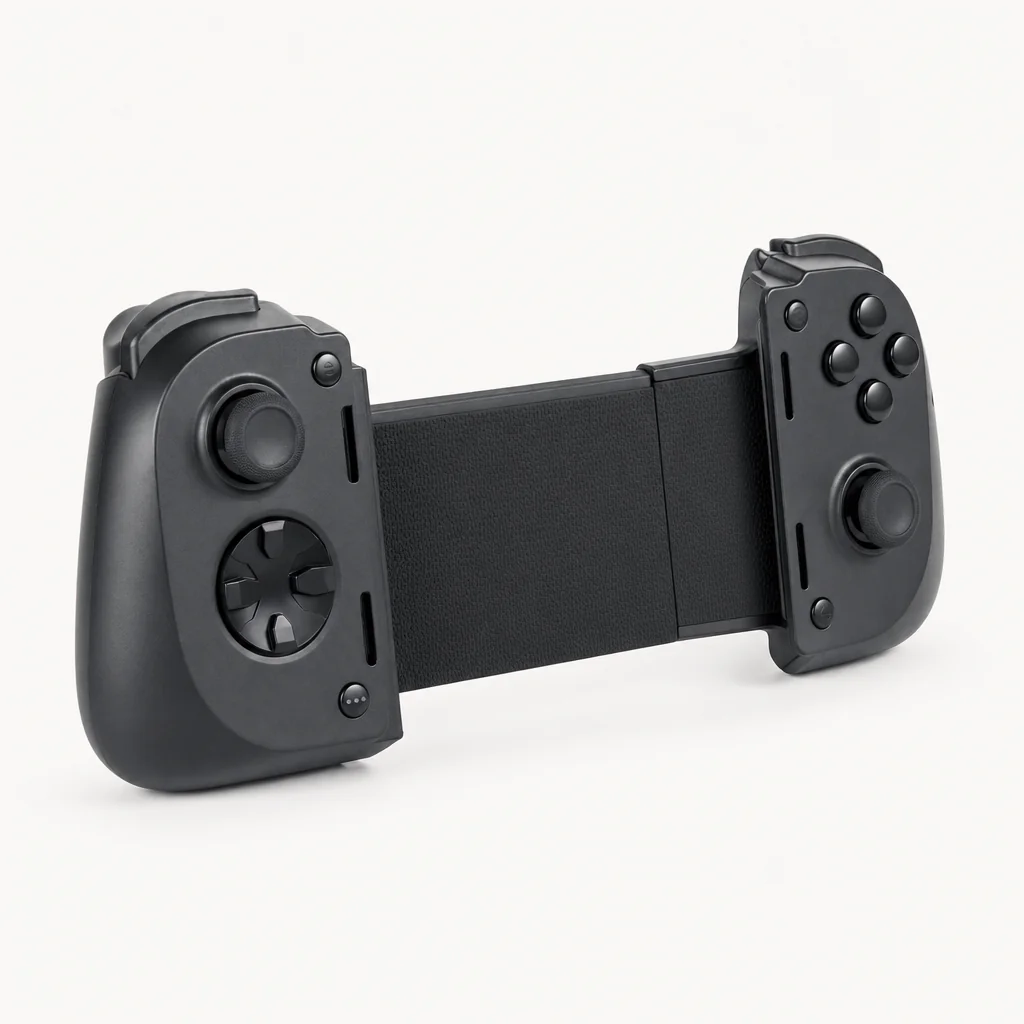
- Sensa HD Haptics on compatible Android 12+ devices and Windows 11 PCs.
- Chroma RGB controls in Razer Nexus.
- 3.5mm headset jack while the phone or tablet is attached.
- Full-size controls and tactile buttons emphasise a console-controller feel.
Backbone Pro sensory compromises
- No vibration or haptic feedback was confirmed; Macworld specifically highlighted the lack of rumble.
- No RGB lighting system is included.
- Wireless Bluetooth is convenient, but sound and controller connection are handled through the connected host device.
- Its extra versatility does not add Kishi Ultra's Android and Windows haptic capability.
Both controllers include a 3.5mm headphone jack, which remains useful when a phone's USB-C port is occupied by the grip. Backbone also states that Bluetooth audio can be used through the connected phone. Neither controller is a speaker: game sound comes from the host device, headphones or a separate display setup.
Power, Charging and the Wireless Question
The greatest functional difference is power management. Kishi Ultra has no controller battery to charge, monitor or eventually replace. It draws power from the device it is plugged into, which keeps setup simple but means the phone or tablet takes the power hit. Reviews noted that leaving the controller attached can contribute to device battery drain, especially while idle. There is no reliable universal percentage-per-hour figure, because the attached handset, brightness, network workload and game all change the outcome.
Backbone Pro's internal battery makes it self-contained for wireless use. Backbone rates it for up to 40 hours, and says a full recharge takes less than three hours. Tom's Guide reported that after a combined 10 hours of use, the controller battery had fallen to 75%, which broadly aligns with the company's headline estimate, although it was not a controlled full-discharge comparison. Backbone also makes clear that its internal battery is not a power bank: it cannot charge your phone unless the controller itself is connected to external power.
| Power and connection | Razer Kishi Ultra | Backbone Pro |
|---|---|---|
| Internal rechargeable battery | No | Yes |
| Wireless battery rating | Not applicable | Up to 40 hours |
| Controller charge time | Not applicable | Less than 3 hours |
| Bluetooth Low Energy | No | Yes |
| Wired USB-C mode | Yes | Yes |
| Pass-through charging | 15W | Up to 30W |
For latency-sensitive play, a direct USB-C connection remains the uncomplicated choice. Kishi Ultra only works this way, so there is no Bluetooth pairing stage or radio link in the controller path. One specialist result listed 13ms on PC, 76.83ms on a Samsung Galaxy S24+ and 51.83ms on an iPhone 15 Pro, although those figures are test-specific and should not be treated as universal end-to-end latency. Network quality, host hardware, display response and the cloud service all affect what you feel.
Backbone Pro can also be used wired, so it is not automatically at a competitive disadvantage. Its Bluetooth mode is simply a trade-off: it enables couch play with a tablet or TV, but introduces a wireless link. Tom's Guide reported no perceptible lag in PS Remote Play and native mobile games, while Thurrott reported no connection-quality issues in fast-paced games over Bluetooth. Other coverage reported occasional wireless lag in demanding games, though without naming specific titles. For a ranked shooter or a game where timing matters most, plugging the Backbone Pro in is the sensible route.
In a typical UK home setup, the distinction is practical rather than theoretical. If the phone is always the display, the Kishi Ultra avoids a second battery and keeps the control path consistent. If a tablet, laptop or compatible TV is regularly used for Steam Link, remote play or a cloud service, Backbone Pro's wireless mode can avoid keeping a USB-C device physically clamped into the controller. The right choice depends on where the screen usually sits during a session.
Software Smarts: Razer Nexus vs the Backbone App
Both controllers have useful configuration basics rather than asking you to accept a fixed layout. Razer Nexus and the Backbone App offer button remapping and stick dead-zone adjustment. Backbone also supports trigger dead-zone and sensitivity changes. Those controls matter more than a feature checklist suggests: mobile games, remote-play clients and cloud services do not always agree on a default layout, and a small adjustment can make a controller feel far more natural.
Razer Nexus: Android Virtual Controller Mode
Kishi Ultra supports Virtual Controller Mode on Android, allowing controller inputs to be mapped to touchscreen controls in supported situations. Its usefulness depends on the game, Android version and compatibility.
Razer Nexus: lighting and haptics control
The app also manages Chroma effects and Kishi Ultra's supported haptic settings, making it the place to tailor the controller's more distinctive extras.
Backbone App: FlowState switching
FlowState is designed to make movement between supported connected screens less cumbersome than conventional repeated Bluetooth pairing, matching the Pro's multi-device purpose.
Backbone App: service integration
Backbone supports Xbox Cloud Gaming, Nvidia GeForce NOW and Amazon Luna, as well as Xbox Remote Play, PlayStation Remote Play and Steam Link through the relevant apps and services.
Backbone+ is not required to use Backbone Pro with compatible games. The free app covers controller essentials such as firmware updates, calibration and remapping. Backbone+ adds discovery, recommendations, cloud-related features, livestreaming and perks, so it is optional rather than a controller access fee. Razer Nexus is also free, though individual games and gaming services can naturally have their own purchases or subscriptions.
Pricing Reality in the UK: List Price vs What You Might Pay
The Kishi Ultra launched in the UK at £149.99. A UK retailer listing showed it at £143.99 when checked, whilst Best Buy in the US listed the controller at $119.99 clearance against its $149.99 MSRP. Those figures indicate that the older Razer model may offer stronger promotional value when stock remains, but retailer pricing and availability change quickly. Separately, the Amazon UK listing linked in this article showed a lower in-stock price of £64.00 when checked on 26 September 2026, so always check that live price before assuming the launch RRP applies.
Backbone Pro sits in a higher UK pricing tier: Apple UK listed it at £169.95, while £169.99 was commonly quoted by reviews and retailers. Its US MSRP is $169.99. The Xbox Edition carries a $179.99 US MSRP, while the blind-box 25th Anniversary Edition was listed at $159.99 in the US. A confirmed UK price for either Xbox variant was not available, so it would be unwise to convert those dollar figures and present them as British retail pricing. Separately, the Amazon UK listing linked in this article showed the standard Backbone Pro at £149.00 when checked on 26 September 2026, below the Apple UK and reviewer-quoted figures, so check that live listing price before buying.
Razer Kishi Ultra
US MSRP was $149.99. A Best Buy clearance listing showed $119.99, while Razer's US page showed the model out of stock when checked. The Amazon UK buy link on this page showed a different in-stock price of £64.00 when checked on 26 September 2026, so treat that live listing as the current UK price rather than the £149.99 launch RRP quoted above.
Backbone Pro
US MSRP is $169.99. The additional spend buys Bluetooth operation, an internal battery and the broader multi-screen role. The Amazon UK buy link on this page showed a different in-stock price of £149.00 when checked on 26 September 2026, so treat that live listing as the current UK price rather than the £169.95–£169.99 figures quoted above.
Backbone Pro Xbox variants
The Xbox Edition is $179.99. The 25th Anniversary blind-box preorder is $159.99 and was due to begin fulfilment on 20 October 2026.
If the Kishi Ultra is discounted near the $119.99 level reflected at Best Buy, it becomes a very strong value proposition for someone committed to wired mobile play. At full price, the £20 gap between its UK launch price and the standard Backbone Pro's UK price tier is easier to justify if Bluetooth, device switching and a 40-hour battery will genuinely get used. Paying extra for functions that remain unused is not good value, but neither is buying a wired-only grip and later realising that a tablet-and-TV setup was the actual goal.
For UK shoppers, availability deserves almost as much attention as the advertised price. The Kishi Ultra's retailer stock can vary, while Backbone's own standard Pro page showed sold out when checked despite a Best Buy listing showing availability in the US. Check the exact model, regional stock status and whether an Xbox-branded version has a confirmed British listing before treating a US price or preorder announcement as a like-for-like local alternative.
Who Actually Wins Each Use Case?
Pick Razer Kishi Ultra for wired focus
It suits players who want a direct USB-C connection every time, full-size grips, Hall Effect triggers and no controller battery to recharge. It is also the clearer choice for fitting an iPad mini or an Android tablet of around eight inches directly in the controller.
Pick Backbone Pro for more screens
It suits players who move between phone, tablet, PC and compatible TV setups. Bluetooth Low Energy, FlowState switching and up to 40 hours of battery life make the Pro much more adaptable away from a handset.
Pick Kishi Ultra for Android or Windows haptics
Sensa HD Haptics and Chroma RGB are genuine differentiators if you use Android 12+ or Windows 11. Do not choose it for this reason on iPhone, because Razer does not support the haptic feature on iOS.
For competitive cloud gaming, the Kishi Ultra is the cleaner technical recommendation because it is built around a direct wired link. The Backbone Pro is still highly capable when wired, but the Razer removes the temptation to prioritise Bluetooth convenience over the lowest-latency controller path. Its larger 266g body is the cost of that console-like feel and broad clamp support.
For the player who wants one controller to cover every screen in the house, Backbone Pro makes more sense. A phone grip that can become a wireless controller has a different kind of value from a wired-only model, particularly for Steam Link, remote play, GeForce NOW or Xbox Cloud Gaming on a tablet. The 203g weight is another advantage if the controller will travel frequently.
A commuter or frequent traveller should also weigh the physical trade-off rather than just the feature list. Backbone Pro is 63g lighter and contracts to 180.7mm wide, so it is the easier controller to carry alongside a phone. Kishi Ultra is the more compelling option when comfort after arrival matters more than compact carrying, particularly if the intended device is an iPad mini or compatible small Android tablet rather than a handset alone.
Neither controller is confirmed for use with a Nintendo Switch console. They create a Switch-style handheld arrangement around a phone or small tablet, but that form factor should not be mistaken for Nintendo Switch compatibility. Their supported roles are mobile gaming, cloud gaming, remote play and PC or tablet gaming through the appropriate host device and service.
Verdict: Two Different Answers to the Same Problem
The Razer Kishi Ultra is the more focused buy. Its permanent USB-C connection, large grips, small-tablet compatibility, Hall Effect triggers, 15W pass-through charging, Android and Windows haptics, and RGB lighting make it suited to players who want a substantial wired handheld setup. It is heavier, bulkier and dependent on the battery of the device it is attached to.
The Backbone Pro is the more flexible buy. It is 63g lighter, works wired or over Bluetooth Low Energy, has an up-to-40-hour battery, supports up to 30W pass-through charging and adds two rear buttons plus multi-screen use. It lacks confirmed vibration and RGB, and wireless play can bring a latency compromise in some circumstances.
Choose Kishi Ultra for a phone-first, wired, Android/Windows-enhanced experience or an iPad mini held directly in the grip. Choose Backbone Pro if the controller needs to serve a phone, tablet, PC and TV setup without being physically attached to the phone every time.
Common Questions UK Buyers Are Asking
Sources and evidence
Specifications, compatibility and pricing references: Razer Kishi Ultra product material and launch announcement; Backbone Pro product page, comparison page and support FAQs; Apple UK and Best Buy listings checked during research. Performance and usability context: Android Authority, TechRadar, Tom's Guide, Engadget, Macworld and Thurrott. Availability and retailer prices are time-sensitive and should be checked before purchase.
- Backbone ProView on Amazon
- Razer Kishi UltraView on Amazon
Sources and evidence (17)
- razer.com (other)
- backbone.com (other)
- androidauthority.com (other)
- techradar.com (other)
- backbone.com (other)
- backbone.com (other)
- help.backbone.com (other)
- tomsguide.com (other)
- macworld.com (other)
- razer.com (other)
- bestbuy.com (other)
- razer.com (other)
- backbone.com (other)
- engadget.com (other)
- macworld.com (other)
- backbone.com (other)
- thurrott.com (other)