
Razer Blade 18 vs MSI Titan 18 HX vs Alienware 18 Area-51: Which Wins?
Three desktop-replacement giants, three very different ideas of where your money should go: screen flexibility, raw RTX 5090 muscle, or high-refresh value.


Lightest here, quieter than the Titan, far longer battery life and a flexible 4K/240Hz or 1200p/440Hz screen.
Check price on Amazon
RTX 5080 at 175W, a 300Hz G-Sync screen and 2TB storage at the lowest reported UK price of the three.
Check price on Amazon
The only RTX 5090 here, with a DisplayHDR 1000 Mini-LED panel and 6TB storage, but loud and short on battery.
Check price on AmazonWe link to the exact model on Amazon UK. Prices change often, so check the live price before you buy. As an Amazon Associate we earn from qualifying purchases.
The tower PC is going, the desk has been cleared, and you are about to spend more on one laptop than some people spend on a decent used car. Choose badly and you live with it every evening: a fan roar that drowns out the soundtrack, a gorgeous screen that smears during a firefight, or a 4kg slab you swore you would take on holiday and never do.
These three 18-inch machines all promise to replace a desktop, but they spend your money in very different places. One chases screen flexibility and composure, one chases raw power and HDR brightness, and one chases refresh rate at the lowest reported price.
The short answer
For most serious buyers, the Razer Blade 18 is the one to get: the lightest of the three, quieter than the Titan in measured tests, far longer-lasting on battery, and fitted with a dual-mode 4K/240Hz or 1200p/440Hz screen, at a £4,099.99 RRP for the RTX 5080 model. Pick the MSI Titan 18 HX if you want the only RTX 5090 here and a dazzling Mini-LED HDR panel for single-player games and creative work, and you can live with the noise and the price. Pick the Alienware 18 Area-51 if you play competitive shooters, want the cheapest route into this class, and the laptop will rarely leave your desk.
The 18-inch Arms Race: Why These Three Made the Shortlist
First, an honest correction to how this class is usually sold. These are often lumped together as "RTX 5090 laptops", but only one of the three Amazon UK listings actually carries that chip. The Razer and Alienware configurations both use the RTX 5080 Laptop GPU with 16GB of GDDR7; the MSI has the RTX 5090 with 24GB. All three run their graphics at up to 175W, so the gap is the chip itself rather than a power-starved variant.
Generations differ too. The Blade 18 is Razer's 2026 model, announced on 1 June 2026 and on UK sale from 29 June 2026. The Titan 18 HX AI and the Area-51 both made their debut at CES in January 2025. That sounds like a year's head start for Razer, but Tom's Hardware found the Blade's new Core Ultra 9 290HX Plus processor delivered no meaningful gain over the previous generation in its benchmarks, so the CPU gap is smaller than the model years suggest.
One listing quirk to clear up: the Amazon title for the Razer mentions "16-inch". Razer's own product page for this exact model, RZ09-05828WR3-R3W1, confirms it is the 18-inch laptop with the same RTX 5080, 32GB and 1TB configuration.
Here is what all three share, so you can stop weighing it:
| Spec | Razer Blade 18 | MSI Titan 18 HX | Alienware 18 Area-51 |
|---|---|---|---|
| Processor | Intel Core Ultra 9 290HX Plus, 24 cores, up to 5.5GHz | Intel Core Ultra 9 285HX, 24 cores, up to 5.5GHz | Intel Core Ultra 9 275HX, 24 cores, up to 5.4GHz |
| Graphics | RTX 5080 Laptop, 16GB GDDR7 | RTX 5090 Laptop, 24GB GDDR7 | RTX 5080 Laptop, 16GB GDDR7 |
| Memory (as listed) | 32GB DDR5-6400, two slots | 64GB DDR5-6400 (2×32GB), two slots | 32GB DDR5-6400 (2×16GB), two slots |
| Storage (as listed) | 1TB PCIe Gen 4 | 6TB: 2TB Gen 5 + 2×2TB Gen 4 in RAID 0 | 2TB NVMe |
| Display | 3840×2400 at 240Hz or 1920×1200 at 440Hz, IPS | 3840×2400 at 120Hz, Mini-LED | 2560×1600 at 300Hz, IPS |
| Rated brightness | 600 nits | VESA DisplayHDR 1000 certified | 500 nits |
| G-Sync | Yes | No adaptive sync, per Notebookcheck | Yes, plus Advanced Optimus |
| Battery | 99Wh | 99.9Wh, user-replaceable | 96Wh |
| Charger | 400W | 400W | 360W |
| Weight | 3.2kg (Notebookcheck scale) | 3.6kg (Notebookcheck scale) | About 4.34kg (listed) |
| Windows | 11 Home | 11 Pro | 11 Home |
| Colour | Black | Core Black | Liquid Teal |
| Buy | Check price | Check price | Check price |
Razer Blade 18: The Composed All-Rounder
The Blade 18 is the one that looks like it belongs in a design studio as much as a gaming den. Razer machines the chassis from a single block of aluminium, sand-blasts and anodises it, and says the 2026 models use recycled metal. The headline feature is the screen: Razer describes it as the first 18-inch panel to switch between a 3840×2400 mode at 240Hz and a 1920×1200 mode at 440Hz.

A caveat matters here. The published 2026 reviews almost all used the RTX 5090 version of this chassis, not the RTX 5080 model on Amazon UK. Treat their numbers as evidence for the design, cooling and screen rather than exact frame rates. On that 5090 unit, Notebookcheck recorded 54.7fps in F1 24 at 4K Ultra High and 108.2fps at 1440p, while Tom's Hardware logged a 146.03fps average across 15 Metro Exodus stress runs. Your RTX 5080 will land below those figures.
Reviewers were warm about the rest. Notebookcheck called it one of the fastest and quietest gaming laptops it had reviewed and praised the rigid metal body. GamesRadar+ liked the full-size keyboard, the large trackpad and battery life that beat expectations for an 18-inch machine. Inside, there are two memory slots and two M.2 slots, each rated by Razer for drives up to 8TB, so the shipped 1TB is a starting point rather than a ceiling. UK configurations top out at 64GB of RAM according to GamesRadar+, although the chassis supports 128GB.
The catch: Notebookcheck argued the 2026 model performs much like the 2025 Blade while costing more, and suggested a discounted 2025 unit instead. Tom's Hardware found it hot under sustained load and criticised the PCIe Gen 4 SSD at this price, plus the half-height arrow keys and a conventional rather than haptic touchpad. GamesRadar+ hit occasions where switching to 4K locked the panel at 60Hz until it fixed things in the Nvidia Control Panel, and Notebookcheck found the Wi-Fi 7 card limited to 160MHz channels, capping its measured transfers at roughly 2Gbps.
MSI Titan 18 HX: The No-Compromise Powerhouse
The Titan is MSI throwing everything into one chassis. The Amazon listing is the Titan 18 HX AI A2XWJG-614US, the same configuration Tom's Hardware reviewed: Core Ultra 9 285HX, RTX 5090 with 24GB of GDDR7, 64GB of DDR5-6400 and 6TB of storage, split between a 2TB PCIe Gen 5 drive and two 2TB Gen 4 drives in RAID 0. The defining spec is MSI's OverBoost Ultra mode, which lets the CPU and GPU draw up to 270W combined.
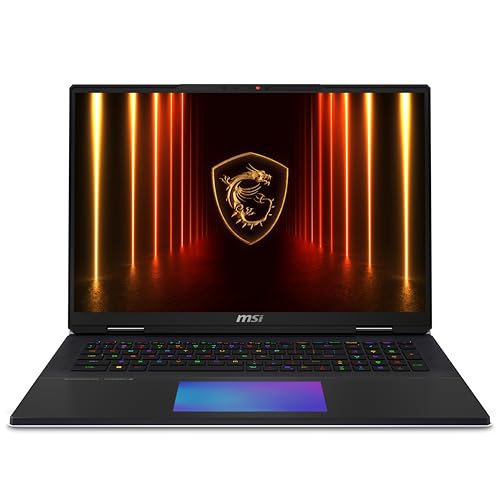
WIRED called it the most powerful gaming laptop it had reviewed. The screen is the other draw: a 3840×2400 Mini-LED panel with VESA DisplayHDR 1000 certification, which Notebookcheck credited with near-infinite contrast. Add a Cherry MX ultra-low-profile mechanical keyboard, two Thunderbolt 5 ports, a full-size SD Express reader and a battery you can replace yourself, and this is as much mobile workstation as gaming laptop.
Reviewers found little to fault in its stamina under load. Tom's Hardware recorded a 145fps average across 15 Metro Exodus runs with only about 1fps variation between runs, and TechRadar scored its performance 5/5.
The catch: it is loud, it drains its battery quickly, and the haptic glass touchpad split critics. Tom's Hardware called it finicky; WIRED reported a loud click, an imprecise feel and occasional delay. Tom's Guide found the speakers tinny and the webcam poor, and argued cheaper desktop replacements deliver similar gaming performance for much less. Notebookcheck also flagged the lack of adaptive sync, an odd omission at this money. Finally, the Amazon unit carries a US model code; MSI UK lists a two-year warranty for its UK models, so confirm warranty terms and keyboard layout with the seller before you buy.
Alienware 18 Area-51: The Desk-Bound Esports Specialist
The Area-51 makes no attempt to look discreet. The Liquid Teal chassis has a raised thermal shelf Alienware calls the Cryo-Chamber, a Gorilla Glass window onto part of the cooling hardware, and RGB lighting across the keyboard, touchpad, rear and underside. Alienware claims the design moves 37% more air and runs 15% quieter than the previous generation; those are the company's figures, not independent measurements.

The listing is UK part number AWAA18250-9208BLU-PGB: Core Ultra 9 275HX (up to 160W maximum turbo power), RTX 5080 at up to 175W according to RTINGS' configuration data, 32GB of DDR5-6400 and 2TB of storage. The screen is a 2560×1600 IPS panel running at 300Hz with G-Sync and Advanced Optimus. Amazon's bundle adds three months of PC Game Pass.
RTINGS reviewed this exact processor, GPU and memory combination, differing only in having a 1TB rather than 2TB drive. It found Cyberpunk 2077 ran smoothly even with ray tracing, recorded minimal thermal throttling, and reported no loss of GPU performance over long sessions. It also praised a sturdy chassis with little flex, a stable hinge, a comfortable keyboard and a responsive touchpad. RAM and storage are user-replaceable.
The catch: RTINGS called it exceptionally bulky, likely too big for most bags, with loud fans and blacks that look grey in a dim room. CGMagazine noted the power brick is unusually large. Notebookcheck, reviewing the RTX 5090 version, criticised the absence of OLED, Mini-LED, 4K or HDR display options in this 18-inch range. The optional Cherry MX mechanical keyboard has drawn praise from CGMagazine, but check the listing to see whether this particular unit has it.
Screen Showdown: Resolution vs Refresh vs Contrast
This is where the three really part company, and probably where your decision gets made.
| Display | Razer Blade 18 | MSI Titan 18 HX | Alienware 18 Area-51 |
|---|---|---|---|
| Resolution | 3840×2400 or 1920×1200 (dual mode) | 3840×2400 | 2560×1600 |
| Refresh rate | 240Hz (UHD+) / 440Hz (FHD+) | 120Hz | 300Hz |
| Panel | IPS, Calman Verified | Mini-LED, IPS-level | IPS/WVA, matte |
| Rated colour | Up to 100% DCI-P3 | 100% DCI-P3 typical | 100% DCI-P3 |
| Response time | 3ms (claimed) | 8.8ms grey-to-grey, 15ms black-to-white (Notebookcheck) | 3ms (claimed) |
| HDR | IPS contrast and HDR criticised by Notebookcheck | DisplayHDR 1000 | No HDR option in the range, per Notebookcheck |
The Titan's Mini-LED is the showpiece. Tom's Hardware measured 729.3 nits average and 762 nits peak HDR brightness; Notebookcheck recorded up to 1,153 nits in HDR with a 10% window, plus 99.9% sRGB, 99.7% Display P3 and 90.4% Adobe RGB coverage. Out of the box its colour accuracy is only fair: Notebookcheck measured a DeltaE of 4.11, improving to 2.5 after calibration. Notebookcheck detected PWM flicker at 15.43kHz but considered it too fast for most people to notice.
The Razer's dual-mode IPS trades contrast for versatility. Tom's Hardware measured 538 nits on its RTX 5090 review unit, up from 467.6 nits on the 2025 model, with 80.8% DCI-P3 colour volume (a different measurement method from Notebookcheck's gamut figure, so don't compare the two directly). Notebookcheck found image quality suffers in the 440Hz mode and that contrast and HDR trail Mini-LED and OLED rivals.
The Alienware's 300Hz panel is rated at 500 nits with full DCI-P3 coverage. RTINGS' measured brightness and response figures sit behind its paywall, so lean on the official ratings with some caution; what RTINGS does say publicly is that response is fast and blacks look grey in a dark room.
Match the screen to your library
If your evenings are Cyberpunk, Alan Wake-style horror and HDR films, the Titan's contrast is the upgrade you will notice every session. If you mostly play Counter-Strike or Valorant, Notebookcheck's view that the Titan's response is potentially too slow for esports makes the Alienware's 300Hz or the Razer's 440Hz mode the sensible choice. If you do both, the Razer's switchable modes are the compromise that covers the most ground.
RTX 5090 vs RTX 5080: What the GPU Tier Actually Buys You
| Silicon | Razer Blade 18 | MSI Titan 18 HX | Alienware 18 Area-51 |
|---|---|---|---|
| GPU | RTX 5080 Laptop | RTX 5090 Laptop | RTX 5080 Laptop |
| Video memory | 16GB GDDR7 | 24GB GDDR7 | 16GB GDDR7 |
| GPU power | Up to 175W | Up to 175W with Dynamic Boost | Up to 175W |
| CPU | Core Ultra 9 290HX Plus | Core Ultra 9 285HX | Core Ultra 9 275HX |
| CPU cores / boost | 24 / 5.5GHz | 24 / 5.5GHz | 24 / 5.4GHz |
The extra 8GB of video memory on the Titan matters most for local AI models, heavy 3D scenes and the very highest texture settings at 4K. For gaming at the Alienware's native 2560×1600, 16GB is a comfortable allowance.
The Titan's real advantage is its power budget. WIRED found it roughly 10% faster in Cyberpunk 2077 and 18% faster in 3DMark Time Spy than a thinner RTX 5090 Razer Blade 16, which shows how much the cooling and power delivery around a chip shape what you get from it.
Even so, native 4K remains hard work. These are Tom's Hardware's and WIRED's figures for the Titan at its full 3840×2400 resolution:
Drop to 1080p and the Titan flies: TechRadar recorded 196fps in Shadow of the Tomb Raider, 220fps in Total War: Warhammer III, 93fps in Metro Exodus Extreme and 71fps in Cyberpunk 2077 Ultra. The lesson from that 21fps ray-traced result is simple: on any of these machines, DLSS and Frame Generation are part of the plan for 4K path-traced games, not an afterthought. Tom's Hardware saw the same pattern on the RTX 5090 Blade in Resident Evil Requiem with path tracing, at roughly 30–37fps at 3840×2400 and around 90fps at 1920×1200.
A useful cross-check: in Tom's Hardware's identical 15-run Metro Exodus loop, the RTX 5090 Blade 18 averaged 146.03fps and the RTX 5090 Titan 145fps. With the same chip, Razer's slimmer chassis kept pace. That suggests the RTX 5080 Blade and RTX 5080 Area-51, both at 175W, should sit close together, and that the Titan's lead over both comes mainly from its GPU tier.
Keeping Cool: Fan Noise, Heat and Sustained Power Under Load
Power has to go somewhere, and in a laptop it leaves as heat and noise. The Titan's 270W budget is the loudest of the measured pair by a distance.
Around 59dB(A) is headphones territory, and Tom's Hardware and TechRadar both described the Titan's fans as loud. The Razer is noticeably calmer in Performance mode, and its Silent mode at around 41dB(A) under gaming load is an option the Titan's measured figures don't match. At idle the Razer measured 24.8–28.6dB(A) against the Titan's 27.68dB(A) in Eco-Silent mode.
Where the heat lands differs too. On the RTX 5090 Blade, Tom's Hardware measured 42.8°C on the keyboard, 37.8°C on the touchpad and a 46.7°C underside hotspot, with the CPU peaking at 88.9°C and the GPU averaging 69.62°C. The Titan's underside reached 53.6°C in Notebookcheck's combined stress test, but its palm rest stayed around skin temperature, which is what your wrists will actually notice.
The Area-51 is the hardest to pin down: RTINGS publishes no decibel figure, only that the fans are loud under load. Its sustained performance is the stronger story, with minimal throttling and no lost GPU performance across long sessions.
Cooling wins
- Razer: around 49dB(A) in Performance gaming and a usable Silent mode (Notebookcheck)
- Titan: roughly 1fps run-to-run variation over 15 Metro loops (Tom's Hardware), cool palm rest
- Area-51: no GPU performance loss over long loads (RTINGS)
Cooling costs
- Razer: warm keyboard and underside under sustained play (Tom's Hardware)
- Titan: up to 58.87dB(A) in Extreme Performance mode (Notebookcheck)
- Area-51: loud fans under load (RTINGS)
Unplugged Reality: Battery Life Compared (Spoiler: None Are Great)
Nobody buys an 18-inch RTX laptop for battery life, but the gap here is big enough to change how you use the thing on a sofa or a train.
| Battery test | Razer Blade 18 | MSI Titan 18 HX | Alienware 18 Area-51 |
|---|---|---|---|
| Tom's Hardware mixed web/video/OpenGL, 150 nits | 5h 31m | 2h 16m | Not confirmed |
| Video playback | Not confirmed | 3h (Notebookcheck) | ~3h (RTINGS) |
| Gaming on battery | Just over 3h, Doom: The Dark Ages (GamesRadar+) | 1h 13m, Cyberpunk 2077 (Notebookcheck) | Under 1h (RTINGS) |
| Capacity | 99Wh | 99.9Wh | 96Wh |
The Razer's lead is consistent across every reviewer: GamesRadar+ also managed around six hours of mixed productivity, and even at maximum brightness Notebookcheck saw 4h 31m. The Titan sits at the other end: Tom's Hardware got about 1h 15m of real-world coffee-shop use, and TechRadar recorded 1h 37m in PCMark 10's gaming battery test. The Area-51's gaming endurance sits much closer to the Titan's than to the Blade's. As before, the Razer figures come from the RTX 5090 version, so the RTX 5080 model may fare a little differently.
Leave the brick at home
The Razer supports USB-C power delivery at up to 100W. That won't feed it during a gaming session, but for a day of email, documents and browsing, a compact USB-C charger can stand in for the 400W adapter. When the Titan does run flat, Notebookcheck measured about two hours for a full recharge on its supplied charger.
Bulk, Build and the Bag Test: Which One Actually Travels
| Physical | Razer Blade 18 | MSI Titan 18 HX | Alienware 18 Area-51 |
|---|---|---|---|
| Weight | 3.2kg (Notebookcheck scale) | 3.6kg (Notebookcheck scale) | About 4.34kg (listed) |
| Dimensions | 399.96 × 275.4 × 22.79–28.7mm | 404 × 307.5 × 24–32.05mm | About 410 × 320 × 24.7–30.5mm |
| Charger | 400W | 400W, about 860g (Notebookcheck) | 360W, described as unusually large (CGMagazine) |
| Build | Milled aluminium unibody, sand-blasted and anodised | Large chassis with glass palm rest and haptic touchpad | Aluminium and plastic, raised Cryo-Chamber shelf, Gorilla Glass window |
The Blade is the only one of the three you might reasonably carry between home and studio a few times a week. It is still a 3.2kg laptop with a 400W brick, so "portable" is relative. The Titan adds 400g and noticeably more depth. The Area-51 is in another weight class: at over 4kg before its charger, RTINGS bluntly suggests it is unlikely to fit most bags. If your "travel" means moving between a desk and a LAN party twice a year, that is fine. If it means a daily commute, it isn't.
Ports, Wi-Fi 7 and the Small Stuff That Decides Daily Use
| Connectivity | Razer Blade 18 | MSI Titan 18 HX | Alienware 18 Area-51 |
|---|---|---|---|
| Thunderbolt | 1× Thunderbolt 5, 1× Thunderbolt 4 | 2× Thunderbolt 5 (DisplayPort, PD 3.1) | 2× Thunderbolt 5 |
| USB-A | 3× | 3× USB 3.2 Gen 2 | 3× USB 3.2 Gen 1 |
| Ethernet | 2.5Gb | 2.5Gb | 5Gb |
| Card reader | UHS-II SD | Full-size SD Express | Full-size SD |
| M.2 storage slots | 2 (Gen 4, up to 8TB each) | 4 (one Gen 5, three Gen 4) | Up to 3 across the range |
| Webcam | 5MP IR, Windows Hello, privacy shutter | 1080p IR, physical shutter | 2MP Full HD RGB/IR |
| Speakers | Six, THX Spatial Audio+ | Four 2W plus two 2W woofers, Dynaudio tuning | Two woofers, two tweeters, Dolby Atmos |
| Keyboard | Per-key RGB, 1.5mm travel, number pad | Cherry MX ultra-low-profile mechanical, per-key RGB | Per-key AlienFX RGB; Cherry MX available on some builds |
| Touchpad | Large mechanical pad | RGB haptic pad in glass palm rest | Responsive, per RTINGS |
Twin Thunderbolt 5 ports on the Titan and Area-51 make a difference if you run a high-bandwidth dock and a fast external drive at once. The Razer's Thunderbolt 4 second port covers most docks and monitors, but it is a half-step behind.
Storage is the Titan's quiet ace: 6TB out of the box and four slots means a large Steam library plus project files without juggling. The Area-51's 2TB is a sensible start, and the Blade's 1TB will fill quickly with modern game installs, though its two slots leave room to grow. On networking, the Blade and Titan match at 2.5Gb, and the Alienware's 5Gb port leads, which matters only if your home network can actually deliver it.
Pound-for-Pound: Which Configuration Actually Justifies Its UK Price
Amazon prices on machines like these move frequently, so use the figures below as reference points for each laptop's tier and check the live listing before you buy.
Alienware 18 Area-51
Reported UK full price before discount (PC Guide deal coverage). RTX 5080, 32GB, 2TB, 300Hz.
Razer Blade 18
Razer's UK RRP for this RTX 5080, 32GB, 1TB model.
MSI Titan 18 HX
TechRadar's reported UK starting price for the range; PC Guide placed this RTX 5090 tier at roughly £6,000.
On headline numbers, the Area-51 is the cheapest way into this class: an RTX 5080 at 175W, a 300Hz G-Sync screen and 2TB of storage for roughly £650 less than the Blade's RRP. Given that both run the same GPU at the same power, most of that gap is buying you the Razer's dual-mode 4K screen, smaller and lighter chassis, quieter running and much longer battery life.
The Titan is a different proposition. You are paying for the RTX 5090, 64GB of RAM, 6TB of storage and the Mini-LED panel all at once. If you would otherwise buy those upgrades separately, it starts to make sense; if you only need the GPU, Tom's Guide's point stands that comparable gaming performance can be had for considerably less.
Notebookcheck's verdict on the 2026 Blade 18 was that it performs much like the 2025 model while costing more, and it recommended looking for a discounted 2025 unit. If you spot one, weigh the 2026 model's brighter screen against the saving before you commit.
Where Each Machine Pulls Ahead: A Category Scoreboard
Common Questions UK Buyers Are Asking Before They Spend £3,400+
The Verdict: Three Different Winners for Three Different Buyers
Razer Blade 18 takes the overall crown, with clear caveats
This isn't a pure like-for-like shootout: one RTX 5090 against two RTX 5080s means the Titan wins raw horsepower before anyone presses a key. But the brief asks for a strong blend of speed, screen quality and value, and the Blade 18 covers more of that ground than either rival. It is the lightest of the three, quieter than the Titan in measured tests, lasts far longer away from the wall, and its dual-mode screen serves both slow-paced 4K adventures and 440Hz shooters.
The MSI Titan 18 HX is the machine to buy if image quality and power come first and price comes a distant second. The Alienware 18 Area-51 is the rational desk-bound choice: same RTX 5080 as the Razer, a fast 300Hz screen and a lower reported price, in exchange for weight, noise and a plainer panel.
The all-rounder
Razer Blade 18You game, edit and occasionally carry it between rooms or buildings, and you want a screen that adapts to both 4K and esports.
The HDR and creator crowd
MSI Titan 18 HXYou want Mini-LED contrast, 24GB of video memory, 6TB of storage and a mechanical keyboard, and you game with headphones on.
The competitive player on a budget
Alienware 18 Area-51You live in high-refresh shooters at 2560×1600 and want the lowest reported price for an RTX 5080 at 175W.
The permanent desk setup
Alienware 18 Area-51It never moves, you value sustained performance and dual Thunderbolt 5 plus 5Gb Ethernet, and 4kg-plus doesn't matter.
Sources
- Razer UK product and tech-spec pages; Razer newsroom, 2026 Blade 18 announcement
- Notebookcheck: Razer Blade 18 (2026) review; MSI Titan 18 HX AI A2XWJG review; Alienware 18 Area-51 review
- Tom's Hardware: Razer Blade 18 (2026) review; MSI Titan 18 HX AI review
- GamesRadar+ and TechRadar: Razer Blade 18 (2026) reviews
- MSI UK Titan 18 HX AI A2XWX specification page; MSI CES 2025 announcement
- TechRadar, Tom's Guide and WIRED: MSI Titan 18 HX AI reviews
- RTINGS: Alienware 18 Area-51 (2025, RTX 5080) review
- CGMagazine: Alienware Area-51 laptop review
- Tom's Guide: Alienware Area-51 launch coverage; PC Guide: Alienware 18 Area-51 UK deal coverage
- Razer Blade 18Best for most buyersView on Amazon
- Alienware 18 Area-51Best for esports valueView on Amazon
- MSI Titan 18 HXBest for HDR powerView on Amazon
Sources and evidence (44)
- razer.com (other)
- razer.com (other)
- razer.com (other)
- notebookcheck.net (other)
- techradar.com (other)
- tomshardware.com (other)
- gamesradar.com (other)
- razer.com (other)
- razer.com (other)
- gamespress.com (other)
- tomshardware.com (other)
- notebookcheck.net (other)
- gamesradar.com (other)
- techradar.com (other)
- tomshardware.com (other)
- us.msi.com (other)
- techradar.com (other)
- uk.msi.com (other)
- notebookcheck.net (other)
- techradar.com (other)
- wired.com (other)
- tomsguide.com (other)
- storage-asset.msi.com (other)
- scan.co.uk (other)
- rtings.com (other)
- tomsguide.com (other)
- pcguide.com (other)
- ratiolog.com (other)
- cgmagonline.com (other)
- notebookcheck.net (other)
- dell.com (other)
- wepc.com (other)
- techstoriesindia.com (other)
- cdn.cs.1worldsync.com (other)
- razer.com (other)
- tomsguide.com (other)
- msi.com (other)
- dell.com (other)
- pcgamer.com (other)
- tomshardware.com (other)
- notebookcheck.net (other)
- razer.com (other)
- razer.com (other)
- razer.com (other)