
Nothing Ear (3): does the case microphone justify the price?
Nothing's distinctive earbuds now let you speak into the charging case. That can help in difficult calls, but it is not the only reason to consider Ear (3)—and it will not suit everyone.

We link to the exact model on Amazon UK. Prices change often, so check the live price before you buy. As an Amazon Associate we earn from qualifying purchases.
The short answer

See Nothing Ear (3) on Amazon UK
Check today's price & availability on Amazon UK
Nothing Ear (3) looks like a sensible buy for an Android user who wants energetic sound, unusually deep EQ controls, effective everyday noise cancelling and a premium-feeling design. The case-mounted Super Mic is clever, and attributed tests suggest it can make speech easier to understand in some noisy or windy situations. It is not consistently more natural than the microphones in the earbuds, though, and holding a charging case near your mouth removes much of the convenience people expect from true-wireless earphones.
At the time of our 25 August 2026 check, Nothing's UK product page showed a promotional price of £129 against £149. At that lower price the complete package is easier to recommend. At full launch pricing, the awkwardness of Super Mic and only average ANC-on endurance are harder to overlook.
Android listeners who enjoy bass, tune their EQ and sometimes take calls in noisy places.
Think twice ifYou want category-leading ANC, maximum battery life, or seamless iPhone features.
Our classificationFirst look based on official UK information and attributed independent measurements; GadgetScout has not used this pair.
Potentially clearer speech in difficult surroundings, but only when the app supports it and you are happy to hold the case.
The bass-forward default is not neutral, but the Nothing X app gives you far more control than a few simple presets.
ANC and LDAC together can shorten a listening session sharply, so headline figures need context.
What is actually new about Nothing Ear (3)?
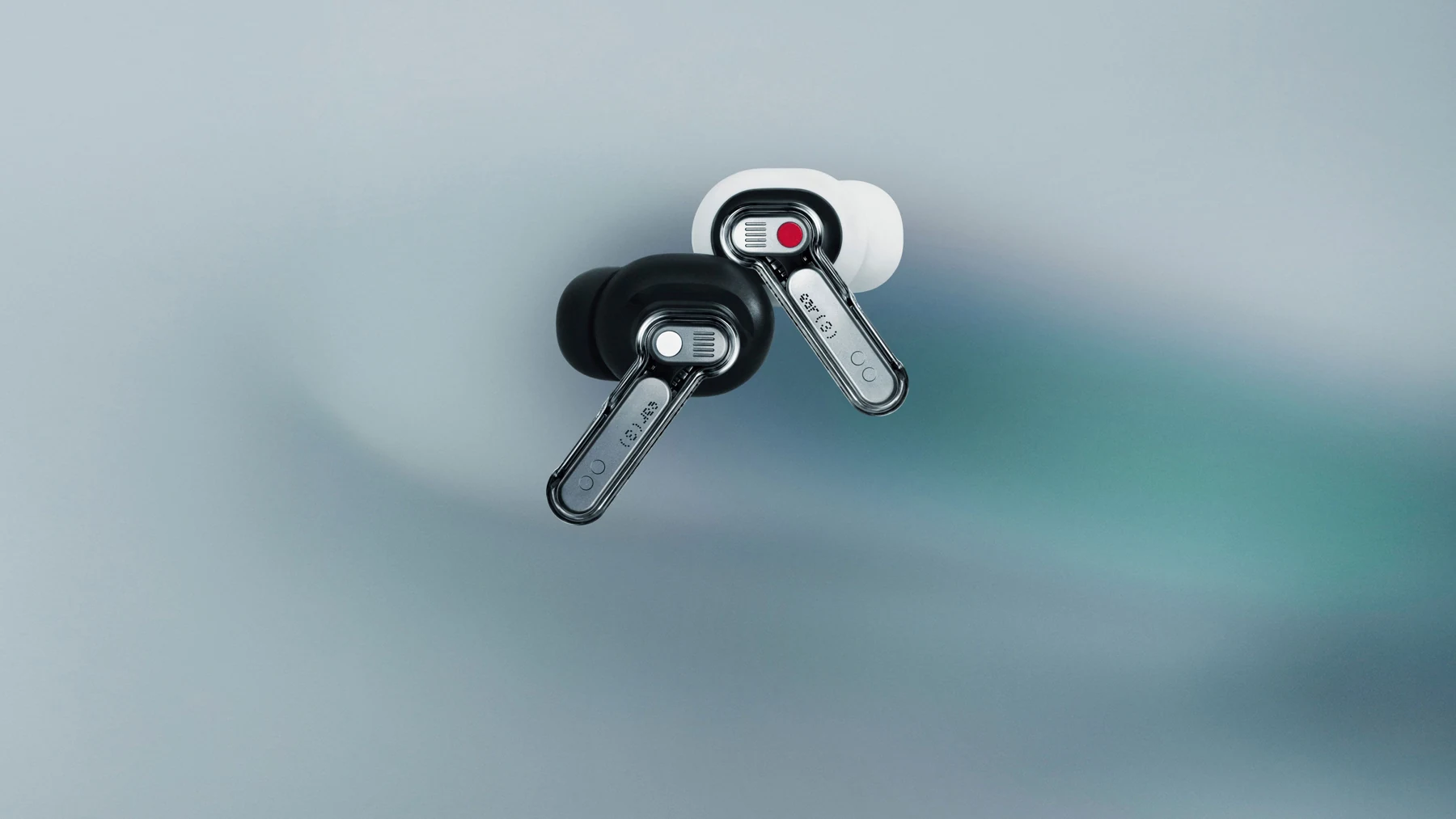
The name is slightly confusing. Ear (3) followed 2024's product simply called Nothing Ear, returning the range to numbered branding. The basic formula is familiar: compact stemmed earbuds, a transparent-lid case and a companion app that treats sound adjustment as a serious feature rather than an afterthought. The obvious visual change is the use of recycled aluminium around the lower part of the case, with small metal details visible through the earbuds' transparent shells.
The defining change is inside that case. Nothing has fitted two MEMS microphones and a prominent Talk button to it. Press the button and, with at least one earbud in place, the case becomes a directional microphone for a supported call or recording app. The idea is straightforward: a microphone held closer to your mouth has a cleaner starting signal than tiny microphones several inches away at your ears, particularly when wind, traffic or café chatter compete with your voice.
Nothing calls this system Super Mic and says its processing can reject environmental noise up to 95dB. That number describes the microphone system's claimed tolerance of background noise; it is not a measure of how loudly the earbuds play. The case mic works with services including phone calls, Zoom, Microsoft Teams, Google Meet and WhatsApp calls, but app behaviour is important. Some camera and messaging apps do not let an external Bluetooth microphone take over in the way you might expect.
Buy it if the earbuds already suit your listening, phone and budget. Treat Super Mic as a useful extra for particular calls or voice notes, not as a replacement for a proper lavalier, headset or recording microphone.
Super Mic in real life: where the idea makes sense
Published impressions do not produce one simple verdict. TechRadar reported a marked improvement when the case microphone was used during a windy outdoor call, and Notebookcheck also found it useful in busy surroundings. SoundGuys' samples were less flattering: background noise reduced, but speech could sound muffled and processed. Those findings are not necessarily contradictory. Noise suppression can make words easier to follow whilst also making a voice less natural.

The useful question is therefore not “is Super Mic better?” but “better for what?” A close directional microphone has a physical advantage when the alternative is asking earbud microphones to separate speech from gusts of wind or a packed room. It also asks the user to change behaviour. You must take out the case, activate it and hold it like a small radio. If you are already sitting at a desk, a wired headset or laptop microphone may be less conspicuous. If you are walking beside traffic and the other caller cannot hear you, the compromise may suddenly seem worthwhile.
A windy walk or station platform
This is the strongest case for Super Mic. Moving the pickup close to your mouth gives the processing a better chance to preserve speech. Independent reports indicate that it can improve intelligibility here, although the result may sound processed. You also lose the hands-free benefit because one hand is occupied.
A café or shared office
The case mic may reduce surrounding voices and clatter, which could help the person at the other end follow a short conversation. The social trade-off is obvious: speaking into an earbud case attracts more attention than wearing earbuds. For a long meeting, a boom microphone remains the more natural tool.
Voice notes and quick ideas
This may be the feature's most practical role. The Talk button makes the case an immediate capture device, and Nothing phones can link recordings with Essential Space features. On another Android phone, usefulness depends on the chosen recording app and its ability to select the Bluetooth input. It is worth checking that workflow during the retailer's return period rather than assuming every app behaves alike.
Video and content creation
Do not treat Super Mic as a wireless filming microphone. SoundGuys reported app restrictions and lag in video use, and the processed voice quality is not intended to replace dedicated creator equipment. Ear (3) is a pair of listening earbuds with an unusual call tool, not a complete production audio system.
Sound: lively by default, flexible when you want it
The 12mm drivers are tuned for an energetic presentation rather than strict neutrality. Independent frequency-response work from SoundGuys shows a substantial low-frequency lift, a slightly recessed midrange and added treble emphasis: the familiar “V-shaped” balance that can make electronic music and pop sound immediate. It can also push bass too far forward or make bright recordings tiring for listeners who prefer voices and acoustic instruments to sit at the centre.
That description should not be confused with a universal judgement of quality. A frequency graph shows tonal balance, not whether every listener will enjoy it. SoundGuys' broader MDAQS assessment rated the overall reproduction highly and found low distortion, whilst Tom's Guide also described strong detail and an expansive presentation. The consensus is that Ear (3) can sound engaging out of the box, particularly for bass-friendly music, but its default balance will not please everyone.
The Nothing X app is the reason that caveat is less serious than it would be on many rivals. It includes simple controls for quick changes and a more advanced equaliser for people who want to alter specific frequencies. Personal Sound builds a profile from a hearing check, and custom EQ profiles can be shared. You do not have to enjoy the factory tuning to get value from the hardware, although buyers who never open companion apps should judge the stock sound more carefully.
Android users with a compatible source can enable LDAC for a higher-bitrate connection. iPhones use AAC rather than LDAC, so Apple's users do not receive that particular benefit. Codec support is only one part of audio quality—fit, seal, source material and tuning often matter more—but its inclusion makes Ear (3) notably flexible in an Android setup.
If the default presentation feels heavy, reduce the lower bass before boosting the midrange or treble. Large boosts can introduce harshness and use headroom; a small cut to the dominant area often produces a cleaner result.
Noise cancelling: effective, but not the class leader
Nothing advertises adaptive noise cancellation up to 45dB. Independent lab work gives that claim useful context. SoundGuys measured strong attenuation in low frequencies and meaningful reduction higher up, reporting an overall improvement over the 2024 Nothing Ear. That should help with the steady drone of a train, aircraft cabin, fan or air-conditioning system—the types of predictable sound ANC handles most effectively.
Wind is a more difficult opponent. The microphones used to analyse external noise can themselves be disturbed by turbulent air, and SoundGuys noted weak behaviour even in modest wind. Sudden voices and irregular outdoor sounds are also harder to suppress than a continuous engine note. If maximum isolation is the priority, Bose's QuietComfort range remains a more obvious place to look. Ear (3) instead balances good everyday ANC with sound customisation, LDAC and its distinctive design.
Passive isolation matters too. The included silicone tips come in four sizes, and a good seal improves bass as well as reducing outside sound before ANC begins. The app's fit test can help, but ears vary. A model with an excellent lab result can perform poorly if its shape or tips do not seal your ear canal, so fit should remain part of any return-period check.
Design, comfort and controls
Nothing has kept the visual identity that made its earlier earbuds easy to recognise. The transparent details expose carefully arranged components rather than hiding everything behind plain plastic, while the aluminium lower case makes this version feel more deliberate. Both the buds and case carry an IP54 rating, which covers limited dust ingress and splashes such as sweat or light rain. It does not make them suitable for swimming, showering or submersion.
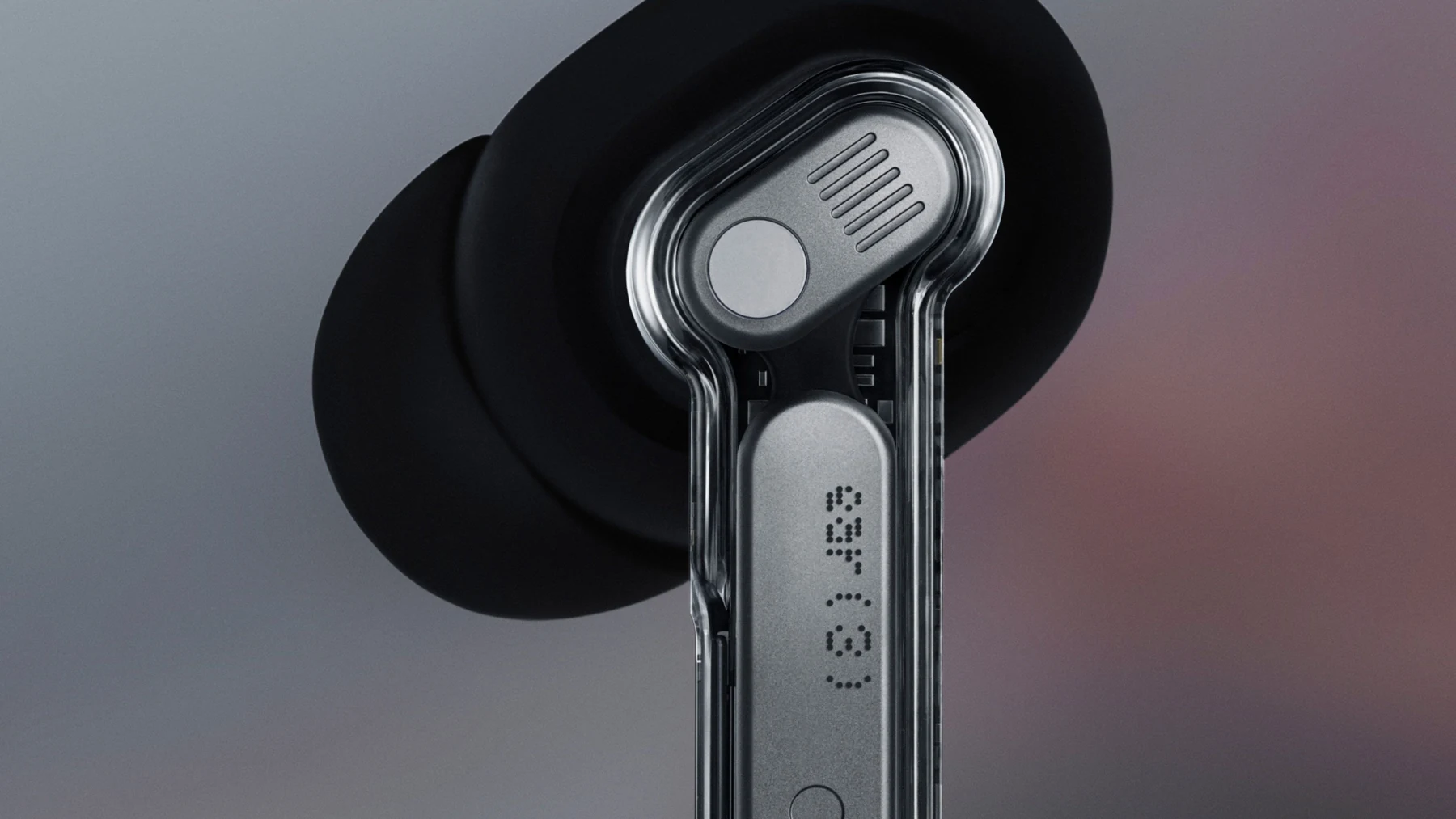
Each earbud weighs 5.2g. Published reviewers generally found the shape comfortable and stable, but that cannot guarantee a match for an individual ear. Four tip sizes provide more scope than the usual three. Anyone sensitive to sealed in-ear pressure may still prefer an open design such as AirPods 4, accepting weaker passive isolation in return.
The stems use pinch controls. A single pinch handles play and pause; double and triple pinches move through tracks, whilst press-and-hold can control listening modes. Most actions are adjustable in Nothing X, although fitting every command—including volume—onto a small set of gestures can become fiddly. Physical pinches do at least reduce accidental commands compared with a very sensitive touch surface.
The square case is pocketable but heavier than the previous all-plastic approach. It includes a USB-C port, a pairing button, wireless charging and a lanyard loop. The Talk button is visually prominent, which is sensible given that it has to be found quickly. The trade-off is that the case is now an active control device rather than something you can forget at the bottom of a bag.
Nothing X, pairing and everyday connectivity
Ear (3) supports Bluetooth 5.4, Google Fast Pair on Android and Microsoft Swift Pair on Windows, with ordinary Bluetooth pairing for other devices. Multipoint lets it stay connected to two devices, useful for moving between a laptop call and audio from a phone. SoundGuys noted that enabling dual-device connection can slightly delay Super Mic activation because the earbuds have to manage the microphone path, so there is a small convenience trade-off.
The app covers firmware updates, ANC modes, EQ, Personal Sound, control customisation, an ear-tip fit test and a sound-based “find my earbuds” function. This breadth is one of the strongest arguments for Ear (3). Some premium earbuds lock useful tuning behind a few presets; Nothing gives owners room to correct the sound to taste.
There are ecosystem differences. LDAC is aimed at compatible Android devices and is unavailable on iPhone. Nothing phones gain closer integration with Essential Space and the company's own software. Basic listening, calls, ANC and app adjustment still work across Android and iOS, but an iPhone owner should compare the experience with AirPods before buying. Apple's automatic device switching and spatial features may matter more than Nothing's extra EQ controls.
Low-lag mode is available for video and games, though it is not a substitute for a wired connection where timing is critical. Bluetooth conditions, phone hardware and game support all affect the result. For ordinary streaming, the standard connection should keep dialogue and pictures aligned.
Battery life: read beyond the largest number
Nothing quotes up to 10 hours from the earbuds with ANC off, 5.5 hours with ANC on, and up to 38 hours including the case when cancellation is disabled. Those are controlled-condition claims, and actual endurance changes with volume, calls, codec, signal strength and feature use.
Independent results show why mode matters. SoundGuys recorded just over five hours with ANC active, close to Nothing's claim. RTINGS reported a similar figure. Tom's Guide achieved around nine hours with ANC and LDAC disabled, but found that using ANC and LDAC together could reduce a session to roughly three hours. These tests used different methods and should not be blended into one definitive result; they agree on the practical point that the most demanding feature combination drains the buds far faster.
For a commute and a working day broken up by case charging, that may be acceptable. For long-haul travel or continuous work calls, it is unexceptional. The case supports USB-C and wireless charging, and Nothing says a ten-minute wired top-up can provide substantial extra playback under its specified conditions. Quick charging softens the limitation, but it does not help whilst the buds must remain in your ears.
Ear (3) against the alternatives
There is no single rival that duplicates the Super Mic. The better comparison is to ask which part of Ear (3) you value. The cheaper Nothing Ear (3a) keeps much of the brand character but omits the case microphone and wireless charging. OnePlus emphasises battery and strong specifications at a competitive price. Apple prioritises iPhone integration and an open fit. Bose concentrates on isolation.
| Model | The main reason to choose it | The important compromise | UK position at our check |
|---|---|---|---|
| Nothing Ear (3) | Deep sound customisation, LDAC, good ANC and the unique case microphone | Super Mic is awkward and heavy feature use shortens battery life | Nothing showed £129 promotional pricing against £149 |
| Nothing Ear (3a) | A lower-cost route to Nothing's design, app, LDAC and ANC | No Super Mic or wireless case charging; source data on some battery modes conflicts | £99 direct price recorded in the product evidence |
| OnePlus Buds 4 | Longer claimed endurance, dual-driver arrangement and strong Android focus | LHDC rather than LDAC; no case microphone | £119 in the recorded UK research |
| AirPods 4 with ANC | Open fit and close iPhone integration | Less passive isolation and no LDAC or case microphone | £169 in the recorded Apple UK evidence |
| Bose QuietComfort Earbuds (2024) | Noise cancellation is the priority | No high-resolution Android codec or Super Mic; feature set is less unusual | Official pricing was higher, though retailer promotions vary |
Nothing Ear (3a) is the internal value choice. It retains a 12mm driver, LDAC, ANC and the Nothing app at a lower price, but buyers should not assume it is simply Ear (3) minus one feature. It lacks the case microphone and wireless charging, and published battery figures vary by mode and source. Choose it when you want the core listening package and do not expect to use Super Mic.
OnePlus Buds 4 deserves attention from Android users who favour long sessions. Its official claims reach 11 hours from the buds or 45 with the case under less demanding conditions, with materially lower figures when ANC and its high-resolution LHDC codec are combined. That same mode dependence applies to Ear (3), but OnePlus begins with more headroom. Compatibility with LHDC depends on the phone, whereas LDAC is widely available across Android brands.
AirPods 4 with ANC solves a different problem. Its open shape avoids silicone tips, and iPhone integration is tighter, but an open fit cannot provide the same passive seal. It supports Apple's spatial and switching features rather than LDAC. An iPhone user should only pick Ear (3) if Nothing's tuning controls, sealed fit or appearance matter more than Apple's ecosystem conveniences.
Bose QuietComfort Earbuds is the comparison for frequent flights and loud commuting. Bose's emphasis is cancellation and secure fit rather than codec flexibility or an experimental case control. Prices move often, so compare the exact current UK listing rather than relying on an old recommended price.
Is Ear (3) good value in the UK?
At £129, Ear (3) occupies a more comfortable position than it did at its £179 launch price. You are paying for a complete combination: premium materials, wireless case charging, IP54 protection on both parts, strong app controls, LDAC, multipoint, useful ANC and a microphone feature nobody else offers in quite the same way. Even if Super Mic becomes an occasional tool rather than a daily habit, the remaining package can justify the price.
At £149, the judgement becomes closer. Ear (3a) undercuts it substantially, while OnePlus competes strongly on battery. Sales can also bring Bose or older flagships into the same bracket. At £179, an iPhone user in particular has little reason to ignore AirPods and other premium alternatives unless Nothing's design and equaliser are decisive.
Prices are volatile, so GadgetScout does not treat the number checked on one day as permanent. Confirm the amount, colour and seller before buying. The product name should read exactly “Nothing Ear (3)”: older Nothing Ear, Ear (2), CMF models and Ear (3a) are different products despite similar-looking listings.
What makes sense
- Engaging sound with unusually capable EQ controls
- LDAC and multipoint for compatible Android setups
- ANC performs well against steady low-frequency noise
- Distinctive design, wireless charging and IP54-rated case
- Super Mic can aid difficult calls and quick voice capture
What gives us pause
- The case must be held near your mouth for its headline feature
- Speech can sound processed even when background noise falls
- App compatibility prevents Super Mic being universal
- ANC plus LDAC can produce short real-world sessions
- Default bass and treble emphasis will not suit every listener
Who should buy it—and who should not?
Ear (3) makes sense if…
- You use Android and want LDAC plus detailed EQ.
- You like a lively, bass-forward sound but want the tools to change it.
- Your calls sometimes happen in wind, stations or busy shared spaces.
- You value wireless case charging and distinctive materials.
- You found it near the lower promotional price and the exact fit works for you.
Look elsewhere if…
- You need a fully hands-free microphone for long meetings.
- Battery endurance with ANC and a high-quality codec is your first priority.
- You want the strongest possible cancellation for frequent flights.
- You use an iPhone and prefer Apple's automatic ecosystem features.
- You dislike sealed silicone tips or do not want to adjust EQ.
Existing owners of 2024's Nothing Ear have the hardest decision. Ear (3) improves materials and adds Super Mic, but its core app, sound-customisation philosophy and general form are familiar. Unless the case microphone solves a real problem or a current pair needs replacing, this looks more like an optional upgrade than an urgent one.
Questions buyers are likely to ask
Has GadgetScout used this Nothing Ear (3) pair?
No. This is a first look built from Nothing's UK product information and clearly attributed independent measurements and observations. GadgetScout has not recorded owner-supplied use or test evidence for this pair.
Does Super Mic work in every app?
No. It works with common calling and meeting services, but apps differ in whether they accept a Bluetooth microphone. Some camera and voice-message workflows can be restricted or introduce lag. Check the particular apps you rely on.
Can Super Mic replace a dedicated creator microphone?
It should not be bought for that purpose. It can improve voice intelligibility in some noise and is handy for notes, but published samples reveal processing and compatibility limitations. A dedicated lavalier or wireless video microphone remains the safer production tool.
Do Ear (3) earbuds work with iPhone?
Yes, including the Nothing X app and standard listening features. iPhone uses AAC rather than LDAC, and Nothing-specific phone integrations are not all available. Compare those compromises with AirPods before choosing.
Are they suitable for running?
The earbuds and case have an IP54 rating, so sweat and light rain are within the intended protection level. Fit varies by ear, and wind can disturb ANC. They are not waterproof and should not be submerged.
How long does the battery really last?
Nothing claims up to ten hours without ANC and 5.5 with ANC. Independent results are broadly close in simpler modes but much shorter when ANC and LDAC operate together. Volume, calls, signal strength and firmware also change the outcome.
Is Nothing Ear (3a) the better deal?
It can be if you mainly want Nothing's sound, app and ANC at a lower price. Ear (3) earns its premium through the case microphone, wireless charging, materials and some higher-end features. Do not pay for those unless they matter to your routine.
What should I check during the return period?
Confirm the seal with each tip size, make a call in the noisiest place you regularly use, test Super Mic inside your important apps, compare AAC or LDAC battery drain, and decide whether the default tuning still pleases you after a longer session.
GadgetScout's first-look verdict
Nothing Ear (3) is more than a charging-case gimmick. Its adjustable, energetic sound, capable app, useful ANC, multipoint connection and premium presentation form a credible package before Super Mic enters the discussion. The microphone can improve speech in the conditions where earbud calls often fail, but the need to hold the case and the variation between apps stop it becoming a universal answer.
At the promotional £129 price recorded during this update, we think Ear (3) belongs on an Android buyer's shortlist. At higher prices, choose it for the complete combination rather than the novelty. If long battery life, maximum isolation or iPhone integration ranks first, one of the alternatives above will be the more coherent purchase.
- Nothing Ear (3)View on Amazon
Sources and evidence (20)
- Nothing (manufacturer)
- Nothing (manufacturer)
- soundguys.com (other)
- techradar.com (other)
- tomsguide.com (other)
- us.nothing.tech (other)
- soundguys.com (other)
- tomsguide.com (other)
- soundguys.com (other)
- rtings.com (other)
- soundguys.com (other)
- notebookcheck.net (other)
- forbes.com (other)
- nothing.tech (other)
- oneplus.com (other)
- apple.com (other)
- bose.co.uk (other)
- samsung.com (other)
- checkout.nothing.tech (other)
- intl.nothing.tech (other)