
AYANEO AM03 Review: A Mini Gaming PC Disguised as a Retro Console
A characterful Windows mini PC with an old-school console silhouette, a surprisingly serious Intel processor and enough compromises to keep Radeon 780M rivals very relevant.
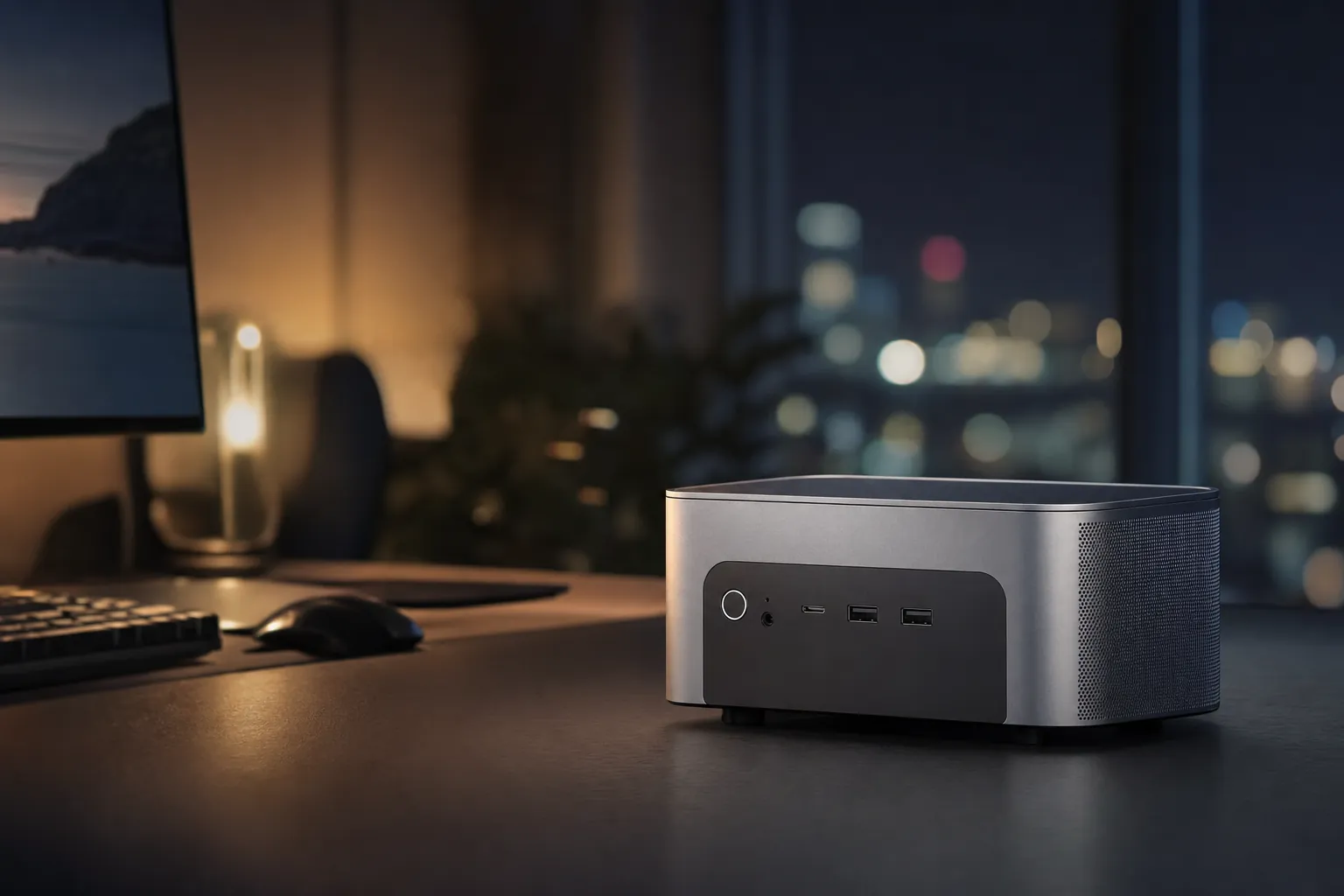
The AYANEO AM03 turns a compact Windows desktop into something that looks far more at home beside a television than under an office monitor.
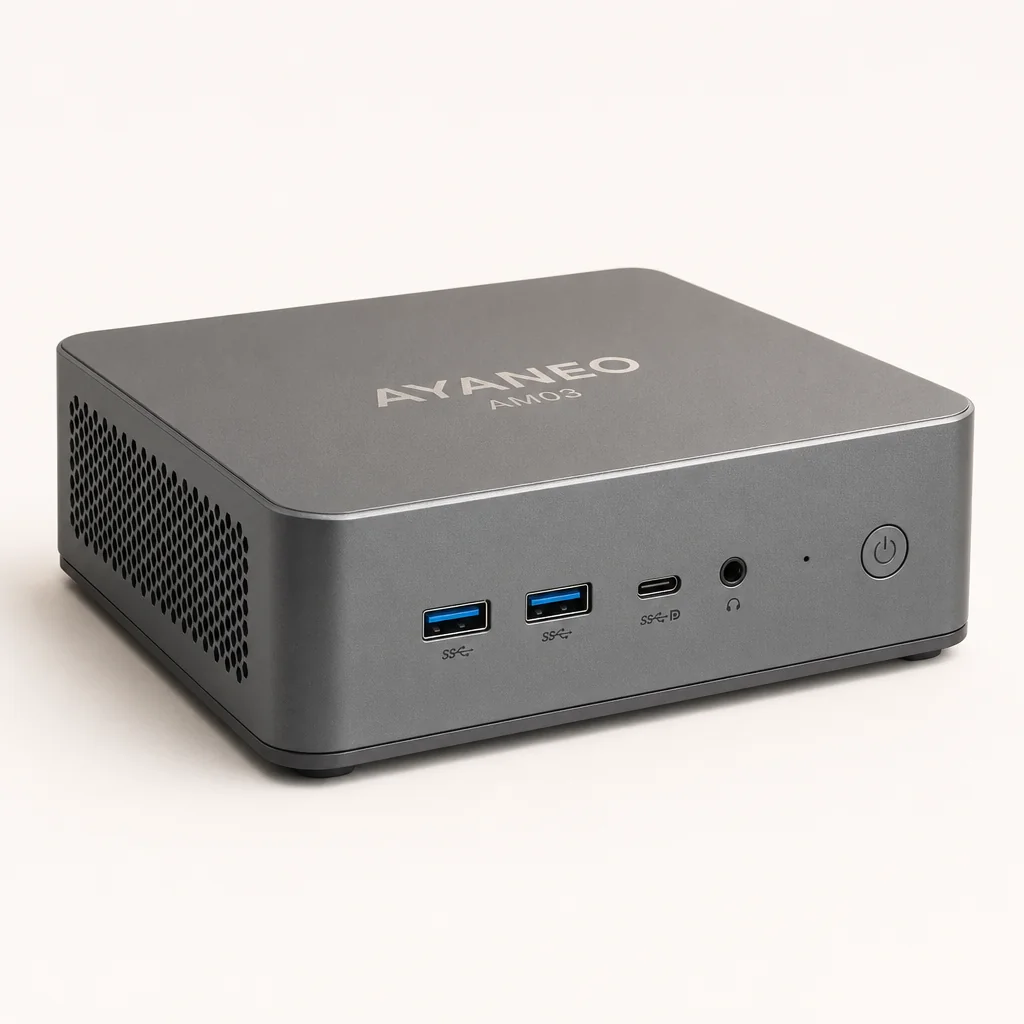
The AYANEO AM03 is one of those products that makes immediate sense the moment you see it. Not because it solves a problem nobody had noticed, but because most mini PCs are about as visually exciting as a Wi-Fi router. This one has a proper point of view. It looks like a retro console, hides its front ports behind a flip-open panel, has skyline RGB lighting and even includes physical volume controls plus built-in stereo speakers. It is a tiny desktop with theatre. Frankly, that is half the fun.
A Retro Console Shell with a Very Modern CPU
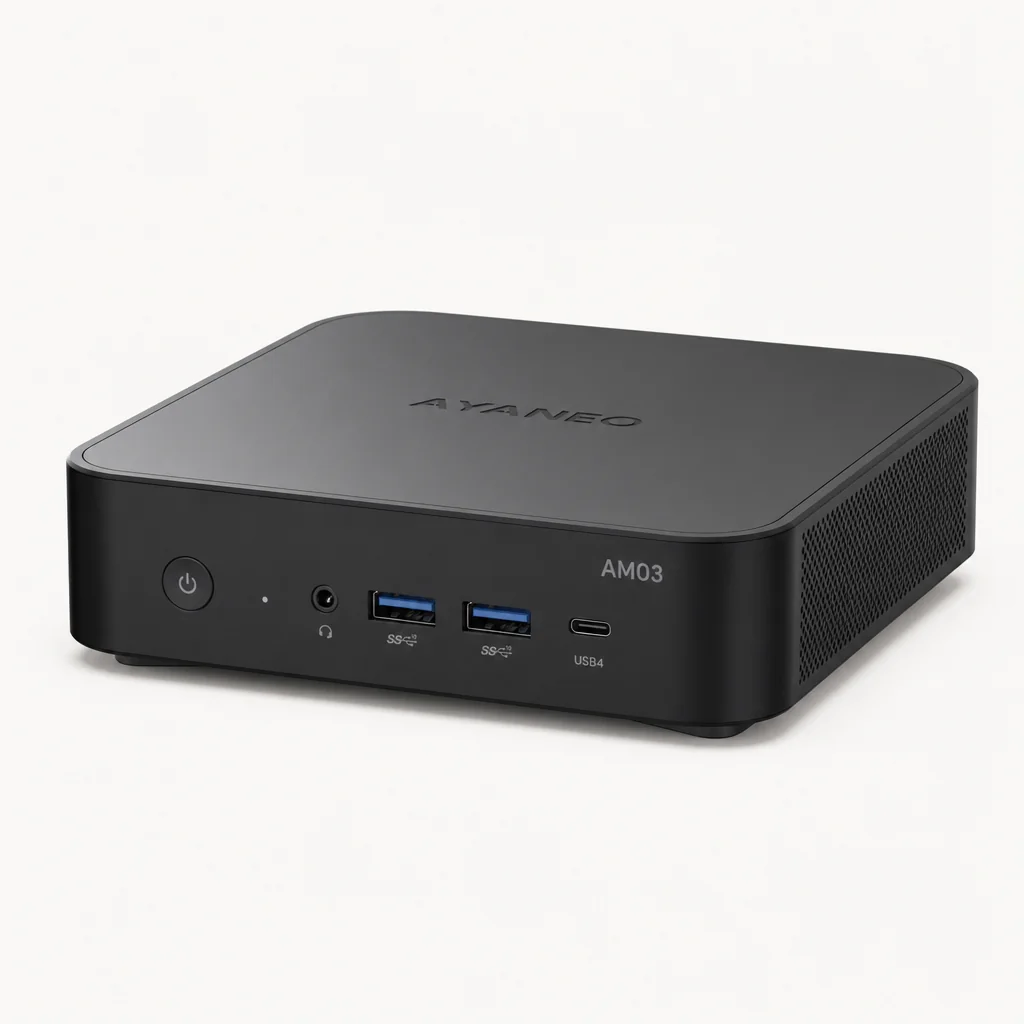
At roughly 146 × 134 × 48mm and approximately 538g according to one retailer specification, the AM03 is properly compact, though a separate US retailer listing gives closer to 139.9 × 129 × 54.1mm and about 626g, so these figures should be treated as unreconciled until confirmed against the official manual. Either way, it will sit beneath a television, on a shelf or beside a monitor without turning the room into a shrine to exposed cables and black plastic boxes. The basic proposition is simple: take a full Windows mini PC, give it the presence of a miniature console, then add enough desktop hardware that it can handle far more than a nostalgic evening of 16-bit games.
Inside is Intel's Core i9-12900H, a mobile chip with 14 cores and 20 threads. Six are performance cores, eight are efficiency cores, and the AM03 runs the processor around a 45W sustained target. That is a sizeable amount of CPU for such a small box. For desktop work, multi-tab browsing, office applications, downloads, file management, media playback and CPU-heavy background jobs, it is still a very capable processor in 2026.
The catch is the graphics. The AM03 uses Intel integrated graphics, described across listings as Iris Xe or Intel UHD graphics. Either way, this is not a current Radeon 780M-class gaming machine. The processor sounds like it belongs in an aggressively priced gaming laptop; the graphics hardware puts it in a more modest bracket. That does not make the AM03 bad. It just means you need to buy it for the right reason.
The important buying decision
Think of the AM03 as a stylish Windows desktop and emulation machine that also plays lighter PC games, rather than a miniature replacement for a discrete-GPU gaming tower. Its CPU is strong. Its graphics are the limiting factor.
What it gets right
- Distinctive retro-console styling with a far more considered desk or living-room presence than a generic mini PC.
- Core i9-12900H remains excellent for demanding everyday Windows work and multi-threaded tasks.
- Two M.2 slots, upgradeable memory and dual 2.5GbE make it more flexible than a sealed console.
- Built-in speakers, physical controls and RGB lighting make it feel unusually self-contained.
Where it loses ground
- Integrated Intel graphics are materially behind AMD Radeon 780M systems in modern games.
- No USB4, Thunderbolt or OCuLink means there is little obvious route to external-GPU expansion.
- The i9-12900H runs at around 45W rather than exploiting a higher 65W power level.
- The design premium makes more conventional AMD mini PCs hard to ignore.
The Mini PC That Wants to Be a Console
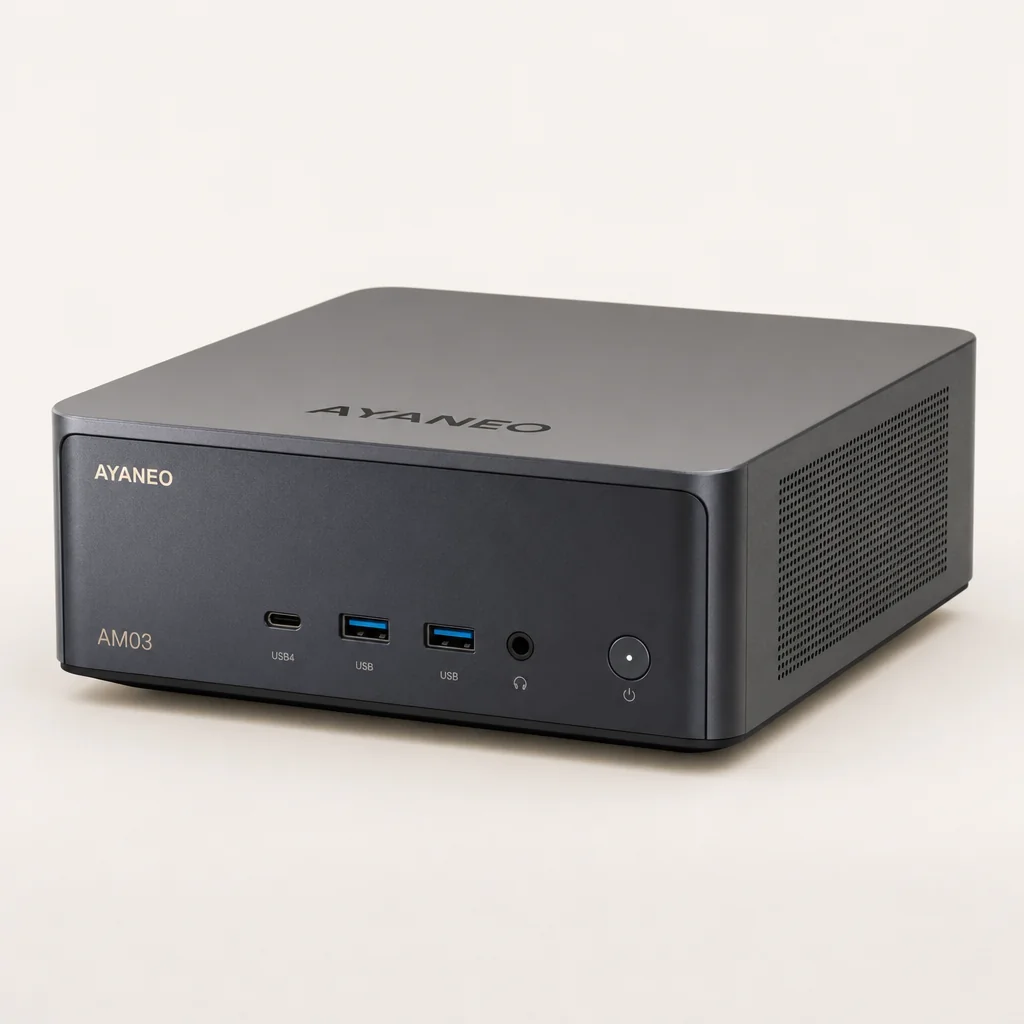
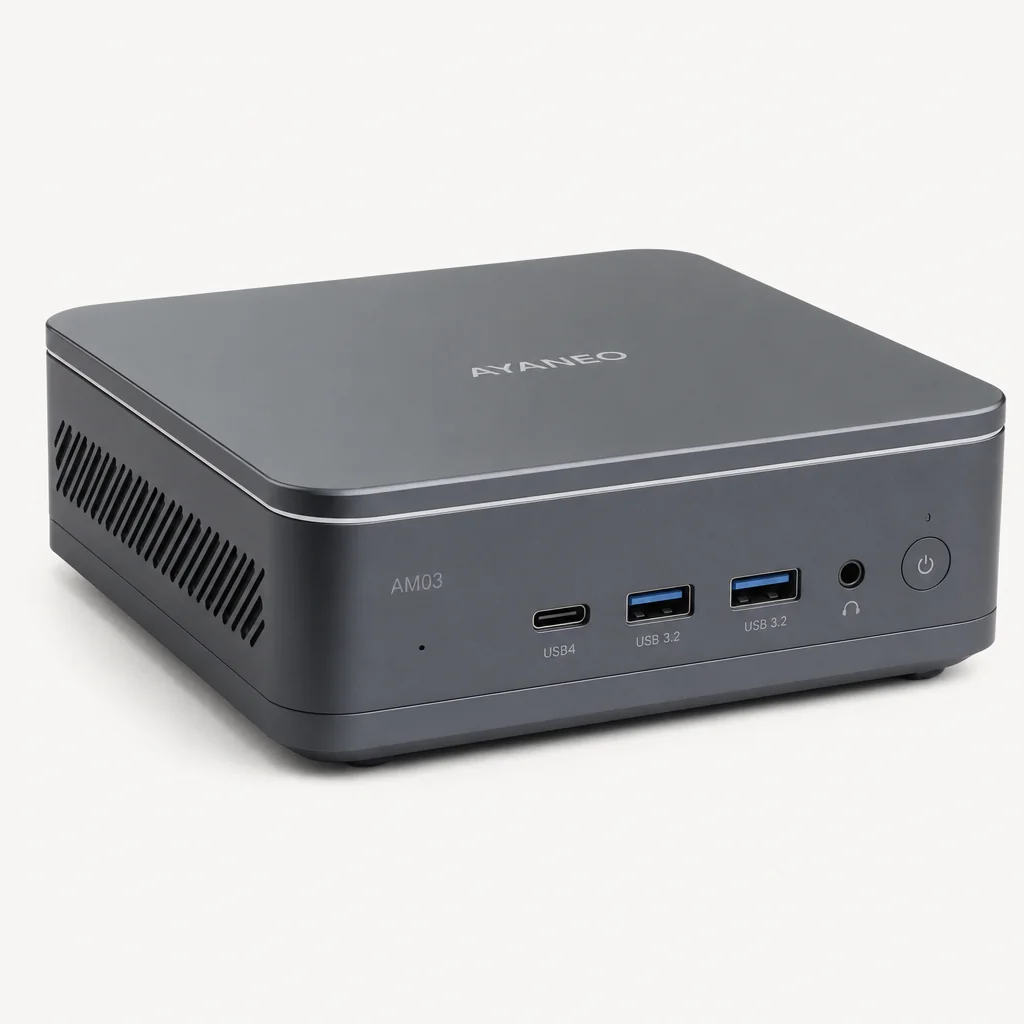
AYANEO has made a name by treating small gaming hardware as lifestyle kit rather than merely technology. The AM03 follows that instinct. It comes in Cyan Sky and Ink Shadow finishes, with the lighter version leaning into that toy-box, late-1990s console charm and the darker one looking more restrained on a desk. Both are much more memorable than the usual anonymous metal slab.
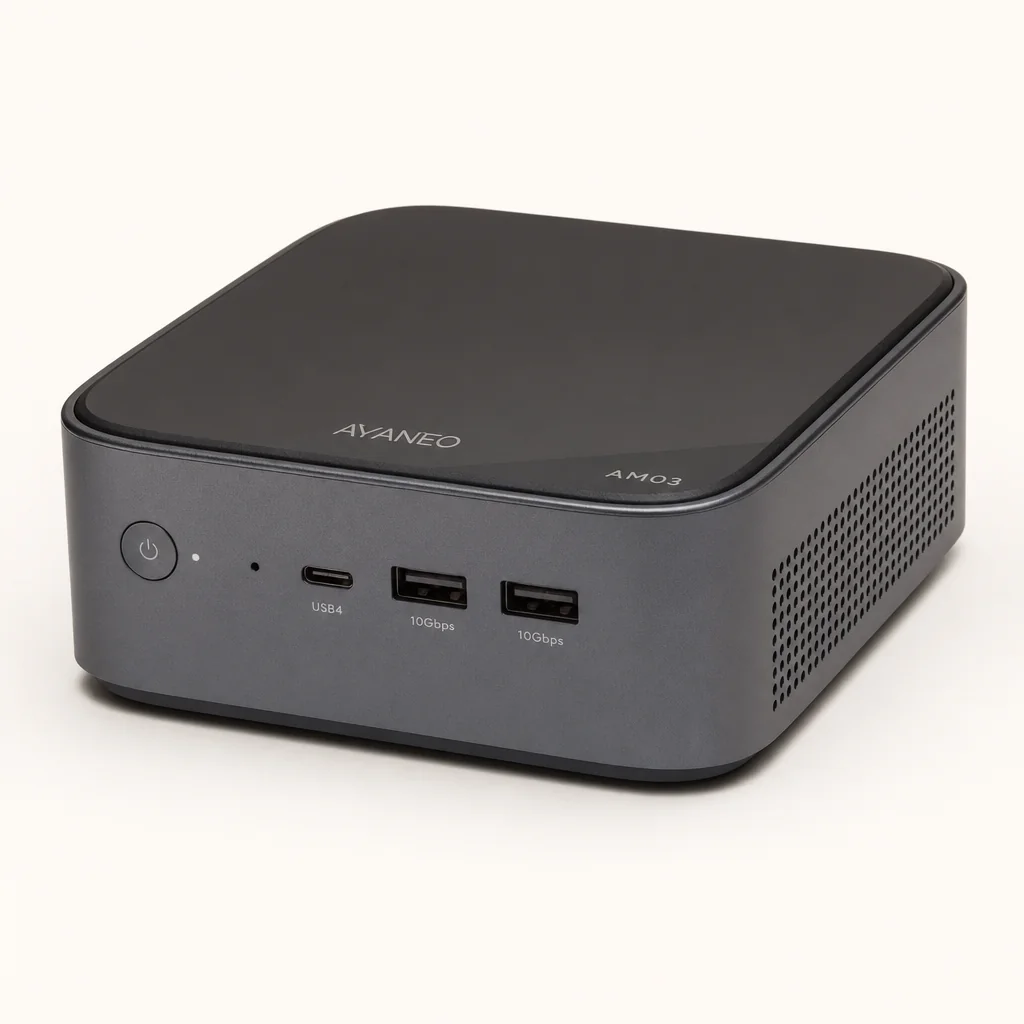
The best bit is the front panel. It flips open to reveal the ports you are likely to use with a controller, USB drive, headset or keyboard. Close it and the AM03 looks tidier, more intentional and considerably less like a PC assembled from spare components. It is a small thing, but small things matter when the machine is visible in a living room. Nobody wants their television cabinet to resemble the back of a call centre desk.
The RGB "skyline" lighting is similarly more about atmosphere than performance. AYASpace lets you customise the lighting and the machine has a dedicated lighting control, so you can go full arcade glow, settle on a subtle accent or switch it down when you want the hardware to disappear. I would not buy a computer because it has RGB. I would, however, appreciate RGB that has been integrated as part of an overall design rather than sprayed on as an afterthought.
Flip-open front I/O
The magnetic-style front panel hides day-to-day ports until a controller, headset or portable drive needs plugging in.
Physical controls
A volume toggle, lighting button, power button and two programmable function keys give it more console-like immediacy.
Built-in stereo speakers
They are unusual on a mini PC and useful for casual desktop use, quick setup or menu audio when external speakers are not connected.
AYASpace controls
AYANEO's software handles custom lighting and function-key behaviour, helping the hardware feel less like a bare Windows box.
The AM03 does not replace the simplicity of a dedicated console. It remains a Windows 11 desktop, which means emulators, launchers, updates and game settings still need managing. The advantage is flexibility. The trade-off is that you are the person in charge.
The AM03's front panel is central to its appeal: ports stay hidden when it is displayed, then become easy to reach for controllers and storage.
Ports, Upgrades and the Living-Room Setup
A lovely enclosure would be pointless if AYANEO had treated the connectivity as decoration. Thankfully, the AM03 is well stocked for a machine this size. It has two upgradeable SO-DIMM slots, two M.2 2280 storage slots and dual 2.5GbE Ethernet. That is a surprisingly grown-up feature list for something that looks as though it should boot directly into a library of pixel-art platformers. One documentation wrinkle is worth flagging: published material disagrees on whether the memory is DDR4 or DDR5, so the exact type and speed should be checked against the supplied unit or official manual before you plan an upgrade.
On the front are two USB-A 3.2 Gen 2 ports at 10Gbps, plus a USB-C port that supports data, DisplayPort output and PD charging. There is also a 3.5mm CTIA headset and microphone jack. This is an excellent arrangement for the living room: plug in wired controllers, a headset or a drive without having to shuffle the unit around and blindly hunt for a port at the rear.
Round the back, AYANEO includes one more USB-A 3.2 Gen 2 port, one USB-A 2.0 port, HDMI 2.1, DisplayPort 1.4, two 2.5GbE RJ45 ports and the DC input. HDMI and DisplayPort are both specified up to 4K at 120Hz. The front USB-C can also carry video, which gives the AM03 real flexibility as a compact desk machine with multiple display options.
Dual Ethernet is more useful than it sounds
Two 2.5GbE ports will matter to fewer people than the RGB, but they are arguably more valuable. The AM03 can sit neatly in a home network with fast local storage, act as a compact media or file box, or connect to separate network segments without needing a USB adapter.
The main connectivity disappointment is what is absent. There is no USB4, no Thunderbolt and no OCuLink port. That matters because AMD-based mini PCs increasingly use USB4 or OCuLink to create an upgrade path for external graphics. The AM03 is designed to be enjoyed as it is. You cannot sensibly buy it with the expectation that a future graphics dock will transform it into a high-end gaming rig.
A Laptop-Class Processor in a Tight Thermal Envelope
The Core i9 badge can be misleading in a mini PC. It does not mean the AM03 behaves like a full-sized i9 desktop. The i9-12900H is a laptop-class chip, and the AM03 must manage it inside a very small enclosure with active cooling and dual aluminium heat pipes. That is a far tougher engineering job than simply fitting a powerful processor into a large, ventilated tower.
Still, the hybrid architecture matters. Six performance cores handle the heavyweight foreground work, whilst eight efficiency cores keep background tasks moving without demanding the same power budget. In practical terms, that is useful for the sort of messy Windows life most of us actually lead: browser tabs multiplying like rabbits, file copies continuing in the background, an emulator running, cloud sync waking up at the least convenient moment and a dozen tray apps insisting they are essential.
The AM03 held around 45W in a 10-minute FPU stress test rather than reaching or sustaining the potentially available 65W PL2 level. It is tempting to see that as a flaw because bigger numbers are fun in marketing slides. In a machine this small, though, a disciplined 45W profile is arguably the sensible choice. It gives the cooling system a chance to stay composed instead of chasing short-lived benchmark glory followed by heat and fan drama.
The thermal result is reassuring. The CPU stayed below 71°C in that 10-minute stress workload, with performance cores running around 2.69–2.79GHz and efficiency cores around 1.79–2.29GHz. Those are not headline-grabbing numbers in the way a briefly sustained 65W mode might be, but they show a system that is being managed rather than pushed into an unhappy corner.
Memory results in AIDA64 came in at approximately 40,978MB/s read, 43,167MB/s write and 39,168MB/s copy, with latency around 85.7ns. The broader point is not that you should memorise those figures before breakfast. It is that the AM03 has enough memory bandwidth and CPU muscle to feel brisk in normal desktop work, especially when fitted with sensible dual-channel memory.
The thermal profile is one of the AM03's better stories. It does not chase a higher 65W setting, but the 45W operating behaviour kept sustained stress temperatures below 71°C. That is a fair compromise for a compact, living-room-friendly design.
The AM03's compact cooling system is tuned around a sustained 45W operating target, prioritising controlled temperatures over a short burst of peak power.
Gaming at the Edge of What Intel Graphics Can Do
This is where the AM03 needs the most honest framing. Yes, it is a gaming PC. No, it is not a gaming PC in the sense that most people now mean when they say "gaming PC". There is no discrete graphics card, and Intel's integrated graphics are substantially weaker for current games than Radeon 780M graphics in similarly priced Ryzen-based mini PCs.
That distinction affects every purchase decision. If your idea of a gaming machine is modern AAA releases at high settings, high frame rates and 1440p resolution, stop here. The AM03 is not that machine. It can run lighter games, older games, indie titles and selected esports-friendly releases far more comfortably than demanding blockbuster games. You will need to make familiar integrated-graphics compromises: lower settings, sensible resolution choices and a willingness to value a stable experience over a prettier screenshot.
Hands-on testing covered Geekbench 6 at 45W and 65W settings, along with Hollow Knight: Silksong and Skyrim. That selection makes sense because it demonstrates the AM03's natural territory. A compact Windows box with Intel integrated graphics is far more at home with lighter, scalable games and older PC favourites than it is trying to pretend it has the graphics horsepower of a full gaming desktop.
There is a quietly good argument for that use case. A machine like this can be brilliant for a Steam library full of indies, roguelikes, older RPGs, visual novels, strategy games and retro-flavoured platformers. It is also convenient for couch gaming with a Bluetooth controller, especially once a launcher is configured to open directly into a game library. The AM03's styling helps here. It looks right next to a television, which is not a performance metric but absolutely changes whether you want it in the room.
| Specification | AYANEO AM03 | GMKtec NucBox K8 Plus | GEEKOM A8 AI Mini PC | MINISFORUM UM790 Pro |
|---|---|---|---|---|
| Processor | Intel Core i9-12900H, 14 cores / 20 threads | AMD Ryzen 7 8845HS, 8 cores / 16 threads | AMD Ryzen 9 8945HS, 8 cores / 16 threads | AMD Ryzen 9 7940HS, 8 cores / 16 threads |
| Integrated graphics | Intel integrated graphics | Radeon 780M | Radeon 780M | Radeon 780M |
| Dimensions | Approximately 146 × 134 × 48mm (unconfirmed; conflicts with another listing) | Approximately 132 × 125 × 58mm | 112.2 × 112.2 × 38mm | 130 × 126 × 52.3mm |
| Wired networking | Dual 2.5GbE | Dual 2.5GbE | 2.5GbE | 2.5GbE |
| External graphics expansion | No USB4, Thunderbolt or OCuLink | USB4 and OCuLink | USB4 | USB4 |
The Radeon 780M problem
AMD Radeon 780M mini PCs are the AM03's most serious rivals because they combine strong mobile CPUs with much more capable integrated graphics. The AM03 wins on personality, physical controls and retro-console presentation. It does not win a straight GPU performance contest.
That does not mean the AM03 should be dismissed as "not really gaming". It means you should align your expectations. The machine is best when it is used deliberately: a compact Steam box, a classic PC-game machine, a media-capable desktop, or an emulator hub. Treat it as a miniature AAA powerhouse and it will feel underwhelming. Treat it as a stylish all-rounder with a gaming hobby and it makes more sense.
The Emulation Sweet Spot: From 8-Bit Classics to Select 3D Systems
Emulation is where the AM03's design and hardware finally point in the same direction. The retro styling is not just a visual joke; it supports the actual use case. This is a small PC that can sit by a television, accept controllers through its easy-to-reach front ports, play audio without separate speakers in a pinch and connect to modern displays through HDMI 2.1 or DisplayPort 1.4.
Older systems are the natural easy win. Arcade boards, 8-bit and 16-bit consoles, PlayStation, Dreamcast, PSP and other older platforms are a sensible fit for a Core i9-12900H-class machine. The CPU has plenty of headroom for emulation workloads that lean more heavily on processor performance than graphics muscle, and the compact form factor makes it far easier to create a neat library machine than a large desktop tower would be.
The sixth generation is where expectations need to become title-specific. Dolphin testing covered GameCube and Wii emulation at 1080p. PCSX2 was tested with PlayStation 2 software at 1080p using DirectX 12. Original Xbox emulation was also tried using Xemu and Cxbx-Reloaded. That is a meaningful level of emulation capability for a machine this size, particularly because these platforms are often where a retro-focused setup starts feeling genuinely modern rather than merely nostalgic.
Classic systems
Older console generations and arcade emulation are a natural match for the AM03's processor, size and controller-friendly setup.
GameCube and Wii
Dolphin was tested at 1080p, placing GameCube and Wii among the key systems the AM03 can credibly target.
PlayStation 2
PCSX2 testing used 1080p and DirectX 12, although individual games and emulator configuration remain important.
Original Xbox
Xemu and Cxbx-Reloaded were both part of the emulation test scope, bringing selected original Xbox titles into play.
That last sentence matters: selected titles. Emulation is never a clean support tick-box. Some games are straightforward, others demand fiddling, and a few remain awkward regardless of how expensive the PC is. The AM03 gives you enough CPU ability to explore this era seriously, but it does not remove the need to tune per-game settings, select the right emulator backend and use legal game dumps from software you own.
For a living-room emulation build, the AM03 is arguably more appealing than it is as a conventional PC gaming machine. Its small footprint, front access, HDMI output, built-in speakers and console-inspired controls all reinforce that role.
Emulation is the AM03's natural habitat: compact enough for a TV cabinet, flexible enough for controllers, launchers and a large library of legally dumped games.
Everyday Windows Use, Speakers and the No-Battery Reality
Strip away the RGB and the console cosplay, and the AM03 remains a Windows 11 Home desktop. That is useful. It means this can be your work machine, family PC, media computer, home-office companion or compact secondary desktop before it ever becomes an emulation box. The 14-core, 20-thread processor is more than capable of making ordinary Windows chores feel quick.
Browser-heavy work should be comfortable. So should office applications, video calls, media playback, file management and light creative tasks. The extra CPU cores also help when several mundane things happen at once: a cloud backup runs while you are editing photos, a download is unpacking, a dozen tabs are open and Windows decides it would like attention. It is not glamorous, but this is exactly where a powerful mobile CPU earns its keep.
The 45W limit is arguably a blessing in routine use. A small desktop does not need to announce every email attachment with a sudden blast of fan noise. By keeping the processor to a controlled power level, AYANEO appears to have aimed for a better sustained balance between speed, heat and noise rather than treating every task as a benchmark competition. The measured thermal behaviour supports that approach.
The built-in dual-channel stereo speakers are another small convenience rather than a replacement for proper external audio. They make the AM03 more self-sufficient for setup, casual viewing and everyday system sounds. For serious gaming, films or music, you will still get a better result from a television, headphones or external speakers. But their inclusion is part of why the AM03 feels like a finished product rather than a motherboard in a fancy case.
One quick reality check: there is no battery. There is no battery life figure because the AM03 is not a handheld, a laptop or a portable console. It is a mains-powered mini PC. The compact chassis makes it easy to move between rooms, but it still needs its power adapter and a display. Think "portable desktop", not "take it on the train and finish a dungeon".
Daily-use strengths
- Desktop-grade connectivity in a very small footprint.
- Strong CPU resources for office work, multitasking and media duties.
- Integrated speakers and physical controls are genuinely handy conveniences.
- RAM and storage can be upgraded rather than locked into one purchase decision.
Daily-use compromises
- AYASpace is another proprietary software layer alongside Windows.
- There is no battery, so portability begins and ends with carrying the box.
- Front ports look neat when hidden, but frequent cable swapping still means opening the panel.
- It is more expensive-looking than a plain mini PC because that is, in part, what you are paying for.
AM03 Pricing: Paying for Personality or Performance?
The AM03 comes as a barebones system or with 16GB of memory and a 512GB SSD installed. Both configurations are available in Cyan Sky and Ink Shadow. The barebones version suits buyers who already have compatible parts or who want to choose their own storage and memory from day one. The factory configuration is the simpler route if you want the box ready to become a Windows machine with minimal fuss.
AYANEO AM03 barebones
AYANEO's international store listed the product at US$399, reduced from US$499.
AYANEO AM03 16GB / 512GB
This was the reported early-bird price at launch, with a US$599 regular launch price; the current official price for this configuration was not clearly exposed on the store's selector at the time of research.
GMKtec NucBox K8 Plus
GMKtec UK listed a 32GB / 1TB Ryzen 7 8845HS and Radeon 780M configuration at this sale price.
At the US$399 sale price, the AM03 becomes easier to defend. You are getting a compact i9-12900H desktop, considerable networking flexibility, two storage slots and a very distinctive enclosure. The barebones nature of that price matters, of course: memory and storage still need budgeting for. But as a platform, it is not unreasonable.
The configured version is trickier because the AMD competition is fierce. The GMKtec NucBox K8 Plus, for example, was listed in the UK at £399.99 for 32GB of RAM and a 1TB SSD, alongside a Ryzen 7 8845HS, Radeon 780M, dual USB4 ports and OCuLink. That is a brutally practical specification for anyone whose priority is gaming performance or future expansion rather than a stylish chassis.
The GEEKOM A8 AI Mini PC and MINISFORUM UM790 Pro are also reminders that the AM03 is not competing in a vacuum. Both use Radeon 780M graphics, and both offer USB4. The GEEKOM is also exceptionally compact at 112.2 × 112.2 × 38mm, whilst the MINISFORUM uses the Ryzen 9 7940HS and has two USB4 ports. On paper, those machines look like the more logical buy for many PC gamers.
The AM03's value is emotional as well as technical. A conventional Ryzen mini PC may offer more frames per second for the money. The AM03 offers a better-looking living-room machine, cleverer physical design and a more console-like ownership experience.
Against conventional AMD mini PCs, the AM03 trades some gaming value for personality, dual Ethernet and a more polished living-room presence.
The Scorecard: Style, Speed and Sensible Compromises
Scoring the AM03 depends heavily on whether you value an attractive, flexible retro machine or simply want the best integrated graphics for your money. It is not a difficult product to like. It is, however, a difficult product to recommend blindly because the processor and the graphics are so unevenly matched.
Design and display output earns the strongest score because this is the AM03's clear differentiator. The chassis is appealing, the hidden front I/O is useful rather than gimmicky, the controls are thoughtful and HDMI 2.1 plus DisplayPort 1.4 give it credible living-room versatility. There is no built-in display, of course; this score reflects the physical design and display connectivity.
CPU performance is strong, if not fully unleashed. The i9-12900H is still a serious processor, and the measured 45W behaviour delivers controlled thermals. Gaming and emulation is more mixed. It is good for older PC games, indie titles and a substantial amount of emulation, but the integrated Intel graphics stop it competing with Radeon 780M machines as a modern PC gaming box.
Daily usability is good thanks to the processor, networking, upgrade paths and speakers. Value is good at the official sale price, but it slides quickly if you find the AM03 at inflated third-party pricing. At that point, the design starts looking like a luxury rather than a sensible compromise.
Who Should Buy the AM03—and Who Should Skip It?
The AM03 makes the most sense for people who know exactly what they want from it. This is not a generic "best mini PC" recommendation. It is a product with a particular personality, and that personality is either worth paying for or it is not.
Buy it for a retro living-room setup
The AM03 is ideal if you want an attractive Windows-based emulation machine that looks intentional beside a television and accepts controllers without cable chaos.
Buy it for compact productivity
The i9-12900H, upgradeable memory, dual M.2 storage and dual 2.5GbE make it a capable workhorse in a very small space.
Buy it for selective sixth-gen emulation
GameCube, Wii, PlayStation 2 and original Xbox testing make it a credible platform for users willing to tune individual games and emulators.
Skip it for modern AAA gaming
If current PC games are your priority, Radeon 780M mini PCs offer a stronger integrated-graphics foundation and often better expansion options.
I would also skip the AM03 if you simply want the maximum performance per pound or dollar. A plain AMD mini PC can look boring and still be the more rational purchase. There is no shame in that. The AM03 is for the buyer who wants their hardware to be part of the room rather than something to hide behind a monitor.
The AM03 is best suited to buyers who want a compact Windows computer that earns its place in a living room instead of being hidden away.
Questions Buyers Will Ask Before Ordering
Final Verdict: A Characterful Retro Box, Not a Pocket-Sized Gaming Monster
The AYANEO AM03 is a stylish, flexible and surprisingly capable retro-focused mini PC whose appeal depends more on its design, controls and emulation credentials than on class-leading gaming speed.
It gets plenty right. The compact chassis is genuinely attractive. The flip-open front panel, physical controls, speakers and RGB skyline lighting create an experience that feels closer to owning a little console than a typical Windows desktop. The Core i9-12900H gives it serious productivity ability, dual 2.5GbE is unusually generous, and the two M.2 slots plus upgradeable memory make it practical long after the novelty of the lights has worn off.
The thermal tuning also deserves credit. Holding around 45W and remaining below 71°C in a 10-minute FPU stress test is a sensible outcome for a machine of this size. It may not exploit every last ounce of i9-12900H performance, but it avoids the more annoying alternative: a miniature desktop that sounds and feels like it is trying to escape its own chassis.
The problem is not the CPU. It is the graphics. Intel integrated graphics leave the AM03 behind Radeon 780M mini PCs when modern games are the priority, and the lack of USB4, Thunderbolt or OCuLink means there is no convincing escape route through external graphics. If frames per second are the main thing you care about, AMD mini PCs such as the GMKtec NucBox K8 Plus, GEEKOM A8 AI Mini PC and MINISFORUM UM790 Pro are better places to start.
The final verdict is simple: the AM03 is a compact Windows mini PC with real character, best enjoyed as a retro-gaming, emulation and productivity machine.
Gadget Scout verdict
Buy the AYANEO AM03 if you want a compact Windows machine with genuine personality: a tidy living-room emulator, a capable desktop and a stylish companion for older PC games and lighter modern titles.
Skip it if your priority is maximum modern-gaming performance or an external-GPU upgrade path. Radeon 780M mini PCs are simply stronger on that front.
For everyone else, the AM03 is a charmingly odd little box that proves mini PCs do not have to be boring.