
UK Gaming Laptops: Exact Configurations Compared
Six budget gaming laptops from ~£799 to ~£1,489, benchmarked across the same six games at 1080p - with a clear winner for every budget, from RTX 5050 to RTX 5070.

See the HP OMEN 16 on Amazon UK
£1585.00price at 23 Aug, may change
A good gaming laptop no longer means spending £2,000. In 2026 the budget bracket - roughly £800 to £1,500 - is the most competitive it has ever been, with NVIDIA's new RTX 5050, 5060 and 5070 laptop GPUs delivering frame rates that would have cost a fortune two generations ago. The hard part isn't finding a capable machine; it's working out which one is right for you, because the differences between them - GPU power, screen size, weight, build - matter more than the headline price.
So we've done the legwork. This guide ranks the six best budget gaming laptops you can buy in the UK right now, each chosen to win a specific category: the cheapest sensible entry point, the best value, the all-rounder most people should buy, the most portable, the most powerful, and the biggest screen. Every one has been benchmarked across the same six games at 1080p so you can compare them like-for-like, and there's a full specs breakdown, honest pros and cons, and a clear verdict for each.
Whether you're a student after one laptop for lectures and late-night gaming, a first-time buyer trying not to overspend, or someone who simply wants the most frames per pound, there's a pick here for you - spanning RTX 5050, RTX 5060 and RTX 5070 graphics and prices from around £799 to £1,489. We update this guide every month with the latest prices, specs and new releases, so the rankings stay current rather than slowly going out of date. Below you'll find what's changed in 2026, exactly how to choose, the head-to-head benchmarks, and then the six laptops in detail.
Our picks at a glance
- Most powerful: HP OMEN 16 (ap0301na) — £1,299
- Best all-rounder: Acer Nitro V16 (ANV16-42) — £1,279
- Biggest screen: ASUS TUF Gaming A18 (FA808) — £1,489
- Best budget buy: Acer Nitro V 15 (ANV15-52) — £849
- Most portable: ASUS TUF Gaming A14 (FA401) — £1,109
- Best cheapest: HP Victus 15 — £799
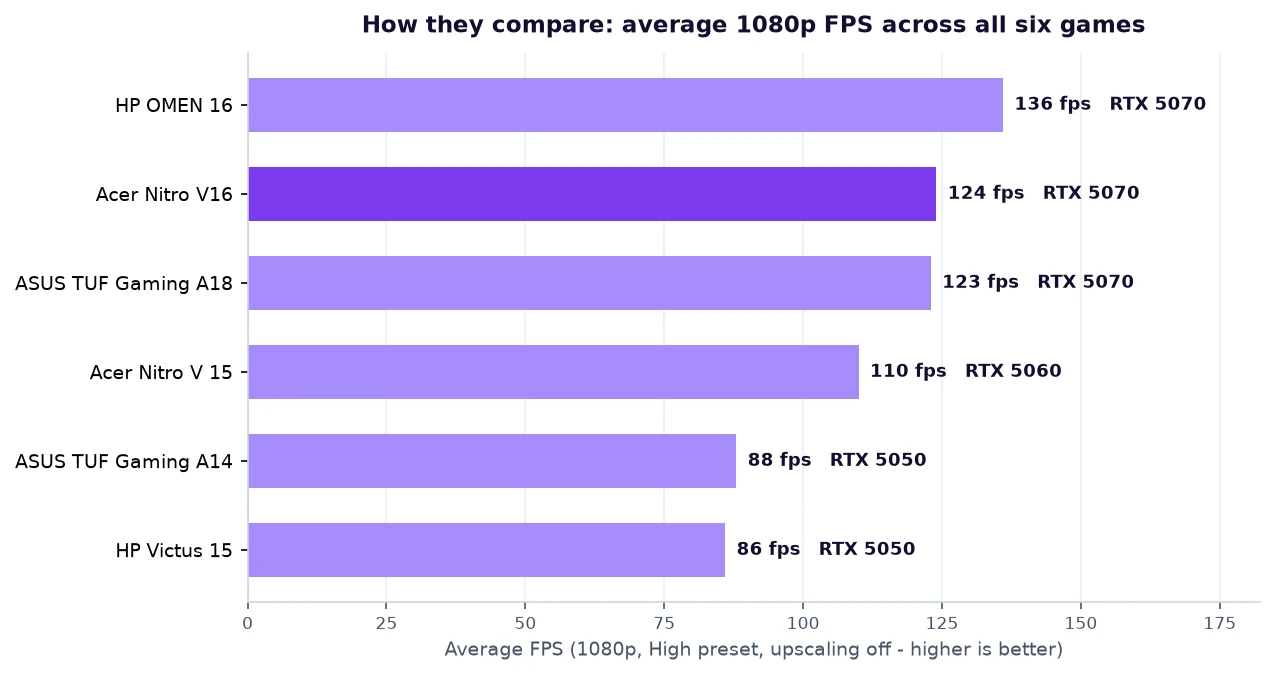
Configuration warning: laptop names cover many CPU, GPU, display and power-limit variants. Match any performance result to the exact listed configuration and current price before buying.
What's changed for budget gaming laptops in 2026
If you last looked at gaming laptops a couple of years ago, a lot has changed - mostly for the better. NVIDIA's RTX 50-series (Blackwell) laptop GPUs now run right down to the affordable end of the market, so the RTX 5050, 5060 and 5070 have replaced the old 3050/4050/4060 tier and brought meaningful generational gains, especially in ray tracing and efficiency. The headline feature is DLSS 4 with Multi Frame Generation, which uses AI to multiply frame rates in supported games - it's the single biggest reason a modern budget laptop punches so far above its price.
Two other shifts are worth knowing. First, prices crept up across 2025-26 (tariffs and component costs), so the "budget" bracket now realistically spans roughly £800-£1,500 rather than £600-£1,200 - but you get far more performance for it. Second, and less happily, NVIDIA cancelled the higher-VRAM mobile GPUs, so every budget laptop - 5050 to 5070 - is stuck on 8GB of video memory. That makes 1080p the natural home for these machines and is the main thing to bear in mind for long-term use. The upside: the gap between "cheap" and "expensive" gaming laptops has never been smaller, which is exactly why this is such a good time to buy at the budget end.
How to choose a budget gaming laptop
How much do you actually need to spend?
The single biggest factor in gaming performance is the GPU, and in 2026 the budget ladder has three rungs. The RTX 5050 (around £800-£1,300 depending on the rest of the laptop) is a solid 1080p card for esports and most AAA games at high settings with the occasional tweak. The RTX 5060 (from ~£850) is the natural 1080p choice - noticeably faster, and the smallest GPU we'd recommend if AAA gaming is your priority. The RTX 5070 (from ~£1,199) is the value sweet spot of the whole market: a full tier up from the 5060 for a relatively modest premium, with enough headroom for 1080p, 1200p and even some 1440p play.
The 8GB VRAM ceiling - the one thing everyone should know
Here's the catch that the spec sheets won't shout about: every budget gaming laptop in 2026 ships with 8GB of video memory. NVIDIA cancelled the higher-VRAM mobile cards, so whether you buy a 5050 or a 5070, you get 8GB. For 1080p gaming today that's fine, but a handful of the most demanding new titles already brush against it at ultra textures, and it's the most likely reason a budget laptop will feel dated in three or four years - more so than the GPU's raw speed. It's not a reason not to buy; it's just the real limit to keep in mind, and an argument for gaming at 1080p rather than chasing 1440p ultra.
Screen, RAM and storage
Aim for at least a 1080p (1920x1080 or 1920x1200) IPS screen at 144Hz or higher - all six laptops here clear that bar, and a fast panel is what makes high frame rates feel smooth. 16GB of RAM and a 1TB SSD are the sensible 2026 minimums, and again, every laptop in this guide meets them. Beyond that it comes down to size and weight: a 14-inch machine you can carry all day, a 15- or 16-inch all-rounder, or an 18-inch desktop replacement.
Don't forget DLSS
Every RTX 50-series laptop supports DLSS 4, NVIDIA's AI upscaling (and frame generation). Our benchmark numbers below are deliberately measured with upscaling off so the comparison is honest and like-for-like - but in real use, turning DLSS on can add 30-80% more frames in supported games, which meaningfully extends what even the RTX 5050 can do. Treat our figures as the floor, not the ceiling.
The CPU matters more than you think
It's easy to fixate on the graphics card, but the processor decides your minimum frame rates - the 1% lows that make a game feel smooth or stuttery - and it does the heavy lifting in CPU-bound titles like Counter-Strike 2, strategy games and big open-world sims. In this guide you'll find two broad tiers: efficient ten-core chips like the Intel Core i7-13620H and AMD Ryzen 7 260 / Ryzen AI 7 260, which are plenty for gaming; and the genuinely high-end Ryzen 9 8940HX, a 16-core monster in the HP OMEN that pulls ahead in CPU-heavy games and flies through video editing, compiling and multitasking. If you only game, an eight-core chip is fine. If you also create, the Ryzen 9 is worth the stretch.
Cooling and noise - the hidden tax on cheap laptops
A budget laptop's GPU is only as fast as its cooling lets it run. Two laptops with the same RTX 5070 can perform very differently if one throttles under sustained load - which is exactly why the 140W OMEN and the well-cooled Nitro and TUF machines hold their frame rates while flimsier rivals fade. The flip side is noise: every laptop here gets audibly loud in its top performance mode, so a decent pair of headphones is effectively part of the kit. If quiet matters, the portable ASUS TUF A14 is the calmest of the bunch.
Build, keyboard and the bits you touch every day
At this price you're getting mostly plastic chassis, and that's fine - what matters is whether the keyboard is comfortable, the trackpad usable, and the hinge solid. All six here clear that bar, with full-size keyboards (the 16- and 18-inch models add a number pad) and per-key or zone RGB backlighting on most. The ASUS TUF A14 has the most premium feel, the HP Victus the most understated, business-like look if you don't want a laptop that screams "gamer" in a lecture hall or office.
Battery, ports and upgradeability
Gaming laptops are not famous for battery life - expect 5-8 hours of light use and far less while gaming (always plug in to play). The standout exception is the efficient ASUS TUF A14, which lasts notably longer. On connectivity, every model here gives you HDMI, USB-A and USB-C (with the bigger machines adding more ports and faster USB-C), plus Wi-Fi 6/6E. Crucially, most have upgradeable RAM and a spare M.2 SSD slot, so you can add memory or storage down the line - a cheap way to extend a budget laptop's life, and a real advantage over soldered-everything ultrabooks.
Where to buy and how to save
The keenest UK prices tend to come from Amazon, Currys, Box, Argos and Laptops Direct, and budget gaming laptops are discounted constantly - the same model can swing £100-£150 within a month. Our prices are typical "buy it today" figures; it's always worth checking for a current deal, and the Acer Nitro V 15 in particular regularly dips under £800. Avoid stretching to last year's models just to save a little - the RTX 50-series' DLSS 4 support and efficiency make the current generation the smarter long-term buy.
The games we tested (and how to read the charts)
To make the six laptops directly comparable, we benchmarked every one across the same six games at 1080p, High preset, with upscaling switched off. They're chosen to stress different parts of the system, so the numbers tell you more than a single average ever could:
- Cyberpunk 2077 - the classic GPU-punishing benchmark; a great proxy for demanding AAA games.
- Counter-Strike 2 - a CPU-bound esports title where high refresh really pays off; shows the ceiling for competitive play.
- Black Myth: Wukong - one of the heaviest games around, and the clearest test of where each GPU runs out of road (watch the RTX 5050s here).
- Hogwarts Legacy - a big open world that leans on both VRAM and CPU.
- Red Dead Redemption 2 - beautiful, well-optimised, and a fair representation of cinematic single-player gaming.
- Forza Horizon 5 - a superbly optimised racer that rewards fast 1080p panels with very high frame rates.
A quick way to read the charts below: anything comfortably above 60fps is smooth, above 100fps feels great on a high-refresh screen, and the 200fps+ you'll see in Counter-Strike 2 is firmly into competitive territory. Remember these are upscaling-off figures - switch DLSS on and the real-world numbers climb substantially.
HP OMEN 16 (ap0301na)
£1,299
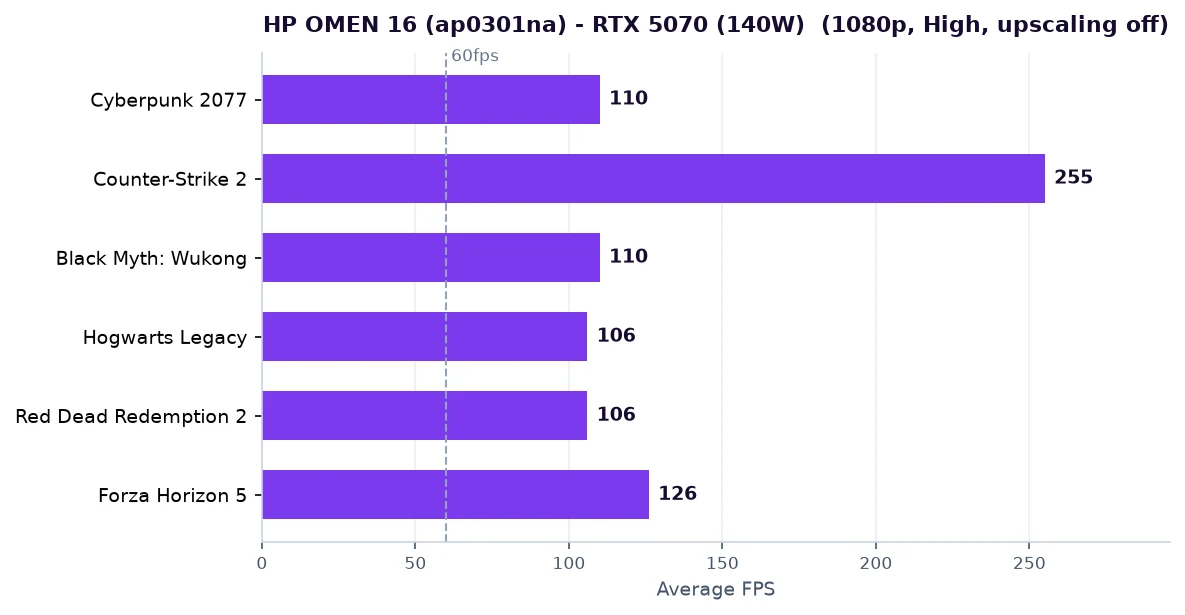
If you want the most performance your roughly-£1,300 can buy, this is it. HP gives the OMEN 16 the full 140W version of the RTX 5070 - 22% more power than the 115W 5070 in cheaper 16- and 18-inch rivals - and pairs it with the genuinely high-end Ryzen 9 8940HX, a 16-core Dragon Range chip that leaves the eight-core Ryzen 7 260 in the other 5070 laptops well behind. In CPU-bound games like Counter-Strike 2 and Forza, and in the all-important 1% lows, that combination simply pulls away.
The screen is the other reason to buy it. Where most budget machines stop at a 1080p panel, the OMEN 16 runs a 16-inch 2560x1600 (QHD+) 240Hz IPS display - more pixels and a faster refresh than anything else in this guide. It also ships with 24GB of RAM rather than the usual 16GB, which helps with multitasking and heavier creative work.
The trade-offs are the ones you'd expect from a performance machine. It is heavier (2.45kg), the fans get loud in performance mode, and that lovely QHD+ panel asks more of the GPU than a 1080p screen would - so for the very highest frame rates you'll still drop to 1080p or lean on DLSS. And like every laptop in 2026's budget bracket, it has 8GB of VRAM, which is the real long-term limit rather than the chip itself.
Day to day, the OMEN backs up the benchmarks. It clears 100fps in Cyberpunk 2077 and a huge 255fps in Counter-Strike 2 at 1080p High, and even in the brutal Black Myth: Wukong it stays around 110fps where the cheaper machines crawl - the combination of the 140W GPU and the 16-core CPU keeps both averages and 1% lows high, so games feel consistently smooth rather than just posting good headline numbers. The QHD+ 240Hz panel is also genuinely good for the money, with strong colour coverage that makes single-player games and creative work look the part. The cooling is the trade-off you accept for all that power: in performance mode it moves a lot of air and gets loud, and the chassis runs warm, so headphones and a desk are part of the deal.
For gamers who also edit video, stream, or just want the longest useful life from a single purchase, the OMEN 16 is the standout. It tops every one of our six benchmarks, and the fact that it does so for less than the 18-inch ASUS is the bargain of the lineup.
See the HP OMEN 16 on Amazon UK
£1585.00price at 23 Aug, may change
Acer Nitro V16 (ANV16-42)
£1,279
This is our overall pick, and the reasoning is simple: a laptop RTX 5070 normally signals a much higher price, yet the Nitro V16 lands at around £1,279 - a sensible step up from a typical RTX 5060 machine for a full GPU tier more power. The 5070 is comfortably the sweet spot for 1080p and 1200p gaming in 2026, and getting one for under £1,300 is what makes this our overall pick.
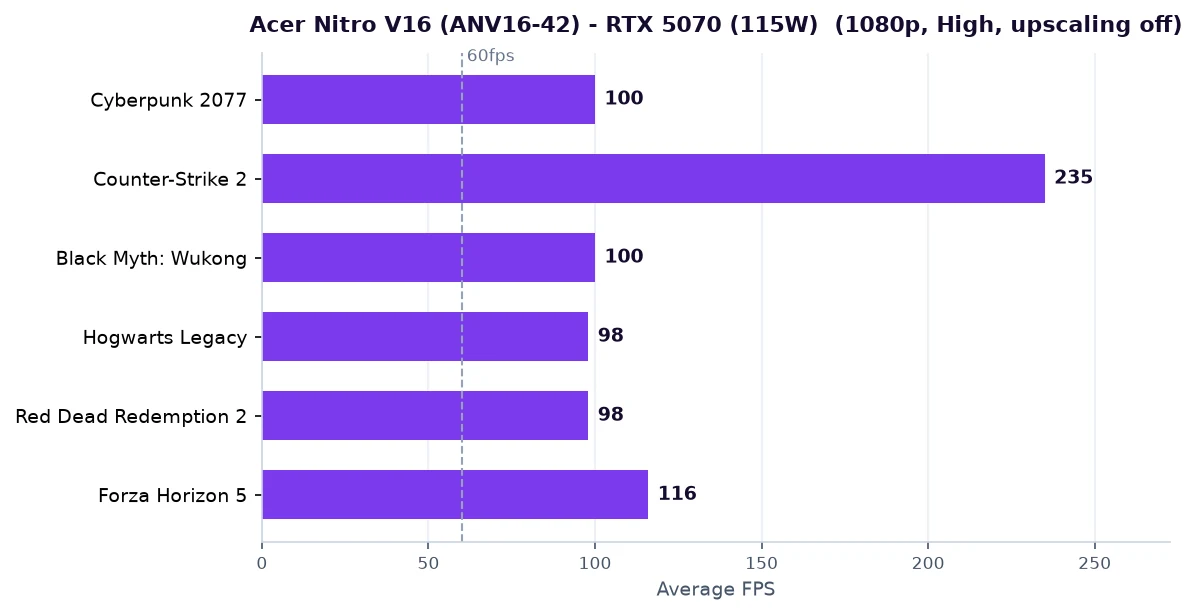
The 5070 here runs at the standard 115W rather than the OMEN's 140W, and it's matched with the eight-core Ryzen 7 260 rather than a Ryzen 9, so it sits a notch below the OMEN in our charts. But the gap is small in GPU-bound games, and the Nitro still clears 100fps in Cyberpunk 2077 at 1080p High and well over 200fps in Counter-Strike 2 - more than enough to make its 180Hz panel sing.
You get a sensible, roomy 16-inch 1920x1200 180Hz display (the taller 16:10 ratio is genuinely nicer for browsing and work), a 1TB SSD and 16GB of RAM. Acer's cooling has a good reputation in this range, so sustained performance holds up. The chassis is plain and there's no fancy QHD panel or 16-core CPU - but those are exactly the things you're not paying for, which is the point.
In the games themselves the value story holds up: ~100fps in Cyberpunk 2077, 235fps in Counter-Strike 2 and triple-digit frame rates in most of our other titles at 1080p High mean it never feels like the "cheap" option, and the taller 1920x1200 panel gives you a little extra vertical space for menus and webpages. It trails the OMEN mainly in the CPU-bound games and 1% lows, where the Ryzen 9 flexes - but unless you're chasing the absolute highest competitive frame rates or editing video, you simply won't notice in normal play. Battery life and speakers are average, as you'd expect at this price, and the design is deliberately low-key.
If your budget is around £1,300 and you just want the most gaming performance per pound without overthinking it, buy this. It's the laptop we'd recommend to the largest number of readers, and it anchors the whole guide.
See the Acer Nitro V16 on Amazon UK
£1299.99price at 23 Aug, may change
ASUS TUF Gaming A18 (FA808)
£1,489
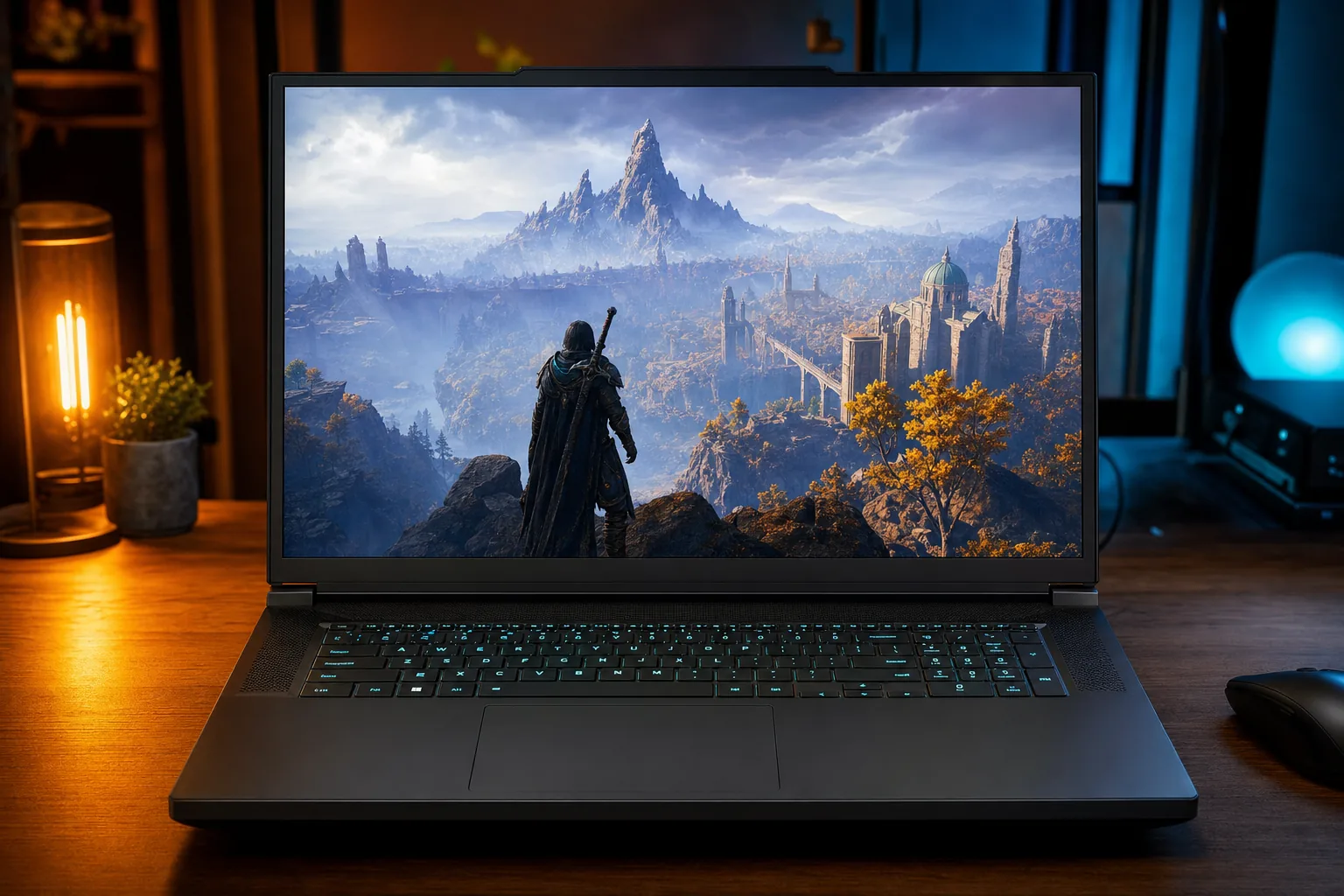
If you want maximum screen real estate without paying flagship prices, the TUF A18 is the answer. An 18-inch display is a different experience to the usual 15- and 16-inch panels - more immersive in single-player games and far more comfortable for spreadsheets, timelines and split-screen multitasking. ASUS backs it with a genuine RTX 5070 (at 115W) and the eight-core Ryzen 7 260, so it games at essentially the same level as our all-rounder pick, just on a much bigger canvas.
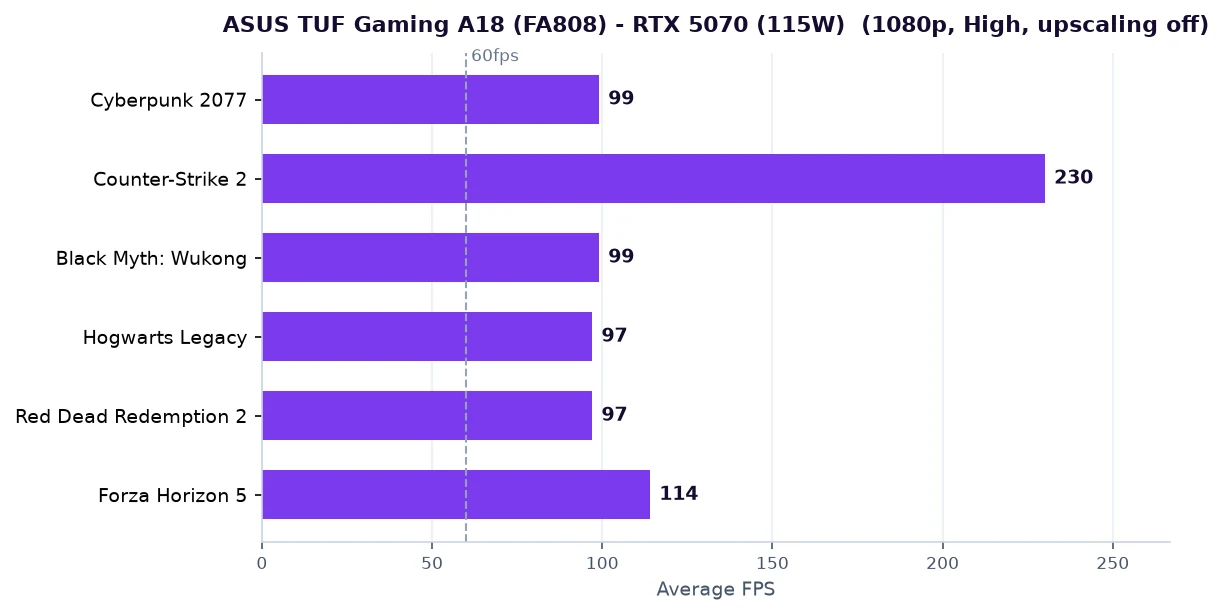
Expect around 99fps in Cyberpunk 2077 and 230fps in Counter-Strike 2 at 1080p High - it sits a hair behind the Nitro V16 only because of normal unit-to-unit variation, and clearly behind the 140W OMEN. The 18-inch panel is a 1920x1200 144Hz IPS unit rather than a QHD screen, which keeps frame rates high and the price (relatively) sane.
ASUS gave this generation a serious thermal overhaul, so the big chassis sustains performance well without throttling. The flip side of an 18-inch laptop is obvious: at 2.6kg plus a chunky charger, this is a machine that lives on a desk and travels only when it has to. It's also the most expensive pick here at around £1,489.
There's a practical upside to all that size beyond immersion: an 18-inch chassis has far more room for cooling and a full keyboard with a proper number pad, so the A18 stays composed under load and is genuinely comfortable for long sessions and spreadsheet work alike. The 1920x1200 resolution on an 18-inch panel isn't as sharp as the OMEN's QHD+, but it keeps frame rates high and demands less from the 8GB GPU - a sensible trade at this size. Just go in clear-eyed about portability: between the laptop and its large charger, this is a two-hands, dedicated-bag machine.
Choose the A18 if the screen is the priority - for movies, immersive RPGs and as a one-box desktop replacement, nothing else in this price range comes close.
See ASUS TUF Gaming A18 on Amazon UK
£1525.89price at 23 Aug, may change
Acer Nitro V 15 (ANV15-52)
£849
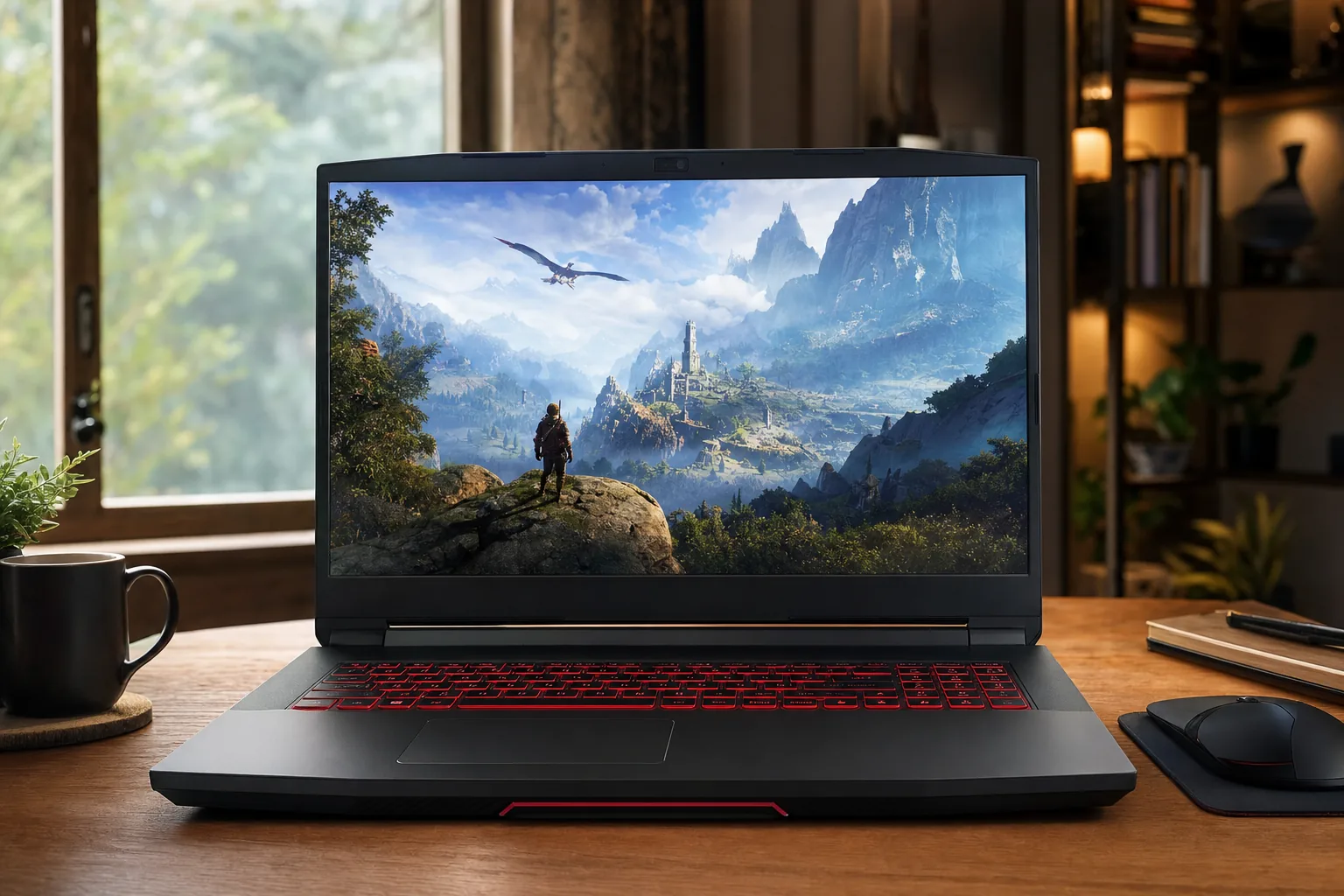
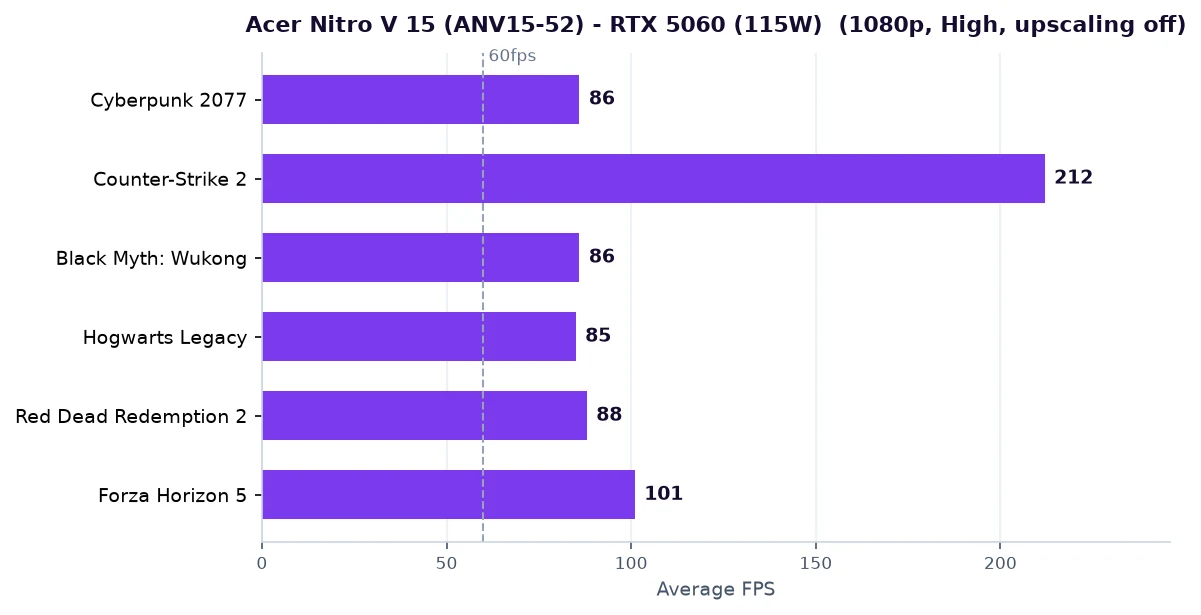
If the Nitro V16 is the value pick of the upper-mid range, the Nitro V 15 is the value pick of the entry range. For around £849 - and frequently £799 on promotion - you get an RTX 5060, a 10-core, 16-thread Core i7-13620H, 16GB of RAM, a 1TB SSD and a fast 165Hz 1080p screen. That's a complete, no-asterisks 1080p gaming laptop at a genuinely budget price.
The RTX 5060 is the natural 1080p card: in our testing it returns roughly 86fps in Cyberpunk 2077 at 1080p High, comfortably over 200fps in Counter-Strike 2, and 85-100fps across most of our other titles - all of which suit that 165Hz panel. It's a clear step up from the RTX 5050 and only one rung below the 5070, making it the smallest sensible GPU we'd recommend for AAA gaming today.
Acer hits the price by trimming the less glamorous areas: battery life is modest, the chassis is plastic and the speakers are forgettable. None of that gets in the way of gaming, and the Nitro V 15 actually runs fairly cool for the money. At 2.1kg it's also the lightest of our 15-inch options.
What makes the Nitro V 15 such an easy recommendation is that nothing important is missing. The 165Hz panel is fast enough to do the RTX 5060's frame rates justice, the Core i7 keeps 1% lows healthy so games feel smooth rather than just "high average fps", and 16GB/1TB means you're not immediately upgrading. The 5060 sits one clear tier below the 5070 picks - you'll see it most in the heaviest games and at higher resolutions - but at 1080p, the resolution this screen is built for, it's comfortably enough. If you can catch it on one of its regular sub-£800 deals, it's arguably the best value in the entire guide.
For most people on a tight budget who still want to play modern games properly at 1080p, this is the one to beat - and the laptop we'd point first-time buyers towards.
See the Acer Nitro V 15 on Amazon UK
£1049.00price at 23 Aug, may change
ASUS TUF Gaming A14 (FA401)
£1,109
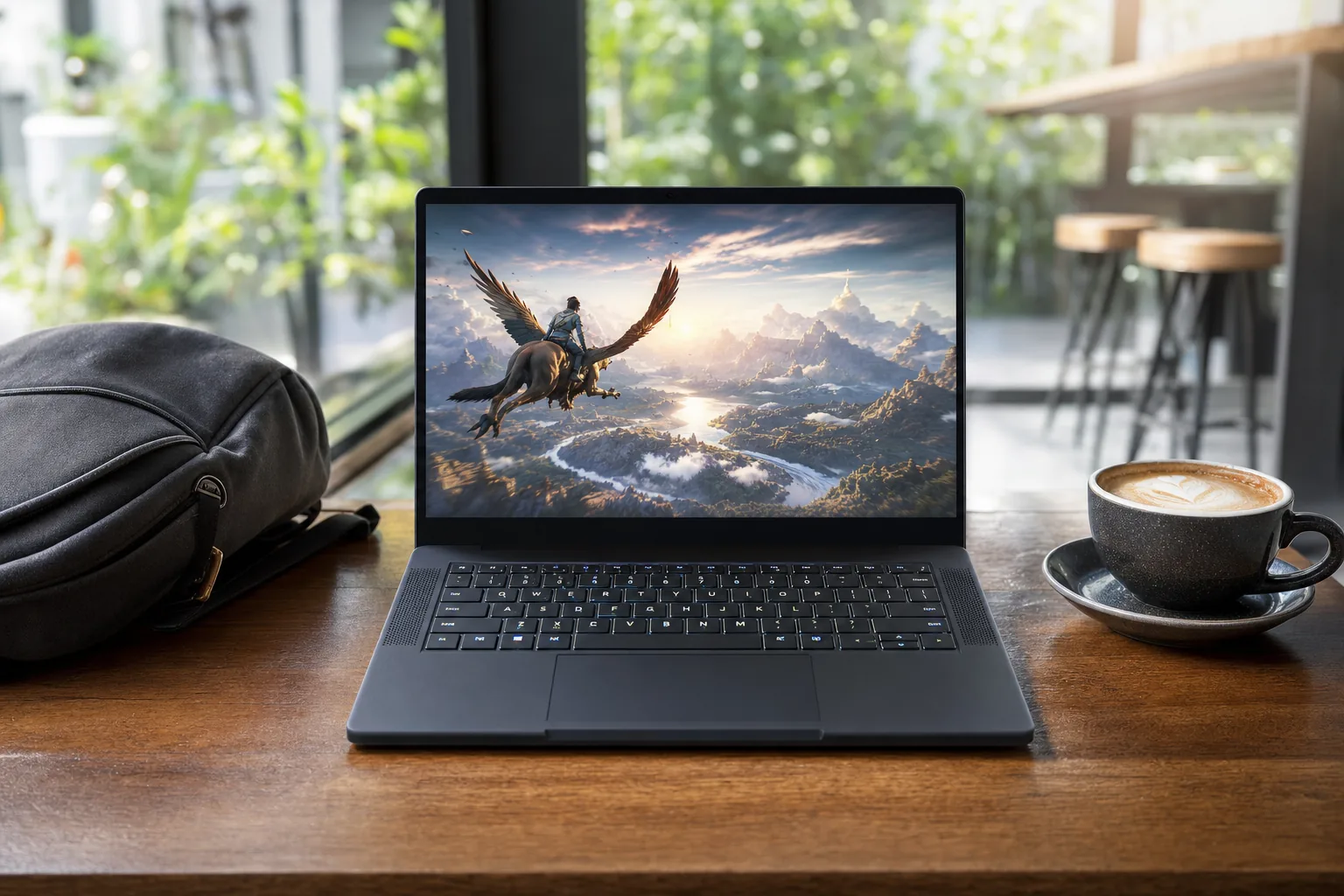
Every other laptop in this guide is something you move occasionally; the TUF A14 is one you actually carry. At 1.46kg it weighs less than many ultrabooks, yet it's a real gaming machine with an RTX 5050, an efficient eight-core Ryzen AI 7 260, and one of the nicest displays in the group - a 14-inch 2560x1600 (2.5K) 165Hz panel that's lovely for both games and work.
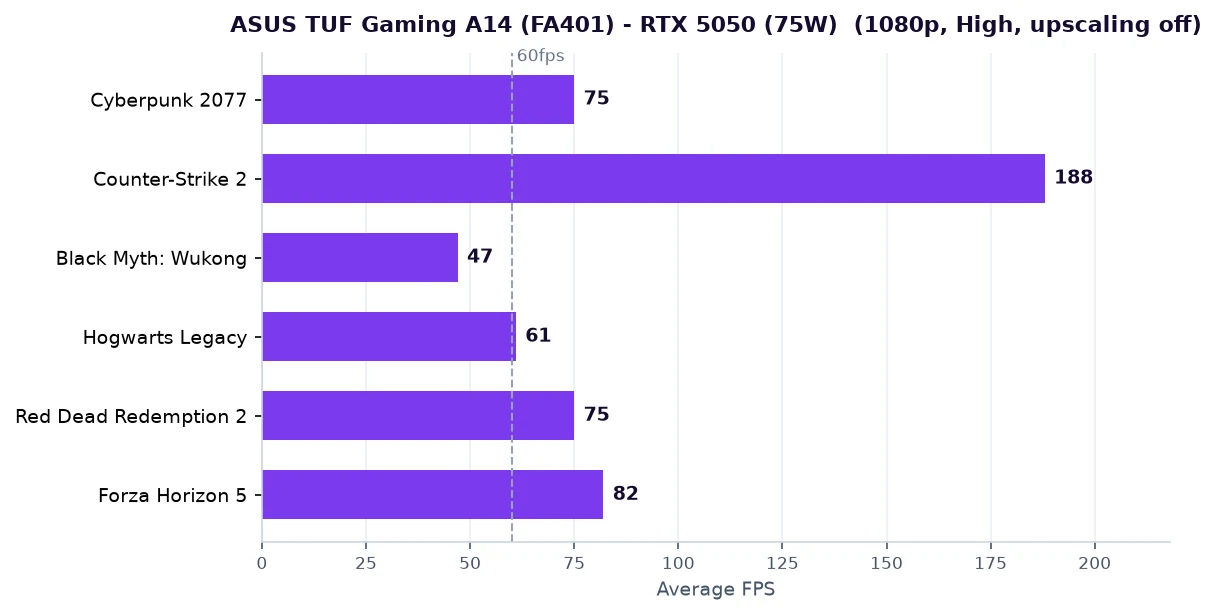
The compromise is performance. The 5050 runs at a lower power limit than the bigger machines, so it's the slowest here: around 75fps in Cyberpunk 2077 at 1080p High, a strong 188fps in Counter-Strike 2, but only the high-40s in the brutal Black Myth: Wukong, where you'll want DLSS or medium settings. For esports, indies and most AAA games at sensible settings, though, it's perfectly capable.
What you're really paying for is the engineering. The A14 has a premium metal-and-plastic build, genuinely long battery life for a gaming laptop, and it stays quiet and cool. It's the rare gaming laptop that doesn't feel like a compromise the moment you leave your desk - the catch is that the size-and-quality premium has it at around £1,109 on Amazon, which is keenly priced for what it is despite the entry-level GPU.
It's worth being clear-eyed about that GPU gap, though. In our charts the A14 sits at the bottom alongside the Victus - around 75fps in Cyberpunk, 47fps in Black Myth: Wukong before upscaling - so this is a 1080p-High machine that leans on DLSS for the heaviest titles, not a frame-rate champion. But it's the only laptop here you'll happily sling in a bag every day, the 2.5K screen is the nicest display of any sub-£1,300 option, and the battery and quiet running make it usable as your only laptop rather than a gaming-only second machine. That dual-purpose versatility is exactly what you're paying the premium for.
If you're a student or commuter who wants one laptop for lectures, work and evening gaming, and you value carrying it all day over raw frames, nothing else here comes close.
See the ASUS TUF Gaming A14 on Amazon UK
Check price & availability on Amazon
HP Victus 15
£799
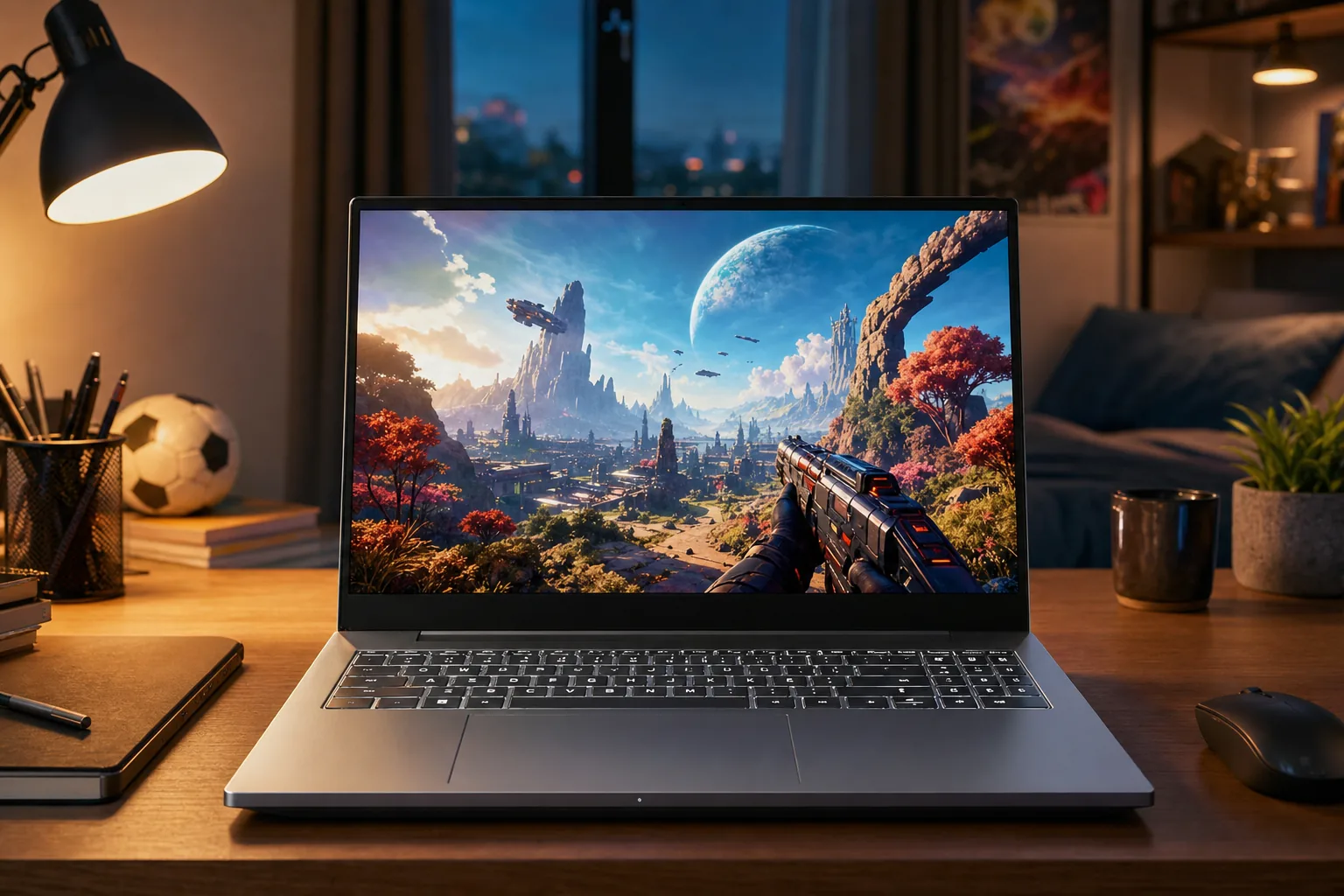
People often ask for a £600 gaming laptop, and the honest answer in 2026 is that current-generation gaming really starts around £799 - below that you're buying last-gen or seriously compromised hardware that will need replacing far sooner. The Victus 15 is the laptop that sits right on that floor and does it properly.
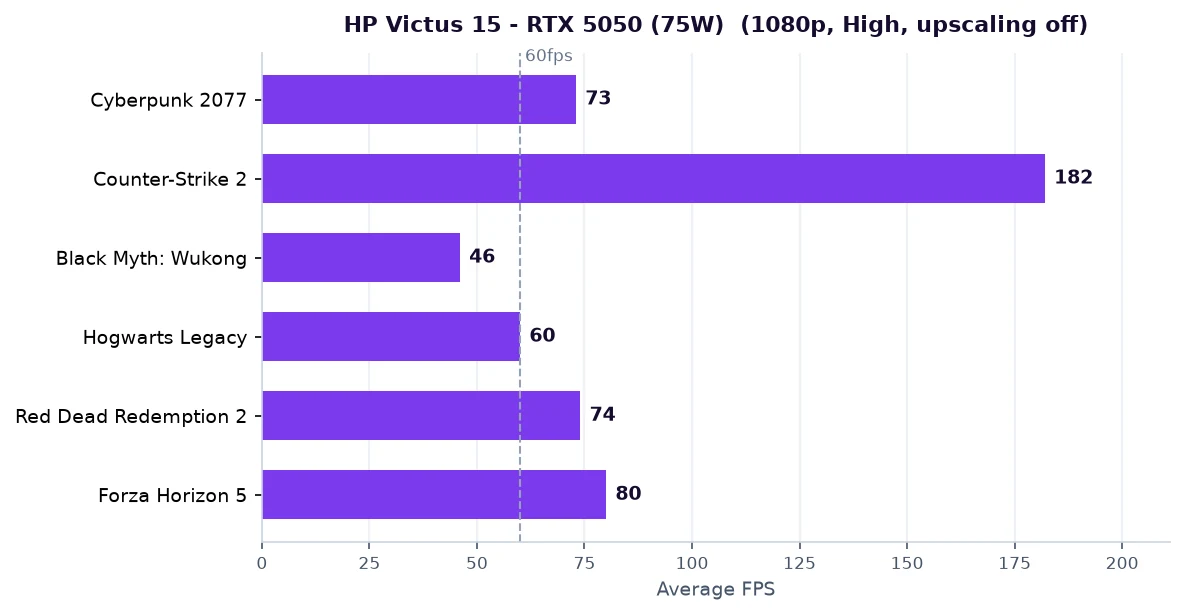
For the money you get an RTX 5050, a 10-core, 16-thread Core i7-13620H, 16GB of RAM, a 1TB SSD and a 144Hz 1080p IPS screen. The 5050 is the entry rung of the RTX 50 family, but it's a capable 1080p card: expect around 73fps in Cyberpunk 2077 at 1080p High, 180fps+ in Counter-Strike 2, and very playable frame rates across most games at high settings. Only the heaviest titles (Black Myth: Wukong) push it to medium settings or DLSS.
HP keeps the price down with a plastic chassis and straightforward cooling, and the Victus's restrained, almost office-like design is actually a plus if you don't want a laptop that screams "gamer". It's not exciting, but it's a complete, reliable machine that punches at its price.
In practice the Victus is more capable than its bottom-of-the-table position suggests. The RTX 5050 holds High settings in the vast majority of games at 1080p, and with DLSS switched on - which costs you almost nothing visually - even demanding titles climb back to comfortably playable frame rates. The 144Hz panel, Core i7 and 16GB/1TB spec mean it behaves like a "proper" laptop for study and work too, not a stripped-out gaming box. You're accepting a plastic build, modest battery and the same 8GB VRAM as everything else - but for the lowest sensible price into the RTX 50 generation, that's a fair deal.
Buy the Victus 15 if you want the lowest possible entry price into real, current-gen gaming and you're happy to play at 1080p High with the occasional setting dialled back. It's the sensible cheapest pick - and a genuinely good first gaming laptop.
See HP Victus 15 on Amazon UK
£829.99price at 23 Aug, may change
Head-to-head: specs & FPS compared
Every laptop, side by side. FPS columns are average frames per second at 1080p, High preset, with upscaling off.
| Laptop | GPU | Price | Cyberpunk | CS2 | Wukong | Hogwarts | RDR2 | Forza |
|---|---|---|---|---|---|---|---|---|
| HP OMEN 16 Most powerful | RTX 5070 (140W) | £1,299 | 110 | 255 | 110 | 106 | 106 | 126 |
| Acer Nitro V16 Best all-rounder | RTX 5070 (115W) | £1,279 | 100 | 235 | 100 | 98 | 98 | 116 |
| ASUS TUF Gaming A18 Biggest screen | RTX 5070 (115W) | £1,489 | 99 | 230 | 99 | 97 | 97 | 114 |
| Acer Nitro V 15 Best budget buy | RTX 5060 (115W) | £849 | 86 | 212 | 86 | 85 | 88 | 101 |
| ASUS TUF Gaming A14 Most portable | RTX 5050 (75W) | £1,109 | 75 | 188 | 47 | 61 | 75 | 82 |
| HP Victus 15 Best cheapest | RTX 5050 (75W) | £799 | 73 | 182 | 46 | 60 | 74 | 80 |
Which budget gaming laptop should you buy?
Six excellent laptops is a good problem to have, but it can also be paralysing. Here's the short version, by the kind of buyer you are:
If you're on the tightest budget
Buy the HP Victus 15 (~£799). It's the cheapest sensible way into current-generation gaming, and the RTX 5050 plays everything at 1080p - lean on DLSS for the heaviest titles. Don't be tempted by sub-£700 "gaming" laptops with last-gen or entry GPUs; you'll regret it within a year.
If you want the best value, full stop
Buy the Acer Nitro V16 (~£1,279). A real RTX 5070 for under £1,300 is the standout deal of 2026, and it's fast enough that you won't be itching to upgrade for years. If that's beyond budget, the Acer Nitro V 15 (RTX 5060, ~£849) is the value champ of the entry tier.
If you want maximum performance
Buy the HP OMEN 16 (~£1,299). The 140W RTX 5070, 16-core Ryzen 9 and QHD+ 240Hz screen make it the fastest, best-equipped machine here - and it costs less than the 18-inch model. It's also the best choice if you edit, render or stream alongside gaming.
If you need to carry it everywhere
Buy the ASUS TUF A14 (~£1,109). At 1.46kg with a gorgeous 2.5K screen and long battery life, it's the only one here that genuinely works as your single, everyday laptop. You trade outright gaming speed for that freedom.
If you want the biggest, most immersive screen
Buy the ASUS TUF A18 (~£1,489). An 18-inch display with a proper RTX 5070 behind it is as close to a desktop experience as budget laptops get - ideal for single-player epics and as a desk-bound all-rounder.
If you're a competitive / esports player
Any of these will fly in Counter-Strike 2 and Valorant, but the high-refresh screens make the difference. The OMEN 16's 240Hz panel is the standout for competitive play; the Nitro and TUF machines' 165-180Hz screens are excellent too.
Frequently asked questions
Can you get a good gaming laptop for £600 in the UK?
Not really, in 2026. Current-generation gaming laptops (RTX 50-series) start at around £799 - the HP Victus 15 with an RTX 5050 is about the floor. Below that you're looking at last-generation GPUs or heavily compromised machines that will need replacing much sooner, so £750-£800 is the sensible entry point if you want a laptop that will still play new games in a few years.
Is an RTX 5050 enough for gaming?
Yes, for 1080p. The RTX 5050 comfortably handles esports titles (Counter-Strike 2, Valorant, Fortnite) at high frame rates and most AAA games at 1080p High, sometimes with a setting or two dialled back or DLSS enabled. Only the very heaviest games (like Black Myth: Wukong) push it to medium settings. It's the entry rung, but a genuinely capable one.
RTX 5060 or RTX 5070 - which should I buy?
If your budget reaches it, the RTX 5070 is the smarter buy: it's a full GPU tier faster than the 5060 for a relatively modest premium (the Acer Nitro V16 at under £1,300 is the standout). Get the RTX 5060 (like the £849 Acer Nitro V 15) if you want the lowest price for proper AAA 1080p gaming and can't stretch to a 5070.
Why do all these laptops only have 8GB of VRAM?
Because NVIDIA cancelled the higher-VRAM mobile cards for this generation, so every budget laptop GPU - 5050, 5060 and 5070 alike - ships with 8GB. It's fine for 1080p gaming now, but it's the most likely thing to feel limiting in a few years' time, which is why we recommend gaming at 1080p rather than chasing 1440p ultra on these machines.
Do I need a 144Hz or 165Hz screen?
It's well worth having, and every laptop here includes one. A high-refresh screen is what turns high frame rates into visibly smoother motion - especially in fast games. There's no point a laptop pushing 200fps in Counter-Strike 2 if the screen can only show 60 of them, so a 144Hz+ panel is one of the best 'free' upgrades in this price range.
Will DLSS make a big difference?
Often a huge one. All these laptops support DLSS 4, which uses AI upscaling (and frame generation) to boost frame rates by anywhere from 30% to 80%+ in supported games. Our benchmark figures are measured with it off for a fair comparison, but in everyday use turning DLSS on meaningfully extends what even the cheapest RTX 5050 can play smoothly.
Are these laptops good for work and study too?
Yes. With Core i7 / Ryzen 7-9 CPUs, 16-24GB of RAM and 1TB SSDs, all six are strong general-purpose laptops for office work, study and light creative tasks. The ASUS TUF A14 (1.46kg) is the best for carrying daily; the HP OMEN 16 (16-core CPU, 24GB) is the best for heavier creative work alongside gaming.
How long will a budget gaming laptop last?
Realistically, three to five years of capable gaming if you stick to 1080p. The GPU's raw speed isn't usually the limiting factor - it's the 8GB of VRAM, which the most demanding new games are starting to brush against at ultra textures. Gaming at 1080p (rather than chasing 1440p ultra), using DLSS, and choosing a model with upgradeable RAM and a spare SSD slot will all stretch that lifespan further.
Can I upgrade the RAM or storage later?
On most of these, yes - and it's the cheapest way to extend a budget laptop's life. The majority of budget gaming laptops have at least one accessible SO-DIMM RAM slot and a spare M.2 slot for a second SSD, so you can add memory or storage down the line. The exception tends to be the thinnest models (like the ultraportable A14), which may use soldered LPDDR5X memory - so if upgradeability matters, check the spec before buying.
Should I game at 1080p or 1440p on these?
1080p is the sweet spot for this class. The GPUs and their 8GB of VRAM are built for it, and a high-refresh 1080p screen gives you the smoothest experience. The OMEN's QHD+ panel and the TUF A14's 2.5K screen can absolutely run at native resolution in lighter games, but for demanding AAA titles you'll get the best balance of sharpness and frame rate at 1080p, optionally with DLSS upscaling from there.
Gaming laptop or build a desktop?
A desktop gives you more performance per pound and easier upgrades, but you can't take it to a lecture, a friend's house or the sofa. If portability or space matters at all, a laptop wins; if it's a fixed setup and you want the most power for your money, a desktop is the better value. These budget laptops exist precisely because plenty of people need one machine that does both jobs.
Should I wait for the next generation?
There's no compelling reason to wait. The RTX 50-series laptops are current, well-priced and have DLSS 4, and the budget tier in particular is as good as it has been in years. There's always something newer on the horizon, but you'd be waiting a long time for a meaningful budget upgrade - and missing a year of gaming to do it. Buy when you need it; just buy current-generation rather than discounted last-gen.
The bottom line
The budget gaming laptop has quietly become one of the best-value products in tech. Whichever of these six you choose, you're getting a machine that plays every current game well at 1080p - the decision is really about which compromise suits you.
For most people, the Acer Nitro V16 is the one to buy: a real RTX 5070 for under £1,300 is the value high point of the entire market. If money is tighter, the Acer Nitro V 15 (RTX 5060, ~£849) and HP Victus 15 (RTX 5050, ~£799) are excellent, honest entry points. Spend up for the HP OMEN 16 if you want the most power and the best screen, the ASUS TUF A18 if you want the biggest, or the ASUS TUF A14 if you need to carry it everywhere. There's no wrong answer here - only the right one for your budget and your bag.