
Best Budget Gaming Mice for Esports and Everyday Use
Lightweight wireless picks across every price tier — with real DPI, weight and sensor comparisons to help you click faster without spending a fortune.
Four genuinely competitive budget wireless mice, ranging from AA-battery stalwarts to 55g esports machines.
There was a time when "budget wireless gaming mouse" was a contradiction in terms. Cheap wireless meant laggy, heavy and unreliable — fine for spreadsheets, hopeless for ranked play. That era is well and truly over. I've spent a good chunk of the last few months living with a handful of affordable wireless rodents, and the honest truth is that the gap between these and the £130 flagships has narrowed to a sliver. In this guide I'm pitting four of the best value options against one another: the evergreen Logitech G305 LIGHTSPEED, the surprisingly punchy Mchose G3 V2 and its Pro sibling, the featherweight SteelSeries Aerox 3 Wireless, and the razor-sharp Razer DeathAdder V3 HyperSpeed.
See Logitech G305 LIGHTSPEED on Amazon UK
£25.49 · 15% offprice at 23 Aug, may change
The brief here is simple — lightweight, wireless, and properly competitive for esports whilst still being comfortable for a full day of emails and browsing. I'll be leaning on real numbers throughout: actual weights, sensor models, DPI ceilings, polling rates and battery figures, rather than vague marketing fluff. Whether you're a CS2 grinder, a Valorant climber or someone who just wants a mouse that doesn't feel like a brick, there's something below for you.
What we'll cover
- How we judged each mouse
- Spec comparison at a glance
- Logitech G305 LIGHTSPEED
- Mchose G3 V2 / G3 V2 Pro
- SteelSeries Aerox 3 Wireless
- Razer DeathAdder V3 HyperSpeed
- Weight & sensor benchmarks
- Head-to-head comparison
- Who should buy which
- FAQs & final verdict
MCHOSE variant note: the 64g, PAW3395, 26,000-DPI and up-to-8,000Hz figures below refer to the G3 V2 Pro. The base G3 V2 uses the PAW3311 and must not be treated as the same SKU. The Amazon button remains an exact-model search, so check that the listing says Pro before ordering.
How I Judged These Mice
Picking a gaming mouse is more personal than picking almost any other peripheral, because it lives under your hand for hours at a time. So whilst raw specs matter, they're only part of the story. Here's the framework I used to weigh these four up against each other.
Weight
For fast-twitch esports, lighter is generally better — it reduces fatigue and lets you flick more freely. The mice here range from a hefty-but-respectable 99g down to a remarkable 55g.
Sensor & tracking
The sensor determines how accurately your movement translates on screen. I looked at the sensor model, DPI ceiling, tracking speed (IPS) and acceleration (G) for each.
Wireless tech & connectivity
Low-latency 2.4GHz is non-negotiable for competitive play. Bonus points for Bluetooth and wired modes that make a mouse versatile for work as well as play.
Battery life & charging
Nobody wants a dead mouse mid-match. I weighed up the trade-off between swappable AA batteries and built-in rechargeable cells.
The Contenders at a Glance
Before we dive into each mouse individually, here's a snapshot of the headline numbers. It's striking how much spec you can buy for relatively little these days — even the lightest options here pack premium-grade sensors.
Weight is the headline differentiator here — but sensor quality and connectivity tell the fuller story.
A quick note on DPI: don't be seduced by huge numbers. Most competitive players sit somewhere between 400 and 1,600 DPI regardless of whether their mouse can hit 12,000 or 26,000. A high ceiling is nice future-proofing, but it's not where matches are won.
Logitech G305 LIGHTSPEED — The Budget Original
See Logitech G305 LIGHTSPEED on Amazon UK
£25.49 · 15% offprice at 23 Aug, may change
If you ask around any PC gaming community for an affordable wireless recommendation, the G305 still comes up time and time again — and for good reason. This is the mouse that proved budget wireless could actually be trusted in competitive settings, and years on it remains a benchmark for value.
It's a symmetrical, right-handed shape with six programmable buttons, and it runs Logitech's excellent LIGHTSPEED 2.4GHz wireless via a tiny USB nano receiver. Under the shell sits the HERO sensor with a 12,000 DPI ceiling, a tracking speed of 400 IPS and 40G of acceleration — figures that comfortably exceed what any human hand actually demands. Polling runs at the classic 1,000Hz out of the box, which remains perfectly competitive for the vast majority of players, and rises to 8,000Hz if you add Razer's HyperPolling Wireless Dongle — sold separately, and not in the box.
The headline trick, though, is the power source. Rather than a built-in rechargeable cell, the G305 runs off a single AA battery — and gets up to a frankly absurd 250 hours out of it. Onboard memory means you can store your settings and use it across machines without faffing with software.
Pros
- Up to 250 hours from one AA battery — basically set-and-forget
- Rock-solid LIGHTSPEED 2.4GHz wireless with a proven track record
- Capable HERO 12K sensor with 400 IPS and 40G acceleration
- Onboard memory for portable, software-free setups
- Often the cheapest genuinely competitive wireless mouse you can buy
Cons
- At 99g it's the heaviest mouse here by a wide margin
- 2.4GHz only — no Bluetooth and no wired fallback
- No RGB, if that matters to you
- Sensor ceiling is lower than the newer competition
Pro Tip
Want that incredible battery life but hate the idea of disposable cells? Pop a rechargeable AA in the G305. You lose a little of the runtime due to lower voltage, but you'll still get weeks of play between top-ups — and you keep the brilliant hot-swap convenience that built-in batteries can never match.
Mchose G3 V2 & G3 V2 Pro — The Value Disruptor
See Mchose G3 V2 & G3 V2 Pro on Amazon UK
Here's where things get interesting. The Mchose G3 V2 is the kind of mouse that makes established brands nervous: it undercuts almost everything whilst stuffing in features you'd normally pay double for. At just 64g (give or take 2g), it's a third lighter than the G305 yet packs considerably more on the spec sheet.
The Mchose G3 V2 weighs in at a featherweight 64g whilst offering tri-mode connectivity — a combination that was unthinkable at this price not long ago.
Connectivity is the standout. Where the G305 gives you 2.4GHz and nothing else, the G3 V2 offers full tri-mode: low-latency 2.4GHz wireless, Bluetooth, and wired. That makes it as happy on a work laptop over Bluetooth as it is on your gaming rig over the dongle. It supports up to an 8,000Hz polling rate, uses TTC Gold and Silver encoders for the scroll wheel, and Omron mechanical switches for the main clicks. Battery life runs up to 170 hours, and there's a single indicator LED rather than a light show — which I personally appreciate.
The clever bit is the two-tier line-up. The standard G3 V2 uses a PAW3311 sensor, which is perfectly competent for everyday and casual competitive play. Spend just a couple of dollars more on the G3 V2 Pro and you get the genuinely premium PAW3395 sensor with a 26,000 DPI ceiling — the same flagship-class sensor you'll find in mice costing several times as much. Crucially, both variants share the exact same weight and shell, so they feel identical in the hand. Given the trivial price difference, the Pro is the obvious pick.
True tri-mode versatility
2.4GHz for gaming, Bluetooth for clutter-free laptop work, and wired when you want zero compromise — all in one 64g body.
8K polling support
An 8,000Hz polling ceiling puts it on paper alongside far pricier mice — handy headroom for high-refresh monitors.
Flagship sensor on the Pro
The PAW3395 in the G3 V2 Pro is a top-tier sensor, hitting 26,000 DPI — and it costs only a couple of dollars more than the base model.
Pros
- Outstanding value — flagship PAW3395 sensor on the Pro for budget money
- Lightweight 64g frame, lighter than most rivals here
- Full tri-mode connectivity (2.4GHz / Bluetooth / wired)
- Up to 8,000Hz polling and quality TTC encoders
- Omron mechanical switches for crisp clicks
Cons
- Brand recognition and after-sales support can't match the big names
- Base model's PAW3311 sensor is a step below the Pro
- Minimal lighting won't please RGB fans
SteelSeries Aerox 3 Wireless — The Versatile All-Rounder
See SteelSeries Aerox 3 Wireless on Amazon UK
£39.99price at 23 Aug, may change
The Aerox 3 Wireless takes a different philosophy to getting light: honeycomb. Its perforated shell helps bring the weight down to a nimble 66g, and it's one of the more characterful designs in this round-up. SteelSeries pairs that with their TrueMove Air optical sensor, offering a 200–18,000 DPI range adjustable in fine 100 CPI increments, plus 400 IPS tracking and 40G of acceleration.
What sets the Aerox 3 apart for everyday use is its dual wireless system: 2.4GHz for gaming and Bluetooth for everything else. That flexibility makes it a genuine do-it-all mouse — flick to Bluetooth for your laptop, jump to the low-latency dongle when it's game time. Battery life is rated at up to 200 hours on a charge, and it tops up via a USB-C to USB-A Super Mesh cable.
The honeycomb shell does more than just save grams, too. The Aerox 3 features a water-resistant design, so it shrugs off the odd spilled drink or sweaty session far better than most perforated mice — addressing the obvious concern that all those holes might let liquids straight into the electronics.
The Aerox 3 Wireless uses a honeycomb shell and water-resistant construction to keep weight down to 66g without sacrificing durability.
Honeycomb shells aren't for everyone — some people love the airy, sweat-reducing feel, others can't get past the texture under their fingertips. If you can, try one in person before committing. The Aerox 3's water resistance does at least remove the usual "what about dust and spills?" worry.
Pros
- Light 66g honeycomb design that's great for flick-heavy play
- Dual wireless (2.4GHz + Bluetooth) makes it brilliantly versatile
- Water-resistant shell — unusual and welcome at this price
- Up to 200 hours battery and modern USB-C charging
- Reliable TrueMove Air sensor with fine 100 CPI DPI steps
Cons
- Honeycomb texture is a love-it-or-hate-it affair
- Slightly heavier than the Mchose and Razer options
- DPI ceiling sits below the newer 26K-class sensors
Razer DeathAdder V3 HyperSpeed — The Esports Specialist
See Razer DeathAdder V3 HyperSpeed on Amazon UK
£74.70 · 25% offprice at 23 Aug, may change
See Razer DeathAdder V3 HyperSpeed on Amazon UK
£121.50price at 23 Aug, may change
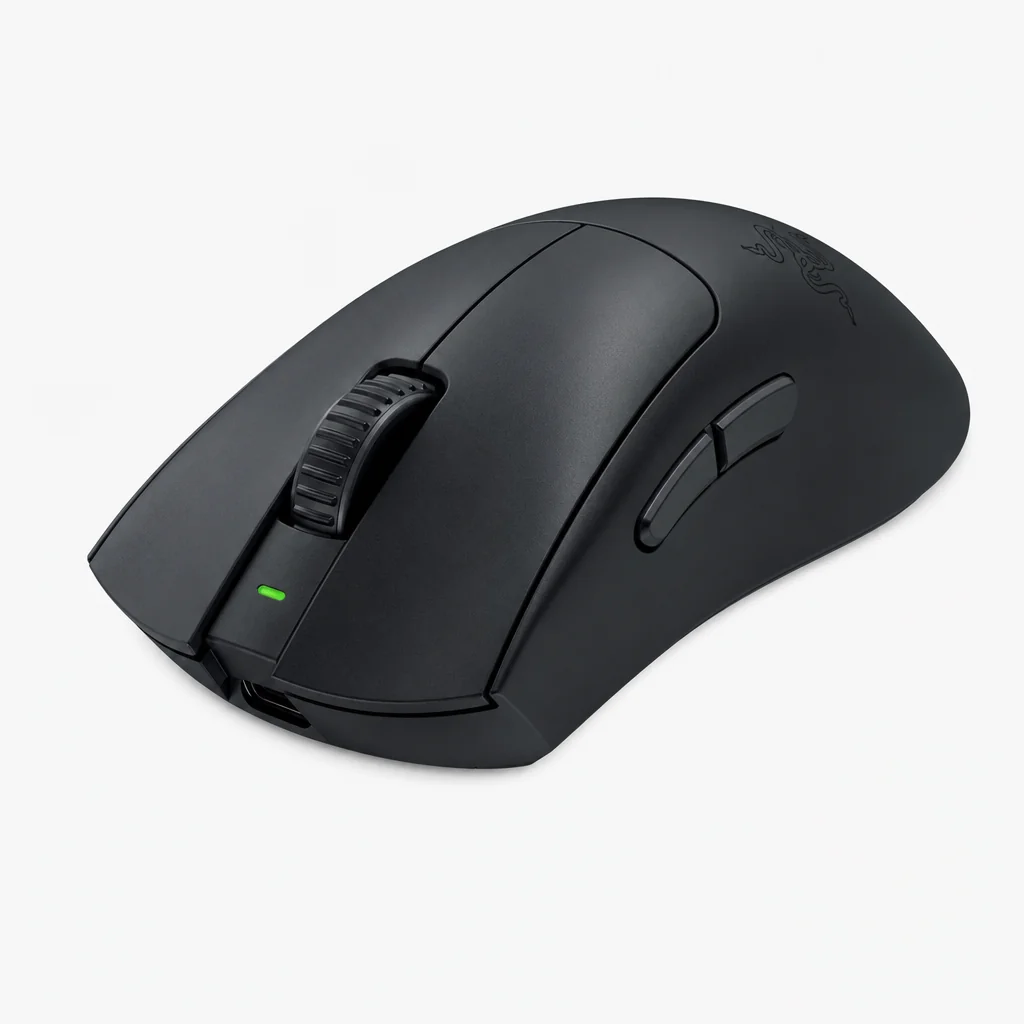
The DeathAdder name is practically synonymous with ergonomic gaming mice, and the V3 HyperSpeed brings that legendary shape to a lighter, wireless, more competitively-priced form. At a remarkable 55g, it's the lightest mouse in this entire guide — and unlike the symmetrical options, its sculpted right-handed shape is built for comfort during marathon sessions.
It runs Razer's Focus X 26K optical sensor, with a 26,000 DPI ceiling, a blistering 500 IPS tracking speed and 40G of acceleration — the highest tracking figure of any mouse here. Connectivity is via Razer's HyperSpeed 2.4GHz wireless on a USB-A dongle, with a USB-A to USB-C wired option for charging or cabled play. The main switches are Gen-3 optical, which are fast, durable and immune to the double-click issues that plague older mechanical switches. PTFE feet keep the glide smooth.
Battery life lands at up to 100 hours, and whilst there's no RGB to speak of, that's no great loss on a mouse this focused on performance. It's backed by a 2-year warranty, which adds peace of mind to what is otherwise the premium pick of this bunch.
The DeathAdder V3 HyperSpeed leads on raw tracking speed with 500 IPS, though in practice all three comfortably exceed real-world demands.
Pros
- Lightest mouse here at just 55g
- Class-leading 500 IPS tracking via the Focus X 26K sensor
- Comfortable, time-tested ergonomic right-handed shape
- Gen-3 optical switches resist double-click failures
- 2-year warranty and smooth PTFE feet
Cons
- The priciest option in this guide
- 100-hour battery trails the others on paper
- No Bluetooth — 2.4GHz and wired only
- Right-handed shape only; no RGB
Pro Tip
Optical switches like the DeathAdder's Gen-3 actuate using a beam of light rather than physical metal contacts. The practical upshot is that they're essentially immune to the dreaded "double-click" wear that eventually afflicts traditional mechanical switches — so this mouse should stay reliable long after cheaper rivals start misbehaving.
Head-to-Head Comparison
Numbers side by side tell the clearest story. Here's how the four stack up on the metrics that matter most, along with the popular HyperX Pulsefire Haste 2 Wireless as a mid-range reference point.
| Feature | Logitech G305 | Mchose G3 V2 Pro | SteelSeries Aerox 3 | Razer DeathAdder V3 HS |
|---|---|---|---|---|
| Weight | 99g | 64g (±2g) | 66g | 55g |
| Sensor | HERO 12K | PAW3395 | TrueMove Air | Focus X 26K |
| Max DPI | 12,000 | 26,000 | 18,000 | 26,000 |
| Max tracking | 400 IPS | 650 IPS (50G accel.) | 400 IPS | 500 IPS |
| Polling rate | 1,000 Hz | Up to 8,000 Hz | 1000 Hz | 1,000 Hz |
| Connectivity | 2.4GHz | 2.4GHz / BT / Wired | 2.4GHz / Bluetooth | 2.4GHz / Wired |
| Battery | Up to 250 hrs (AA) | Up to 170 hrs | Up to 200 hrs | Up to 100 hrs |
| Switches | OMRON switches | Omron mechanical | IP54-rated switches | Gen-3 optical |
| Buy | Check price | Check price |
A few patterns jump out. The DeathAdder wins outright on weight and tracking speed, the Mchose G3 V2 Pro offers the most connectivity and the highest polling ceiling for the money, the Aerox 3 splits the difference with strong battery and Bluetooth versatility, and the G305 dominates the battery chart thanks to its swappable AA approach.
See Head-to-Head Comparison on Amazon UKOverall Ratings
Pulling everything together, here's how I'd score the field as a whole for value-conscious buyers chasing competitive wireless performance. These ratings reflect the balance of weight, sensor quality, connectivity and battery across the line-up.
Who Should Buy Which?
There's no single "best" here — the right pick depends entirely on how you play and what you value. Here's my quick steer for each type of buyer.
The bargain hunter
Go for the Logitech G305. It's the most affordable proven wireless option, and the 250-hour AA battery means you'll basically never think about charging.
The value maximiser
The Mchose G3 V2 Pro is the spec-per-pound champion: a flagship PAW3395 sensor, 64g weight and tri-mode connectivity for budget money.
The work-and-play hybrid
The SteelSeries Aerox 3 Wireless. Bluetooth plus 2.4GHz and a water-resistant shell make it the most versatile all-rounder for desk and game.
The competitive grinder
The Razer DeathAdder V3 HyperSpeed. At 55g with 500 IPS tracking and a comfy ergonomic shape, it's the purest esports tool here.
From AA-battery convenience to 55g esports precision, there's a clear winner for every type of player.
Frequently Asked Questions
Whichever you choose, today's budget wireless mice deliver performance that genuinely rivals far pricier flagships.
The Verdict
The most encouraging takeaway from this round-up is that there are no bad choices here — every one of these mice would have been considered a premium product just a few years ago. The budget wireless category has matured to the point where you're really just choosing your priorities.
If I had to crown a single all-round value champion, it's the Mchose G3 V2 Pro. For genuinely budget money you get a flagship-grade PAW3395 sensor, a featherweight 64g body, tri-mode connectivity and up to 8,000Hz polling — a spec sheet that simply embarrasses its price tag. For the most committed competitors, the Razer DeathAdder V3 HyperSpeed is the dream pick at 55g with class-leading 500 IPS tracking and that beloved ergonomic shape, provided you're happy to spend a little more.
Meanwhile the SteelSeries Aerox 3 Wireless remains the smartest do-everything choice thanks to its Bluetooth versatility and water-resistant honeycomb shell, and the evergreen Logitech G305 LIGHTSPEED is still the one I'd hand to anyone who just wants reliable, hassle-free wireless on the tightest of budgets — that 250-hour AA battery never gets old. Whatever your hand shape, grip style or wallet, there's a brilliant little rodent here waiting for you.