
Why Kids' Gaming PCs Often Come In Full Of Malware And Pop-Ups
When a parent finally sits down at their child's gaming PC, they usually get a nasty shock — and I've seen why it happens, over and over again.

We link to the exact model on Amazon UK. Prices change often, so check the live price before you buy. As an Amazon Associate we earn from qualifying purchases.
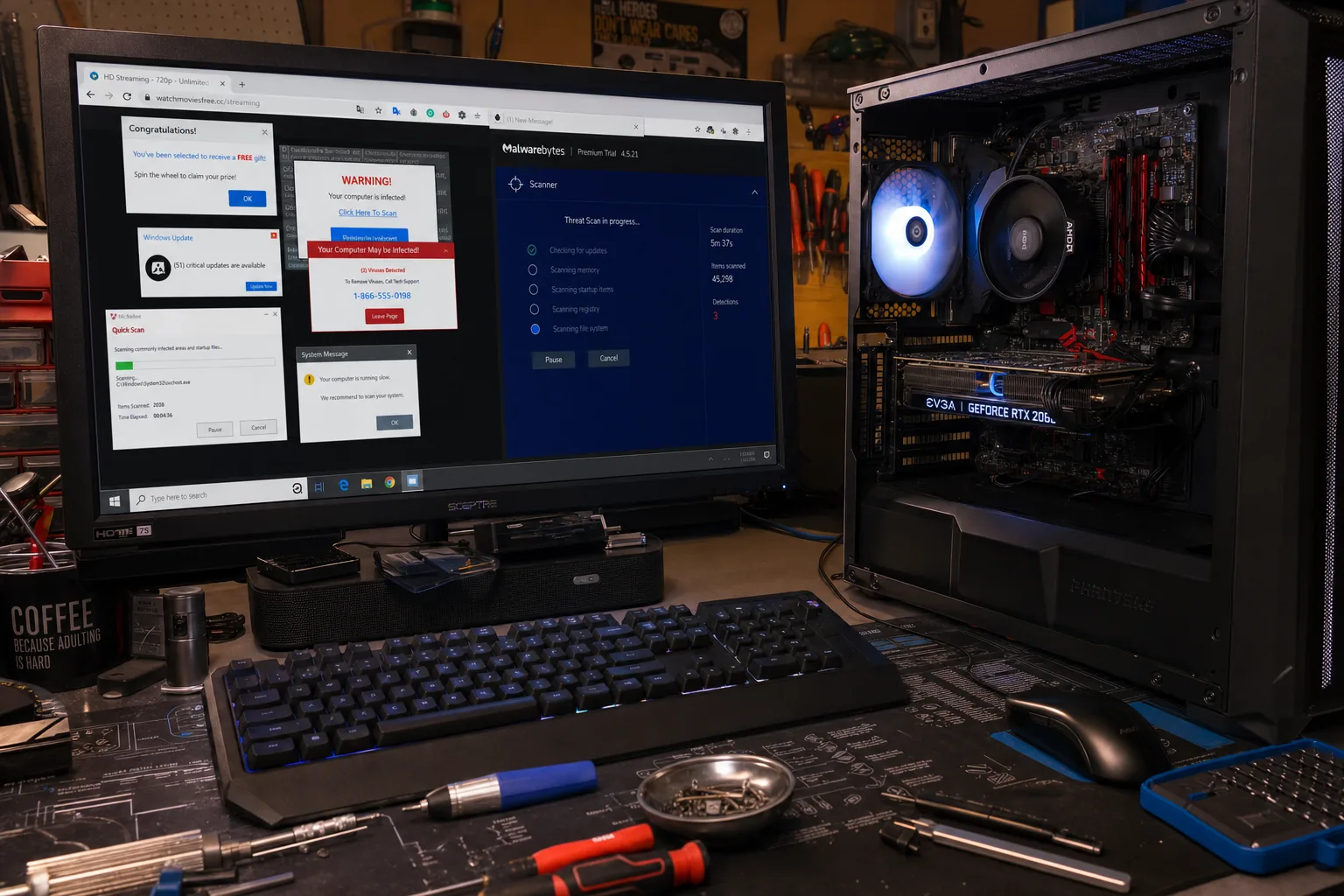
A mum brought in her son's gaming PC last month with a look I recognise immediately: half-embarrassed, half-furious. "I don't know what he's done to it, but it's covered in pop-ups and I daren't type my bank details anywhere near it." She wasn't wrong to be worried. That machine had four different adware programmes running at startup, a browser hijacker redirecting every search, and a toolbar nobody had ever deliberately installed. Her son is thirteen and absolutely convinced he'd done nothing wrong.

See Malwarebytes Premium on Amazon UK
Check today's price & availability on Amazon UK
The thing is, he probably hadn't done anything he thought was wrong. That's the real problem with kids and gaming PCs, and it's something I explain to parents almost every week.
Where the junk actually comes from
Gaming is the perfect storm for unwanted software. Children are constantly chasing free versions of paid games, cheat tools, mods, and in-game currency generators. Almost all of those are found on third-party sites rather than official stores, and those sites bundle their downloads with extras the child never asked for. Click through an installer quickly enough — which every child does — and you've agreed to install a browser toolbar, a "system optimiser," and something that quietly watches your browsing habits.
- Cheat engines and trainers are notorious for this. Some are legitimate tools; many are not. The dodgy ones carry adware at minimum, and occasionally something far nastier.
- Free game launchers from unofficial sites are another big source. If a paid game is suddenly free on a random website, someone is getting paid another way.
- YouTube "how to get free Robux" videos — or whatever the current equivalent is — almost always point to sites that bundle malware into a download. I've seen this pattern for years and it hasn't changed.
- Clicking "Download" on ad banners rather than the real button is an honest mistake children make constantly, because those fake buttons are designed to confuse adults, let alone a ten-year-old.
What I actually find on the bench
Most of what I clean off these machines is adware and browser hijackers rather than the devastating ransomware people fear most. That's cold comfort, because adware still slows the machine to a crawl, redirects searches to earn someone else money, and occasionally opens the door to something worse. I run Malwarebytes alongside Windows Defender — Defender has improved enormously in recent years but it misses some of the greyware that Malwarebytes catches. Between the two, I can usually get a clear picture of what's on there.
The browser is always the worst of it. I'll find multiple extensions nobody installed on purpose, a changed homepage, and search results going somewhere other than Google. Resetting the browser to defaults — and I mean a full reset, not just clearing history — sorts that out immediately.
What parents can do before it gets to my bench
The honest answer is that software alone won't fix a habits problem, but it does raise the floor considerably.
- Keep Windows Update on. Most successful infections exploit unpatched systems. This costs nothing and matters enormously.
- Install Malwarebytes Premium alongside Defender. The free version scans on demand; the paid version watches in real time. Worth every penny on a child's machine.
- Set Chrome or Edge to require your approval for extensions. It takes thirty seconds to configure and stops a lot of drive-by installs.
- Have the installer conversation. Teach children to read every screen during installation and untick anything they didn't ask for. It sounds obvious; most adults don't do it either.
- Use a standard Windows account, not an administrator account, for day-to-day gaming. It limits what an infection can actually do to the system.
The Repair Bench verdict
Why it happens: kids chase free games and mods from unofficial sites, click through installers without reading them, and end up with adware and browser hijackers they never knowingly agreed to.
First thing to do: run Malwarebytes alongside Windows Defender, do a full browser reset, and switch the child's account from administrator to standard user.
Best prevention: habits matter more than software — but Malwarebytes Premium running in real time is the most practical safety net I'd recommend for any gaming PC a child uses regularly.
As an Amazon Associate we may earn from qualifying purchases, at no extra cost to you. We only recommend kit we would actually use.
- Malwarebytes PremiumView on Amazon