
Framework Laptop 16 First Look: Ryzen AI 300, RTX 5070 and UK Buying Trade-offs
A repairable 16-inch laptop with a genuinely removable graphics module, but UK buyers need to decide whether that flexibility justifies the cost, bulk and more complicated configuration process.
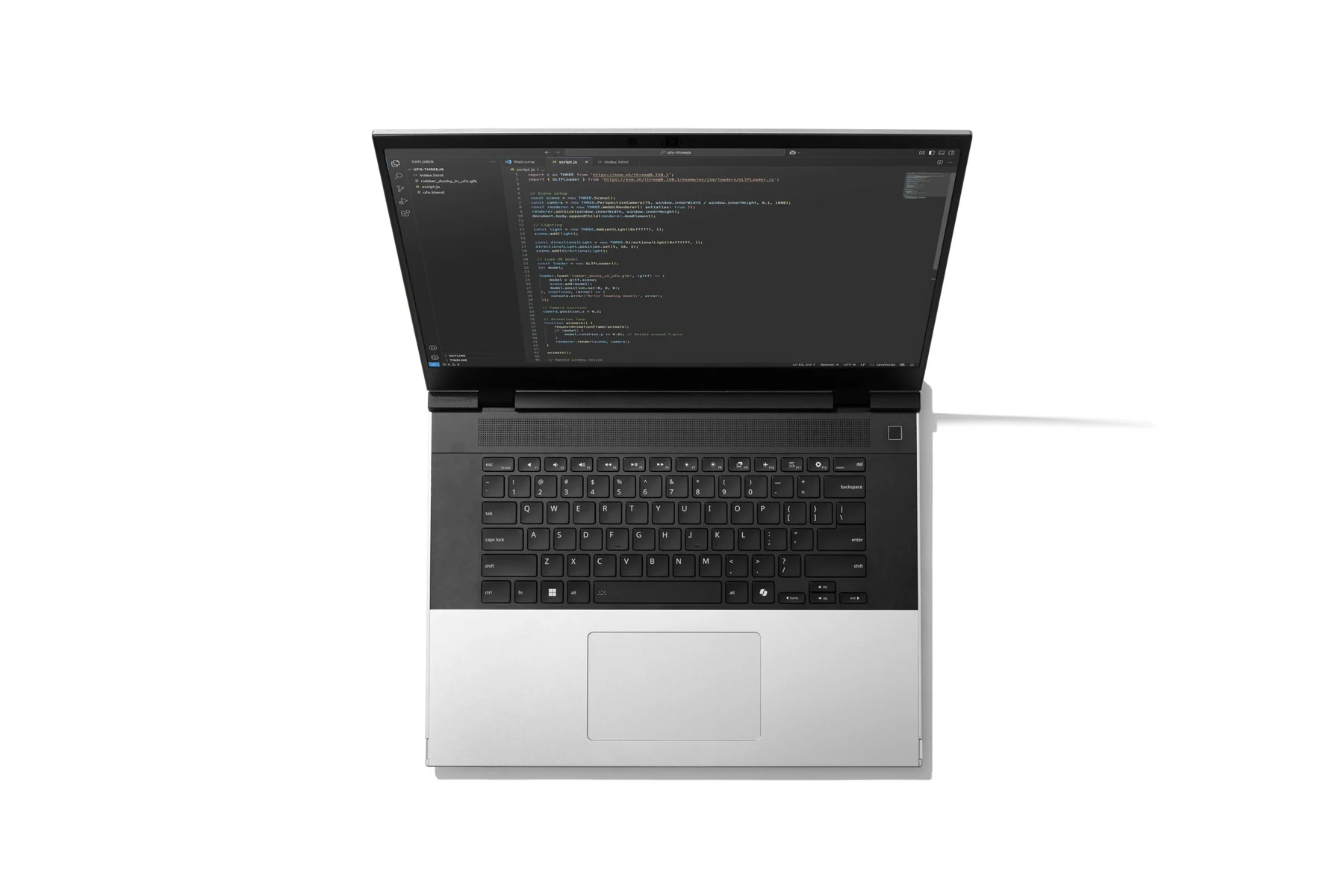

The Framework Laptop 16 makes most sense for a buyer who dislikes treating a powerful laptop as disposable. Its core promise is unusually concrete: memory, storage, battery, keyboard, touchpad, ports and the discrete GPU module can be replaced. The 2025 Ryzen AI 300 refresh made that promise more consequential, adding AMD's newer processors and an NVIDIA RTX 5070 Graphics Module. Independent testing suggested the resulting machine was a capable 1440p-class gaming laptop, whilst its modular construction remained both its biggest advantage and its clearest compromise.
This is a researched first look rather than a hands-on review. It draws on Framework's specifications and technical documentation alongside clearly attributed reporting from Tom's Hardware and PC Gamer. The short version is that the Laptop 16 is not presented as the cheapest route to RTX 5070 gaming in Britain. It is a platform for people who value repairability, configuration freedom and the possibility of changing one costly component rather than replacing the entire computer.
Framework's UK store separates DIY choices from ready-to-use configurations, but this article does not quote a starting price that the server-side reviewer cannot independently recheck. Build the complete live UK basket with the selected memory, storage, Expansion Cards, input modules, operating system, power adapter and Graphics Module. That delivered total is the figure to compare with another laptop.
What to Confirm Before Ordering in the UK
Start with the complete basket, not the chassis price. Check the processor, graphics module, memory, storage, operating-system choice, keyboard and input modules, Expansion Cards and power adapter line by line. A DIY configuration can look cheaper at first because parts that would be standard in a conventional laptop may be separate choices. The useful comparison is the delivered total for a machine you could switch on and use, set against a conventional laptop with broadly equivalent memory, storage, display and graphics.
Then check how the modular design fits your routine. Decide which ports you need each day, whether the larger 16-inch chassis suits your bag and desk, and whether you genuinely expect to replace or upgrade parts. The Expansion Bay and replaceable modules are the point of this machine, but their value depends on using that flexibility rather than paying for it in theory. If gaming matters, compare the exact RTX 5070 module and power setup with the fixed-GPU alternatives you are considering.
Finally, recheck Framework's UK product page and checkout before paying. Configuration choices, lead times and prices can move, and the independent results quoted in this article apply to the reviewers' stated hardware rather than every possible build. Save the final specification and order details so that later performance comparisons, support questions and upgrades refer to the machine you actually bought.
Four Tiers, One Chassis: Decoding the Ryzen AI 300 Line-up
Framework sold four main preconfigured Ryzen AI 300 tiers: Base, Performance, Performance Pro and Overkill. They share the same 16-inch chassis, 2560 × 1600 matte display, six Expansion Card bays, 85Wh replaceable battery and modular input system. The meaningful decisions are processor class, integrated graphics, supplied memory and storage, Windows edition, charger, and access to the RTX 5070 options.
| Tier | Processor and integrated graphics | Prebuilt memory and storage | Operating system | RTX 5070 options |
|---|---|---|---|---|
| Base | Ryzen AI 5 340, 6 cores / 12 threads, up to 4.8GHz; Radeon 840M | 16GB DDR5-5600; 512GB SSD | Windows 11 Pro | No discrete GPU in the prebuilt Base tier; DIY choices are separate |
| Performance | Ryzen AI 7 350, 8 cores / 16 threads, up to 5.0GHz; Radeon 860M | 16GB DDR5-5600; 512GB SSD | Windows 11 Home | RTX 5070 8GB configurable |
| Performance Pro | Ryzen AI 7 350, 8 cores / 16 threads, up to 5.0GHz; Radeon 860M | 32GB DDR5-5600; 1TB SSD | Windows 11 Pro | RTX 5070 8GB configurable |
| Overkill | Ryzen AI 9 HX 370, 12 cores / 24 threads, up to 5.1GHz; Radeon 890M | 64GB DDR5-5600; 2TB SSD | Windows 11 Pro | RTX 5070 8GB or 12GB configurable |
The Base is the least complicated choice for productivity-focused buyers who want Framework's repairable chassis without treating it as a gaming machine. Its Radeon 840M integrated graphics should be viewed as an everyday graphics solution rather than a substitute for the discrete module.
Performance and Performance Pro are the more natural starting points for buyers considering an RTX 5070. They use the same Ryzen AI 7 350 and Radeon 860M; the Pro model's distinction is not a faster processor, but 32GB of memory, a 1TB SSD and Windows 11 Pro instead of 16GB, 512GB and Windows 11 Home. That means a DIY buyer who is comfortable fitting components may find it useful to separate the platform decision from Framework's prebuilt memory and storage bundles.
Overkill is the listed configuration with the Ryzen AI 9 HX 370 and Radeon 890M, and Framework's UK specification table lists the 12GB RTX 5070 with that tier. It arrives with 64GB RAM and a 2TB SSD, making it the obvious specification for demanding local workloads, but it is also where Framework's value question becomes sharpest.
What Modular Graphics Actually Changes
Most gaming laptops have a GPU soldered permanently to the motherboard. Framework's Laptop 16 instead uses its documented Expansion Bay interface. The bay can house a Graphics Module, an Expansion Bay Shell for a slimmer integrated-graphics configuration, or a dual-M.2 storage adapter. Framework documents the removal and installation process in its service material; owners should follow that current guide rather than rely on an unverified time estimate.
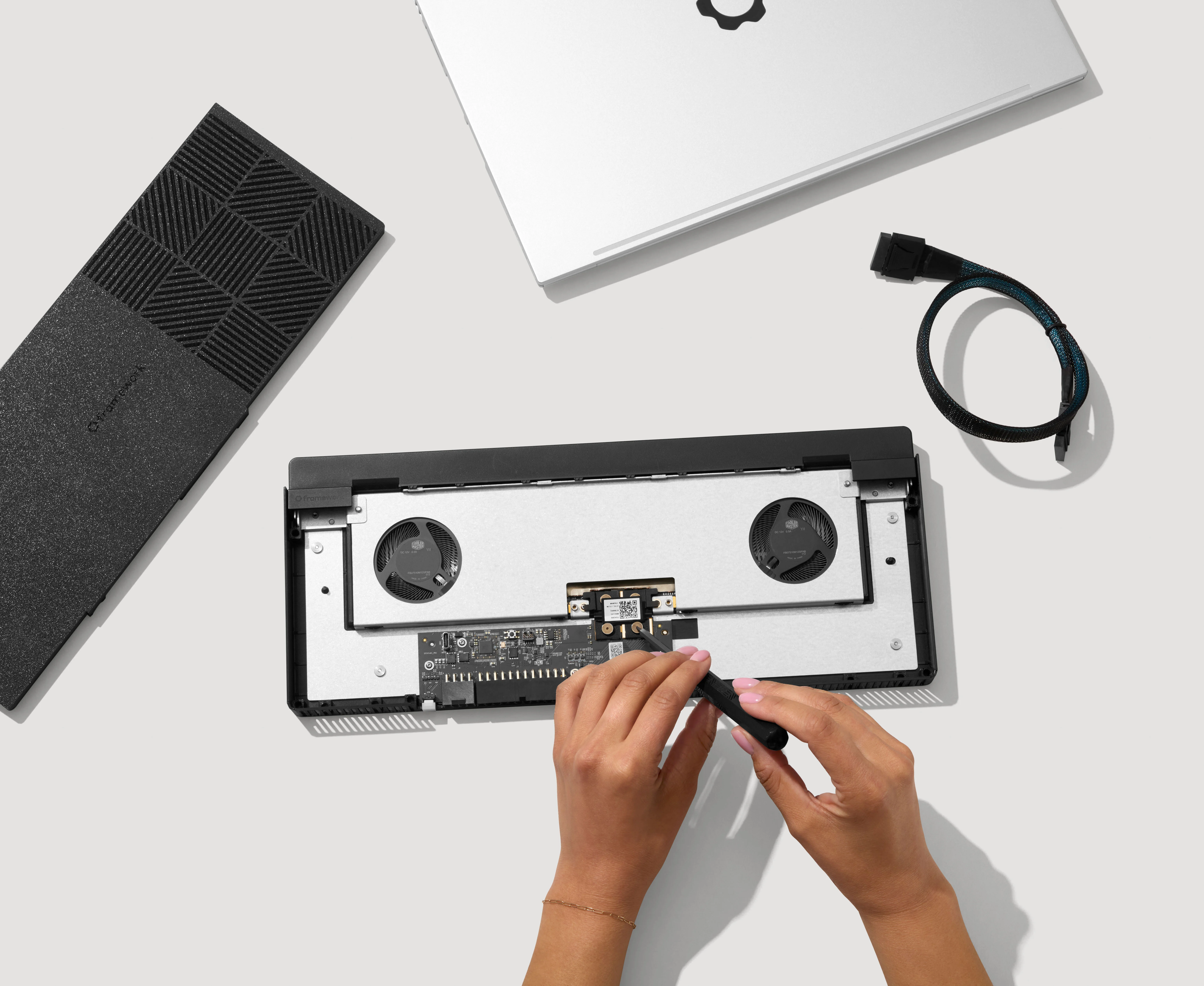
RTX 5070 8GB Graphics Module
The NVIDIA GeForce RTX 5070 Laptop GPU operates at up to 100W on mains power and up to 50W on battery. It has 8GB of GDDR7 memory, 4,608 CUDA cores, DLSS 4, fifth-generation Tensor Cores and fourth-generation ray-tracing cores.
RTX 5070 12GB Graphics Module
The 12GB option increases GDDR7 capacity while retaining the stated power limit, clocks, bus width and bandwidth. Framework's US product page listed the 12GB module at $1,199 when accessed on 26 August 2026. That is a time-sensitive US listing, not a UK price; check the current UK basket for the configuration actually being ordered.
A genuine cross-generation upgrade route
Framework describes the RTX 5070 module as backwards-compatible with the original Laptop 16 chassis. Owners of an earlier machine should use Framework's current compatibility and firmware instructions for their exact mainboard before purchasing the module.
Integrated-graphics travel mode
Replacing the GPU module with the Expansion Bay Shell reduces the laptop to 2.10kg and 17.95mm thick. With a discrete Graphics Module installed, it becomes 2.40kg, 20.95mm thick and 290.2mm deep.
This is more than an easily accessible GPU for repair: it changes how the Laptop 16 can be used over time. Someone might begin with a DIY integrated-graphics configuration, add a GPU later, replace an ageing battery after several years, and increase memory or storage independently. It also avoids locking a buyer to a proprietary barrel charger: Framework's 240W GaN USB-C adapter is intended to sustain maximum system performance while charging.
The important caveat is economic rather than technical. A swappable graphics module is only a cheaper upgrade if Framework can continue to source and sell future modules at sensible prices. The RTX 5070 8GB module demonstrated that Framework's original multi-generation promise had been delivered in practice. But the US price of the 12GB module makes clear that modularity is not automatically a budget-friendly route to keeping up with the GPU market.
UK buying implication
The Laptop 16 should be bought for repairability and configuration control first, not on the assumption that every later upgrade will beat the cost of a replacement gaming laptop. Module prices, regional availability and the pace of future GPU releases remain material variables.
Independent Performance Results: Capable, Not a Desktop Replacement
Tom's Hardware reported results for a Ryzen AI 7 350 / RTX 5070 8GB configuration with 16GB of DDR5-5600 memory, a 1TB SSD, the 2560 × 1600 165Hz display and the 85Wh battery. The results suggest that Framework's 100W RTX 5070 is a credible gaming GPU, especially at 1080p, although native-resolution gaming sometimes requires sensible settings choices and upscaling.
Reported game result: Tom's Hardware recorded 132fps in Shadow of the Tomb Raider at its stated highest-settings 1080p test on the named review configuration. No invented percentage scale is applied.
The supported 132fps result at 1080p shows what the named Tom's Hardware review configuration achieved in one game and preset; it is not a blanket performance promise. At the display's higher native resolution, demanding games place substantially more work on the GPU, so settings and upscaling may need adjustment. Check results for the specific games you use, with the reviewer's resolution, preset, driver and power mode stated, rather than extrapolating from a single chart.
Results from different review sites are not directly interchangeable when the laptop configuration, game build, graphics preset, driver and power mode differ. For that reason, the figures retained here come from the named Tom's Hardware configuration and are not combined with a second outlet's competitor chart. A UK buyer should compare the exact Framework basket with alternatives under one consistent test method rather than treating unrelated scores as a league table.
Tom's Hardware also used a repeated Metro Exodus workload to examine sustained behaviour on its review configuration. This first look does not attach an unsupported frame rate to that run. Repeated-load testing is useful because a laptop can behave differently after heat has built up, but the result still belongs to the exact CPU, GPU, memory, storage, driver and power settings documented by the reviewer.
Creator performance also depends on more than the CPU and Graphics Module. A DIY buyer's storage model, memory capacity and memory layout can materially affect transfer and application results. Compare an external review's complete configuration with the basket being considered, and do not transfer a storage measurement from one fitted SSD to another drive that was not part of that review.
How to read the performance figures: laptop benchmarks are configuration records, not product-wide guarantees. Note the fitted CPU and Graphics Module, memory layout, storage, firmware, driver, wall-power mode, resolution and quality preset before comparing two results. If any of those differ, use the numbers to understand the likely trade-off rather than declaring an absolute winner. This matters especially for the Laptop 16 because buyers can change more of those variables than on a sealed gaming laptop.
Screen, Battery, Thermals and Everyday Ergonomics
The display is one of the more convincing shared parts of the specification. Every Ryzen AI 300 tier uses a 16-inch, 16:10, anti-glare panel at 2560 × 1600 and 165Hz, with VRR and AMD FreeSync. Framework claimed 500 nits brightness, 100% DCI-P3 colour coverage, 1500:1 contrast and a 9ms rise-plus-fall response time. Framework lists NVIDIA G-SYNC support when an RTX 5070 module and Display Kit (2nd gen) are fitted.
Framework publishes a 2560 × 1600 resolution, 165Hz refresh rate and matte finish for the current display. Those are useful confirmed characteristics, but they do not establish real-world brightness or colour accuracy on their own. Buyers who depend on a calibrated screen should look for measurements of the exact panel revision and test method, rather than borrowing an unsupported number from a different review or configuration.
Battery life needs context. In Tom's Hardware's test combining video streaming, light OpenGL activity and browsing at 150 nits, its RTX 5070 Laptop 16 configuration lasted 8 hours 20 minutes. That figure belongs to the outlet's stated workload and hardware rather than every Laptop 16 configuration. Screen brightness, GPU use, power mode, installed modules and the chosen workload can all change what an owner sees, so neither result is a universal runtime promise.
Gaming away from the mains remains a compromise. The RTX 5070 is limited to up to 50W on battery, half its stated AC ceiling, and demanding gaming should be treated as plugged-in use. The power adapter also adds to the travel load beyond the published laptop weight. Buyers who carry the machine regularly should compare the complete packed system, including adapter and modules, rather than the chassis figure alone.
Surface temperatures deserve similar realism. During Tom's Hardware's Metro Exodus stress test, the keyboard reached approximately 38.3°C, the touchpad 33.1°C and the hottest underside area 43.7°C. The average CPU temperature was 62.13°C. The publication considered the keyboard warmer than ideal but usable. Those temperatures belong to the named review unit and stress workload; they should not be presented as a GadgetScout measurement or as the expected result for every configuration.
Repairability Brings Design Compromises
Framework's physical design is unusually configurable. The CNC-machined aluminium lid, magnesium alloy base, 155-degree hinge, replaceable Wi-Fi 7 card and dual SO-DIMM memory slots are accompanied by hot-swappable keyboards, conventional or haptic touchpads, optional numpad and RGB Macropad modules.
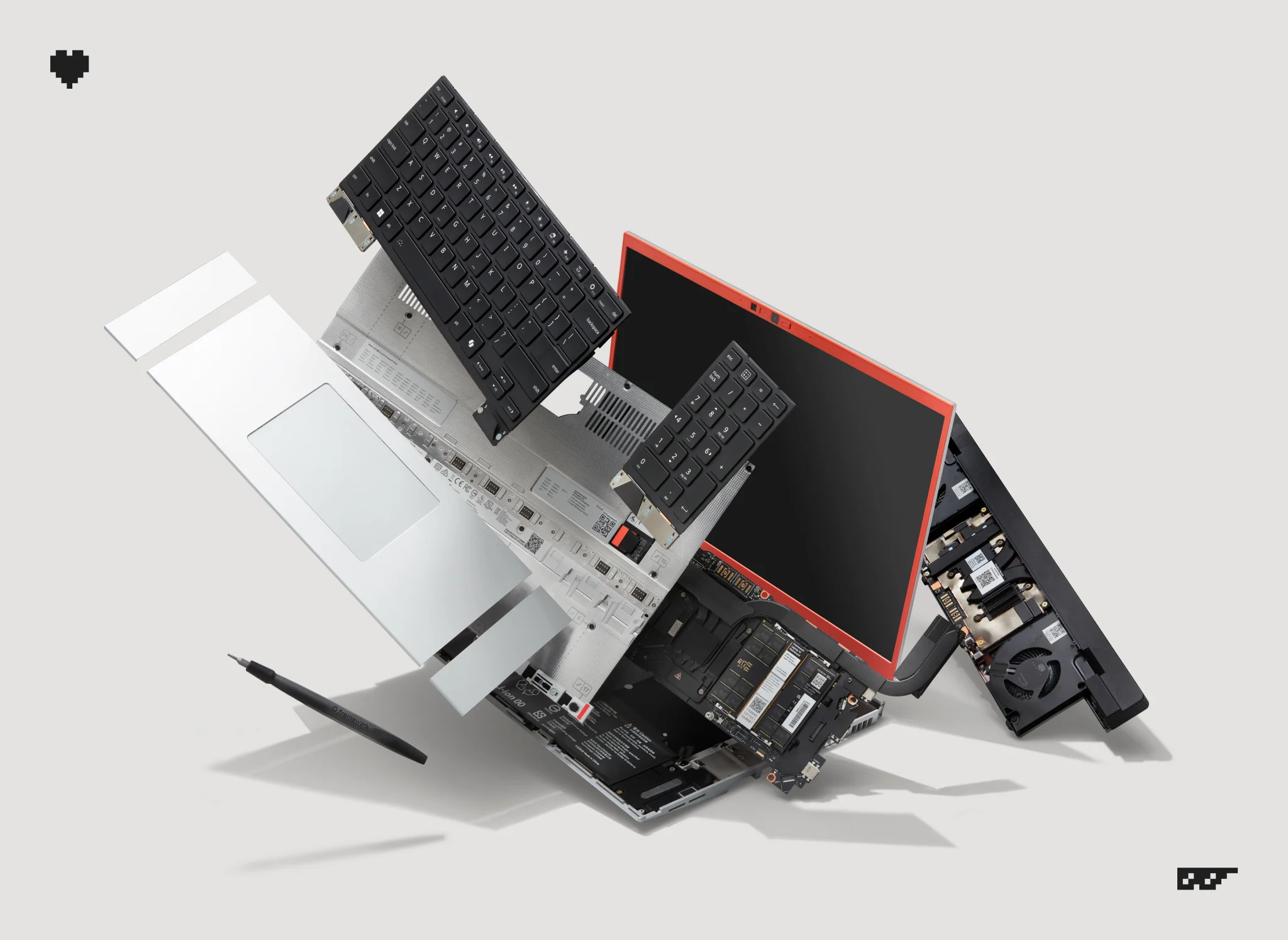
The six Expansion Card slots remain one of the most practical Framework ideas. A buyer can choose among USB-C, USB-A, HDMI, DisplayPort, Ethernet, audio, SD, MicroSD and storage cards. Slots 1 and 4 support USB4 and DisplayPort 2.1 UHBR10, while other bays have their own specified USB and DisplayPort capabilities. This means the physical port mix can change with a working week: Ethernet at a desk, extra USB-A for older accessories, or SD and MicroSD when importing media.
However, modularity is not invisible. The removable keyboard, touchpad and spacer modules necessarily create more seams than a one-piece deck, and that visual trade-off is clear in Framework's own product imagery. A sealed premium laptop can look more unified because it has no need to accommodate removable components; Framework has prioritised serviceability and configuration flexibility instead.
Software controls are another practical buying check. Framework offers Windows 11 configurations and publishes Linux guidance for DIY systems, but buyers who routinely tune processor limits, graphics behaviour or fan profiles should inspect the current control software before ordering. Physical modularity does not automatically guarantee that every low-level setting an enthusiast expects is exposed in software.
Reasons to consider it
- One of the few laptops with a proven, removable discrete graphics upgrade path.
- Memory, storage, battery, ports, keyboard, touchpad and Wi-Fi module are serviceable or configurable.
- Strong shared display specification, including 2560 × 1600, 165Hz and matte coating.
- Tom's Hardware found competitive 1080p gaming performance and 8h 20m battery life in its mixed-use test.
- 240W charging over USB-C avoids a proprietary barrel connector.
Reasons to pause
- Conventional RTX 5070 and RTX 5070 Ti laptops can offer more performance per pound.
- The GPU-equipped machine is a substantial travel system once its required adapter and selected modules are packed.
- The 12GB RTX 5070 option needs a live basket-price check before its value can be assessed.
- Reviews noted warm surfaces under load, visible modular seams and an unexceptional keyboard feel.
- There is no equivalent of a mature gaming control suite with granular fan and power tuning.
UK Value: Pay for the Platform, Not Just the Frame Rate
The Framework Laptop 16 makes more sense when viewed as a platform purchase. Configure the complete UK basket and compare its delivered total with a conventional laptop carrying broadly equivalent memory, storage, display and graphics. The difference is the price being placed on repair access, selectable ports and the possibility of changing major components later. An incomplete headline figure would hide rather than clarify that decision.
That configuration flexibility cuts two ways. DIY buyers who already own compatible storage, memory or an operating-system licence may be able to direct more of their budget towards the parts that matter. Buyers who simply want a fully configured machine with a powerful GPU need to assess the final basket price, rather than begin from the entry figure.
Framework's US product page listed the RTX 5070 8GB module at $699 and the 12GB module at $1,199 when accessed on 26 August 2026. A US figure is not a UK checkout price and should not be converted mechanically because VAT, regional configuration and delivery can differ. Stock and batch timing can also move, so rely on the availability shown for the exact UK basket.
For perspective, PC Gamer compared its heavily configured Framework review machine with less expensive conventional gaming laptops. Those are not like-for-like products: screens, GPUs, CPU power limits, build, warranty, sales timing and upgradeability differ. The comparison is useful only for exposing the central trade-off: Framework asks the buyer to value repairability and later component changes as part of the purchase, rather than judging the machine on short-term frame rate per pound alone.
| Reported result | Framework Laptop 16 configuration | Source and interpretation |
|---|---|---|
| Shadow of the Tomb Raider, 1080p | 132fps | Tom's Hardware review unit; useful only for the exact configuration and settings stated in that review. |
| Mixed light-use battery test | 8h 20m | Tom's Hardware review unit at its stated test settings; not a promise for every build or workload. |
Warranty terms deserve checking at the point of purchase rather than being inferred from another region's documentation. UK buyers should read the terms linked from Framework's current UK checkout, record the coverage shown for their exact configuration and keep the order documentation. Repairability can improve access to parts, but it is not a substitute for knowing the warranty that applies to the purchase.
Who the Framework Laptop 16 Suits
The long-term owner
Suited to someone who expects to replace storage, memory, battery or graphics over time and values access to parts over a sealed, tidier chassis.
The Linux-friendly power user
The DIY route, replaceable components and Framework's published Linux support make it more attractive than many conventional gaming systems.
The balanced gamer-creator
The RTX 5070 module, sharp 165Hz screen and the battery result reported by Tom's Hardware fit a mixed work-and-play role, provided mains gaming and a larger bag are acceptable.
It is less persuasive for somebody who changes laptops every two or three years, wants the highest possible frame rates for a fixed budget, or prioritises a compact and flawless-looking metal chassis. Those buyers may find a conventional RTX 5070 or RTX 5070 Ti laptop easier to buy and easier to justify financially.
Framework Laptop 16 FAQs
First-look verdict
The Framework Laptop 16 remains unusual because it makes laptop upgradeability tangible rather than aspirational. The Ryzen AI 300 refresh and RTX 5070 module turn it into a much more convincing gaming and creator machine than the original concept alone. Independent results point to solid 1080p and workable native-resolution gaming, a good matte 165Hz screen and respectable battery life for this class. The catch is straightforward: UK buyers pay a premium for repairability, and the GPU-module economics—particularly the 12GB option—are not automatically favourable. Buy it because you want to keep, adapt and repair one laptop over years, not because it is the cheapest way to obtain RTX 5070 performance.
Sources
- Framework UK and global Laptop 16 specifications, configuration tables and product documentation, accessed 26 August 2026.
- Framework Marketplace: NVIDIA GeForce RTX 5070 Graphics Module product listing and module pricing.
- Framework, "Introducing the new Framework Laptop 16 with NVIDIA", including the 2025 announcement and later graphics-module information.
- Tom's Hardware, Framework Laptop 16 (2025) RTX 5070 review, for gaming, productivity, battery, display and thermal measurements.
- PC Gamer reporting on the Framework Laptop 16 with RTX 5070, used for independently described trade-offs.
Sources and evidence (9)
- frame.work (manufacturer)
- frame.work (manufacturer)
- frame.work (manufacturer)
- frame.work (manufacturer)
- downloads.frame.work (manufacturer)
- tomshardware.com (professional reviewer)
- pcgamer.com (professional reviewer)
- tomsguide.com (professional reviewer)
- wired.com (professional reviewer)