
Anker Prime Docking Station First Look: One Cable for a Whole Desk
Anker's Prime name now covers three very different 14-port desktop docks. The right one depends less on port count than on your laptop, monitors and appetite for DisplayLink software.

We link to the exact model on Amazon UK. Prices change often, so check the live price before you buy. As an Amazon Associate we earn from qualifying purchases.
The promise is appealing: plug one cable into a laptop and gain power, screens, wired networking, storage readers and room for desk accessories. Anker's Prime docks can make that arrangement practical, but "Anker Prime Docking Station" is no longer a single product. It is a family with three distinct connection technologies, display limits and compatibility rules. A buyer comparing only the shared 14-in-1 label could easily choose the wrong one.
Why Anker Now Sells Three Very Different Docks Under One Name
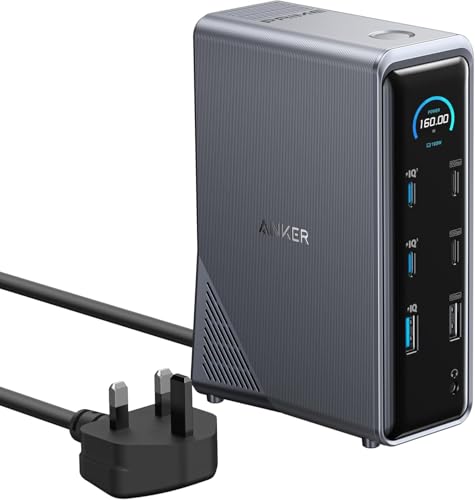
See Anker Prime A83B6 (14-in-1, 160W USB-C dock) on Amazon UK
Check today's price & availability on Amazon UK
Listing checked: This link selects the A83B6 USB-C charging dock with 160W total charging output. It is not the Thunderbolt 5 A83B5 or DisplayLink DL7400 A83B3 discussed in this guide.
There are three current desktop models in the Anker Prime Docking Station range: the Anker Prime Charging Docking Station A83B6, the Anker Prime TB5 Docking Station A83B5, and the Anker Prime Docking Station DL7400 A83B3. Each carries 14-in-1 branding, each has an integrated mains power supply, and each can charge a connected laptop. That shared headline is useful shorthand, but it does not describe what happens between the dock and the computer.

The A83B6 is a 10Gbps USB-C dock built around native USB-C DisplayPort Alt Mode and MST. It targets conventional desk equipment: HDMI monitors, USB peripherals, Ethernet and charging. It supports Thunderbolt 3 and Thunderbolt 4 laptops, although its own connection remains capped at 10Gbps.
The A83B5 is the premium option. Its upstream connection is Thunderbolt 5, with up to 120Gbps bandwidth in supported bandwidth-boost conditions, two downstream Thunderbolt 5 ports and up to 140W laptop charging. It is designed for high-resolution display arrangements and faster external storage, but it has stricter host requirements than the other two docks.
The A83B3 DL7400 goes in another direction. It uses DisplayLink, a driver-led display technology, to support up to three independent external displays. That makes it potentially relevant to Mac owners and others whose laptop cannot natively drive their desired number of separate screens. The trade-off is that DisplayLink requires software and comes with different considerations for latency-sensitive graphics work and protected video.
The distinction matters in ordinary buying scenarios. A Windows laptop with two 4K HDMI screens and several chargers does not necessarily need Thunderbolt 5. A Thunderbolt 5 workstation connected to fast SSDs will not gain TB5 storage performance from the A83B6. And a Mac user trying to extend across three displays should examine the DL7400 rather than assuming that a native USB-C dock will bypass macOS display-controller limits.
The Anker Prime Charging Docking Station A83B6: What 160W Actually Buys You

The A83B6 is the entry-priced member of the range in the US, at $269.99 direct from Anker when pricing was checked on 8 September 2026. UK pricing was less stable: Anker's UK pages showed simultaneous campaign and product-page figures, so it makes more sense to treat it as the lower-priced Prime desktop dock and check the direct listing before buying.
Its central proposition is power rather than bandwidth. The dock can provide up to 100W to a laptop through the upstream USB-C connection, whilst its total charging output is rated at 160W. That total includes the laptop and the dedicated charging ports, rather than representing an additional 160W sitting alongside 100W host charging.
Anker lists two USB-C charging ports rated at up to 100W maximum output each, as well as a USB-A charging port rated at up to 12W. Those figures describe the capacity of individual ports in suitable allocation conditions, not three separate maximums that can simply be added to the host's 100W. Anker provides smart and custom power-allocation modes through its Dock Manager software, which is relevant for a desk where a phone, tablet, camera battery or another laptop is plugged in alongside the primary computer.
Power-budget reality: the A83B6's 160W rating is a shared dock-wide charging budget. A connected laptop's charging rate also remains limited by the laptop's own USB-C charging capability.
One meaningful practical feature is the integrated GaN AC-DC power module. Rather than occupying space with a separate charger brick, the A83B6 contains its mains conversion hardware inside the vertical dock body. Anker specifies a compact 140 × 97 × 47mm enclosure, though it is substantial at 888g. Reviewer coverage from Tech Advisor and Digital Camera World described that weight and desktop orientation positively for stability when multiple cables are connected.
The port selection reflects the product's role. There is one 10Gbps upstream USB-C port, one 10Gbps USB-A port, two 10Gbps USB-C data ports, three 480Mbps USB-A data ports, two HDMI 2.0 ports, Gigabit Ethernet and a 3.5mm audio combo jack. It does not include SD or microSD readers, which is a notable omission for camera users. Digital Camera World also reported that its mains cable is integrated rather than detachable, so cable replacement and routing need a little more thought than with a standard IEC lead.
Where the A83B6 makes sense
This model is about reducing charging clutter around a mainstream USB-C desk, not turning a laptop into a Thunderbolt storage workstation. Its strongest case is a compatible Windows laptop, two HDMI displays, wired networking and several lower-power devices that would otherwise need a separate multi-port charger.
Display capability needs a careful reading. Anker's headline material refers to dual 4K/60Hz, but the detailed resolution guidance is host-dependent. Its own table lists up to two 2K/60Hz displays with a DisplayPort 1.4 host and up to two 1080p/60Hz displays with a DisplayPort 1.2 host. Windows can run extended displays subject to the laptop's video output capability. On macOS, however, the two HDMI outputs show identical content because macOS does not support MST through this dock. That is a decisive limitation for a Mac owner hoping to run two separate external desktops.
Supported strengths
- Up to 160W total charging from an integrated GaN supply.
- Up to 100W laptop charging through one USB-C connection.
- Two HDMI outputs and no DisplayLink software requirement.
- Compact desktop footprint with a status display and smart power controls.
Buying constraints
- 10Gbps bandwidth is far below Thunderbolt 4 or Thunderbolt 5 capability.
- macOS mirrors its HDMI displays instead of extending them independently.
- Gigabit Ethernet and no memory-card readers limit its appeal for some desks.
- The detailed display table is more restrictive than the broad dual-4K headline.
Thunderbolt 5 on Paper: The Anker Prime TB5 Docking Station A83B5

The A83B5 is the range's high-bandwidth option. It launched on 23 April 2025 and was listed at $399.99 in the US when prices were checked on 8 September 2026. In the UK, Anker had shown a £399.99 list price and a lower promotional price on the range page, so the direct product page remains the sensible place to confirm the current amount.
The key change is Thunderbolt 5. Anker specifies up to 120Gbps in supported bandwidth-boost conditions, compared with the A83B6's 10Gbps USB-C ceiling. It also raises host charging to up to 140W through its Thunderbolt 5 upstream port. For a compatible laptop, that makes one rear connection responsible for laptop power, data, Ethernet and display connectivity.
There are two downstream Thunderbolt 5 ports, each able to provide 15W, plus two front USB-C ports with 45W combined output. The dock also has three 10Gbps USB-A ports, 2.5Gbps Ethernet, 3.5mm audio, UHS-I SD and microSD readers, and one HDMI 2.1 or DisplayPort 2.1 output. The HDMI and DisplayPort connections cannot be active simultaneously.
Unlike the A83B6 and DL7400, Anker does not clearly state one consolidated total dock-wattage figure on the A83B5's product material. The confirmed figures are 140W to the host, 15W for each downstream Thunderbolt port and 45W combined for the two front USB-C ports. That is enough to establish its charging role, but not enough to treat it as carrying the same 160W total-output claim as its siblings.
The chart is a specification comparison rather than a file-transfer result. Real performance varies with the laptop, cable, drive, enclosure and workload. Still, independent coverage gives useful context. Digital Camera World reported that a PNY RP60 portable SSD was almost as fast through the A83B5 as when directly connected to the laptop, though it did not publish a precise figure in accessible text. The same publication reported no negative impact on SD-card read/write performance compared with a dedicated reader, and a ProGrade CFexpress 4.0 card in a USB4 reader was marginally quicker through the dock in that comparison.
A separate video-derived report recorded roughly 344MB/s through the dock's 10Gbps USB ports and up to 2,758MB/s through its Thunderbolt ports. Because its measurement method was not documented in the same way as a written lab report, those figures should be read as indicative rather than definitive. They do, however, illustrate why the A83B5's appeal is strongest for people with external storage that can take advantage of Thunderbolt bandwidth.
The A83B5's dense cube enclosure measures 116 × 116 × 75mm and weighs approximately 1.086kg, according to The Gadgeteer. Anker includes a smart active cooling system with an internal fan and airflow duct, alongside a blue status-light ring. One review-derived thermal report recorded around 38°C at idle, 52°C under moderate dual-4K load and 68°C during heavy stress, with fan figures of roughly 1,200rpm and 4,200rpm. It also cited approximately 20dB noise, although no measurement distance or methodology was supplied, so this should not be treated as a controlled acoustic result.
Dual 8K Monitors From One Cable — With Conditions Attached

Anker states that the A83B5 can support up to two 8K/60Hz external displays on compatible Thunderbolt 5 Windows systems. The operating words are "compatible", "Thunderbolt 5" and "Windows". This is not a blanket promise for every laptop with a USB-C-shaped port, nor does it override the limits of a computer's own display controller.
The two downstream Thunderbolt 5 ports can each drive a display, which creates a route to genuine extended dual-monitor workspaces on supported machines. A display connected through one of those ports can be paired with a monitor on either the HDMI 2.1 or DisplayPort 2.1 socket. TechRadar reported that the dock cannot drive three external monitors, despite its multiple video-capable connections.
The physical video-output catch
The A83B5 has both HDMI 2.1 and DisplayPort 2.1, but they are alternatives rather than a pair. Only one of those two sockets can be used at a time. For two external displays, the other screen needs to connect via a downstream Thunderbolt 5 port.
Digital Camera World connected a 31.5-inch 4K monitor over HDMI using a Thunderbolt 4 laptop and reported automatic recognition and stable operation. That is encouraging for a more ordinary 4K desk display, although it does not prove every monitor, cable or laptop combination will behave identically. TechRadar also reported generally seamless connectivity and charging, whilst mentioning minor external-monitor issues.
The practical decision is straightforward. If a desk uses two conventional HDMI monitors, the A83B6 offers two HDMI sockets and may be simpler, provided the host and operating system fit its native MST model. If the desk includes Thunderbolt displays or high-speed storage, the A83B5 offers a substantially more capable path. Buyers should not purchase it assuming HDMI and DisplayPort can both be used at once, or assuming a third external monitor will become available through a spare-looking socket.
The Compatibility Checklist Anker Buries in the Small Print
For a dock built around a single cable, compatibility is more important than the raw number of ports. The A83B5 has the strictest rules in the Prime family. Anker explicitly lists Thunderbolt 3 laptops and monitors as unsupported, and also lists ChromeOS and Linux as unsupported. Thunderbolt 4 is supported. Its official Windows listing covers Windows 10 and Windows 11, with Windows 11 version 23H2 or later recommended for optimal compatibility.
Its macOS wording is less tidy. The technical specifications listed macOS 14.5 or later, whilst descriptive copy elsewhere on the official listing referred to macOS 15 or later. That discrepancy is decision-relevant rather than cosmetic: prospective Mac buyers should verify their exact machine, macOS version and intended display arrangement with Anker before committing.
The A83B6 is more forgiving as a host dock. Anker confirms Windows 10, Windows 11, macOS 11 or later and ChromeOS support, as well as use with USB-C, Thunderbolt 3 and Thunderbolt 4 hosts. Yet support does not mean equal capability: regardless of the Thunderbolt version on the laptop, the dock itself remains a 10Gbps USB-C product.
The DL7400 supports Windows 10, Windows 11 and macOS 13.5 or later. It requires DisplayLink software on both platforms. On macOS, DisplayLink Manager and screen-recording permission are necessary for extended displays. This permission allows the driver to process the desktop output needed for its virtual-display approach; it is a setup step that should be considered before choosing this route for a managed work machine.
| Compatibility point | Anker Prime A83B6 | Anker Prime TB5 Docking Station A83B5 | Anker Prime Docking Station DL7400 A83B3 |
|---|---|---|---|
| Windows 10 and 11 | Supported | Supported | Supported |
| macOS | macOS 11 or later | macOS 14.5 or later listed; some official copy states macOS 15 or later | macOS 13.5 or later |
| Thunderbolt 3 host | Supported, with dock bandwidth limited to 10Gbps | Not supported according to Anker | Not confirmed |
| Thunderbolt 4 host | Supported, with dock bandwidth limited to 10Gbps | Supported | Not confirmed |
| ChromeOS | Supported | Not supported according to Anker | Not confirmed |
| Linux | Not confirmed | Not supported according to Anker | Not confirmed |
| DisplayLink software | Not required | Not required | Required |
Mac display planning: the A83B6 can connect to macOS but its two HDMI outputs mirror one another. The DL7400 can extend displays on macOS through DisplayLink Manager, whilst the A83B5's maximum display arrangement still depends on the particular Mac's display hardware.
One Socket, One Cable, One Dock: The Desk-Tidying Case in Numbers
"One cable" should be interpreted accurately. It means one host cable from the laptop to the dock, carrying laptop power and data connections. The dock still needs its mains lead, and most monitors still need one cable each into the dock. The A83B5 can simplify certain display layouts with Thunderbolt daisy-chaining, but that is dependent on compatible display hardware rather than a general replacement for monitor cables.
Even with that caveat, the integrated power design is a practical advantage. Both the A83B6 and A83B5 include their own power supply instead of relying on an external laptop charger or a separate dock brick. The A83B6 uses GaN conversion hardware; the A83B5 similarly integrates its power supply within the unit. This can make a visible difference to a permanent desk installation, where an external charger and dock power brick otherwise compete for floor or cable-tray space.
One host connection
A83B6 supplies up to 100W to the laptop; A83B5 and DL7400 supply up to 140W to compatible hosts.
Integrated mains power
All three docks are mains-powered desktop products with their power supply built in, rather than a separate external brick.
Wired desk connections
A83B6 offers Gigabit Ethernet, while A83B5 and DL7400 offer 2.5Gbps Ethernet.
Dock management
Anker Dock Manager is available across the range for firmware updates and dock management; the A83B6 also offers power-allocation modes.
For a laptop that accepts 100W or 140W over USB-C, the dock can replace its dedicated charger at the desk. That may be particularly useful for moving between a home office and a meeting room: one cable disconnects the computer from the fixed monitor, keyboard, Ethernet and charging setup. The reverse side is that the supplied host cable and computer port must support the required charging and display mode. A low-spec USB-C cable can turn a simple-looking setup into a frustrating one.
The DisplayLink Wildcard: The Anker Prime Docking Station DL7400 A83B3
The DL7400 is aimed at a different desk problem: three independent external displays. Anker markets an arrangement of one 8K screen plus two 4K displays, using one DisplayPort output and two HDMI outputs. Its DisplayPort port is rated up to 8K/60Hz, while the HDMI ports can run at up to 4K/60Hz in the three-display arrangement. Individually, Anker lists the HDMI ports at up to 8K/30Hz.
This works through DisplayLink rather than native Thunderbolt or USB-C video output. DisplayLink is useful because it can expand display options beyond the native multi-screen capability of some computers, including Macs. It also explains why the dock requires the DisplayLink driver on Windows and DisplayLink Manager on macOS. On a Mac, users must grant screen-recording permission to enable extended displays.
DL7400 charging condition: Anker specifies that 140W laptop charging requires a PD 3.1-compatible laptop and no more than one device connected to the front USB-C ports. The dock's power allocation matters as much as the number printed on its box.
The A83B3 can provide up to 140W to a laptop and up to 160W total dock output. Its three USB-C charging ports are listed at up to 100W each, subject to shared allocation. AndroidGuys reported that attaining the full 140W host output required careful port use, describing the dock's power distribution as a balancing exercise intended to preserve stability. A two-week user account on Reddit said the dock maintained 140W through heavy use, but that was an anecdotal report rather than a controlled measurement.
It is a relatively wide desktop unit at 195 × 92 × 47mm, but at 834g it is lighter than the A83B6 and A83B5. It includes a smart display for charging, transfer and display information, a cooling fan, 2.5Gbps Ethernet, SD and TF/microSD slots, two 10Gbps USB-C ports, one 5Gbps USB-C port, two 5Gbps USB-A ports and one 480Mbps USB-A port.
DisplayLink is not a universal substitute for native graphics output. Its driver-led approach makes it less compelling for applications where low latency, variable refresh-rate support, graphics acceleration behaviour or protected-video playback are priorities. The supplied evidence does not establish VRR, G-Sync, FreeSync, HDR gaming support or latency figures for the DL7400. For office work, browser windows, communication tools, documentation and static creative layouts, the attraction is the number of separate screens it can address. For specialist visual workloads, a buyer should establish application compatibility before purchase.
Three Docks, Three Very Different Buyers
Anker's range is easier to understand as three answers to three different desk arrangements than as a straight good-better-premium ladder. The price gap matters, but the host port and display needs matter more.
Two HDMI screens and lots of charging
The Anker Prime Charging Docking Station A83B6 suits compatible Windows users who want dual HDMI, up to 100W laptop power and up to 160W shared charging without a separate power brick. It is a less convincing choice for Mac users needing two separate external desktops.
Thunderbolt storage and high-resolution displays
The Anker Prime TB5 Docking Station A83B5 fits compatible Thunderbolt 5 or Thunderbolt 4 systems needing up to 140W host charging, 2.5GbE, Thunderbolt display options and faster storage connectivity. It does not suit Thunderbolt 3, ChromeOS or Linux hardware according to Anker.
Three independent external displays
The Anker Prime Docking Station DL7400 A83B3 is the relevant option for a triple-screen desk, including Mac setups that can work with DisplayLink Manager. Its driver requirement and power-allocation conditions should be accepted before choosing it.
| Decision point | Anker Prime A83B6 | Anker Prime TB5 Docking Station A83B5 | Anker Prime Docking Station DL7400 A83B3 |
|---|---|---|---|
| US direct-store price checked 8 September 2026 | $269.99 | $399.99 | $299.99 |
| Host connection | USB-C, up to 10Gbps | Thunderbolt 5 | USB-C with DisplayLink display technology |
| Maximum host charging | 100W | 140W | 140W |
| Total charging output | 160W | Not confirmed as a consolidated total figure | 160W |
| External display capability | Up to two displays, host-dependent | Up to two displays; dual 8K/60Hz on compatible Windows TB5 systems | Up to three displays; one 8K plus two 4K arrangement |
| Mac extended dual-display route | Not supported through native MST; HDMI outputs mirror | Not confirmed; display configuration depends on the Mac's own display controller | Supported through DisplayLink Manager |
| Ethernet | Gigabit | 2.5Gbps | 2.5Gbps |
| SD and microSD readers | Not supported | Supported, UHS-I | Supported |
| Integrated power supply | Supported, GaN AC-DC module | Supported | Supported |
Where CalDigit changes the A83B5 calculation
The A83B5 has a meaningful direct rival in the CalDigit TS5. Both carried a $399.99 US list price in the cited comparison material, both support 140W host charging and both offer 2.5Gbps Ethernet. The CalDigit TS5 has 15 ports to Anker's 14 and supports up to three 4K/144Hz displays on supported systems, according to CalDigit. The Anker counters with integrated power, a smaller cube-like footprint, SD and microSD readers, and two downstream Thunderbolt 5 ports.
At the higher end, the CalDigit TS5 Plus cost $499.99 in the US, or $100 more than Anker's listed price. It has 20 ports, 10GbE, three downstream Thunderbolt 5 ports, 36W downstream Thunderbolt charging and support for up to three displays on supported Thunderbolt 5 Windows systems according to CalDigit. The A83B5 remains smaller in footprint, includes card readers and keeps its power supply internal, whereas the TS5 Plus uses an external 330W supply. Those are different priorities rather than a simple specification win.
First-look verdict
The Anker Prime range has a credible one-cable desk proposition, but the shared 14-in-1 name conceals three separate buying decisions. Choose the A83B6 for a charging-heavy dual-HDMI Windows desk that does not need Thunderbolt bandwidth. Choose the A83B5 for a supported Thunderbolt 4 or 5 system where high-speed storage, 140W charging and high-resolution display options justify its higher price. Choose the DL7400 only when triple independent displays are the priority and DisplayLink's software-led model fits the applications used on that desk.
Sources and research notes
Specifications, compatibility statements, availability and direct-store pricing were checked against Anker product and range pages on 8 September 2026. Prices can change, particularly on Anker UK pages where promotional and list prices appeared simultaneously.
- Anker official product pages and Prime Docking Station range page for A83B6, A83B5 and A83B3 specifications, compatibility and pricing.
- Tech Advisor and Digital Camera World for A83B6 design and capability reporting.
- TechRadar, Digital Camera World, The Gadgeteer and Creative Bloq for A83B5 connectivity, display and build reporting.
- Anker launch material and AndroidGuys for DL7400 configuration and power-allocation reporting.
- CalDigit official TS5 and TS5 Plus comparison information for cited competing specifications.
- Anker Prime A83B6 (14-in-1, 160W USB-C dock)View on Amazon
Sources and evidence (12)
- anker.com (other)
- anker.com (other)
- anker.com (other)
- techradar.com (other)
- the-gadgeteer.com (other)
- anker.com (other)
- release.anker.com (other)
- anker.com (other)
- finance.yahoo.com (other)
- techadvisor.com (other)
- digitalcameraworld.com (other)
- androidguys.com (other)