
Why Spilling Tea On A Laptop Is Never As Simple As It Looks
A quick mop-up and a bit of hope won't save a laptop that's had a soaking — here's what's actually happening inside.
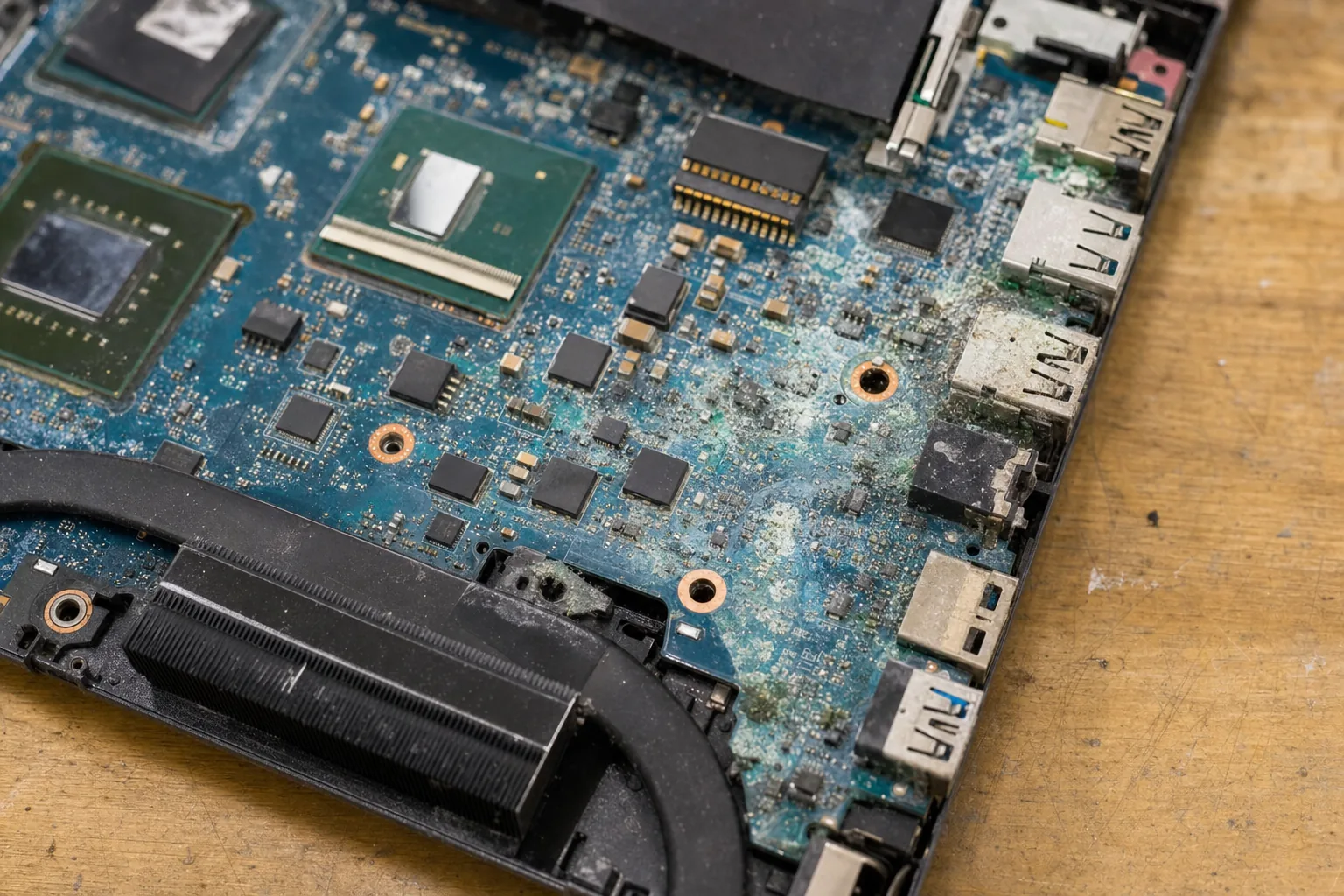

A customer came in last week carrying a laptop in a plastic bag, like it was evidence at a crime scene. She'd knocked a mug of tea over it two days earlier, dabbed it with a tea towel, left it to dry on the radiator, then switched it on. It turned on fine — for about thirty seconds. Then it died. "I thought it was okay," she said. I hear some version of that story almost every month.
The radiator trick is one of those things that sounds sensible but quietly makes everything worse. And the two-day gap between the spill and the failure is completely normal. Liquid damage rarely kills a laptop instantly. It kills it slowly, through corrosion, and corrosion needs a little time to get going.
What the liquid actually does
Tea — especially with sugar or milk — isn't just water. It leaves a residue behind when it dries, and that residue is conductive. It sits across solder joints and component legs on the motherboard, creating tiny short circuits that come and go depending on temperature and humidity. That's why a machine can seem fine for a day or two, then fail when the heating comes on or the weather changes.
- Plain water is the best-case scenario. It can still cause corrosion, but it leaves less residue than anything with sugar, milk, or alcohol in it.
- Sugary drinks — tea, coffee, juice, fizzy drinks — are the worst. The sugar crystallises between components and is extremely difficult to shift.
- Heat speeds corrosion up. Putting a wet laptop on a radiator or using a hairdryer on it drives moisture deeper into the board and accelerates the chemical reaction you're trying to stop.
The right move — the one that gives me the best chance of saving it — is to turn it off immediately, turn it upside down to drain, and bring it straight to a technician. Don't charge it. Don't test it. Don't try to dry it with heat. Every hour it sits powered on or warm is an hour of corrosion.
What happens on the bench
When a liquid-damaged laptop comes in, the first job is disassembly — all the way down to the bare motherboard. I inspect it under a bright light and a loupe, looking for the brown or green staining that tells you where the liquid travelled. Then comes cleaning with isopropyl alcohol and a soft brush, working carefully around every component.
- Isopropyl alcohol at 99% concentration is the correct cleaner. It dissolves the residue, doesn't leave its own residue, and evaporates quickly. The stuff sold in pharmacies is often 70%, which contains too much water to be useful here.
- Ultrasonic cleaning is a step up from hand-cleaning — the board sits in a bath that uses high-frequency vibration to shift contamination from places a brush can't reach. I use it on badly affected boards.
- Not everything is salvageable. If corrosion has eaten through a trace on the board, or a component has burnt out from a short, no amount of cleaning will fix that. Those jobs sometimes need micro-soldering, and sometimes they're beyond economic repair.
The honest truth is that outcome depends heavily on how quickly the laptop came to me and what was in the drink. Clean water, switched off immediately, in my hands within an hour — that's a machine I'll most likely save. Milky tea, left on a radiator for two days — that's a much harder conversation.
The Repair Bench verdict
If you spill anything on a laptop: power it off immediately, flip it upside down to drain, and get it to a technician as fast as you can. Do not apply heat and do not switch it back on to test it.
The damage isn't always visible: a laptop that seems to survive a spill can fail days later once corrosion takes hold — so even if it appears fine, have it checked and cleaned professionally.
Watch out for: DIY drying with hairdryers or radiators, and pharmacy-grade isopropyl alcohol — both are commonly used and both tend to make things worse.