
Best Lightweight Laptops Under 1kg for Commuters and Travellers
Four remarkably portable machines, including a 16-inch Acer that weighs less than a kilogram. Your shoulder bag may never forgive your old laptop.
We link to the exact model on Amazon UK. Prices change often, so check the live price before you buy. As an Amazon Associate we earn from qualifying purchases.
A proper travel laptop used to demand a slightly miserable choice: carry a tiny screen, accept anaemic performance, or resign yourself to lugging around something that felt like a paving slab by the end of the day. Happily, that equation has changed. These are the sub-1kg laptops worth knowing about if your working week involves trains, airport lounges, café tables and the occasional fight for a plug socket.
The Sub-1kg Revolution: Why Featherweight Laptops Finally Make Sense for Serious Work
One kilogram is not a magic number in any technical sense. Your laptop does not suddenly become better at 999g than it was at 1.01kg. But it is a very real threshold when you are carrying it every day. Put a charger, notebook, headphones, lunch and the rest of modern life in a backpack, then walk across a station concourse or through an airport for several hours. Those few hundred grams start to feel surprisingly personal.
For years, the most portable Windows laptops made the same compromises. They tended to be small. They often had modest batteries. A larger display was generally treated as the price of admission to a heavier machine. That was frustrating for anyone who works in documents, spreadsheets, browser tabs, presentations or photo libraries, because screen area is not an indulgence when you are trying to get useful work done between meetings.
The Acer Swift Air 16 is the clearest sign that this category has moved on. Its IPS configuration is a 16-inch laptop that weighs 990g. That is the sort of figure usually attached to a compact 13- or 14-inch ultraportable, not a machine with a 16:10 display designed to show more of a spreadsheet or two documents side by side. There is an AMOLED version too, although that one weighs 1.1kg and therefore sits outside this guide's strict sub-kilo brief.
Screen size is only one half of the story. The other is that these machines are no longer automatically low-spec travel companions. AMD Ryzen AI, Snapdragon X and Intel Core Ultra silicon all appear in this shortlist. There are proper productivity-focused memory and storage configurations, modern wireless connectivity, increasingly capable webcams and, in several cases, battery figures that make a charger feel less like an emergency ration.
Why 1kg matters more than it sounds
A laptop is one of the few things you may carry from breakfast to bedtime. Reducing that daily load is not about winning a spec-sheet contest; it means a slimmer bag, less strain on a packed commute and fewer moments where you decide that taking the laptop "probably isn't worth it". The best lightweight laptop is often the one you actually have with you.
A sub-1kg laptop changes the character of a travel bag: the computer becomes one item among many rather than the thing everything else has to work around.
At a Glance: Every Sub-1kg Pick Side by Side
There is no single winner here because "lightweight" means different things to different travellers. Acer's trick is fitting a genuinely large display into a 990g package. ASUS brings an OLED panel and a large 70Wh battery to its 980g Zenbook A14. Dynabook takes a business-first route, with a tough magnesium chassis, a replaceable battery and the kind of port selection that saves you packing a hub. Fujitsu, meanwhile, goes almost absurdly light.
It is worth reading the weight figures carefully. The Acer number applies to the IPS model, while its AMOLED option is heavier. Dynabook's non-touch configuration sits at roughly the 1kg line. The Fujitsu's headline 634g figure applies to its lightest configuration. The details matter. They always do.
| Feature | Acer Swift Air 16 | ASUS Zenbook A14 | Dynabook Portégé Z40L-N | Fujitsu FMV UX-K3 |
|---|---|---|---|---|
| Weight | 990g IPS; 1.1kg AMOLED | 980g | 2.2lb; non-touch variant around 1kg | 634g in lightest configuration |
| Display | 16-inch WUXGA IPS or WQXGA+ AMOLED, 120Hz | 14-inch WUXGA OLED, 60Hz | 14-inch, 1920 × 1200 | 14-inch 1920 × 1200 anti-glare IPS |
| Processor options | AMD Ryzen AI 5 330, AI 5 340 or AI 7 350 | Snapdragon X Plus or Snapdragon X Elite variants | Core Ultra 5 226V or Core Ultra 7 258V | Intel Core Ultra 7 255U |
| Memory / storage | 16GB/256GB expected base; up to 32GB/1TB | 16GB DDR5 / 1TB NVMe M.2 SSD | 16GB or 32GB RAM configurations | 16GB / 512GB SSD |
| Battery capacity | 50Wh | 70Wh | 56Wh, user-replaceable | 31Wh |
| Reported endurance | Up to 13 hours video playback; about 11 hours in a maximum-brightness video loop | Up to 32 hours claimed | Up to 8 hours productivity; 18 hours 55 minutes in a looped video playback test | About 7 hours video playback |
| Standout travel advantage | 16-inch workspace below 1kg | OLED display and 70Wh battery | MIL-STD-810H chassis and broad port selection | Extreme 634g minimum weight |
| Buy | Check price | Check price |
Battery claims are useful for comparing intent, not predicting your exact day. Screen brightness, video calls, browser tabs, apps and wireless use all change the result. The Dynabook's 18-hour-55-minute looped video result is especially impressive, but it is not the same workload as a full day of conferencing and spreadsheet wrangling.
Known UK Starting Prices
Where UK pricing has been cited, the numbers below give useful context. Configuration matters greatly in this class, particularly when display, processor and storage options can vary. Treat these as starting points rather than a promise that every retailer will stock every version.
| Model | UK pricing cited | What that gets you in broad terms |
|---|---|---|
| Acer Swift Air 16 | From £899 | A 16-inch sub-1kg IPS configuration sits at the heart of its appeal. |
| ASUS Zenbook A14 UX3407 | Under £850; OLED configurations cited from £819.99 to £1,499.99 | The range spans Snapdragon configurations while retaining the 14-inch OLED focus. |
Ranked Picks: The Best Lightweight Laptops Under 1kg
These rankings are about practical travel usefulness, not simply shaving the greatest possible number of grams. A featherweight machine is brilliant, but so is a laptop that can survive an intense workday, connect to the things you need and give you enough display space to avoid squinting at a half-sized spreadsheet.
1. Acer Swift Air 16 — Best for Commuters Who Refuse to Downsize Their Screen

See Acer Swift Air 16 on Amazon UK
Check today's price & availability on Amazon UK
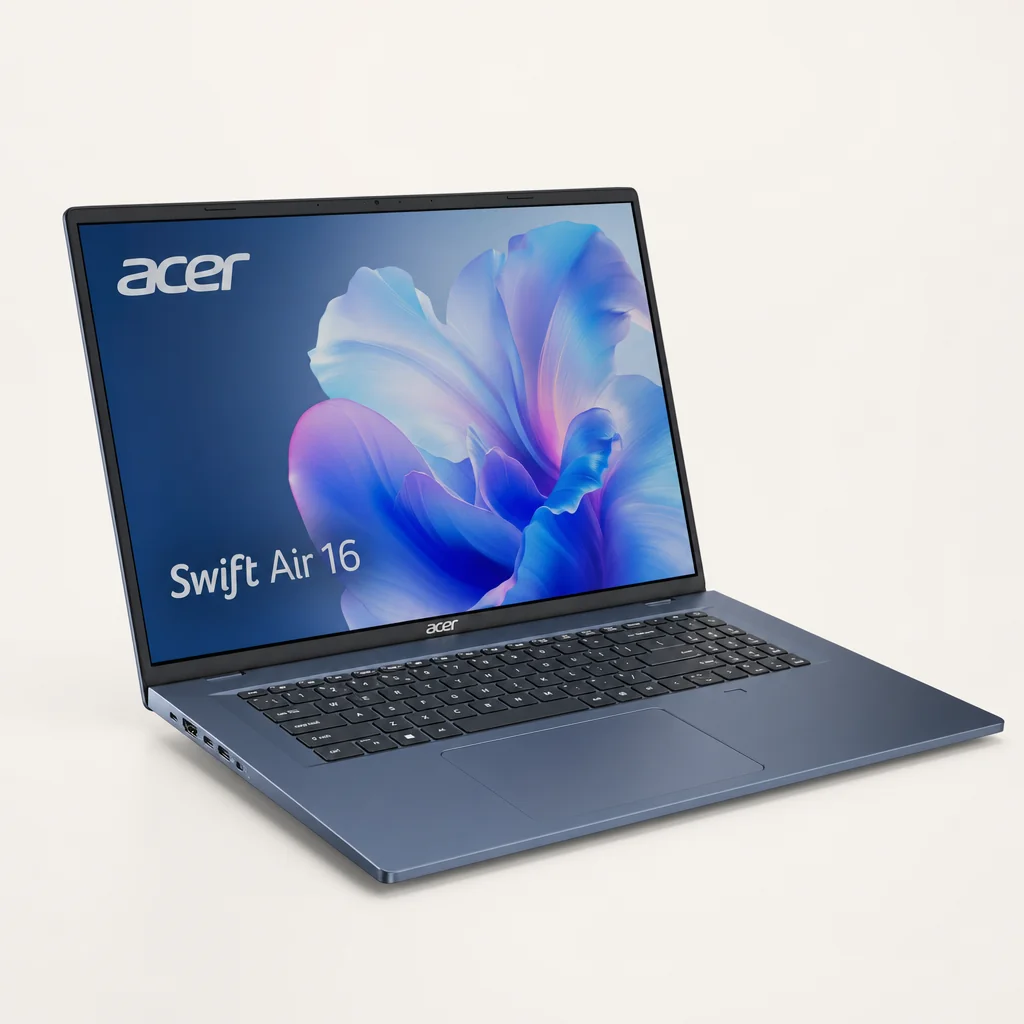
The Acer Swift Air 16 is the headline act because it tackles the old portability problem from the opposite direction. Instead of asking you to make peace with a smaller display, it gives you a 16-inch panel while keeping the IPS model at 990g. That is a genuinely unusual combination, and it makes immediate sense for anyone who spends train journeys editing documents, comparing files, living in browser tabs or working with a timeline.
The important word is IPS. Acer offers the Swift Air 16 with either a 16-inch WUXGA IPS display at 60Hz or a WQXGA+ AMOLED panel at 120Hz. The IPS model is the one that slips below the 1kg line at 990g and is 15.9mm thick. The AMOLED version is 16.5mm thick and weighs 1.1kg. It may still be very portable, but it is a different proposition. If your priority is the strictest possible carry weight, pick the IPS configuration deliberately rather than assuming every Swift Air 16 is identical.
The magnesium-aluminium chassis is a sensible material choice for the mission. It allows Acer to pursue low weight without abandoning a conventional laptop shape or a useful collection of ports. You get two USB-C ports, two USB-A ports and HDMI, plus Wi-Fi 6E and Bluetooth 5.4. For commuting, that is refreshingly straightforward. It means fewer days carrying a dongle merely to use an old flash drive, attach a display or plug in a presentation-room cable.
Performance should be ample for the kind of productivity work this form factor invites. The Swift Air 16 achieved a PCMark 10 score of 8,358, putting it in solid territory for general office work and multitasking, though it was less convincing for digital content creation. That distinction is helpful. This is not a machine to buy because you want a portable workstation for sustained heavy creative jobs. It is a very good candidate if you want a large, useful workspace in a bag that remains pleasantly light.
The 50Wh battery is modest beside the ASUS Zenbook A14's 70Wh pack, but Acer quoted up to 13 hours of video playback. In a maximum-brightness video-loop test, it managed about 11 hours. That is an encouraging result for a machine with this much screen, and it gives a useful reality check alongside the claim.
Pros
- A rare 16-inch laptop that weighs 990g in IPS form.
- Useful port selection includes USB-A and HDMI as well as USB-C.
- 2MP IR webcam supports face recognition and includes a privacy shutter.
- PCMark 10 score of 8,358 points to strong everyday productivity.
Cons
- The AMOLED configuration is 1.1kg, so it is not a strict sub-kilo option.
- Its 50Wh battery is smaller than the Zenbook A14's 70Wh capacity.
- The magnesium-aluminium construction showed some flex and creak rather than the rigidity of a unibody aluminium chassis.
- Digital content creation is not its strongest benchmark area.
The configuration decision is simple
Choose the Swift Air 16 IPS if the point is carrying a full 16-inch workspace under 1kg. Choose the AMOLED configuration only if its WQXGA+ 120Hz panel matters more to you than meeting that weight target. Both are portable; only one delivers the category-defining trick.
The Acer Swift Air 16's key idea is not merely thinness; it is preserving a 16-inch, 16:10 workspace while keeping the IPS model at 990g.
2. ASUS Zenbook A14 — Best for All-Day Battery Life Without the Bulk

See ASUS Zenbook A14 on Amazon UK
Check today's price & availability on Amazon UK
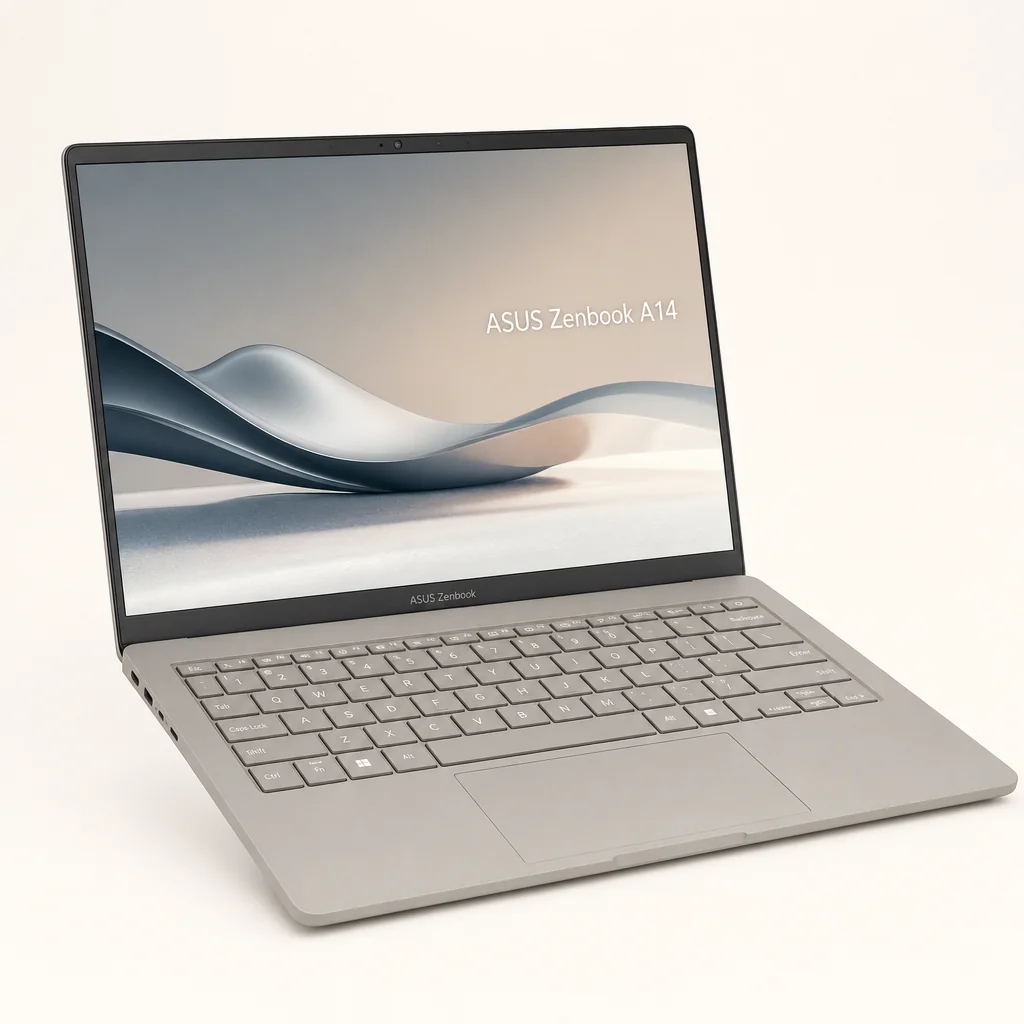
ASUS takes a more traditional 14-inch route with the Zenbook A14, but nothing about it feels ordinary on paper. At 980g, it is a little lighter than the IPS Acer. More importantly for frequent travellers, it combines that weight with a 70Wh battery, a 14-inch WUXGA OLED display and Snapdragon X hardware. It is the pick for someone who values a compact footprint and wants the battery capacity to be a major part of the purchase decision.
The chassis is made from what ASUS calls Ceraluminum, a fusion of ceramic and aluminium. Material terminology can become marketing soup very quickly, but the practical point is clear enough: the Zenbook is built around an unusually light shell rather than merely stripping features away to hit its number. It also avoids the "ultraportable equals compromised display" problem. This WUXGA configuration is an OLED panel with a 60Hz refresh rate and quoted coverage of 100% sRGB, 98% DCI-P3 and 95% AdobeRGB.
Those colour figures make the A14 particularly attractive for a commuter who occasionally needs to work on visual material, review photos or simply wants a display that feels richer than the average travel laptop panel. Its 400-nit maximum brightness should be comfortable indoors and in many travel settings. In direct outdoor light, though, no one should assume an OLED display becomes magically glare-proof. Bright conditions are still bright conditions. Laptop physics remains irritatingly stubborn.
ASUS specified 16GB of DDR5 memory and a 1TB NVMe M.2 SSD as the base configuration cited here. That is an unusually reassuring starting point for travel work: plenty of room for local files without immediately needing to manage storage, and enough memory for a realistic pile of browser tabs, office apps and messaging tools. Snapdragon variants include the eight- or 12-core options described across X Plus and X Elite configurations, with up to 45 NPU TOPS for AI tasks.
The 70Wh battery is the headline specification, paired with an up-to-32-hour battery-life claim. That is clearly a best-case manufacturer figure, so I would not pack away your charger on the basis of it alone. It does, however, tell you ASUS has given the Zenbook A14 a significantly larger energy reserve than Acer's 50Wh Swift Air 16 and Fujitsu's 31Wh UX-K3. For long travel days, capacity is a very sensible place to put your money.
Pros
- 980g chassis with a substantial 70Wh battery.
- 14-inch 60Hz OLED in the cited WUXGA configuration.
- 16GB RAM and 1TB SSD in the cited base specification.
- Two USB4 connectors, with Wi-Fi 7 on top-end X Elite configurations.
Cons
- The 14-inch screen cannot match the Swift Air 16 for workspace.
- Keyboard spacing feels cramped beside larger 15-inch alternatives.
- Fan noise is audible under sustained load, even if it is not obnoxious.
- The 32-hour battery figure is a claimed maximum rather than a real-world all-purpose result.
OLED colour work on the move
The display covers 100% sRGB, 98% DCI-P3 and 95% AdobeRGB, making it the most clearly colour-focused panel in this group.
A keyboard built for regular typing
Key travel is 1.3mm with decent cushioning. The trackpad measures 115 × 75mm and uses Windows Precision drivers.
Modern connection standard
Two USB4 connectors suit a traveller who works with current docks, displays and storage, while selected X Elite models add Wi-Fi 7.
The Zenbook A14 makes a different kind of case for lightness: a compact 14-inch OLED machine with a 70Wh battery rather than a larger display.
3. Dynabook Portégé Z40L-N — Best for Road Warriors Who Need Enterprise Durability
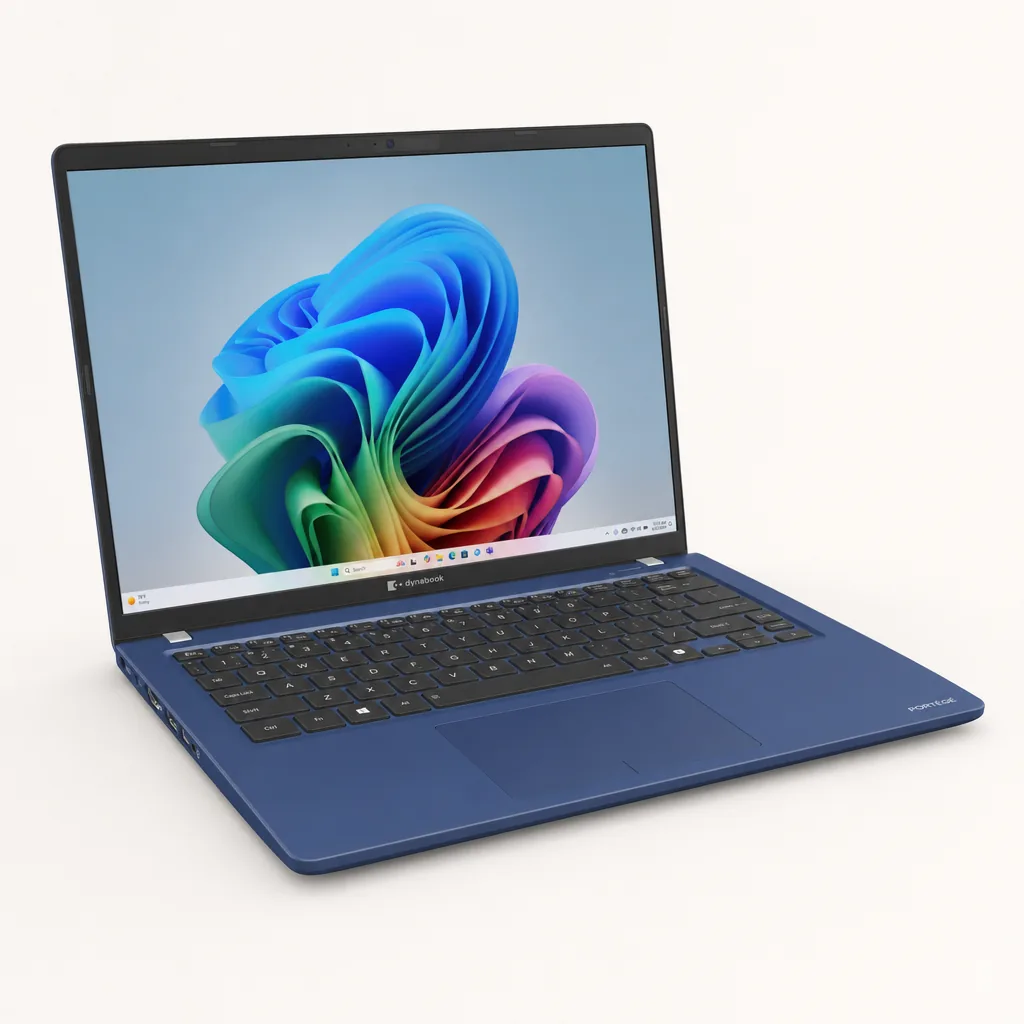
If the Acer is the screen-size rebel and the ASUS is the battery-and-OLED choice, the Dynabook Portégé Z40L-N is the pragmatic professional's machine. It is the laptop here that most obviously treats travel as a rough-and-tumble job rather than a lifestyle photograph. Its magnesium alloy chassis meets MIL-STD-810H durability standards, the non-touch model is around 1kg, and it packs a selection of ports that reads like a polite refusal to make adapters your responsibility.
The quoted weight is 2.2lb, with dimensions of 312.4 × 224 × 15.9mm. That places it right on the edge of this guide's category rather than dramatically beneath it, but the trade-off is capability around the chassis. Alongside two Thunderbolt 4 ports, you get two USB 3.2 Gen 1 Type-A ports, Gigabit Ethernet, a microSD card reader and a 3.5mm audio connection. For hotel desks, meeting rooms, managed office networks and old peripherals that refuse to retire gracefully, that is a very grown-up specification.
There are two primary configurations: a Core Ultra 5 226V with 16GB of RAM, or a Core Ultra 7 258V with 32GB. Both include an integrated NPU for AI functionality. The 14-inch display has a 1920 × 1200 resolution, so it matches Fujitsu's 16:10-style working shape in pixel terms and gives more vertical space than the old 1080p norm. It is not trying to sell you OLED drama. It is trying to help you finish the presentation before boarding. Fair enough.
The Portégé's battery story is unusual and genuinely important. Its 56Wh battery is user-replaceable, a rare feature in modern ultraportables. Dynabook quoted up to eight hours of productivity and said rapid charging could add four hours of runtime in 30 minutes. In a looped video playback test, it lasted an exceptional 18 hours and 55 minutes. That huge figure needs the usual workload caveat, but it is still evidence that the platform can be remarkably frugal under the right conditions.
MIL-STD-810H magnesium alloy chassis
This is the standout reason to choose the Portégé if your work involves frequent journeys, busy bags and environments where consumer-style delicacy is not an appealing idea.
User-replaceable 56Wh battery
Replaceable batteries are rare in this category. Add the stated rapid-charge result of four hours in 30 minutes and this becomes a very travel-aware design decision.
Ports without the dongle tax
Thunderbolt 4, USB-A, Ethernet, microSD and audio are all built in, with Wi-Fi 7 and Bluetooth for wireless work.
5MP AI-enhanced webcam
The camera supports automatic background blur, lighting adjustments and eye-contact correction, useful when the "office" is whatever corner of the terminal you could find.
Pros
- MIL-STD-810H durability credentials distinguish it from consumer-focused rivals.
- 56Wh battery is user-replaceable.
- 18 hours 55 minutes in a looped video playback test.
- Excellent built-in connectivity, including Ethernet and microSD.
Cons
- It sits around the 1kg boundary rather than far below it.
- The 14-inch 1920 × 1200 display is practical rather than the OLED showcase offered by ASUS.
- Quoted productivity endurance is up to eight hours, which is distinct from its much longer video-loop result.
The Dynabook Portégé Z40L-N prioritises practical travel hardware: a durable magnesium chassis, replaceable battery and connections for the equipment business travellers still encounter.
4. Fujitsu FMV UX-K3 — Best for Extreme Weight Minimalists
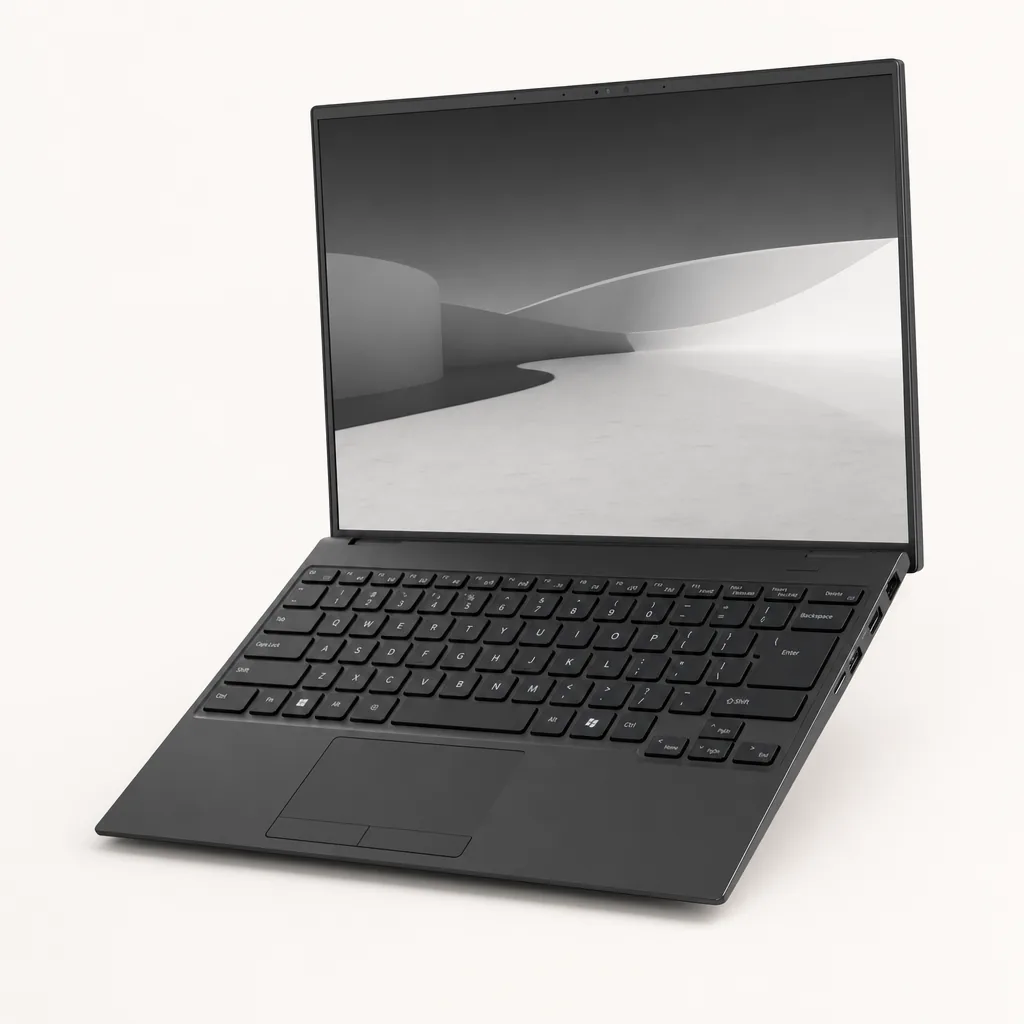
The Fujitsu FMV UX-K3 begins with a number that makes every other laptop on this page look as though it has been carrying spare change: 634g in its lightest configuration. That is extraordinary for a 14-inch Windows laptop with a 1920 × 1200 display, a Core Ultra 7 processor and real ports. If your overriding aim is to make your bag feel as empty as possible, nothing else here gets close.
This is a Japanese-market laptop, which is the crucial context before you get too excited. It belongs in the conversation because its engineering is so remarkable, but it is not the straightforward default choice for a commuter shopping broadly across the UK. For buyers who can obtain and support it appropriately, though, it is a fascinating alternative to the usual "small equals light" formula.
Fujitsu uses carbon fibre and magnesium-lithium alloy to achieve its weight target. The configuration cited includes an Intel Core Ultra 7 255U processor with 12 cores, 16GB of memory and a 512GB SSD. Its 14-inch IPS display is anti-glare, a quietly valuable feature for trains, cafés and any seat with an unfortunate window angle. Reflections are one of those little daily irritations that spec sheets rarely make exciting, right until you are staring at your own face instead of the spreadsheet.
Port provision is especially impressive for such a light machine: two USB-C ports, one USB-A, HDMI, microSD, LAN, Wi-Fi 7 and Bluetooth 5.4. That makes the FMV UX-K3 feel less compromised than its mass suggests. The battery is 31Wh and Fujitsu quoted about seven hours of video playback. That is the obvious price of chasing 634g. This is a laptop for the person who wants the lightest possible proper computer and is willing to manage charging more carefully.
Pros
- 634g in its lightest configuration is astonishingly light for a 14-inch Windows laptop.
- Core Ultra 7 255U, 16GB memory and 512GB SSD are a credible working configuration.
- Anti-glare 1920 × 1200 IPS display suits mobile working.
- USB-C, USB-A, HDMI, microSD and LAN provide exceptional flexibility at this weight.
Cons
- It is primarily a Japan-market product.
- The 31Wh battery and quoted seven-hour video playback figure are less generous than the larger-battery alternatives here.
- The lightest weight applies to its lightest configuration.
The FMV UX-K3 is best treated as a specialist choice, not the easy answer for every traveller. Its 634g figure is a superb achievement, but the Acer, ASUS and Dynabook options make more conventional, simpler buying decisions for most people.
What Matters Most When You Travel With a Laptop
Weight gets the headline, as it should in this guide, but it is not enough on its own. The best choice is the one that removes friction from your particular workday. A larger screen may be more useful than another 10g saved. A built-in HDMI port may matter more than a glamorous display. A replaceable battery may be more valuable than a lower headline weight if your laptop is a long-term work tool.
Start with the shape of your work. If you mainly write, browse and join calls, any of these can be compelling. If you frequently compare documents, use spreadsheets or need several windows open, the Acer's 16-inch panel earns its place immediately. If you work with colour-critical content or simply care about image quality, the Zenbook A14's OLED coverage is the strongest display proposition here. If every trip ends with a projector, wired network or external storage, Dynabook's ports are the sort of feature that seems boring until it saves your presentation.
Then think about charging honestly. Manufacturers quote video playback because it is repeatable, but your working day may involve a browser, cloud sync, a video call, a second screen and an unhealthy number of tabs. The ASUS has the largest stated battery capacity at 70Wh. Dynabook has the most striking measured video-loop result and a replaceable 56Wh battery. Acer delivered around 11 hours in its maximum-brightness video loop. Fujitsu makes the clearest endurance trade-off in pursuit of its remarkable 634g mass.
For commuters, the best specification is usually the one that eliminates a daily annoyance: enough screen space, a charger-free journey, a built-in port or simply a noticeably lighter bag.
Who Should Buy Which Lightweight Laptop?
If you want the short version before the final questions, here it is. These awards are deliberately practical. They are about the person carrying the laptop, not the company that made the prettiest slide deck about it.
Best for maximum workspace: Acer Swift Air 16
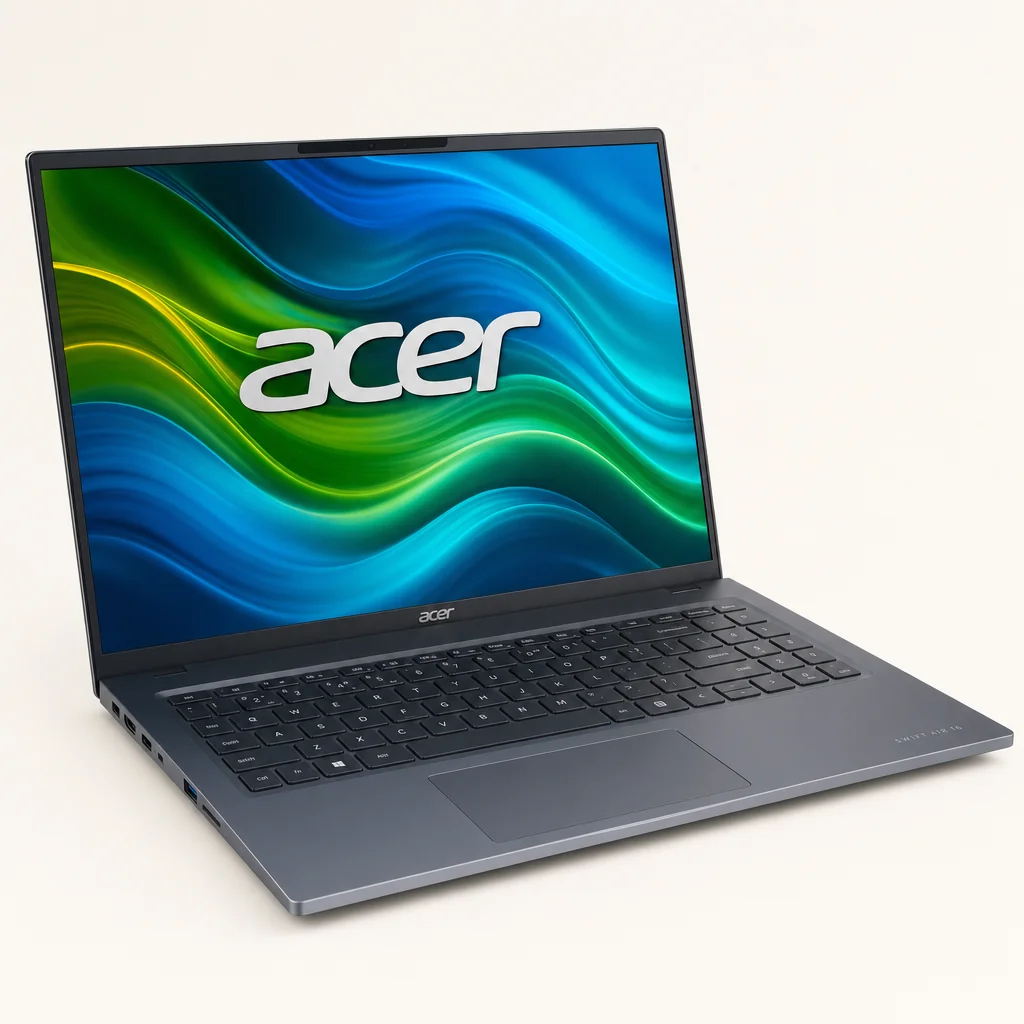
Buy this if a 14-inch screen feels cramped but you still want the IPS model's 990g weight. It is the obvious choice for document-heavy commuters and multi-window workers.
Best for battery-focused travellers: ASUS Zenbook A14
Its 70Wh battery, 980g weight and OLED screen make it the strongest fit for travellers who value a compact machine with a large stated energy reserve.
Best for business travel: Dynabook Portégé Z40L-N
Choose Dynabook for MIL-STD-810H durability, Ethernet, USB-A, Thunderbolt 4, microSD and a user-replaceable battery. It is built for work that does not happen in one tidy office.
Best for minimum carry weight: Fujitsu FMV UX-K3
At 634g in its lightest configuration, Fujitsu is for the genuine weight obsessive who wants a proper 14-inch Windows machine and accepts the Japan-market caveat.
Frequently Asked Questions
The winning travel laptop is not always the smallest one; it is the model whose screen, battery, ports and weight best match the way you actually move through a working week.
The Bottom Line
The Acer Swift Air 16 is the most exciting recommendation in this roundup because it proves that a 16-inch work screen and a 990g carry weight can coexist. For commuters who have spent years shrinking their workspace to protect their shoulders, it is the obvious place to start.
The ASUS Zenbook A14 is the best alternative for buyers who would rather have a compact 14-inch OLED display and a large 70Wh battery. The Dynabook Portégé Z40L-N is the sensible professional choice when durability, ports and serviceable battery design matter as much as grams. And the Fujitsu FMV UX-K3 is the extraordinary specialist option: 634g of proper laptop, with the important caveat that it is primarily a Japan-market machine.
My advice is simple: do not buy a lightweight laptop just because it is light. Buy the one that makes your commute easier without making the work itself harder. In 2026, you can finally have a serious screen, serious connectivity or serious endurance without carrying a serious lump of metal. That is progress.
- Acer Swift Air 16View on Amazon
- ASUS Zenbook A14View on Amazon