
Best Laptops for Students UK: The Definitive Buyer's Guide
Six expertly chosen laptops to carry you through GCSEs, A-levels and a full degree — tested for portability, battery life, multitasking and real student workloads.

We link to the exact model on Amazon UK. Prices change often, so check the live price before you buy. As an Amazon Associate we earn from qualifying purchases.
See Apple MacBook Air 13" on Amazon UK
The 2026 student laptop landscape is more competitive — and more affordable — than ever.

Picking the right laptop for university or sixth form is one of the most important tech buys of a student's degree.
What's in This Guide
Quick Navigation
- How I chose these laptops
- Comparison table at a glance
- Apple MacBook Air 13" (M5 / M4)
- Acer Aspire 14 AI
- Lenovo IdeaPad Slim 3x
- Honor MagicBook Pro 14
- ASUS Chromebook 14 CX1405
- HP Envy x360 14 (2025)
- Software-specific picks
- Buying advice & FAQ
How I Chose These Laptops
Students aren't a monolith. A history undergrad bashing out essays needs something completely different to a film student wrangling 4K timelines, or a computer science fresher juggling Docker containers and an IDE with thirty Chrome tabs open. So rather than ranking purely on raw power, I weighted four things heavily: battery life (you need to survive a full day without finding a plug socket in a packed library), portability (your back will thank you after a term of lugging it across campus), RAM headroom (16GB is the new sensible minimum) and real-world price-to-performance.
For 2026, 16GB of RAM has become the sweet spot for most students — it's enough to keep dozens of browser tabs, a writing app, a video call and a music streamer all running smoothly without the constant stutter you'll get from 8GB machines. Most UK students end up spending somewhere between £400 and £900 depending on course requirements, and every laptop here either falls in that range or gives you exceptional value just outside it.
Important: If your course is engineering, architecture, animation, music production or anything mentioning "CAD" or "Adobe Creative Cloud" in the welcome pack, lean towards the Honor MagicBook Pro 14 or the MacBook Air. For everyone else, the Acer Aspire 14 AI or the Lenovo IdeaPad Slim 3x will do everything you need and last all day.
2026 Student Laptop Comparison Table
| Model | Best For | Display | RAM (base) | Battery | Weight |
|---|---|---|---|---|---|
| MacBook Air 13" (M5, 2026) | Premium all-rounder | 13.6" Liquid Retina, 500 nits | 16GB | Up to 18 hrs | 1.24 kg |
| Acer Aspire 14 AI | Best Windows all-rounder | 14" WUXGA IPS touch | 16GB | ~22–24 hrs (tested) | 1.22 kg |
| Lenovo IdeaPad Slim 3x | Budget Copilot+ PC | 15.3" WUXGA IPS, 300 nits | 16GB | All-day | 1.55 kg |
| Honor MagicBook Pro 14 | Creative work / OLED | 14.6" OLED, 120Hz | 16GB+ | 92Wh battery | 1.39 kg |
| ASUS Chromebook 14 CX1405 | Tightest budget | 14" display | 8GB LPDDR4X | All-day | Light |
| HP Envy x360 14 (2025) | 2-in-1 versatility | 14" touchscreen | 16GB LPDDR5X | Full-day | Light |
Battery life is the spec that actually matters most on campus — and it's where 2026 laptops genuinely shine.
1. Apple MacBook Air 13" (M5, 2026) — Best Overall
See Apple MacBook Air 13" on Amazon UK
If money isn't tight and you want a laptop that will sail through your entire degree without breaking a sweat, the MacBook Air is the obvious pick. As of March 2026 the line has moved to the M5 chip (announced 3 March, on sale 11 March), with the headline upgrades being a faster 10-core CPU, a next-gen GPU with a Neural Accelerator in every core for roughly 4x faster on-device AI, Wi-Fi 7, and — crucially for students — double the base storage at 512GB. The base config still ships with 16GB of unified memory, so there's no more miserly 8GB here.
The fanless design is genuinely transformative when you're using it in a quiet study space — completely silent no matter what you throw at it. Apple's promised 18 hours of battery life holds up beautifully in the real world, and the 12-megapixel Center Stage webcam finally makes those 9am seminar Zoom calls look respectable. The chassis is unchanged from the M4/M2 era, so it's still just 1.13 cm thick and disappears into a backpack, with two Thunderbolt 4 / USB 4 ports, a 3.5mm headphone jack and MagSafe 3 charging. Both Thunderbolt ports sit on the left side, which is a small annoyance if you're a right-handed mouse user. Available in Sky Blue, Silver, Midnight and Starlight.
Smart-money tip: The 2025 MacBook Air M4 is no longer the current model, but it's far from obsolete — it shares the same 16GB base RAM, fanless chassis and 18-hour battery, and is now widely discounted by third-party UK retailers. For most students it remains a brilliant buy, just check you're happy with its 256GB base storage (vs the M5's 512GB) and Wi-Fi 6E. Apple has also just launched the budget MacBook Neo, which has gone straight to the top of several best-budget-laptop lists — worth watching as UK stock and full specs settle.
Pros
- 16GB RAM and 512GB storage standard on the entry config
- Genuinely silent fanless design
- Up to 18-hour battery life
- Wi-Fi 7 and much faster on-device AI than the M4
- Featherlight at 1.24 kg
Cons
- Only 2 Thunderbolt ports, both on the left
- No HDMI or USB-A — dongle life
- 60Hz IPS panel (no OLED option)
- Storage and RAM upgrades get expensive fast

See Apple MacBook Air 13 on Amazon UK
Check today's price & availability on Amazon UK
2. Acer Aspire 14 AI — Best Windows All-Rounder
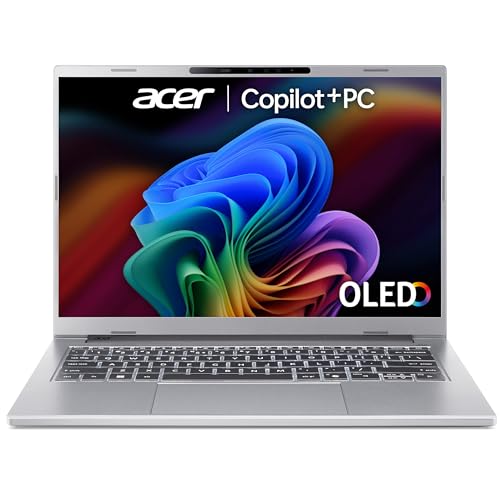
See Acer Aspire 14 AI on Amazon UK
Check today's price & availability on Amazon UK
If you want a Windows machine that gets out of your way and lasts forever on a charge, this is the one. The Acer Aspire 14 AI runs an Intel Core Ultra 5 226V (or Core Ultra 7 258V in the higher trim) with Intel Arc graphics, and it qualifies as a Copilot+ PC thanks to its integrated NPU (47 TOPS on the Core Ultra 7 258V). It starts at £699 in the UK, which is genuinely competitive given the spec sheet.
The Aspire 14 AI's 22+ hour battery life is the headline — and it backs it up.
Battery life is the headline figure here, and it's not marketing fluff. TechRadar clocked it at 22 hours in their movie playback test, and WhatGadget got just under 24 hours — a touch shy of Acer's claimed 28-hour figure but still genuinely incredible. That's two full lecture days between charges. The 14-inch 1920×1200 IPS touchscreen is bright and sharp, and reclines all the way back by a full 180 degrees, which is brilliant for sharing notes across a library desk.
Port selection is excellent for the price — two USB-A 3.2 ports, USB-C 4, full-size HDMI and a headphone jack. That HDMI in particular saves you a lifetime of dongle stress when you need to plug into a lecture hall projector. Build is described as a high-quality keyboard and durable plastics, although there's noticeable flex in the lid and chassis if you press hard. It's perfectly fine for everyday use, just don't go waving it about by one corner.
Pros
- Astonishing 22+ hour battery life
- Excellent port selection including HDMI
- 1.22 kg makes it a true ultraportable
- Touchscreen folds flat to 180°
- Copilot+ PC with on-device AI
Cons
- Some lid and chassis flex
- Plastic body lacks the premium feel of metal rivals
- 60Hz IPS won't impress creative students

A modern lightweight laptop covers note-taking, essays and seminar work without the noise or weight that haunts older machines.
See Acer Aspire 14 AI on Amazon UK
Check today's price & availability on Amazon UK
3. Lenovo IdeaPad Slim 3x — Best Budget Copilot+ PC
The IdeaPad Slim 3x is what happens when you take a proper Copilot+ PC and aim it squarely at students on a budget. Powered by a Qualcomm Snapdragon X X1-26-100 chip with an NPU delivering 45 TOPS for advanced AI processing, it nails the basics: 16GB of LPDDR5x RAM, a 512GB SSD and a roomy 15.3-inch WUXGA (1920×1200) IPS display with 300 nits of brightness and an anti-glare coating. UK pricing typically falls in the ~£540–£720 range depending on configuration — at the top end you can spec a 2.5K OLED screen, 24GB RAM and a 1TB SSD — making this one of the most accessible (and configurable) Copilot+ machines around.
MIL-STD-810H Certified
Tested against military durability standards, with an aluminium top built for everyday bumps and rough commutes. Rare at this price.
45 TOPS NPU
The Snapdragon X's neural processing unit handles Copilot+ features locally — Live Captions, Recall, Cocreator and more.
15.3" Big Screen
That extra real estate is brilliant for split-screen study — research on one half, essay on the other.
1.55kg, slim chassis
Surprisingly portable for a 15-incher, and slim enough to slip into most laptop sleeves without issue.
The trade-off is the port speed — you get two USB-A ports and one USB-C, but they're capped at 5 Gbits/sec, which is slow by 2026 standards if you're moving big video files. For everyday study tasks, browser tabs, Word, Teams, and the occasional Netflix binge, you genuinely won't notice. The 300-nit display is fine indoors but will struggle in bright sunlight, so don't plan on outdoor library sessions. Wi-Fi 7 and a backlit keyboard are inexpensive (£10) configurable add-ons worth ticking.
Pro Tip
Snapdragon X laptops still occasionally hit compatibility wrinkles with niche Windows software (some older specialist apps or anti-cheat-protected games). For 95% of student workflows — Office, Teams, browsers, Spotify, Adobe, basically anything modern — it's flawless. Check your course's required software list before committing if you're on an unusual programme.

See Lenovo IdeaPad Slim 3x on Amazon UK
Check today's price & availability on Amazon UK
4. Honor MagicBook Pro 14 — Best for Creative Students
Shop Honor MagicBook Pro 14 on Amazon UK
If you're studying anything visual — graphic design, photography, film, animation, fine art — the Honor MagicBook Pro 14 is a borderline obvious choice. Expert Reviews rated it among their top student laptops for 2026, and it's easy to see why: it pairs an Intel Core Ultra 9 285H processor with 32GB of RAM (on the UK flagship SKU), a stunning 14.6-inch 3.1K OLED display and a chunky 92Wh battery in a 1.39 kg body that doesn't feel the weight.
The MagicBook Pro 14's OLED panel makes Photoshop and Premiere look genuinely incredible.
OLED is the spec that really matters here. The 3120×2080, 120Hz panel covers 100% DCI-P3, hits up to 700 nits in HDR and is TÜV Rheinland certified for flicker-free (4320Hz PWM) low blue light — so you get inky-deep blacks, punchy colour and genuine HDR that makes a world of difference if you're colour-grading photos for a portfolio or scrubbing through a Premiere timeline. The Core Ultra 9 has plenty of grunt for video edits, light 3D work, and any AI-assisted creative tools you'll be running locally, and the 1TB PCIe 4.0 SSD posts over 7,100 MB/s read speeds. The 92Wh battery is the largest on this list, and it shows in real-world endurance.
Coming soon: Honor has a 2026 MagicBook Pro 14 in for review, stepping up to a near-15-inch OLED display, a close-to-100Wh battery and Intel's latest Panther Lake processors (launched at CES 2026). UK pricing isn't confirmed yet, so if you can wait it may be worth holding out — otherwise the current 2025 model remains an excellent buy.
Pros
- Stunning 120Hz OLED display with HDR
- Intel Core Ultra 9 285H has serious grunt
- Massive 92Wh battery
- 32GB RAM and 1TB SSD on the UK flagship
- Excellent value for what's effectively a creator-class machine
Cons
- Pricier than the budget options here
- Only Wi-Fi 6 (not 6E or Wi-Fi 7)
- Honor's UK service network is smaller than Lenovo/HP
- OLED can suffer burn-in over years (use auto-hide taskbar!)
See Honor MagicBook Pro 14 on Amazon UK
5. ASUS Chromebook 14 CX1405 — Best Budget Pick
If your course is essay-heavy and your budget is tighter than tight, you genuinely don't need to spend more than around £230 to get something brilliant. The ASUS Chromebook 14 CX1405 runs ChromeOS, has a comfortable 14-inch display and gets you through a full day of writing, browsing, Google Docs, YouTube, and video calls without breaking a sweat. Sub-£230 in the UK is the kind of price that used to get you a barely-functional 4GB plastic brick — this isn't that.
Honest truth about Chromebooks: They're brilliant if your university uses Google Workspace or Microsoft 365 in the browser, and you're happy installing Android apps for everything else. They are not suitable if your course requires desktop versions of SPSS, MATLAB, AutoCAD, Visual Studio, Adobe Creative Cloud, or any specialist Windows-only software. Check your course's software list before buying.
For most humanities, social sciences, languages and business students, a Chromebook is honestly all you need. Battery life is excellent, ChromeOS boots in seconds, and the security model means you'll never spend an evening fighting Windows Update before a deadline.

See ASUS Chromebook Plus 14 on Amazon UK
Check today's price & availability on Amazon UK
6. HP Envy x360 14 (2025) — Best 2-in-1
For students who like to annotate PDFs in lectures, sketch diagrams, or read e-textbooks in tablet mode, the HP Envy x360 14 is the only convertible on this list — and it's a properly polished one. The 360-degree hinge lets you flip it from laptop into tent mode for watching lectures, presentation mode for group work, or full tablet mode for stylus input.
Note-takers
Stylus-friendly tablet mode is brilliant for handwritten lecture notes that sync across devices.
Casual readers
Tent mode and tablet flips are perfect for reading e-books and PDFs in halls.
Group workers
Folding it flat or into presentation mode is genuinely useful for collaborative tasks.
Daily traditional users
Still works as a perfectly normal, well-built clamshell laptop the rest of the time.
Convertibles like the Envy x360 are quietly fantastic for note-taking-heavy degrees.

Battery life and portability matter as much as raw spec - a long lecture day with no plug socket is the real test.

See HP Envy x360 14 on Amazon UK
Check today's price & availability on Amazon UK
Software-Specific Recommendations
This is where most generic guides fall down. Different courses demand wildly different things from a laptop, so here are my software-led picks:
For Microsoft Office / writing-heavy courses
Any of these laptops will absolutely fly. The Acer Aspire 14 AI wins on battery life for all-day library sessions. If you prefer macOS, the MacBook Air runs Microsoft 365 beautifully.
For Adobe Creative Cloud (Photoshop, Premiere, Illustrator)
The Honor MagicBook Pro 14 with its Core Ultra 9 and OLED panel is the standout choice. The MacBook Air M5 is also superb — Adobe runs natively and beautifully on Apple Silicon, and the M5's faster GPU and unified memory punch well above their on-paper specs.
For programming / computer science (VS Code, Docker, IDEs)
The MacBook Air M5 is genuinely brilliant for development thanks to its Unix underpinnings — Homebrew, Terminal, all of it. On the Windows side, the Acer Aspire 14 AI's Intel Core Ultra has full x86 compatibility for any Windows-only tooling, and the Lenovo IdeaPad Slim 3x works fine for the vast majority of modern dev work despite being ARM-based.
For statistics / data work (SPSS, R, Stata, MATLAB)
Stick with x86 Windows or macOS to avoid compatibility headaches. The Acer Aspire 14 AI or MacBook Air M5 are the safer picks here.
For browser-only / Google Workspace courses
The ASUS Chromebook 14 CX1405 is unbeatable value, full stop.
For light gaming alongside study
None of these are dedicated gaming laptops, but the Honor MagicBook Pro 14 with its Intel Arc graphics handles indie titles, older AAA games and emulation comfortably. The MacBook Air M5 is also surprisingly capable thanks to the M5's improved GPU (reaching 100fps in some testing) and the steadily improving Mac gaming scene.
Frequently Asked Questions
Whichever you pick, plan to use it daily for the next 4+ years — choose accordingly.
Who Should Buy What?
The All-Round Winner
MacBook Air M5 — if you can stretch to it, you won't regret it. Lasts the entire degree (or grab the discounted M4 to save money).
Best Windows Pick
Acer Aspire 14 AI — 22+ hour battery, full ports, Copilot+ PC, sensibly priced.
On a Real Budget
Lenovo IdeaPad Slim 3x for Windows users; ASUS Chromebook 14 if you're browser-only.
Creative Courses
Honor MagicBook Pro 14 — that OLED display and Core Ultra 9 are genuinely a creator's delight.
Note-taking & Flexibility
HP Envy x360 14 — the only convertible here, and a properly nice one at that.
Postgrad / Research
MacBook Air M5 for stability and longevity, or the Honor MagicBook Pro 14 if you need horsepower.
The Final Verdict
If I had to send one student off to university tomorrow with one laptop, it'd be the Apple MacBook Air 13" — now in its M5 (2026) guise. The combination of 16GB standard RAM, a 512GB base SSD, an utterly silent fanless chassis, an 18-hour battery and a 1.24 kg weight makes it almost impossible to beat for the typical undergraduate workload — and crucially, it'll still feel fast in year four. If you'd rather save money, the outgoing M4 model is now heavily discounted and remains brilliant value.
If you're firmly in the Windows camp or just want to spend less, the Acer Aspire 14 AI is my unhesitating recommendation. A 22-hour real-world battery test result is genuinely staggering, and at £699 it's serious value. The Lenovo IdeaPad Slim 3x is the budget Copilot+ pick if money's tight; the Honor MagicBook Pro 14 is the obvious choice for anyone running creative software; the ASUS Chromebook 14 CX1405 is unbeatable if your degree is browser-based; and the HP Envy x360 14 covers anyone who values the flexibility of a 2-in-1.
Whichever you pick, double-check your course's specific software requirements before committing — that single piece of advice will save more students from buyer's regret than any spec comparison ever could.
- Apple MacBook Air 13Best OverallView on Amazon
- Acer Aspire 14 AIBest Windows All-RounderView on Amazon
- Lenovo IdeaPad Slim 3xBest Budget Copilot+ PCView on Amazon
- ASUS Chromebook Plus 14Best Budget PickView on Amazon
- HP Envy x360 14Best 2-in-1View on Amazon
 Lenovo ThinkPad E14 Gen 6View on Amazon