
Nintendo Switch 2 vs Steam Deck vs ROG Ally: Which Handheld?
Three very different philosophies, three very different libraries. I've spent months living with all of them — here's the honest buyer's guide to picking the right one for you.
We link to the exact model on Amazon UK. Prices change often, so check the live price before you buy. As an Amazon Associate we earn from qualifying purchases.
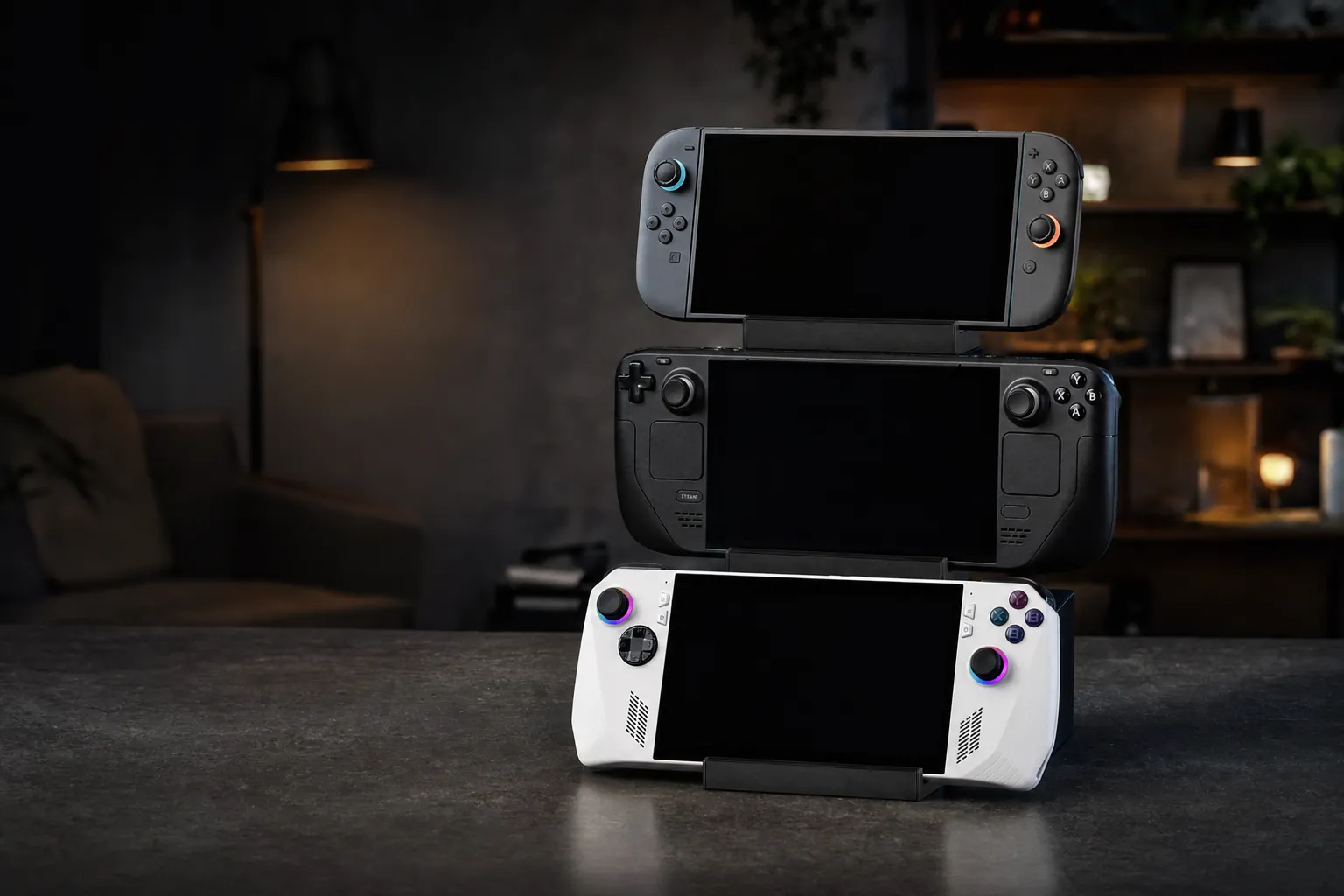
The three big handheld ecosystems of 2026: Nintendo's hybrid, Valve's Linux-powered PC and ASUS's Windows powerhouse.
If you're shopping for a handheld gaming machine in 2026, you're spoilt for choice in a way we simply weren't a few years ago. But the choice is genuinely tricky, because these three devices barely compete on the same terms. The Nintendo Switch 2 is a console-first hybrid with exclusive games you can't play anywhere else. The Steam Deck OLED is a beautifully judged Linux PC that punches above its raw spec sheet. And the ROG Ally X is a full Windows powerhouse that will happily run anything you throw at it. In this guide I'll pull them apart category by category — display, performance, battery, library, ergonomics — and finish with clear recommendations for different kinds of buyer rather than crowning a single winner. Because honestly, the "best" handheld here depends entirely on what you want from it.

See Nintendo Switch 2 on Amazon UK
Check today's price & availability on Amazon UK
The Quick Version: Who Each One Is For
Before we dive into the granular detail, let me set the scene. These three machines answer three fundamentally different questions.
The Switch 2 answers: "How do I play Nintendo's games and the widest family-friendly library, at home on the telly and on the go, with zero fuss?" It's Switch 2 has the most console-like official docked mode, but Steam Deck OLED and ROG Ally X can also output to 4K displays; actual game rendering resolution and performance vary. It is a console that happens to be portable.
The Steam Deck OLED answers: "How do I take my existing Steam library — possibly hundreds of games — everywhere, on a device that's been tuned within an inch of its life for handheld comfort and battery efficiency?" It's a PC, but it feels like an appliance. Valve has done the hard work so you don't have to.
The ROG Ally X answers: "How do I get the most raw horsepower and the most open platform in a handheld, with access to every PC storefront and every launcher, and I don't mind wrangling Windows to get there?" It's the enthusiast's pick — the fastest and most flexible, but also the most demanding of your patience.
One important framing point: the Switch 2 is a closed console ecosystem, whilst both the Steam Deck and ROG Ally are open PC platforms. That single difference cascades into almost every category below — game library, modding, emulation, storefront choice and long-term flexibility all flow from it.
Specifications at a Glance
Let's get the headline numbers on the table. Here's how the three stack up on the specs that matter day to day.
| Feature | Nintendo Switch 2 | Steam Deck OLED | ROG Ally X (2024) |
|---|---|---|---|
| Platform | Nintendo console OS | SteamOS (Linux) | Windows 11 |
| Processor | Custom Nvidia chip | AMD Zen 2 (4-core) | AMD Ryzen Z1 Extreme (8-core) |
| RAM | — | 16GB LPDDR5 | 24GB LPDDR5X-7500 |
| Display size | 7.9-inch | 7.4-inch | 7-inch |
| Resolution | 1920 × 1080 | 1280 × 800 | 1920 × 1080 |
| Panel type | LCD, HDR10 | OLED, HDR, 1000 nits | IPS-level LCD, 500 nits |
| Refresh rate | 120Hz VRR | 90Hz | 120Hz FreeSync Premium |
| Battery capacity | 5,220 mAh | 50Wh | 80Wh |
| Weight (with controls) | 536g | 669g | 678g |
| Storage | 256GB + microSD Express | 512GB / 1TB NVMe | 1TB PCIe 4.0 NVMe |
| Connectivity | Wi-Fi 6 | Wi-Fi 6E, BT 5.3 | Wi-Fi 6E, USB4 |
| Dock / TV output | Yes — up to 4K 60fps | Via USB-C dock | Via USB4 / DisplayPort |
| Buy | Check price | Check price |
Already you can see the personalities emerging. The Switch 2 is the lightest, has the biggest and highest-resolution handheld panel, and it's the only one that natively drives a 4K television. The ROG Ally X has the muscle — eight cores, 24GB of fast memory and a huge 80Wh battery. The Steam Deck OLED sits in the middle on paper but has the best screen technology of the trio and, crucially, the most polished software experience.
Display: OLED Punch vs High-Res Sharpness
The screen is the thing you stare at for every second of play, so it deserves careful thought. And here the three really diverge.
The Steam Deck OLED has, to my eyes, the most immediately pleasing panel. It's a 7.4-inch OLED running at 90Hz with proper HDR and a punchy 1000 nits of peak brightness, plus an anti-glare coating that makes a genuine difference near windows. Blacks are truly black, colours are vivid, and there's an emotional wow factor when you first fire up something like a moody sci-fi title. The catch is resolution: at 1280 × 800 it's the lowest-resolution panel of the three. In practice that's fine — it's a small screen and the pixel density is perfectly acceptable — but text and fine detail aren't as crisp as on the 1080p rivals.
The Nintendo Switch 2 takes the opposite approach: a large 7.9-inch Full HD (1920 × 1080) LCD running at 120Hz with VRR and HDR10, at roughly 279 ppi. It's the biggest and sharpest handheld screen in this comparison, and the 120Hz variable refresh rate makes menus and compatible games feel wonderfully smooth. Being LCD, it can't match OLED's inky blacks or contrast, but it's bright, crisp and generous in size.
The ROG Ally X uses a 7-inch 1080p IPS-level LCD at 120Hz with FreeSync Premium, Gorilla Glass Victus protection and a swift 7ms response time. It's a lovely gaming panel — that 120Hz refresh paired with FreeSync makes for tear-free, fluid motion — but at 500 nits peak it's the dimmest of the trio, and like the Switch 2 it's LCD rather than OLED.
OLED contrast versus high-resolution 120Hz sharpness — the display choice here really comes down to personal taste.
Best for HDR and contrast
The Steam Deck OLED wins on sheer picture quality — its 1000-nit HDR OLED with anti-glare coating is genuinely lovely and the best pure viewing experience of the three.
Best for size and sharpness
The Switch 2's 7.9-inch 1080p panel is the largest and highest-density here, with 120Hz VRR for silky motion. If you value real estate and crisp text, it leads.
Best for high-refresh gaming
Both the Switch 2 (120Hz VRR) and ROG Ally X (120Hz FreeSync Premium) hit 120Hz. The Ally X's Gorilla Glass Victus and 7ms response make it a treat for fast-paced action.
My take on the screens
If I had to sum it up: the Steam Deck OLED has the most beautiful panel, the Switch 2 has the most practical one (bigger, sharper, high-refresh), and the ROG Ally X splits the difference with a fast, colourful 1080p display that's only let down by its lower peak brightness in sunlight.
Performance: Raw Power vs Optimisation
This is where the ROG Ally X flexes hardest — but it's also where the conversation gets more nuanced than a spec sheet suggests.
The ROG Ally X (2024) is powered by AMD's Ryzen Z1 Extreme, an eight-core, sixteen-thread APU that boosts up to 5.0 GHz, paired with RDNA 3 graphics (12 compute units) and a hefty 24GB of LPDDR5X-7500 memory. On paper and in practice it's the most powerful of the three. That extra memory bandwidth and core count means it handles demanding modern titles at higher settings and frame rates than the Steam Deck can, and its 1TB PCIe 4.0 NVMe SSD loads games quickly. For 2025's most punishing AAA releases, the Ally X is the handheld most likely to give you a comfortable experience without heavy compromises.
The Steam Deck OLED runs a more modest AMD APU — a four-core Zen 2 CPU on a 6nm process with RDNA 2 graphics rated around 1.6 TFLOPS, and 16GB of LPDDR5 memory. In raw numbers it's clearly behind the Ally X. But here's the thing: Valve's tuning is exceptional. Games are validated for the hardware, SteamOS is lean, and the whole system is optimised to squeeze consistent, playable frame rates out of that silicon. The result is that in real-world play the gap often feels smaller than the specs imply, particularly if you're happy tuning settings and locking to 40 or 60fps.
The Switch 2 is the hardest to benchmark directly because Nintendo keeps its custom Nvidia chip's details firmly under wraps. What we do know is that it supports 4K at 60fps when docked and 120fps output in some scenarios, almost certainly leaning on Nvidia's DLSS upscaling to get there. In the hand it drives that 7.9-inch 1080p panel, and docked it steps up to 4K on the telly. It's a console, so its performance is best judged by how its games look and run rather than by cross-platform frame-rate charts — and Nintendo's first-party titles are, as ever, beautifully optimised for the exact hardware they ship on.
On raw compute and memory, the ROG Ally X leads clearly — but Valve's software optimisation narrows the real-world gap.
Raw power isn't everything in a handheld. More horsepower usually means more heat and shorter battery life at a given performance level. The Steam Deck's efficiency and the Switch 2's console-grade optimisation both count for a lot when you're playing untethered.
Battery Life: The Real-World Numbers
Battery life is where handhelds earn or lose their keep, and it's a category full of asterisks — because it depends enormously on what you're playing and at what settings.
The ROG Ally X carries the largest battery of the three at a substantial 80Wh — double the 40Wh cell in the original ROG Ally. That translates to real-world figures of roughly 2 to 3.5 hours under load in Turbo mode (25W TDP), around 3 to 3.5 hours in Performance mode (17W TDP), and up to about 10 hours with lightweight indie titles. Under a sustained maximum turbo load it manages around 1 hour 40 minutes — nearly twice what the original Ally could do. It charges over 65W USB Power Delivery with the included adapter.
The Steam Deck OLED steps up to a 50Wh battery (from 40Wh on the older LCD model), and combined with the more efficient 6nm chip and OLED panel, Valve quotes 30–50% longer runtime than the LCD Deck. In practice that's around 2 to 3.5 hours in demanding AAA games such as Cyberpunk 2077 or Starfield at 90Hz, 5 to 7 hours in indie games like Hollow Knight or Stardew Valley, and roughly 4 hours of mixed use at a sensibly tuned TDP.
The Switch 2 houses a 5,220 mAh lithium-ion cell and Nintendo quotes a broad 2 to 6.5 hours depending on the game — lighter titles nudging that upper 6.5-hour figure, and demanding AAA games pulling it down to around 2 hours. It charges in roughly 3 hours in sleep mode. As a bonus, the Joy-Con 2 controllers themselves carry around 20 hours of battery when used wirelessly.
| Scenario | Switch 2 | Steam Deck OLED | ROG Ally X |
|---|---|---|---|
| Battery capacity | 5,220 mAh | 50Wh | 80Wh |
| Demanding AAA | ~2 hours | 2–3.5 hours | 2–3.5 hours (Turbo) |
| Lighter / indie games | up to 6.5 hours | 5–7 hours | up to ~10 hours |
| Mixed real-world use | varies by title | ~4 hours | ~3–3.5 hours (Performance) |
| Charging | ~3 hours (sleep) | USB-C | 65W USB-PD |
Battery reality check
For the most demanding games, all three land in a similar 2–3.5 hour window — there's no magic here. Where the gaps open up is with lighter fare: the ROG Ally X's giant 80Wh battery can stretch to around 10 hours on indie titles, and both the Steam Deck and Switch 2 comfortably clear 5–7 hours in the same scenarios. If you mostly play smaller games, you'll rarely be caught short with any of them.
Game Library: The Deciding Factor for Many
For a lot of buyers, this is the category that settles the whole argument — and it's where the closed-versus-open divide really bites.
Your existing library often decides the winner before specs even enter the conversation.
Nintendo Switch 2
See Nintendo Switch 2 on Amazon UK
Check today's price & availability on Amazon UK
The Switch 2 is the only device here with Nintendo's exclusives — Mario, Zelda, Metroid, Kirby, Splatoon and the rest — none of which you can legally play on the other two. Just as importantly, it's backward compatible with most of the enormous Switch 1 library, so a large existing collection carries forward. If your household loves Nintendo games, family multiplayer, or the sheer breadth of that first-party catalogue, no amount of raw PC power changes the fact that only the Switch 2 plays these titles.
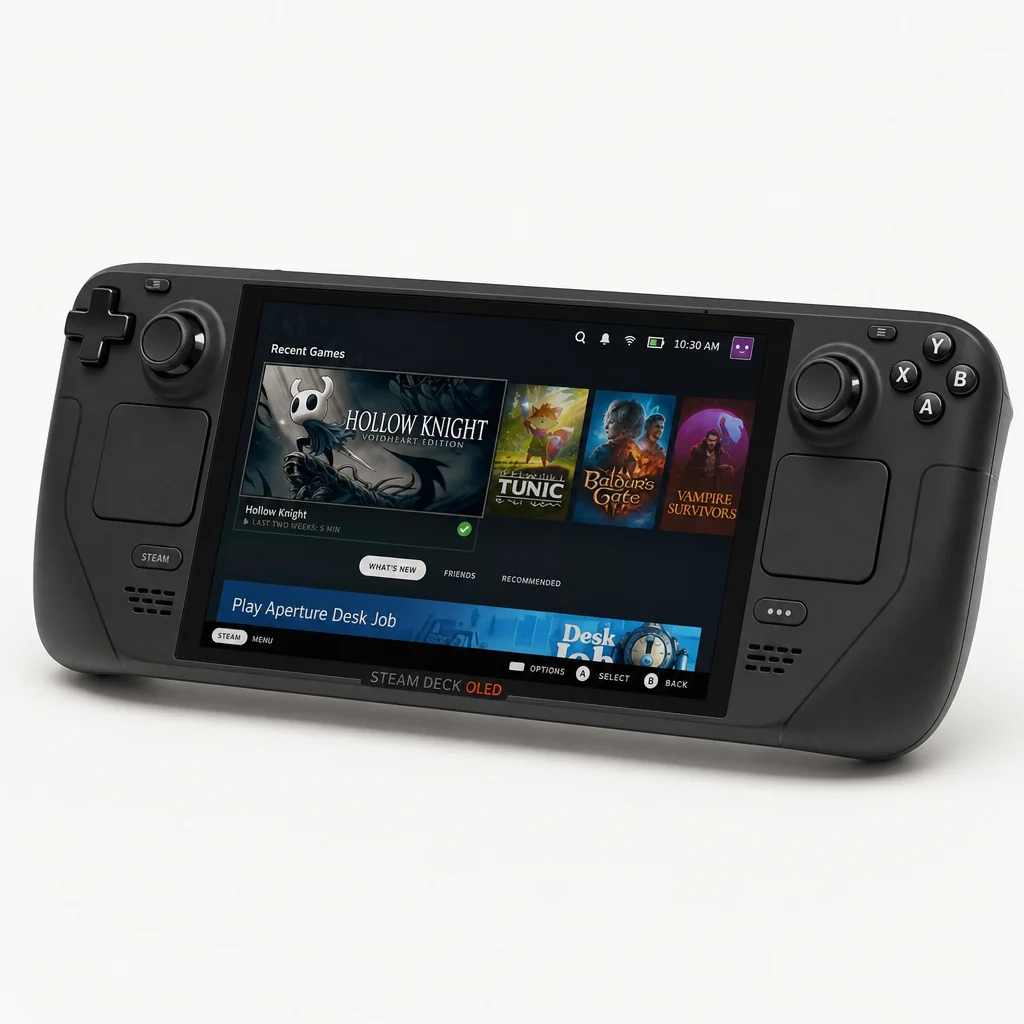
Steam Deck OLED
See Steam Deck OLED on Amazon UK
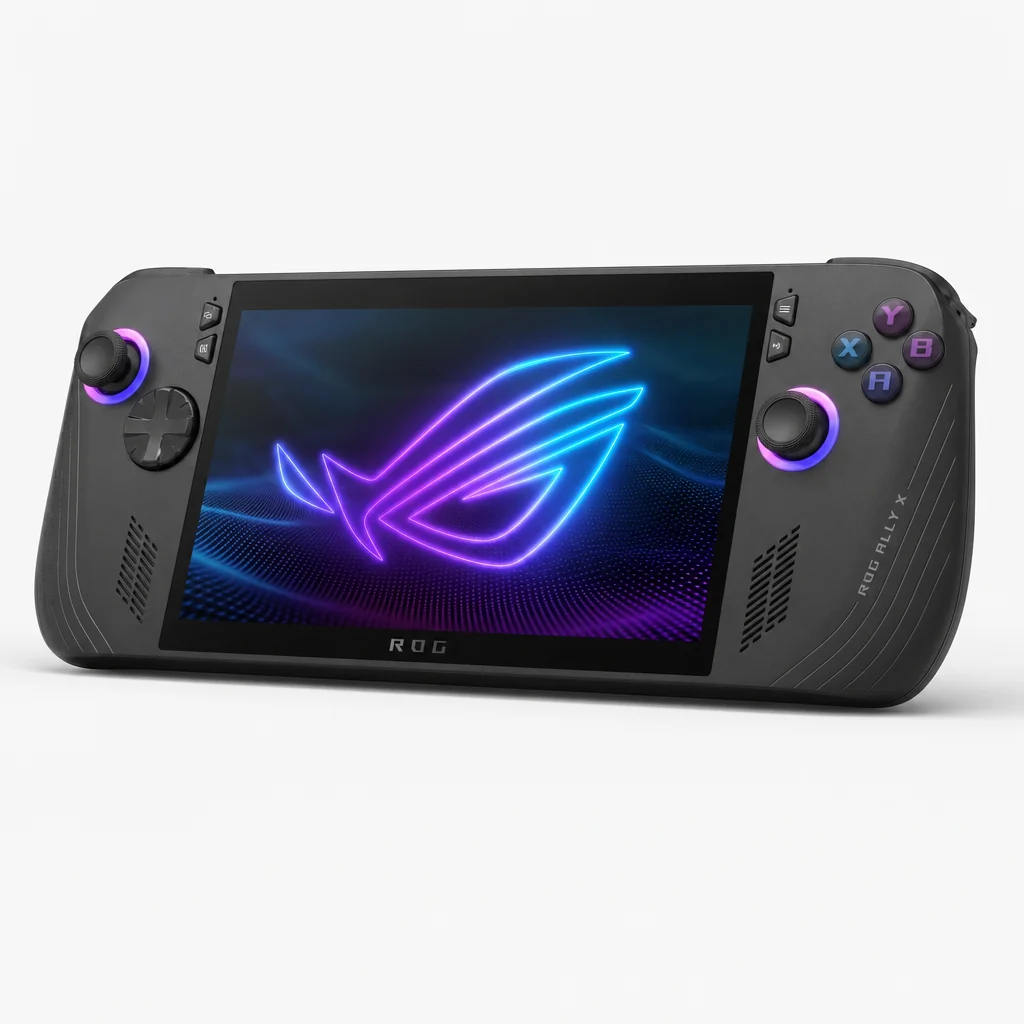
ROG Ally X

See ROG Ally X on Amazon UK
Check today's price & availability on Amazon UK
Because the Ally X runs full Windows 11, it's the most open of the three when it comes to storefronts and launchers. Steam, the Epic Games Store, GOG, Xbox Game Pass, Battle.net — whatever you use, it works, because it's simply a Windows PC in handheld form. That flexibility is genuinely liberating for anyone whose library is spread across multiple platforms. The trade-off is that Windows itself isn't designed for a 7-inch touchscreen, so you'll occasionally find yourself poking at tiny buttons or wrestling with a launcher that expects a mouse.
Exclusive games
Only the Switch 2 plays Nintendo's first-party titles and offers backward compatibility with most of the Switch 1 library.
Existing PC library
Every storefront
The ROG Ally X runs Windows 11, so Steam, Epic, GOG, Game Pass and every other launcher work out of the box.
Design, Ergonomics and Extras
These devices feel very different in the hand, and the little design touches add up over long sessions.
The Switch 2 is the lightest of the trio at 536g with the Joy-Con 2 attached (400g for the console alone), which matters over long handheld sessions. The headline change is that the Joy-Con 2 now attach magnetically rather than sliding onto rails — a slicker, more satisfying mechanism. They also gain a new mouse function, letting you glide a Joy-Con across a flat surface as a pointer, which opens up interesting control possibilities for certain genres. There's a dedicated C button for GameChat, Nintendo's built-in voice and screen-sharing hub, plus two USB-C ports (one top-mounted for accessories and charging, one on the bottom for the dock).
The Steam Deck OLED weighs 669g and is around 5% lighter than the outgoing LCD model. Valve refined the thermals and made the internals more serviceable — it uses Torx screws for easier disassembly, and fan noise stays below a quiet 32 dB under load. It has dual front-facing speakers, a 3.5mm headphone jack, Wi-Fi 6E and Bluetooth 5.3. Everything about it feels considered, from the improved haptics to the anti-glare screen coating.
The ROG Ally X weighs 678g and measures 279.9 × 111.0 × 24.6mm. ASUS packed in a lot: one USB4 port with DisplayPort 2.1 plus one USB 3.2 Gen 2 Type-C port with DisplayPort 1.4, a second USB port, a 3.5mm jack and a UHS-II microSD reader. Audio is a genuine highlight, with a dual-speaker system carrying Dolby Atmos, AI noise-cancelling, Hi-Res Audio certification and a built-in array mic. The "Zero Gravity" thermal system uses a 23% smaller fan with 50% thinner fins yet delivers 10% more airflow, and the full-size buttons and improved D-pad make it comfortable for long sessions.
Comfort over long sessions
The Switch 2 is meaningfully lighter than both PC handhelds, which really tells during a two-hour stint on the sofa. The Steam Deck and Ally X are within 9g of each other in weight, but the Ally X's larger grips and full-size buttons make it feel a touch more ergonomic for players with bigger hands.
Docking and the Big-Screen Experience
All three can play on a television, but they go about it very differently — and this is one of the Switch 2's clearest wins.
The Switch 2 is built around the dock. Slide it in and it outputs up to 4K UHD (3840 × 2160) at 60fps to your telly, dropping to 1080p in tabletop and handheld modes. This hybrid transition is seamless and utterly core to the Switch identity: pick it up to play on the go, drop it in the dock to continue on the big screen. Nothing else here does that switch quite as elegantly, and the 4K output is a genuine step up for living-room play.
The Steam Deck OLED outputs to a TV via a USB-C dock (sold separately), turning it into a compact living-room PC. It works well and Desktop Mode makes it flexible, but it's a more deliberate setup process than the Switch's drop-in dock.
The ROG Ally X has arguably the most capable connectivity of all thanks to its one USB4 port with DisplayPort 2.1 plus one USB 3.2 Gen 2 Type-C port with DisplayPort 1.4. You can drive external displays, and USB4 even opens the door to external GPU enclosures for a serious power boost at a desk — something neither of the others can match. As a Windows PC, it's the most versatile once connected to a screen, keyboard and mouse.
If the "play on the telly" use case is central to how you'll use the device, the Switch 2 makes it effortless with its included 4K dock. The PC handhelds can absolutely do big-screen gaming too, but expect to buy a dock and do a little more setup.
Pros and Cons of Each Handheld
Nintendo Switch 2
Pros
- Exclusive Nintendo games plus backward compatibility with most Switch 1 titles
- Largest, sharpest handheld screen — 7.9-inch 1080p 120Hz with VRR
- Lightest device here at 536g with Joy-Con 2
- Seamless 4K 60fps docked output for TV play
- Clever Joy-Con 2 with magnetic attach and mouse mode
Cons
- Closed ecosystem — no third-party storefronts or PC games
- LCD panel can't match OLED contrast
- Demanding titles can drop battery life to around 2 hours
- Only Wi-Fi 6, not the newer Wi-Fi 6E
Steam Deck OLED
Pros
- Gorgeous 1000-nit HDR OLED with anti-glare coating
- Plays your existing Steam library — huge value if you own PC games
- Superbly optimised SteamOS with ~94% Proton compatibility on top titles
- Quiet under load (<32 dB) and easy to service via Torx screws
- Wi-Fi 6E and Bluetooth 5.3
Cons
- Lowest resolution panel at 1280 × 800
- Least powerful CPU — 4 cores versus the Ally X's 8
- Linux means the odd anti-cheat game won't run
- Dock sold separately for TV play
ROG Ally X (2024)
Pros
- Most raw power — 8-core Ryzen Z1 Extreme and 24GB LPDDR5X
- Huge 80Wh battery, up to ~10 hours on lighter games
- Windows 11 runs every storefront and launcher
- one USB4 port with DisplayPort 2.1 plus one USB 3.2 Gen 2 Type-C port with DisplayPort 1.4 for external displays and eGPUs
- Excellent audio — Dolby Atmos, Hi-Res certified
Cons
- Windows isn't built for a 7-inch touchscreen — more fiddly
- Dimmest display of the three at 500 nits, LCD not OLED
- Heaviest device at 678g
- More setup and maintenance than the console-like rivals
Overall Ratings
Here's how I'd score each device across the categories that matter most. Remember these ratings reflect each device against its own goals as much as against each other.
Nintendo Switch 2 Rating
Steam Deck OLED Rating
ROG Ally X Rating
All three are excellent — the right one depends far more on your library and priorities than on any single score.
Frequently Asked Questions
Who Should Buy Which?
Rather than crown one absolute winner, here's how I'd steer different kinds of buyer.
Buy the Nintendo Switch 2 if…
You want Nintendo's exclusive games, family-friendly multiplayer and a seamless jump from handheld to a 4K telly. You value simplicity, the lightest device and the biggest, sharpest screen — and you don't need a PC platform.
Buy the Steam Deck OLED if…
You already own a Steam library and want the most polished, appliance-like PC handheld. You'll love the gorgeous OLED screen, quiet operation and superb out-of-the-box optimisation, and you're happy with a Linux-based system.
Buy the ROG Ally X if…
You want maximum power, the biggest battery for lighter games and full Windows flexibility across every storefront and launcher. You don't mind a little extra setup, and you value USB4 for external displays or an eGPU.
Check the latest price and any current bundles on Amazon.
The Verdict
After months with all three, my honest conclusion is that there's no single "best" handheld in 2026 — there's only the best handheld for you, and it hinges almost entirely on which library you're buying into.
For most families and Nintendo fans
The Nintendo Switch 2 is the easy recommendation. Its exclusive games, backward compatibility with most Switch 1 titles, lightest-in-class body, biggest and sharpest 7.9-inch 120Hz screen and effortless 4K docked play make it the most polished all-round package for anyone who isn't specifically chasing PC gaming.
For existing PC gamers
The Steam Deck OLED is the sweet spot. That stunning 1000-nit HDR OLED, the quiet and refined hardware, and Valve's exceptional software tuning make it feel like a console despite being a full PC. If you already own games on Steam, it delivers the most value and the least hassle.
For power users and platform hoppers
The ROG Ally X is the enthusiast's pick. Its 8-core Ryzen Z1 Extreme, 24GB of fast memory, huge 80Wh battery and full Windows 11 flexibility make it the most capable and open device here — provided you're comfortable doing a bit more of the driving yourself.
Pick the ecosystem first, and the right handheld will pick itself.
- Nintendo Switch 2View on Amazon
- ROG Ally XView on Amazon