
MacBook Neo Review: Is Apple's First Sub-£600 Laptop Actually Any Good?
Apple put an iPhone 16 Pro chip in a colourful £599 MacBook, stripped out plenty of familiar luxuries, and called it Neo. I spent time with the compromises that matter — including Apple Intelligence on mobile silicon.
The MacBook Neo makes a very different first impression from the sober MacBook Air range: this is Apple attempting to make a laptop feel approachable again.
Apple had never sold a MacBook below £600 in the UK. Then the MacBook Neo arrived at £599, with an A18 Pro chip, regular macOS 26 Tahoe and Apple Intelligence. It is a properly significant little machine — and also a lesson in how many small luxuries we had started taking for granted.
Shop MacBook Neo value on Amazon UK
MacBook Neo at a glance: a real Mac for less
The Neo is not an iPad wearing a keyboard case, nor a cut-down version of macOS. It is a conventional, fanless MacBook running the same macOS 26 Tahoe environment as its more expensive siblings. You get desktop apps, proper window management, external display support through one of its USB-C ports, and the familiar Apple ecosystem advantages if your phone, tablet and earbuds already have fruit logos on them.
That is the headline. The asterisk is that Apple had to be ruthlessly practical to reach this price. There is no MagSafe, no Thunderbolt, no backlit keyboard, no Force Touch trackpad, no P3 wide-colour panel, no True Tone, no Wi-Fi 7 and no 12MP Centre Stage webcam. Any one omission is manageable. Put them together and the Neo feels less like a cheaper MacBook Air than a deliberately different branch of the family tree.
Still, its core proposition is unusually strong. The A18 Pro delivers startling single-core speed for this money, the chassis is aluminium rather than bargain-bin plastic, and Apple Intelligence runs here rather than being held back for an M-series machine. For schoolwork, browsing, writing, music, casual photo management and the general administrivia of modern life, it can feel faster than plenty of more expensive-looking Windows laptops.
Pros
- Excellent single-core performance at this price.
- Proper aluminium MacBook build in four cheerful colours.
- Sharp 3:2 display is excellent for documents and browsing.
- Apple Intelligence is supported despite the mobile-class chip.
- Silent, cool-running fanless everyday experience.
Cons
- 8GB memory and storage are fixed forever.
- Battery capacity is modest and real-world stamina disappoints.
- Heavy multi-core and video work expose the A18 Pro's limits.
- No backlit keyboard, MagSafe, Thunderbolt or Force Touch.
- Base 256GB model also misses out on Touch ID.
Four colours, one chassis: what the MacBook Neo actually looks like
The Neo gets something Apple had largely edited out of its laptop wardrobe: personality. Silver is the safe, timeless choice, and probably the one that will still look entirely at home in a meeting room several years down the road. Indigo is the dark blue option, a little more grown-up but not quite as anonymous as Space Grey would have been. Then there are Blush, a light pink, and Citrus, a warm yellow that makes the Neo look almost toy-like from a distance.
I mean that as a compliment. The playful finishes are a useful reminder that an affordable laptop does not have to look apologetic. Citrus will not be for everyone — it is absolutely a conversation starter — whilst Blush manages to feel softer and more premium than the marketing photographs might suggest. Silver is the practical recommendation if you are buying for a business-minded teenager or sharing a machine in a household. Indigo is my favourite of the four. It has enough colour to make the Neo recognisable, without asking for applause every time you open the lid.
All versions use an aluminium case, produced through a process Apple said reduced material waste. Sustainability claims are easy to throw around in a product launch, so I would not buy a laptop solely on that basis. But it is still welcome to see the entry-level Mac retain metal construction rather than switching to a cheaper-feeling shell. The Neo feels like a MacBook in the important tactile sense: the lid is solid, the wrist rest is cleanly finished, and it does not flex or creak like the more forgettable end of the budget laptop aisle.
At 297.5 x 206.4 x 12.7mm, it has a footprint smaller than an A4 sheet in both directions. It slips into a backpack easily, and at 1.23kg it is light enough for commuting or carrying around campus without becoming a daily grudge. The 12.7mm profile is not record-breaking, but it is neatly slim and substantially more polished than the bulky, plastic-heavy budget Windows laptops many buyers will have encountered.
The small but important design win
The Neo does not look like Apple made it cheaply. It looks like Apple chose where to spend the money: the chassis, display sharpness and chip feel premium; several convenience features do not. That distinction matters more in daily use than a flashy spec sheet.
Silver, Blush, Citrus and Indigo give the Neo a more relaxed character than the standard MacBook Air palette, whilst retaining an all-aluminium enclosure.
Compact footprint
At 297.5 x 206.4mm, the Neo occupies less desk space than a standard A4 sheet. It is an easy laptop to pack, open on a train table or use in a cramped student room.
1.23kg travel weight
It is not featherweight in the abstract, but this is a very manageable carry weight for a metal laptop with a 13-inch display.
Waste-reducing process
Apple described the aluminium manufacturing process as one that reduces material waste — a meaningful design consideration rather than an excuse to overlook repairability and longevity.
Retina on a budget: screen quality and what Apple left out
The 13-inch Liquid Retina IPS LCD is one of the Neo's best decisions. Its 2,408 x 1,506 resolution works out at roughly 224 pixels per inch, which makes text pleasingly crisp. Documents look clean rather than grainy, browser type is easy on the eyes, and the fine detail in photos is more than adequate for the casual editing most owners will do.
Just as importantly, this is a 3:2 display. That is a more productive shape than the broad 16:9 panels common in inexpensive laptops because it gives you extra vertical room. You can see more of a Word document, more lines in a spreadsheet, more of a webpage before the endless scroll begins. It does not sound glamorous. It is, however, one of those things you notice immediately when you move back to a wider, shallower screen.
The panel reaches 500 nits peak brightness, so working near a window or in a well-lit room is not a problem. The 60Hz refresh rate is perfectly ordinary. There is no ProMotion, and anyone used to a 120Hz phone or premium tablet will spot that scrolling is less buttery. But this is not a unique budget compromise: 60Hz IPS remains normal at this price on Windows too. I would much rather have a sharp, bright 60Hz screen than a lower-resolution panel chasing a meaningless headline figure.
The losses are colour-focused. The Neo is limited to sRGB rather than the wider P3 gamut, and it lacks True Tone. For writing, browsing, streaming and classroom work, neither omission should be a deal-breaker. For photographers, designers and anyone delivering colour-critical client work, they are very good reasons to buy an Air instead. The Neo can display photos nicely; it is not the machine I would choose to judge exact colours before sending work to print.
Screen reality check: 60Hz is normal at this price. The more consequential omissions are P3 colour and True Tone, which affect specialist creative work far more than coursework, web browsing or Netflix.
iPhone chip in a laptop: how the A18 Pro actually performs
This is the part that makes the Neo genuinely fascinating. Apple used the exact same 3nm A18 Pro silicon found in the iPhone 16 Pro line, then put it inside a laptop. That sounds like a novelty until you look at the numbers. The chip has a six-core CPU with two performance cores and four efficiency cores, a five-core GPU, and a 16-core Neural Engine. The performance cores can reach approximately 4.04GHz.
For everyday work, the A18 Pro is quick. Very quick. Geekbench 6 returned a single-core score of 3,461, with some runs reaching 3,589. That puts it 47% ahead of the original M1's 2,346 result, ahead of M2 and M3 in this particular measure, and within around 6–7% of the M4's 3,696. Single-core performance is what makes a computer feel alert when you open apps, jump around a browser full of tabs, edit a document or ask the system to do one thing right now. The Neo feels responsive because this aspect of the chip is extremely good.
Apple's unified memory architecture helps too. The 8GB memory pool is shared by the CPU, GPU and Neural Engine rather than split into separate silos. It is not magic — 8GB is still 8GB, and it will become a constraint with very heavy multitasking or demanding creative projects — but unified memory is efficient. For the intended light-to-medium workload, macOS and the chip work together neatly. It is less sensible to compare the number in isolation with a Windows laptop's RAM figure than it is to ask whether your own work regularly includes huge media files, virtual machines or dozens of ambitious apps.
Where the phone-chip heritage catches up with it is sustained multi-core work. The Neo scored around 8,668 in Geekbench 6 multi-core testing, with another result reaching 9,239. That is respectable, but its six cores put it behind the Surface Laptop 13 at 11,321 and the M3 MacBook Air at 12,087. In Cinebench 2024, it scored 161 single-core and 654 multi-core. More tellingly, the fanless design gives full burst performance for about 60 seconds before thermal throttling sharply reduces CPU utilisation — by 64% in 15 seconds.
That sounds brutal because it is. A fanless machine has nowhere to put sustained heat. The consolation is that the Neo stayed comfortable to the touch even during stressful Cinebench workloads, and it remained completely silent. For a student writing an essay, a parent sorting photos, or somebody working in a library, silence is a feature. For somebody exporting long videos every day, it is a warning label.
The A18 Pro is extraordinary at quick, everyday tasks; prolonged rendering and video work are where the fanless laptop design starts to show its limits.
| Measured result | MacBook Neo | Surface Laptop 13 | M3 MacBook Air |
|---|---|---|---|
| Geekbench 6 single-core | 3,461 | — | — |
| Geekbench 6 multi-core | 8,668 | 11,321 | 12,087 |
| HandBrake 1080p transcode | 9 minutes 57 seconds | Under 5 minutes | — |
| Light-load battery result | 7 hours 48 minutes | — | 11.5 hours |
| Heavy-load battery result | Just under 4 hours | — | 4 hours 41 minutes |
Apple Intelligence on mobile silicon: the AI reality check
Apple Intelligence is one of the Neo's strongest arguments, not because it turns the laptop into a robot but because it removes the artificial feeling of buying an entry-level machine that is already excluded from modern software features. The A18 Pro and 8GB of unified memory meet Apple's requirements, so the Neo runs Apple Intelligence on macOS 26 Tahoe.
In plain English, the 16-core Neural Engine is a specialised processor for machine-learning tasks. Rather than asking the main CPU to do everything, Apple can send certain AI workloads to this dedicated hardware. That can make those jobs more power-efficient and quicker, whilst keeping data processing on the device where appropriate. It is the same broad idea as the NPUs now appearing in Windows laptops, just deeply integrated into Apple's silicon and operating system.
The useful bit is not a score or a buzzword. It is whether the features fit into work you already do: drafting and rewriting text, summarising material, making sense of notifications, generating images in supported contexts, or using smarter assistance inside system apps. Apple Intelligence does not replace knowing what you want to say, and it is not a licence to submit unedited machine-written coursework. Nothing quite says "please look at my work more closely" like a paragraph that sounds faintly written by a cheerful corporate ghost.
But the Neo demonstrates that mobile-class silicon is not inherently second-class here. The 16-core Neural Engine and 8GB memory make Apple Intelligence practical, and it operates within the same regular macOS environment. That is meaningful at £599. Plenty of budget laptops can run browser-based AI services, of course, but the Neo offers the integrated Apple route without requiring an M-series upgrade.
AI worth having is boring in the best way
Apple Intelligence makes the most sense when it saves a few minutes inside the apps and workflows you already use. Buy the Neo because it is a competent laptop first; consider on-device AI a useful layer of future-facing capability, not the entire reason to own one.
16-core Neural Engine
This dedicated part of the A18 Pro handles compatible machine-learning operations rather than leaving every task to the CPU alone.
On-device capability
The Neo meets the hardware threshold for Apple Intelligence in macOS 26 Tahoe, even with its phone-derived processor.
Unified memory
The 8GB pool is shared between processing, graphics and AI hardware. Efficient, yes; expandable, sadly not at all.
Battery life: the small cell that could — and sometimes couldn't
The MacBook Neo has a 36.5Wh battery. The MacBook Air M4, and the newer 13-inch MacBook Air M5, use a 53.8Wh battery instead. That makes the Neo's cell roughly 32% smaller, which is not a minor paper difference. It is the sort of gap that decides whether you bring a charger to a long day away from a plug.
Apple rated the Neo for up to 16 hours of video streaming or 11 hours of web browsing. Those are controlled, best-case figures, as manufacturer battery claims always are. Under light-load testing, the Neo managed 7 hours 48 minutes. Under a heavier load it lasted just under four hours. By comparison, the MacBook Air M4 managed 11.5 hours under that light condition and 4 hours 41 minutes under heavy use.
There are two ways to read those results. The generous reading is that almost eight hours of light work can cover a school or office day if you are sensible with brightness and workload. The less generous one is that Apple spent so much effort making the Neo feel like a portable Mac that its endurance falls well below the expectation set by recent Apple laptops. Both are true.
For writing, email, web browsing and streaming, it is workable. For a long day of lectures, travel, lots of video calls or heavier multitasking, I would plan around a charger. There is no MagSafe, so charging happens over USB-C. One USB-C port offers USB 3 speeds and DisplayPort capability; the second is USB 2. It is all functional, but a less elegant experience than the magnetic cable and more flexible connectivity you get higher up Apple's range.
Practical battery advice: treat Apple's 11-hour web figure as a lab maximum rather than a promise. The 7-hour-48-minute light-load result is the more sensible planning number if your day involves Wi-Fi, normal brightness and actual human behaviour.
The Neo's 36.5Wh battery keeps the chassis light, but it is significantly smaller than the 53.8Wh cell used in the 13-inch MacBook Air range.
Webcam, speakers and the stuff that makes daily life better — or worse
Apple fitted a 1080p FaceTime HD camera, a clear saving compared with the 12MP Centre Stage camera found on the MacBook Air. It is a downgrade, no point pretending otherwise. There is no Centre Stage subject tracking to pan and zoom around as you move, and the Neo will not have the same flexibility if you are presenting, cooking on a call, or attempting to keep a toddler and a cat in shot at once. A surprisingly common modern workload, frankly.
For a normal solo FaceTime, Zoom or Teams call, though, 1080p is entirely serviceable. It is competitive at this price, where budget Windows laptops have often used 720p cameras. Good lighting remains the biggest factor in looking presentable, and the Neo's 1080p unit is capable enough for remote meetings, family calls and online tutorials. It is not an exciting camera. A laptop webcam should rarely be exciting.
The dual-microphone array uses directional beamforming, helping it focus on your voice rather than every clatter in the kitchen. That makes the Neo a better practical communication machine than its stripped-down specification might initially suggest. The side-mounted speakers support spatial audio and Dolby Atmos. Their placement is sensible: they are less easily muffled than bottom-firing speakers when the laptop is on a soft surface, and the feature support gives streamed films and music a little more scale than you might expect from such a slim device.
Then there is the input hardware. The Magic Keyboard is comfortable and familiar, but it has no backlighting. This is one of those savings that will annoy some people every evening and never bother others. If you regularly write in bed, on late trains or in dim lecture halls, it matters. The multi-touch trackpad lacks Force Touch haptic feedback. It is still a capable trackpad, but the click does not have the refined, consistent feel of a modern MacBook Air.
Touch ID is even stranger: it is reserved for the 512GB model. The 256GB version, the one designed to get people through the door at £599, lacks the most convenient method for unlocking the Mac and approving purchases. It does not ruin the laptop. It is simply a frustratingly artificial distinction.
1080p FaceTime HD camera
Good enough for everyday calls and competitive among budget laptops, but a step below the MacBook Air's 12MP Centre Stage setup.
Spatial audio speakers
Side-positioned speakers support Dolby Atmos and spatial audio, giving casual streaming a more satisfying soundstage than basic laptop audio.
Keyboard compromises
The Magic Keyboard remains pleasant to type on, but there is no backlight. The trackpad also drops Force Touch haptics.
Ports, storage and the compromises you cannot fix later
The Neo has two USB-C ports and a 3.5mm headphone jack. One USB-C port supports USB 3 speeds and DisplayPort; the other is rated at USB 2. This is a very Apple way of making a budget machine: the ports look symmetrical until you discover they are not equally useful. If you connect a fast external SSD, a display or a hub, use the capable port. The other is best thought of as a charging or low-speed accessory connection.
No MagSafe means both ports can feel precious. Charge on one side and attach a drive on the other, and you are basically done. There is no Thunderbolt for high-bandwidth professional docks or specialist storage. Most Neo buyers will not care. Those who do should not try to rationalise their way around it; the MacBook Air is the better fit.
The bigger concern is internal capacity. You get 8GB of unified memory and either 256GB or 512GB of storage, with no higher configuration at purchase and no later upgrade path. That makes the decision unusually final. A 256GB machine can work if your files mostly live in cloud storage and you do not maintain a large photo library, game collection or video archive locally. It gets tight quickly otherwise, especially after macOS, apps and the inevitable pile of downloads you fully intended to sort out last weekend.
The 512GB configuration includes Touch ID as well as double the storage. That makes it the more comfortable long-term choice, even if it rather undermines the whole idea of a stripped-back entry Mac. The base model makes sense only if £599 is a hard ceiling and your needs are genuinely modest.
MacBook Neo 256GB
8GB unified memory, 256GB storage and no Touch ID. Education pricing was £499.
MacBook Neo 512GB
8GB unified memory, 512GB storage and Touch ID. The sensible configuration if you can stretch.
MacBook Neo value: cheap for Apple, not cheap in isolation
Shop MacBook Neo value on Amazon UK
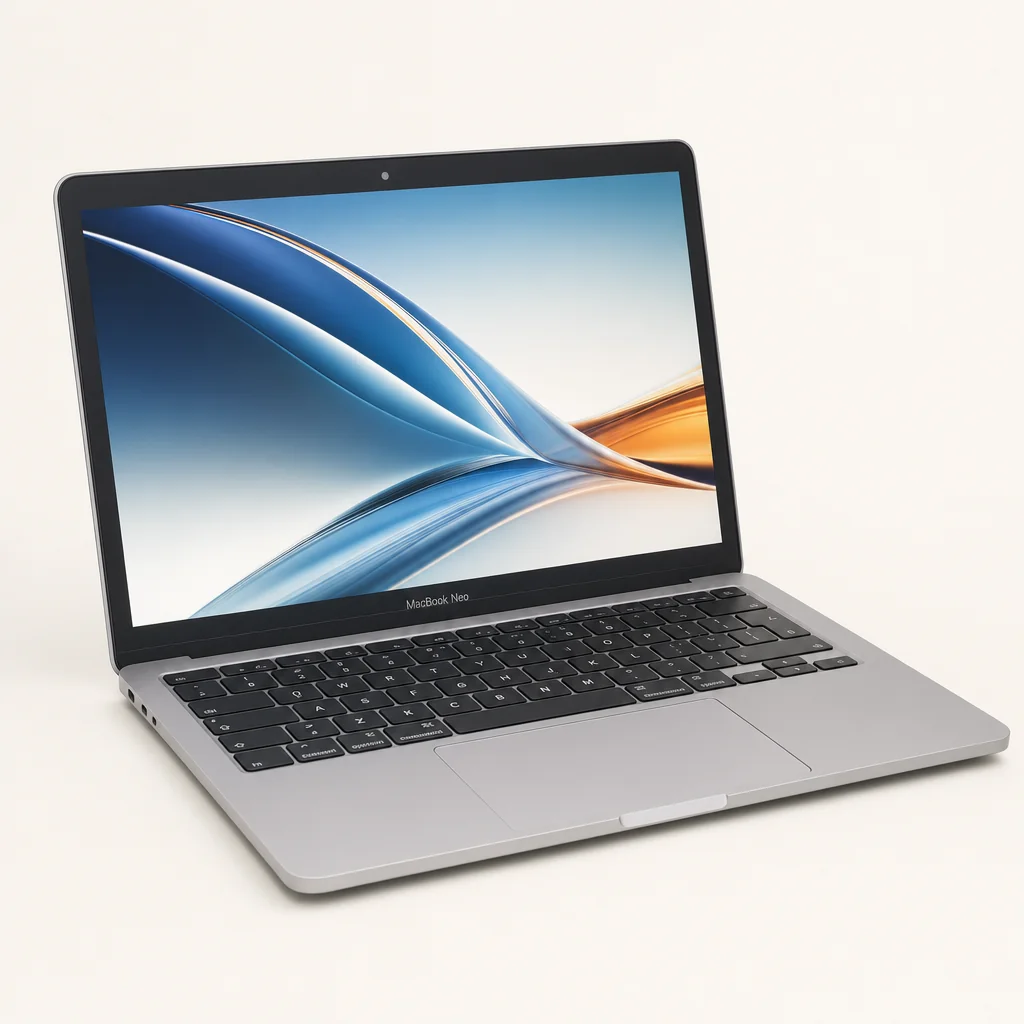
In the UK, the Neo begins at £599, with education pricing at £499. That is the breakthrough. It brings macOS, Apple silicon, an aluminium enclosure and Apple Intelligence into a price band Apple had previously ignored. It also makes the Neo an easy recommendation for someone who specifically wants a Mac but simply could not justify a MacBook Air.
At £699 for the 512GB model with Touch ID, the calculation becomes more awkward. It remains a fair price for what it is, but it is no longer an impulse-level entry point. You need to decide whether you are paying for the Mac experience or whether you need the flexibility that a more fully specified machine brings. The Neo's memory ceiling, battery result and weak sustained multi-core performance are all easier to accept at £599 than at £699.
US buyers had a different story: the Neo launched at $599, but Apple increased the base price by $100 in June 2026, taking it to $699. The 512GB model rose to $799. That change made the UK pricing look comparatively tidy, particularly for students. Still, value is not just a launch price. It is about whether the laptop will remain comfortable for the next several years, and that is where the fixed 8GB memory gives me pause.
The good news is that the core experience does not feel cheap. The bad news is that Apple removed some of the small touches that usually make a MacBook feel effortlessly nicer than the competition. This is an honest budget laptop, not a budget laptop pretending it is a MacBook Air.
The MacBook Neo's value proposition is strongest at the £599 entry price, where its premium chassis and fast single-core performance stand out most clearly.
MacBook Neo 256GB
The £499 education price made this a compelling choice for essays, research, streaming and general university life — provided cloud storage suits you.
MacBook Neo 512GB
More storage and Touch ID make this the less frustrating family laptop for browsing, admin, photos and video calls.
MacBook Neo
Excellent single-core speed, silent operation and a sharp 3:2 display make it very good for documents, email and browser-heavy work.
M3 MacBook Air
Its confirmed 12,087 multi-core score and stronger battery results better suit sustained creative work than the fanless A18 Pro Neo.
Who should buy the MacBook Neo — and who should keep looking?
Buy the MacBook Neo if you want a straightforward Mac for ordinary life and have a clear budget. It is especially well aimed at students, first-time Mac buyers, families who need a shared machine, and iPhone owners who value continuity across Apple devices. The screen is lovely for the money, the chassis feels substantially better than many rivals, and everyday performance is genuinely excellent.
It is also a sensible machine for people who value silence. No fan means no whine during a late-night writing session, no sudden burst of noise during a video call, and no sense that the laptop is working harder than you are. The A18 Pro is extremely efficient in lighter tasks, and the Neo stays cool to the touch even when pushed harder than most intended owners will push it.
Do not buy it for professional video editing, lengthy rendering, regular code compilation, large local media libraries or demanding multi-app workloads. The HandBrake result of 9 minutes 57 seconds for a 1080p transcode makes the point nicely, especially alongside the Surface Laptop 13's sub-five-minute result. You can do those things on the Neo. You will simply spend more time doing them, and performance will drop back under sustained heat.
Likewise, skip the base model if 256GB already sounds restrictive. Storage anxiety is not a personality trait you need to cultivate. The 512GB model is the safer long-term machine and adds Touch ID, but anyone who needs more than 8GB memory cannot solve that problem by spending a little more. They need a different Mac.
MacBook Neo FAQ
The Neo is most convincing as a quiet, colourful everyday Mac: ideal for writing, browsing and study, rather than a substitute for a higher-spec creative workstation.
Verdict: a clever first Mac, with carefully priced compromises
The MacBook Neo is actually good. Not "good for the money, if you squint", but a properly pleasant everyday laptop with a premium-feeling aluminium body, a sharp productivity-friendly display, excellent single-core speed and full Apple Intelligence support. Apple putting the iPhone 16 Pro's A18 Pro inside a £599 MacBook was a bold move, and for light work it paid off.
But this is not the MacBook Air bargain some people hoped for. The small 36.5Wh battery, 8GB memory ceiling, modest sustained performance, non-backlit keyboard, basic trackpad, limited ports and missing Touch ID on the base model are real trade-offs. Buy the 256GB Neo if price is everything and your needs are simple. Buy the 512GB version if you can stretch. And if your work involves serious media, creative projects or all-day untethered use, save for a MacBook Air instead.
Gadget Scout rating: 7.8/10. A welcome, capable entry point to macOS — just make sure its limits are your limits too.