
Best Budget OLED Monitors for Gaming: Affordable QD-OLED, Tested for Real
Newer QD-OLED panels are finally landing at prices regular humans can afford. I've dug into the brightness numbers, the burn-in warranties and the connectivity trade-offs so you don't get burnt — figuratively or literally.
We link to the exact model on Amazon UK. Prices change often, so check the live price before you buy. As an Amazon Associate we earn from qualifying purchases.
Why QD-OLED, and Why Now?
QD-OLED is a Samsung Display panel technology that pairs a self-emissive OLED layer with a quantum-dot colour filter. In plain English: every pixel makes its own light, so blacks are genuinely black rather than dark grey, and the quantum dots produce vivid, saturated colour without the brightness penalty older filter approaches suffered from. For gaming, the killer feature is response time — these panels switch pixels in fractions of a millisecond, which means almost no motion smearing behind fast-moving objects.
What's new is the price. The Alienware AW2726DM arrived as the cheapest QD-OLED from a major brand, and AOC then folded the tech into its mass-market G4 gaming line for the very first time with the Q27G4ZDR. MSI, meanwhile, brought a fourth-generation Samsung panel to a 4K screen, the MAG 272UP QD-OLED X24, undercutting every 4K QD-OLED that came before it. Three different routes to the same goal: getting you onto an OLED panel without flagship money.
Per-pixel black levels
Self-emissive pixels switch off completely, so contrast in dark scenes is effectively limitless — the MSI is even rated at a 1.5 million:1 contrast ratio.
Blistering response times
The AOC and MSI panels are both rated at 0.03ms grey-to-grey, which is the kind of figure that keeps fast motion crisp rather than blurry.
Wide colour gamut
All three cover roughly 99% of DCI-P3, so HDR films and saturated game worlds look genuinely punchy and well-saturated.
The Alienware AW2726DM: Bare-Bones Brilliance
Currently unavailable on Amazon UK. Dell sells the AW2726DM in batches and it goes in and out of stock. If you want a QD-OLED at this price today, the AOC below is the closest thing on sale — same Samsung panel family, 240Hz in the Q27G4ZDR form reviewed here, and it adds the USB hub and KVM the Alienware leaves out. (AOC also sells the 280Hz AG276QZD2 and a 360Hz Q27G4SDR, so check the exact model code before ordering.)

See AOC AG276QZD2 27in QD-OLED on Amazon UK
Check today's price & availability on Amazon UK
If you want the cheapest way onto a name-brand QD-OLED, this is it. The AW2726DM uses a 3rd-generation Samsung panel with the updated subpixel layout, which matters more than it sounds — older QD-OLED screens had a slightly odd triangular subpixel arrangement that could leave coloured fringing around text. The newer layout cleans that up, so this is a screen you can comfortably use for desktop work as well as gaming.
It's a 27-inch class screen (26.5 inches of actual panel) at 2560 × 1440, running at 240Hz with FreeSync Premium baked in. The colour coverage is excellent for the money: 98.9% of DCI-P3, 98.6% of Adobe RGB and 158.5% of sRGB. That's a properly wide gamut, and it means saturated content looks superb straight out of the box.
Where Alienware has saved money is on the extras. Connectivity is genuinely minimal: two HDMI 2.0 ports, a single DisplayPort 1.4 and a 3.5mm headphone jack. There's no USB hub, no KVM switch and no built-in speakers. That's the trade-off you make for the lowest entry price — this is a "plug your PC in and game" monitor, not a desk command centre.
The AW2726DM peaks at around 1,000 nits on HDR content but is rated at 200 nits for SDR brightness — that SDR figure is something to keep in mind if your room gets a lot of daylight. More on brightness shortly.
Pros
- The cheapest QD-OLED from a major brand
- Updated 3rd-gen subpixel layout improves text clarity
- Exceptional colour coverage — 98.9% DCI-P3
- 240Hz with FreeSync Premium
- Three-year warranty that includes burn-in cover
Cons
- No USB hub, KVM or speakers
- HDMI tops out at 2.0 rather than 2.1
- 200-nit SDR brightness is modest in bright rooms
- No RGB or styling frills for the showcase crowd
The Alienware keeps things clean and frill-free — the budget goes into the panel, not the ports.
AOC AG276QZD2: The Cheapest Real QD-OLED
See AOC AG276QZD2 27in QD-OLED on Amazon UK
Check today's price & availability on Amazon UK
This is the one I'd point most people towards if connectivity matters to them. The Q27G4ZDR is the first QD-OLED in AOC's popular and affordable G4 gaming line, and rather than stripping things back to hit a price, AOC has loaded it up. It's a 27-inch class (26.5-inch actual), flat, 2560 × 1440 panel running at 240Hz with a 0.03ms grey-to-grey response and full 178/178° viewing angles.
The connectivity is where it pulls ahead of the Alienware in a big way: two HDMI 2.1 ports, one DisplayPort 1.4, four USB-A ports and — crucially — a KVM switch and a headphone jack. The KVM means you can run two machines through one keyboard and mouse, which is genuinely handy if you've got a work laptop alongside your gaming rig. The stand is properly adjustable too, with height, tilt and swivel plus VESA mounting support.
Colour coverage is right up there with the Alienware: AOC quotes 99.1% DCI-P3 (with a separate measurement of 99.4%), 98% Adobe RGB and 147.6% sRGB. Peak HDR brightness is rated at 1,000 nits with DisplayHDR True Black 400 support, and there's an anti-glare coating plus flicker-free operation. The whole unit weighs 6.6kg with the stand and measures 609.3 × 537.7 × 240mm.
The Q27G4SDR is the same panel and the same feature set, but pushed to a 360Hz refresh rate. If you live in competitive shooters and want every last frame, that's the one to look at — but for the vast majority of players, the 240Hz ZDR is plenty, and the extra refresh of the SDR commands a higher price.
Built-in KVM switch
Drive two computers from a single keyboard and mouse — a rarity at this price and a genuine workspace win.
Two HDMI 2.1 ports
Full-fat HDMI 2.1 makes this a far better fit for current consoles than the Alienware's HDMI 2.0.
Fully adjustable stand
Height, tilt and swivel plus VESA mounting — you can actually get it to a comfortable position.
G-Menu software
Desktop control over display settings, so you're not fishing through fiddly OSD buttons for every tweak.
My take on the AOC
For a desk that does double duty — gaming in the evening, work during the day — the Q27G4ZDR is the smart pick. That KVM switch and four-port USB hub turn it from "just a gaming monitor" into the hub of your whole setup, and you're not paying a premium for the privilege. The 360Hz SDR only makes sense if you're a dedicated esports player.
The AOC Q27G4ZDR leans into connectivity — HDMI 2.1, a USB hub and a KVM switch all make the cut.
MSI MAG 272UP QD-OLED X24: 4K Without the Wallet Damage

See MSI MAG 272UP QD-OLED X24 on Amazon UK
Check today's price & availability on Amazon UK
Want QD-OLED but not 4K? The MSI MAG 274QP QD-OLED X24 is the same panel technology at 1440p for roughly £180 less. At 27 inches, 1440p is the resolution most people should buy — 4K here is about desktop sharpness, not gaming.

See MSI MAG 274QP QD-OLED X24 (1440p) on Amazon UK
Check today's price & availability on Amazon UK

This is the wildcard, and arguably the most exciting of the three. The MAG 272UP QD-OLED X24 is the cheapest 4K QD-OLED panel available, built around a 4th-generation Samsung Display panel. You're getting a 26.5-inch (27-inch class), flat 3840 × 2160 screen — that works out to roughly 166 pixels per inch, which is properly sharp — running at 240Hz with a 0.03ms grey-to-grey response.
The image quality credentials are serious. It carries VESA DisplayHDR True Black 400 and VESA ClearMR 13000 certifications, a 1.5 million:1 contrast ratio, and peaks at up to 1,000 nits on HDR. SDR brightness is rated at 250 nits, which is a touch higher than the Alienware. Colour is 10-bit (1.07 billion colours) covering 99% DCI-P3, 98% Adobe RGB and 138% sRGB, and MSI ships it pre-calibrated to a Delta E of 2 or better — so it's accurate enough for creative work straight out of the box.
Connectivity is solid without being lavish. There's HDMI 2.1 with the full 48Gbps bandwidth (so 120Hz, VRR and ALLM all work), DisplayPort 1.4a, and a USB-C port. That USB-C carries 15W of power delivery, which is enough to keep a phone topped up or run a peripheral, but it's a long way short of the 98W on MSI's premium MPG 272URX. The 272UP also drops the KVM functionality and full USB hub that the pricier model has — those are the trims that get it to its budget position.
What I really like is the engineering underneath. The new QD-OLED panel uses a graphene film for thermal conductivity, letting it run with custom heatsinks and no fan at all — so it's silent. And on the burn-in mitigation front, MSI's OLED Care 2.0 is the most thorough of the three: pixel shift moves the image at regular intervals to avoid static elements settling in, pixel refresh kicks in automatically after the screen has been on for four hours, and there's boundary, taskbar and multi-logo detection to dim or shift the most at-risk areas.
The 15W USB-C is fine for charging a phone or running a peripheral, but don't expect it to power a laptop. If single-cable laptop charging is on your wish list, this isn't the right monitor for that job.
Pros
- Cheapest 4K QD-OLED you can buy, with a 4th-gen panel
- 240Hz at 4K — sharp and fast at once
- Pre-calibrated to Delta E ≤ 2
- The most comprehensive OLED Care suite here
- Silent, fanless graphene cooling
- Full 48Gbps HDMI 2.1 with VRR and ALLM
Cons
- Only 15W USB-C power delivery
- No KVM or full USB hub like the pricier MPG model
- 4K at 240Hz demands a powerful GPU to exploit fully
- The most expensive of the three by some margin
The MSI brings 4K QD-OLED at 240Hz down to a previously impossible price point.
A 4th-gen Samsung panel with graphene cooling keeps the 272UP running silently.
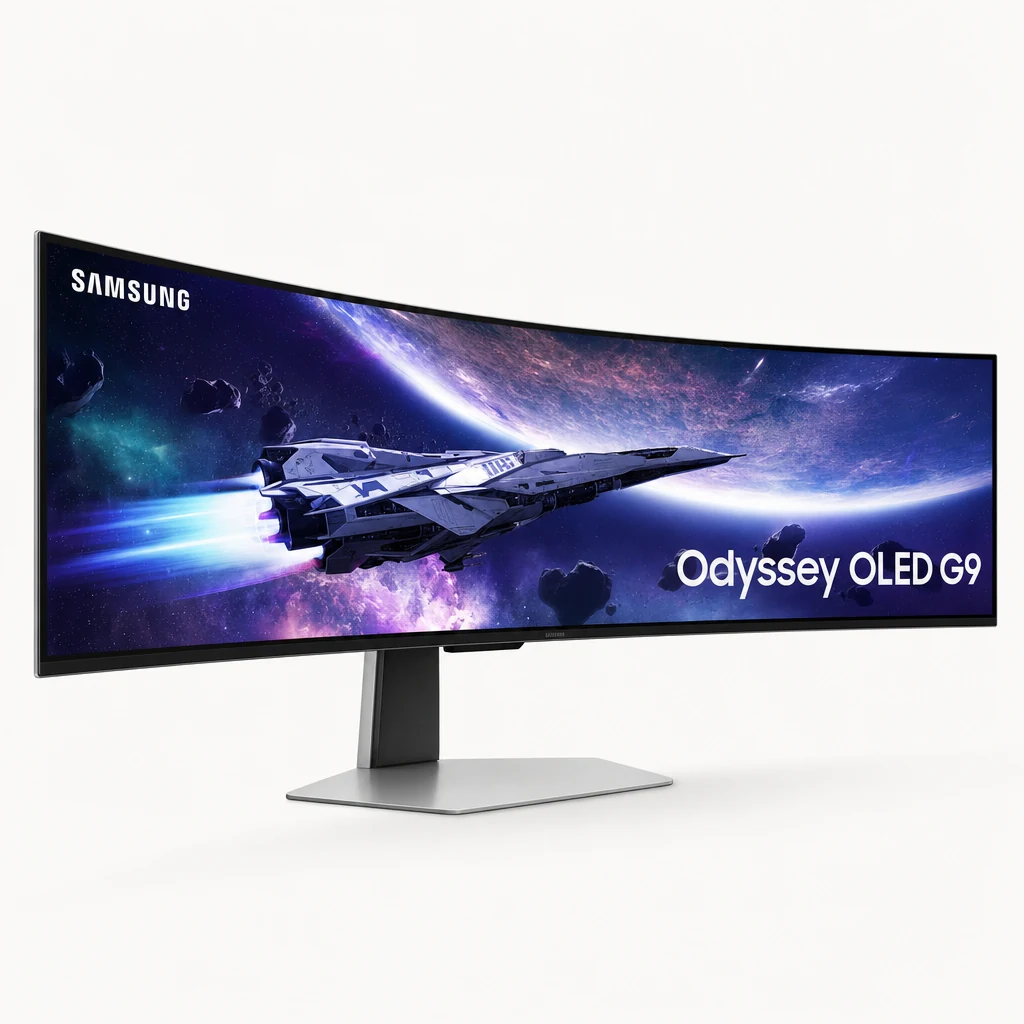
The Premium Stretch: Samsung Odyssey OLED G9 (49″ Ultrawide)
If your budget can flex, the monitor that genuinely turns heads is Samsung’s super-ultrawide showstopper, the Odyssey OLED G9. It steps outside the budget remit of this guide for sheer spectacle: a 49-inch, 32:9 QD-OLED panel with a deep 1800R curve, 5,120 × 1,440 resolution and a blistering 240Hz refresh rate and a near-instant 0.03ms response.
For immersive single-player games and sim racing it is in a class of its own — the curve wraps your peripheral vision and OLED’s per-pixel contrast makes HDR highlights leap off the screen. The trade-offs are exactly what you’d expect: it costs several times what the budget picks above do, and you’ll want a deep desk to seat it. But as a money-no-object alternative, nothing else here comes close on wow factor.
See Samsung Odyssey OLED G9 49in on Amazon UK
Check today's price & availability on Amazon UK
The Brightness Reality Check
Here's the bit nobody likes to dwell on at the till. OLED is magnificent in dark and moderately lit rooms, but it's never been a brightness champion in full sunlight, and budget models are no exception. All three of these screens peak at around 1,000 nits — but that's the HDR peak, a figure reached only in small, bright highlights for short bursts. It is not the brightness you'll see across a full white desktop.
SDR brightness is the number that matters for everyday use, and it's more modest. The Alienware AW2726DM is rated at 200 nits SDR, whilst the MSI MAG 272UP nudges ahead at 250 nits SDR. The AOC carries DisplayHDR True Black 400 certification alongside its 1,000-nit HDR peak. In practical terms, all of these are at their best in a room where you can control the lighting — a study with curtains you can draw, or a setup that isn't directly opposite a south-facing window.
Pro tip on brightness
Don't judge an OLED on a showroom floor under aggressive overhead lighting — that's the worst possible environment for it. In a normal living room or study with curtains, these panels look spectacular. The anti-glare coating on the AOC helps tame reflections, which is worth bearing in mind if your room is on the bright side.
The Burn-In Reality Check
Burn-in — where a static element gets permanently retained on the panel — is the question every OLED buyer asks, and it's a fair one. The good news is that modern QD-OLED panels are far more resilient than the OLEDs of a few years ago, and all three manufacturers here back their screens with a three-year warranty that explicitly includes burn-in cover. That's a meaningful statement of confidence.
There's a caveat worth reading carefully: the AOC warranty (and these warranties generally) is conditional on you allowing the monitor to perform its screen-maintenance routines as instructed. In other words, don't yank the power the moment a game ends — let the panel run its pixel refresh cycles. These are part of the deal, not optional nags.
Pixel refresh
All three include automatic pixel-refresh routines. On the MSI, this kicks in automatically after the screen has been active for more than four hours.
Pixel shift
MSI's OLED Care 2.0 nudges the entire image by tiny amounts at regular intervals, so static elements never sit in exactly the same spot for long.
Boundary & logo detection
The MSI also adds boundary detection, taskbar detection and multi-logo detection to dim the static UI elements most likely to cause retention.
Of the three, MSI's OLED Care 2.0 is the most comprehensive mitigation suite. The Alienware and AOC both include pixel-refresh care in their OSDs; MSI layers several detection systems on top. If you'll be doing a lot of mixed desktop and gaming use with static taskbars and HUDs, that extra protection is genuinely reassuring.
Head-to-Head Comparison
Time to line them up. Remember the AOC comes in two flavours — the 240Hz ZDR and the 360Hz SDR — but they share a panel, so I've shown the ZDR as the representative model below.
| Feature | Alienware AW2726DM out of stock | AOC AG276QZD2 | MSI MAG 272UP QD-OLED X24 |
|---|---|---|---|
| Panel generation | 3rd-Gen QD-OLED | Samsung QD-OLED | 4th-Gen QD-OLED |
| Resolution | 2560 × 1440 | 2560 × 1440 | 3840 × 2160 |
| Refresh rate | 240Hz | 240Hz (360Hz on SDR) | 240Hz |
| Response time | 0.03ms (gray to gray) | 0.03ms GtG | 0.03ms GtG |
| SDR brightness | 200 nits | True Black 400 | 250 nits |
| HDR peak | ~1,000 nits | 1,000 nits | 1,000 nits |
| DCI-P3 coverage | 98.9% | 99.1% | 99% |
| HDMI | 2× HDMI 2.0 | 2× HDMI 2.1 | HDMI 2.1 (48Gbps) |
| USB hub / KVM | No | 4× USB-A + KVM | USB-C (15W), no KVM |
| Adaptive sync | FreeSync Premium | Adaptive-Sync + G-Sync compatible | VRR / HDMI 2.1 |
| OLED care | Pixel refresh | Pixel refresh | OLED Care 2.0 (full suite) |
| Burn-in warranty | 3 years | 3 years | 3 years |
| Buy | Out of stock | Check price | Check price |
| Buy | Check price | Check price |
What the table makes obvious is that these aren't really fighting over the same buyer. The Alienware wins on raw entry price and colour accuracy but skimps on connectivity. The AOC is the all-rounder with the best port selection and that valuable KVM. The MSI is in a class of its own on resolution and protection features, but you pay for the privilege of 4K.
Pricing changes fast on OLED panels
Check the latest price and any current bundles on Amazon.
Who Should Buy Which?
The value hunter
You want OLED for the lowest possible outlay and you'll plug in one PC and game. The Alienware AW2726DM is your screen — superb colour, 240Hz, minimal fuss.
The work-and-play setup
Your desk juggles a gaming rig and a work machine. The AOC Q27G4ZDR and its KVM, USB hub and dual HDMI 2.1 make it the connectivity king.
The competitive shooter
Frames are everything and you've a GPU to match. The 360Hz AOC Q27G4SDR on the same gorgeous QD-OLED panel is built for you.
The pixel purist
You want razor-sharp 4K and the best burn-in protection. The MSI MAG 272UP QD-OLED X24 delivers 4K at 240Hz with OLED Care 2.0.
Performance Ratings
Taking all three together as a category, here's how affordable QD-OLED gaming monitors stack up across the things that actually matter day to day.
Image quality and motion handling are where these screens shine and shine hard — there's simply no comparison with budget IPS or VA panels for contrast and response. Brightness is the consistent weak spot across the category, which is why it pulls the average down. Connectivity varies wildly between models, so the score above is a blended view; the AOC alone would rate considerably higher there, the Alienware lower.
Frequently Asked Questions
The Verdict
Affordable QD-OLED has genuinely arrived, and all three of these screens deliver the contrast, colour and motion clarity that make OLED so addictive — without the flagship sting. There's no single winner here, because they target different people.
If you want the cheapest route onto a name-brand QD-OLED and you'll mostly game from one PC, the Alienware AW2726DM is remarkable value, with 98.9% DCI-P3 colour and a clean 240Hz panel. If your desk does double duty for work and play, the AOC Q27G4ZDR is my pick of the bunch — the KVM switch, four USB ports and dual HDMI 2.1 make it the most flexible, with the faster 360Hz Q27G4SDR waiting for the esports crowd. And if you want the sharpest image and the most thorough burn-in protection going, the MSI MAG 272UP QD-OLED X24 brings 4K at 240Hz, a pre-calibrated Delta E of 2 or better, and the excellent OLED Care 2.0 suite.
Just go in with eyes open on brightness: these are screens that reward a room you can keep out of harsh light. Treat them well, let them run their maintenance cycles, and that three-year burn-in warranty should let you enjoy the best image quality in budget gaming for years to come.
- AOC AG276QZD2 27in QD-OLEDView on Amazon
- MSI MAG 274QP QD-OLED X24 (1440p)View on Amazon
 Samsung Odyssey OLED G9 49inView on Amazon