
Best Budget 3D Printers for Beginners
Ready-to-run FDM machines under a few hundred pounds, judged on how quickly they get you printing — and how good those first prints actually look.
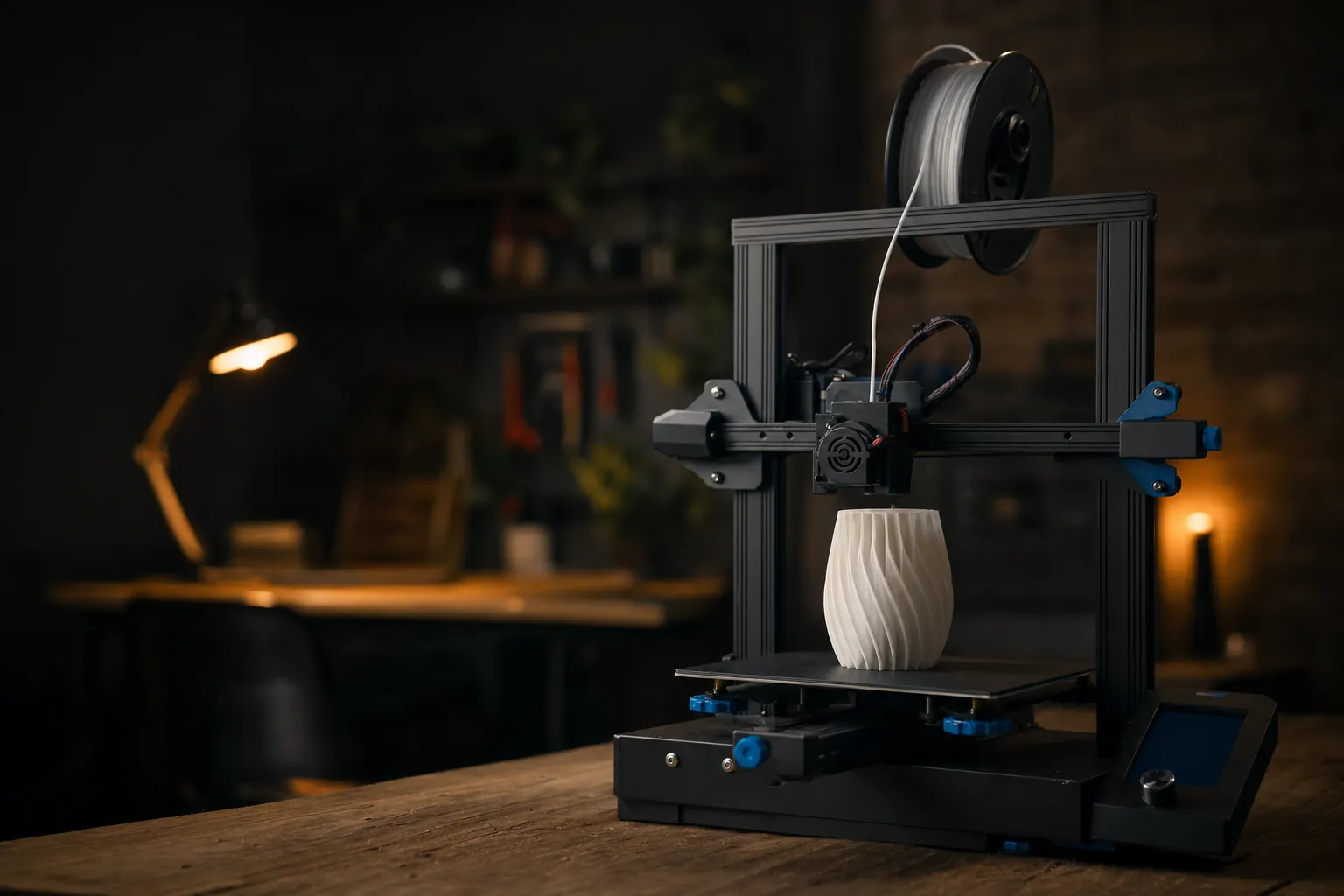
We link to the exact model on Amazon UK. Prices change often, so check the live price before you buy. As an Amazon Associate we earn from qualifying purchases.
Budget FDM printers have quietly become genuinely brilliant — the 2026 crop of beginner machines arrives pre-calibrated and ready to go.
If you'd asked me five years ago whether a beginner should buy the cheapest 3D printer they could find, I'd have winced. Budget printers used to mean hours of bolt-tightening, frustrating bed-levelling rituals and a first print that looked like melted spaghetti. In 2026, that story has completely flipped. The machines I've rounded up here arrive largely pre-assembled, self-level themselves, and in several cases will hand you a clean first print inside twenty minutes of opening the box. This guide focuses squarely on ready-to-run FDM printers that won't punish you for being new — and I've weighed them on the two things that matter most to a first-timer: how painless the setup is, and how good the prints look when you're done.

See Creality Ender 3 V3 SE on Amazon UK
Check today's price & availability on Amazon UK
Who this guide is for
This is a buyer's guide written specifically for people who have never owned a 3D printer, or who tried one years ago and gave up in a huff. I'm assuming you don't want to spend a weekend learning what "Z-offset" means before you can print a keyring. You want to plug something in, watch it do its clever calibration dance, and start making things.
Every printer here is a fused-deposition-modelling (FDM) machine — the type that squeezes melted plastic filament through a nozzle, layer by layer. FDM is the right technology for beginners: the materials are cheap, the process is forgiving, and the machines are affordable. I've deliberately left out resin printers, which produce gorgeous detail but involve messy liquids, fumes and gloves that make them a poor first purchase.
Throughout, I've leaned on hands-on impressions and the measured performance figures that actually distinguish these machines — print speeds, benchmark times, noise levels and setup times — rather than marketing fluff. Let's get into it.
All six printers in this guide are FDM machines aimed at complete beginners. Each was chosen because it ships pre-assembled or near-pre-assembled and automates the calibration steps that used to trip newcomers up.
How I judged them
Because this guide is built around the "ready-to-run" promise, I've weighted my assessment towards the beginner experience rather than the exotic capabilities that thrill hobbyists. Here's what I paid attention to.
Setup time out of the box
How long from cutting the tape to your first successful print? The best here manage it in around twenty minutes, and I've flagged exactly which ones.
Automatic calibration
Auto bed-levelling, auto Z-offset and vibration compensation take the guesswork away. This is the single biggest reason modern budget printers are beginner-friendly.
Print quality
Clean layers, tidy overhangs and smooth surfaces on a standard test model. A fast printer that produces rough parts isn't a bargain.
Speed
Higher top speeds mean less waiting. Several of these machines run at 500mm/s or beyond, a figure unthinkable at this price a couple of years ago.
Material flexibility
A good beginner printer should handle PLA effortlessly and give you room to grow into PETG, TPU and beyond.
Multi-colour potential
Not essential day one, but the option to add multi-colour printing later is a lovely upgrade path — and several models here offer it.
The shortlist at a glance
Six machines made the cut for 2026. Each earns its place for a slightly different type of beginner, so don't just skim to the top of the list — the "best" printer here genuinely depends on what you want to make.
The 2026 budget field, from the classic bedslinger layout to fully enclosed CoreXY boxes — there's a beginner-friendly option for every kind of maker.
Creality Ender 3 V3 SE — the safe, sensible starting point
See Creality Ender 3 V3 SE on Amazon UK
Check today's price & availability on Amazon UK
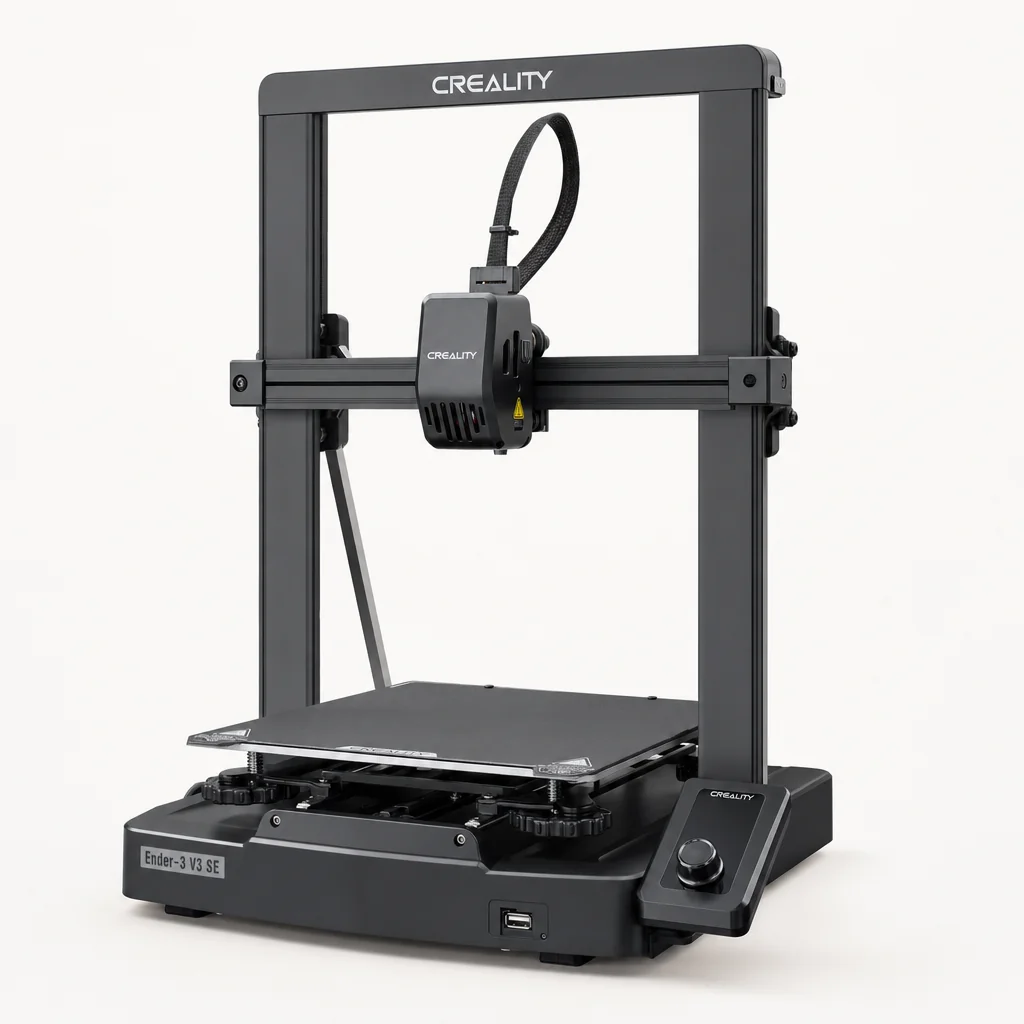
Creality Ender 3 V3 SE
The Ender 3 name is practically synonymous with beginner 3D printing, and the V3 SE is the version I'd point most first-timers towards if they want something proven, well-supported and refreshingly simple. It's the modern descendant of the printer that got an entire generation into the hobby, but with all the fiddly bits automated away.
What makes the V3 SE such a comfortable first machine is that Creality has quietly fixed nearly everything that used to make the old Ender 3 a rite of passage. It ships largely pre-assembled — you'll snap it together and be printing in about twenty minutes — and it handles its own levelling with a CR Touch sensor, plus a strain sensor that sets the Z-offset automatically. Those two features alone eliminate the two most common beginner headaches.
The "Sprite" direct-drive extruder is a genuine upgrade over the old Bowden setup, sitting the motor right above the nozzle so filament is pushed a shorter distance. In practice that means it copes happily with PLA, PETG and flexible TPU — the last of which older budget Enders struggled with badly. There's also automatic filament loading and unloading, so you're not manually feeding plastic into a hot nozzle and hoping for the best.
Mechanically, Creality has added a dual Z-axis and dual linear Y-axis shafts. That sounds like jargon, but it matters: the twin Z leadscrews reduce the wobble that shows up as wavy artefacts on tall prints, and the wear-resistant Y-axis rails keep the bed moving smoothly for longer. For a machine at this end of the market, that's a genuinely solid foundation.
Pros
- Assembles and prints in around 20 minutes
- CR Touch auto-levelling plus automatic Z-offset removes the classic beginner pain points
- Sprite direct-drive extruder handles PLA, PETG and flexible TPU
- Dual Z-axis and dual Y-axis shafts steady the machine for cleaner tall prints
- Automatic filament loading and unloading
Cons
- No Wi-Fi or app control — you'll be printing from an SD card
- 250 mm/s top speed is modest against the 500 mm/s rivals here
- Open frame isn't ideal for higher-temperature materials
Pro Tip
The lack of Wi-Fi on the V3 SE isn't the dealbreaker it sounds like. Popping a print file onto the SD card takes seconds, and for a beginner it removes a whole layer of network faff. If wireless convenience matters to you, look at the Bambu or Elegoo machines instead — but don't dismiss the Ender purely on that count.
Elegoo Centauri Carbon — an enclosed box that punches above its weight
See Elegoo Centauri Carbon on Amazon UK
Check today's price & availability on Amazon UK
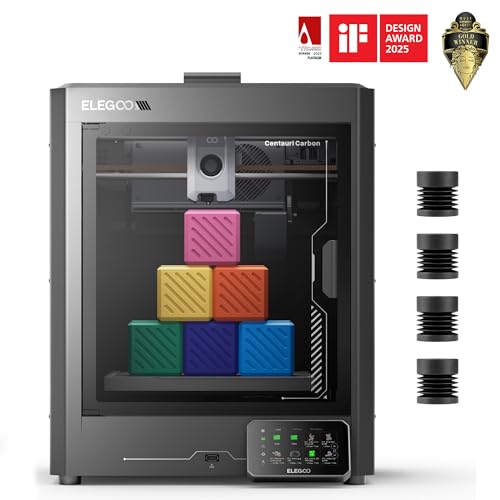
Elegoo Centauri Carbon
Here's the machine that made me sit up. Fully enclosed CoreXY printers with a hardened nozzle used to be firmly mid-range territory. (Worth being precise here: the Centauri Carbon is enclosed, which helps retain heat, but it does not have an actively heated chamber.) The Centauri Carbon drags that entire package down to £299.99, and it does so without feeling like a compromise. If you want a printer that looks and behaves like something far more expensive, this is it.
The Elegoo Centauri Carbon's enclosed chamber and CoreXY motion system are the sort of features that used to cost a great deal more.
The "CoreXY" bit refers to how the printhead moves. Instead of the whole bed sliding back and forth (the classic "bedslinger" design of the Ender), the print head zips around on two belts while the bed only moves up and down. That layout is inherently more stable at high speed, which is how this machine reaches up to 500 mm/s with 20,000 mm/s² acceleration and still lays down tidy layers.
And the speed is real. In testing, the Centauri Carbon printed a flawless 3DBenchy — the little tugboat model that's the universal 3D-printing benchmark — in under 19 minutes. A clean Benchy that fast, from a machine at this price, is genuinely impressive and tells you the motion system and calibration are working in harmony.
The enclosed chamber and 320°C brass-hardened steel nozzle mean this machine specialises in carbon-fibre-reinforced filaments — tougher, stiffer materials that need a hardened nozzle to avoid wearing it out and a warm, draught-free chamber to print without warping. For a beginner that's a lovely bit of headroom: you can start with easy PLA and grow into engineering-grade parts without buying a new printer.
On the calibration front, Elegoo has thrown the lot at it. There's auto-levelling, auto Z-offset, auto vibration calibration and auto pressure-advance tuning — the printer essentially profiles its own quirks and dials in perfect extrusion before it starts. It arrives pre-assembled, calibrated and tested, so you really can print straight out of the box. The chamber camera lets you keep an eye on progress remotely, and dual LED strips light the build area so those camera shots are actually useful.
Pros
- Fully enclosed CoreXY design, rare at this price
- Flawless 3DBenchy in under 19 minutes
- 320°C hardened nozzle handles carbon-fibre filaments
- Comprehensive auto-calibration: levelling, Z-offset, vibration and pressure advance
- Dual-band Wi-Fi, chamber camera and OTA updates
Cons
- More printer than a casual PLA-only user strictly needs
- Enclosed box takes up more desk space than an open bedslinger
- Advanced material capability may go unused by pure beginners
Bambu Lab A1 Mini — the closest thing to plug-and-play

See Bambu Lab A1 Mini on Amazon UK
Check today's price & availability on Amazon UK
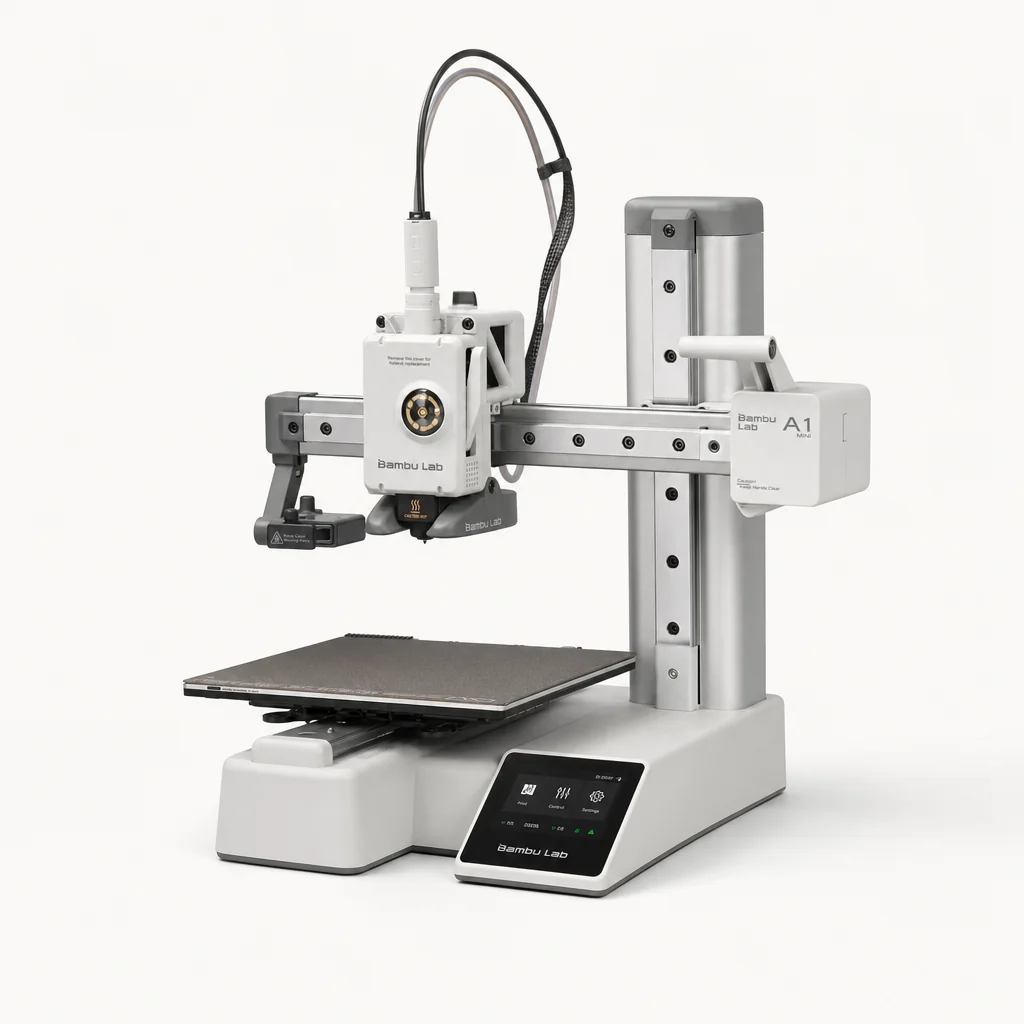
Bambu Lab A1 Mini
If your priority is "I just want it to work, quietly, without me learning anything," the A1 Mini is the machine I'd hand you. Bambu Lab has built a reputation for making 3D printing feel like using a normal appliance, and the A1 Mini is that philosophy distilled into its most affordable form.
Setup is the headline. From unboxing to your first print takes about twenty minutes, because it arrives almost fully assembled and runs a full-auto calibration routine with no manual tuning whatsoever. You don't level the bed, you don't set a Z-offset, you don't tweak flow rates. You load filament, pick a model and press go. For a genuine newcomer, that's exactly the experience you want.
It's also remarkably quiet. At 49dB — and dropping under 48dB in silent mode — it's about as loud as a quiet library, which matters far more than you'd think if the printer is going to live in your bedroom, study or lounge. I've owned printers that sounded like a small aircraft; the A1 Mini genuinely fades into the background.
Despite the compact 180mm cube build volume, speed isn't sacrificed: it hits 500 mm/s, with Bambu noting there's no meaningful speed difference between it and the larger A1. The all-metal extruder with steel gears is a durable bit of engineering that keeps feeding filament reliably. You can print PLA, PETG, TPU and support filaments comfortably; it's not built for the higher-temperature stuff like ABS, ASA, PC, PA or PET, but honestly, very few beginners need those.
The AMS Lite upgrade path
The A1 Mini is available as a standalone printer or paired with the AMS Lite system, which enables seamless multi-colour printing by feeding several filament spools automatically. It's the tidiest way to graduate from single-colour keyrings to genuinely eye-catching multi-colour models, and you can add it when you're ready rather than paying for it upfront.
Everything is controlled through Bambu Studio on the desktop or the Bambu Handy app on your phone, and the built-in camera lets you watch a print from anywhere. This is the most "modern gadget" feeling machine in the group.
Pros
- Fully automatic calibration with zero manual tuning
- Unbox to first print in about 20 minutes
- Whisper-quiet at 49dB, under 48dB in silent mode
- Full 500 mm/s speed despite compact size
- Optional AMS Lite adds seamless multi-colour printing later
- Slick app and desktop control with built-in camera
Cons
- Smallest build volume here at 180mm cubed
- Not suited to high-temperature materials like ABS, ASA or PC
- Multi-colour requires the extra AMS Lite outlay
Pro Tip
That 180mm build volume sounds small, but it covers the vast majority of what beginners actually print — figurines, phone stands, organisers, replacement knobs and toys. Only reach for a bigger bed if you specifically plan to print helmets, large vases or big functional parts in single pieces.
Sovol SV06 Ace — the all-rounder that quietly wins
Shop Sovol SV06 Ace on Amazon UK
Sovol SV06 Ace
The SV06 Ace is the machine I'd nominate as the best budget printer overall, because it balances speed, material flexibility and out-of-box readiness better than almost anything at its price. It's less flashy than the Bambu and less exotic than the Centauri, but it just gets on with the job superbly.
Speed first, because the number is startling: the SV06 Ace tops out at 600 mm/s, the fastest figure in this entire round-up. Backing that up, it printed a flawless 3DBenchy in under 19 minutes in testing — matching the enclosed Centauri Carbon for that benchmark, which is remarkable for an open-frame machine. Fast and clean is a hard combination to nail on a budget, and Sovol has managed it.
The engineering behind that performance is sensible. Carbon-fibre-reinforced axis rails add stiffness so the frame doesn't flex at high speed, dual Z-axis motors keep the gantry level, and built-in vibration reduction cancels out the ringing artefacts that fast printing usually introduces. Add automatic bed levelling and you've got a machine that's both quick and forgiving.
Material handling is a strong point too. The direct-drive extruder reaches 300°C and has handled PLA, PETG, ABS, ASA and TPU in testing — a broader spread than the Bambu A1 Mini, notably including the higher-temperature ABS and ASA. That makes the SV06 Ace a printer you genuinely won't outgrow quickly. It arrives pre-assembled and calibrated, so the ready-to-run promise holds here as well.
Pros
- Fastest top speed on test at 600 mm/s
- Flawless 3DBenchy in under 19 minutes despite open frame
- Handles PLA, PETG, ABS, ASA and TPU
- Carbon-fibre-reinforced rails and dual Z motors for stability
- Built-in vibration reduction keeps fast prints clean
- Pre-assembled and pre-calibrated
Cons
- Open frame is less ideal than an enclosure for ABS/ASA in draughty rooms
- No integrated multi-colour system
- Less of a polished ecosystem than Bambu's app experience
Anycubic Kobra 3 V2 — the colour specialist
Shop Anycubic Kobra 3 V2 on Amazon UK
Anycubic Kobra 3 V2
If the thing that excites you about 3D printing is making colourful, eye-catching models rather than single-tone functional parts, the Kobra 3 V2 is the budget machine built with that in mind. It's the printer I'd steer creative, project-driven beginners towards.
Multi-colour printing turns simple models into striking pieces — the Kobra 3 V2's optional four-colour unit makes it accessible on a budget.
The V2 refresh brings a new slicer, an improved hotend, an upgraded frame and an added camera for easy monitoring — all sensible, meaningful updates rather than cosmetic tweaks. The new hotend and stiffer frame matter for consistent quality, and the camera means you can keep an eye on longer, multi-colour jobs without hovering over the machine.
Four-colour capability
Add the four-colour ACE Pro multimaker unit and the Kobra 3 V2 becomes a genuine multi-colour machine — the flexible upgrade that transforms what a beginner can create.
Upgraded hotend
The revised hotend improves melting consistency, which pays off in the smooth colour transitions that make multi-material prints look professional.
Built-in monitoring
The added camera lets you watch progress remotely — invaluable for the longer print times that multi-colour jobs inevitably involve.
Upgraded frame & slicer
A stiffer frame and refreshed slicing software combine for more reliable, better-looking results straight away.
The clever part of Anycubic's approach is that the multi-colour capability is modular. You can buy the printer on its own and print in single colour to start, then add the four-colour ACE Pro unit when you're ready to level up. That keeps the entry cost sensible while leaving the door open to far more ambitious projects down the line.
Pros
- Excellent budget route into four-colour printing
- Upgraded hotend and frame improve consistency over the previous model
- Built-in camera for remote monitoring
- New slicer streamlines the software side
- Modular multi-colour upgrade keeps starting cost down
Cons
- Multi-colour requires the separate ACE Pro add-on
- Multi-colour printing uses more filament and time due to purging between colours
- Colour work has a steeper learning curve than single-tone printing
A word of honesty on multi-colour printing generally: it's brilliant but wasteful. Every colour change purges a little filament to clean the nozzle, so a four-colour model uses noticeably more plastic and time than a single-colour one. Worth knowing before you fall in love with the rainbow.
FlashForge AD5X — multi-material out of the box

See FlashForge AD5X on Amazon UK
Check today's price & availability on Amazon UK
FlashForge AD5X
The newest arrival in FlashForge's Adventurer lineup, the AD5X takes the multi-colour idea a step further by baking it in from the start — and crucially, it does so with flexible TPU support included, which is unusually ambitious for a beginner-friendly machine.
The FlashForge AD5X IFS multi-colour feed is for compatible rigid filaments. Flexible TPU must be fed and printed separately through the supported direct path rather than mixed through IFS.
Compact four-colour IFS system
An efficient, compact four-colour independent feeding system handles the material changes without dominating your desk.
Flexible TPU 95A support
Multi-colour with TPU 95A out of the box means you can combine rigid and flexible plastics in one print — a real functional edge.
Strong layer adhesion
Testing showed strong layer adhesion and smooth colour transitions, so multi-material parts come out looking cohesive rather than patchy.
Consistent complex prints
It maintained consistent print quality across complex multi-material designs and functional TPU parts — the sort of jobs that expose a weak machine.
For a beginner with an eye on eventually making practical, functional objects rather than just ornaments, the AD5X is a compelling pick. The four-colour IFS system being compact and integrated means there's less to set up and less clutter than a separate bolt-on unit, and the fact that it treats flexible filament as a first-class citizen sets it apart from most rivals at this level.
Pros
- Multi-colour printing built in from the start
- Flexible TPU 95A support out of the box
- Compact, efficient four-colour IFS system
- Strong layer adhesion and smooth colour transitions in testing
- Consistent quality across complex, functional multi-material prints
Cons
- Multi-material printing generates more waste and takes longer
- Flexible-plus-rigid printing has a learning curve for newcomers
- More capability than a pure single-colour PLA user needs
Head-to-head comparison
Sometimes it's easiest to see the differences side by side. Here's how the core specifications stack up across the three machines I'd most often recommend to a beginner — the safe pick, the appliance-simple pick and the do-everything all-rounder.
| Feature | Creality Ender 3 V3 SE | Bambu Lab A1 Mini | Sovol SV06 Ace |
|---|---|---|---|
| Build Volume | 220 × 220 × 250mm | 180 × 180 × 180mm | 220 × 220 × 250mm |
| Max Speed | 250 mm/s | 500 mm/s | 600 mm/s |
| Auto Calibration | CR Touch + Z-offset | Full auto, no tuning | Auto bed levelling |
| Extruder | Sprite direct drive | All-metal, steel gears | Direct drive, 300°C |
| Materials | PLA, PETG, TPU | PLA, PETG, TPU | PLA, PETG, ABS, ASA, TPU |
| Connectivity | SD card | Wi-Fi, app, camera | USB, Wi-Fi |
| Multi-colour | No | Via AMS Lite | No |
| Setup Time | ~20 minutes | ~20 minutes | Pre-assembled |
| Buy | Check price | ||
| Buy | Check price | Check price |
The pattern is clear. The Ender is the dependable, no-frills choice; the A1 Mini is the smoothest experience with the best software; and the SV06 Ace is the raw performance and material-flexibility champion. All three are legitimately beginner-friendly.
Speed benchmarks compared
Since speed is one of the biggest differences between these machines, here's how their maximum print speeds line up visually. Remember that a higher top speed doesn't automatically mean better prints — but combined with clean benchmark results, it means less waiting for the same quality.
And where it really counts — a clean 3DBenchy — both the Sovol SV06 Ace and the Elegoo Centauri Carbon delivered a flawless model in under 19 minutes. That's the sweet spot: fast and good, which is exactly what you want when you're printing your fifth revision of a design and don't fancy waiting an hour each time.
Pro Tip
Don't obsess over top speed as a beginner. Most of your early prints will run at more relaxed speeds anyway, because slowing down often improves surface quality on detailed models. A high maximum is lovely headroom to have, but the Ender 3 V3 SE's 250 mm/s is perfectly pleasant to live with day to day.
My scores
Here's how I'd rate the field overall as beginner machines, weighing setup ease and print quality most heavily in keeping with the whole point of this guide.
Which one should you buy?
Rather than crown a single winner, let me match each printer to the kind of beginner it suits best — because that's genuinely how I'd advise a friend.
The cautious first-timer
Go for the Creality Ender 3 V3 SE. It's proven, well-supported, simple to run from an SD card, and gets you printing in twenty minutes without any fuss.
The "just make it work" type
The Bambu Lab A1 Mini is your machine. Full auto-calibration, whisper-quiet 49dB running and a lovely app make it the closest thing to a plug-and-play appliance.
The ambitious all-rounder
Pick the Sovol SV06 Ace. A 600 mm/s top speed, a sub-19-minute Benchy and support for PLA through ABS, ASA and TPU means you won't outgrow it in a hurry.
The future engineer
The Elegoo Centauri Carbon suits anyone who wants an enclosed machine and a 320°C hardened nozzle for carbon-fibre filaments, all with comprehensive auto-calibration.
The colour enthusiast
The Anycubic Kobra 3 V2 is built for vivid four-colour models via the optional ACE Pro unit, with an upgraded hotend and built-in camera.
The functional maker
The FlashForge AD5X handles multi-colour printing with flexible TPU 95A out of the box, ideal for practical rigid-plus-soft functional parts.
There's no single "best" beginner printer — the right choice comes down to whether you value simplicity, speed, enclosure or colour.
Frequently asked questions
The verdict
The best news for anyone starting out in 2026 is that there's no wrong answer here. Every one of these six machines will get a total beginner printing quickly and producing results that would have astonished a hobbyist a few years ago.
If you want the smoothest, most appliance-like experience, the Bambu Lab A1 Mini is my top recommendation — full auto-calibration, whisper-quiet 49dB operation and a first print in about twenty minutes make it almost impossible to get wrong. If you'd rather maximise capability, the Sovol SV06 Ace is the all-rounder to beat, pairing a 600 mm/s top speed with a flawless sub-19-minute Benchy and broad material support. For those who want an enclosed, semi-professional machine that punches well above its class, the Elegoo Centauri Carbon is a remarkable amount of printer, and the Creality Ender 3 V3 SE remains the dependable, uncomplicated classic.
And if colour and function are what excite you, the Anycubic Kobra 3 V2 and FlashForge AD5X bring genuine multi-colour and multi-material printing within a beginner's reach. Pick the one that matches how you want to create — then enjoy the addictive little thrill of watching your first design rise off the bed layer by layer.
- Creality Ender 3 V3 SEView on Amazon
- Elegoo Centauri CarbonView on Amazon
- Bambu Lab A1 MiniView on Amazon
- FlashForge AD5XView on Amazon