
Best Laptop Stands and Risers for Better Posture
Folding, adjustable and standing-friendly stands, tested for the realities of home-office ergonomics — from premium desktop risers to featherweight travel companions.
We link to the exact model on Amazon UK. Prices change often, so check the live price before you buy. As an Amazon Associate we earn from qualifying purchases.
A properly raised laptop screen keeps your neck neutral and your shoulders relaxed through long working days.
If you spend your working day hunched over a laptop, you already know the toll it takes. That gentle forward slump of the neck, the ache that creeps into your shoulders by mid-afternoon, the tight lower back by the time you close the lid — it all traces back to one simple problem: laptop screens sit far too low for comfortable, sustainable posture. A good stand or riser is one of the cheapest, most effective ergonomic upgrades you can make, and after countless hours living with these devices at my own desk, I've become genuinely evangelical about them.

See Rain Design iLevel2 on Amazon UK
Check today's price & availability on Amazon UK
In this guide I've pulled together the stands I keep coming back to, split across the two categories that matter most: rock-solid desktop risers that transform a fixed home-office setup, and featherlight folding models built for people who work on the move. I'll be honest about the trade-offs too — no single stand nails every use case, and part of my job here is helping you match the right design to the way you actually work.
One thing worth clearing up early: laptop stands aren't sold as tidy branded ranges the way phones or headphones are. Each of these picks is a standalone product from a different maker, so I've ranked them on merit and matched each to a specific kind of user rather than pretending they're variants of one line.
Why a Laptop Stand Matters for Your Posture
Let's start with the "why", because it genuinely reframes how you'll shop. The core issue with any laptop is that the screen and keyboard are welded together. To read the display comfortably you need it roughly at eye level; to type comfortably you need the keyboard low and flat. On a bare laptop, those two requirements are in permanent conflict, and your neck loses the argument every single time.
A stand breaks that compromise. By lifting the screen to eye level and tilting it toward you, it lets you sit tall with a neutral neck, whilst you type on a separate external keyboard and mouse kept down at desk height. The result is the classic ergonomic posture physiotherapists bang on about: ears over shoulders, shoulders over hips, forearms roughly parallel to the floor. It's not a gimmick — it's basic biomechanics, and the difference after a full working week is often startling.
Neutral neck alignment
Raising the top of the screen toward eye level stops the constant downward tilt that strains the cervical spine.
Separated input
Once the screen is up high, you'll want an external keyboard and mouse at desk level so your forearms stay relaxed.
Cooler running
Elevating and tilting the chassis opens up airflow beneath the laptop, and aluminium models double as a heat sink.
Reduced fatigue
Better alignment means less muscular effort holding yourself upright, so you tire far more slowly across the day.
Pro Tip
A stand only works its magic if you pair it with a separate keyboard and mouse. Lifting the screen without moving your hands off the built-in keyboard just leaves you reaching up awkwardly. Budget for that external kit as part of the same upgrade — it's the other half of the equation.
How I Chose and Tested These Stands
Ergonomics gear is easy to get wrong because so much depends on how it feels in daily use rather than how it looks in a product shot. My priorities, in rough order, were: how high the stand lifts the screen and whether that height suits real people; how stable it stays when you type heavily; build quality and materials; portability where relevant; and thoughtful extras like cable routing and airflow. I leaned heavily on extended real-world use, the kind where a stand's little annoyances only reveal themselves after a fortnight of living with it.
One reference point I trust: an extended testing programme that ran to roughly 60 hours across 15 different risers landed on the Rain Design iLevel2 as its standout performer. That tallies neatly with my own experience of premium adjustable stands, and it's a useful anchor for the rankings below. With that groundwork laid, here are the picks.
The Best Laptop Stands and Risers at a Glance
Desktop risers deliver stability and heat dissipation; folding stands trade some of that for extraordinary portability.
The Ranked Picks
1. Rain Design iLevel2 — Best for Smooth Height Adjustment
See Rain Design iLevel2 on Amazon UK
Check today's price & availability on Amazon UK
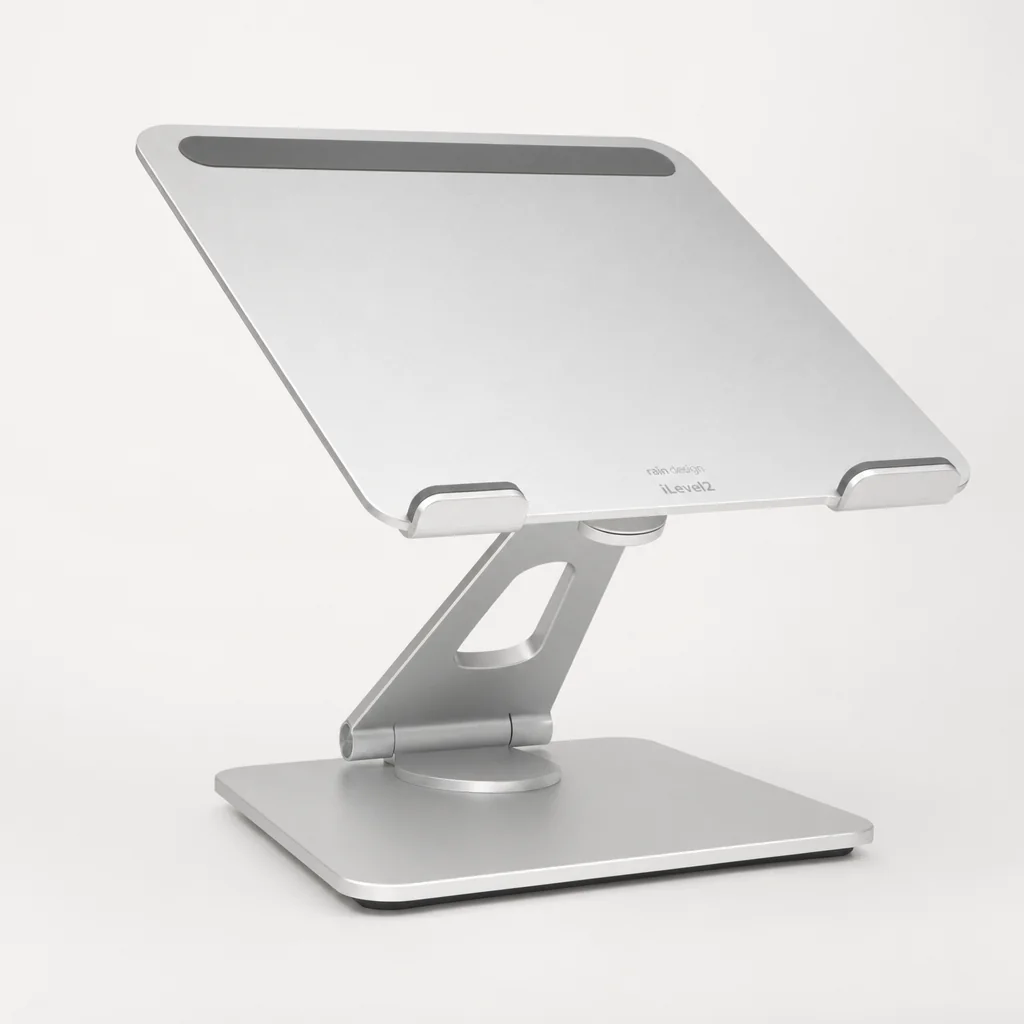
If I could only recommend one desktop stand to a fixed home-office worker, this would be it. The Rain Design iLevel2 is the rare adjustable stand that gets the fundamentals so right you stop thinking about it entirely, which is exactly what you want from ergonomics kit. Its party trick is a sliding mechanism that lets you drag the platform up or down to dial in your exact eye level — no tools, no fiddly locking screws, just a fluid glide that holds firmly wherever you leave it.
That adjustability is the reason it topped that 60-hour, 15-stand testing programme. But what really impressed me in daily use is how it manages the trade-off between adjustability and stability. Adjustable stands often wobble; this one doesn't. The wide aluminium base keeps the centre of gravity low, so where lesser risers bounce and shimmer every time you thump the keyboard, the iLevel2 stays reassuringly planted.
The design details are the sort you only appreciate once you've lived with them. The aluminium base doubles as a heat sink, drawing warmth away from the laptop, and the tilt brings the screen a touch closer whilst improving airflow underneath. There's a generous 2-inch cable management hole at the back so charging and peripheral cables can be routed cleanly out of sight rather than draping over the front edge.
Pros
- Effortless, tool-free height adjustment via the sliding mechanism
- Wide base and low centre of gravity give class-leading stability
- Minimal screen shake even under heavy typing
- Aluminium base acts as a heat sink for cooler running
- Excellent build quality that feels built to last
- Neat 2-inch cable routing hole at the rear
Cons
- Very tall users, or those pairing it with a standing desk, may want more lift than the range allows
- Overheating can occur if you block the underside vents
- Not remotely portable — this is a stay-at-home stand
2. Rain Design mStand360 — Best for Shared and Collaborative Desks

See Rain Design mStand360 on Amazon UK
Check today's price & availability on Amazon UK
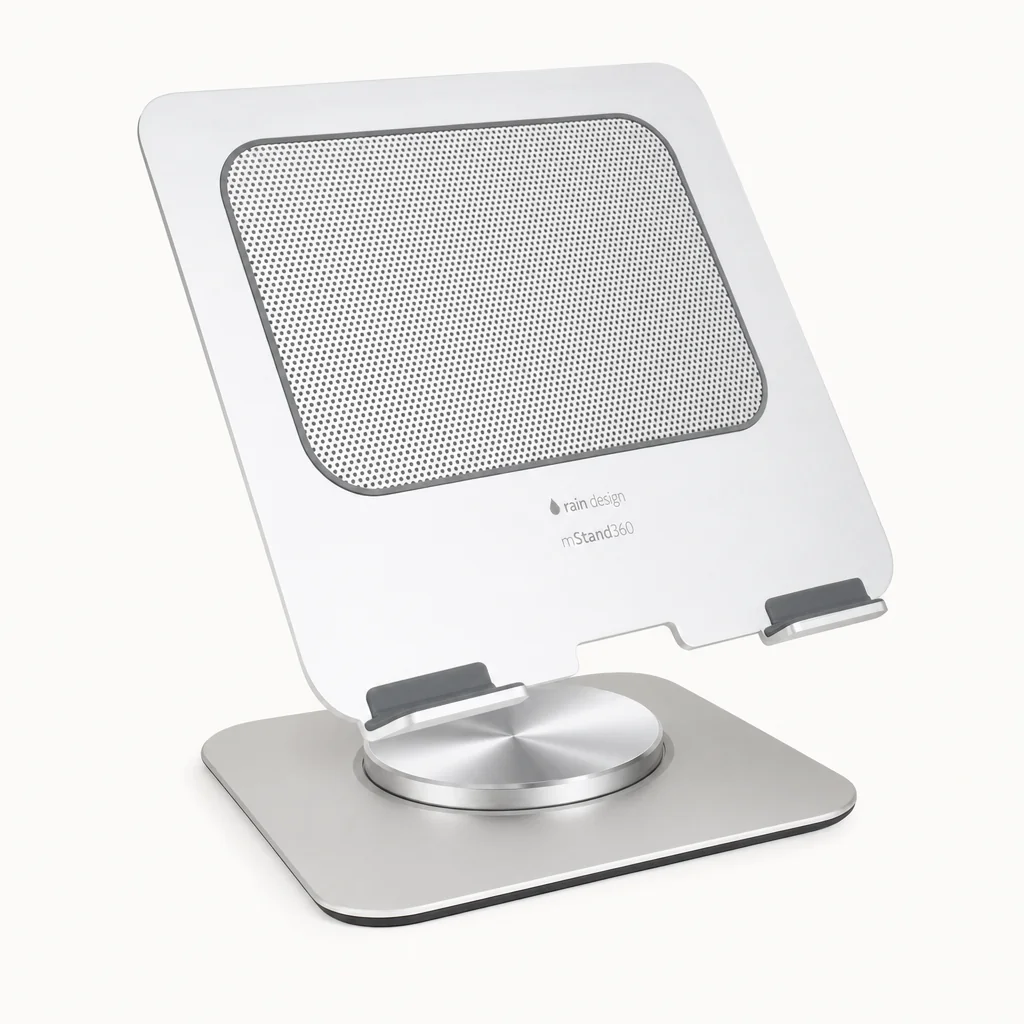
The mStand360 takes the beloved mStand silhouette and adds the one feature that transforms it for shared spaces: a swivel. Hidden away at the base is a very low-profile 360-degree turntable running on ball bearings embedded into the body, letting you spin the whole laptop to show a colleague, a client or a family member what's on screen without unplugging a single cable. If your desk ever hosts more than one set of eyes, that's genuinely useful.
What underpins it all is the construction. Rather than a bent strip of metal, the mStand360 is machined from a single solid aluminium plate, with edges that are forged rather than cast for extra strength. You feel that heft the moment you pick it up, and it translates directly into stability — in my testing this was among the steadiest fixed stands I've used, with the least perceptible movement when typing hard.
Like its stablemate, it's clever about the small stuff. The aluminium doubles as a heat sink and the tilt improves airflow, so your laptop runs cooler than it would flat on the desk. There's also space beneath the raised platform to stash an external keyboard when you're done for the day — a tidy touch that keeps a small desk clutter-free. The catch, and it's a real one, is that the height is fixed. There's no sliding adjustment here, so you're locked into the lift Rain Design chose, and the large footprint eats into desk real estate.
Pros
- 360-degree swivel base is brilliant for sharing your screen
- Single forged aluminium plate feels immensely sturdy
- Least on-desk movement of any fixed stand I tested when typing
- Aluminium heat sink and tilt keep the laptop cool
- Space underneath to tuck away a keyboard
Cons
- Height is fixed with no adjustment
- Large footprint takes up meaningful desk space
- Weighty and not designed to travel
The mStand360's hidden ball-bearing turntable lets you spin the whole laptop to share a screen without unplugging anything.
3. Roost V3 — Best for Travel and Digital Nomads

See Roost V3 on Amazon UK
Check today's price & availability on Amazon UK
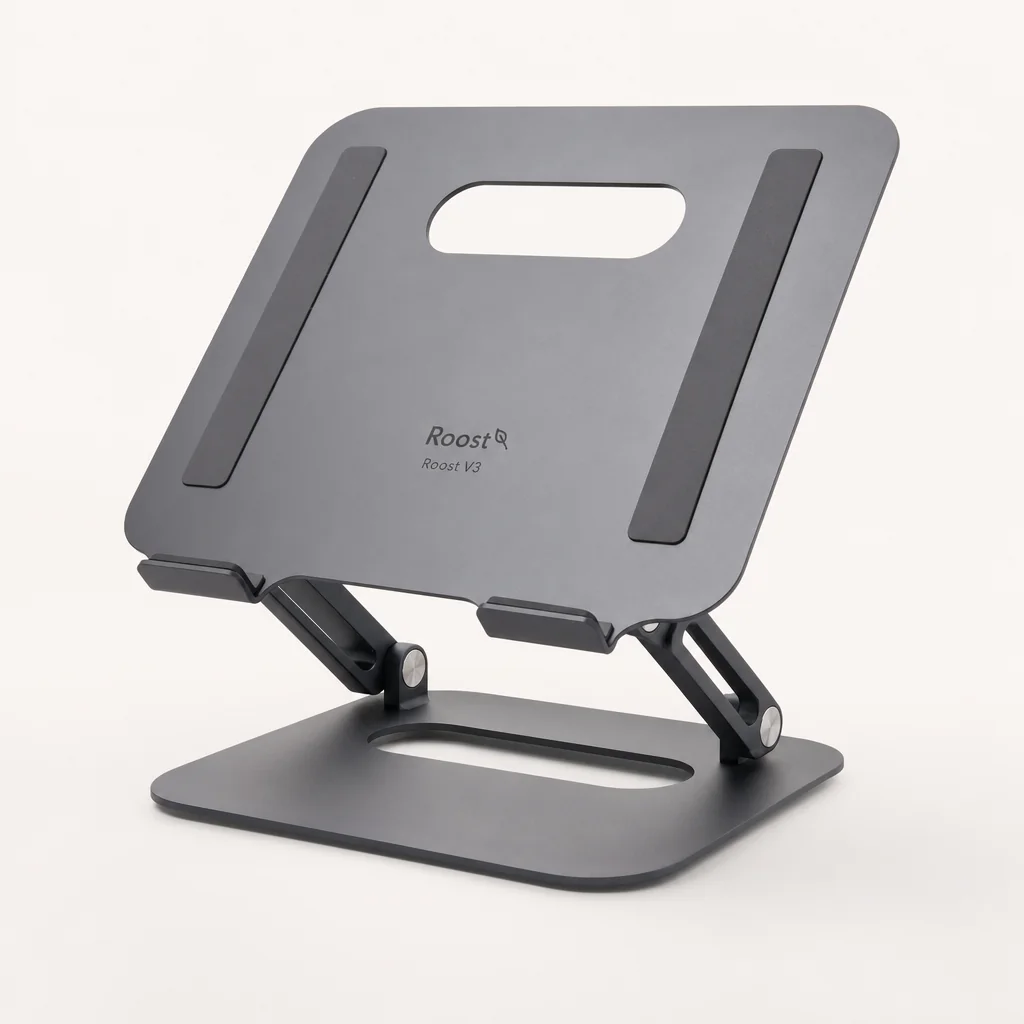
Everything so far has been a stay-put desktop stand. The Roost V3 is the polar opposite, and it's one of my genuine go-to recommendations for anyone who works from more than one location. Billed as one of the most portable, lightweight, eye-level laptop stands going, it weighs a scarcely believable 170 grams — six ounces — and folds down into a slim, stick-like instrument barely over an inch thick that lives happily in any bag alongside your laptop.
The engineering that makes that possible is properly clever. A scissors-like mechanism lets it compress into that skinny profile, whilst an interlocking truss frame and high-stiffness materials — glass-fibre reinforced nylon, a structural metal-replacement polymer, plus Delrin high-performance resin — create a platform that's astonishingly rigid for its weight. Despite tipping the scales at just six ounces, it can securely hold laptops up to 13 pounds, which covers the overwhelming majority of machines you'd carry.
Where it earns its keep ergonomically is that generous height. Seven selectable settings span a range from around six inches above the table to a genuinely lofty eleven inches — the top setting is high enough that even taller users can get the screen to true eye level, something many desktop stands can't manage. Patented PivotGrips automatically adapt and lock onto any 12 to 18-inch laptop for a confident, non-slip hold, so it feels secure rather than perched, and Roost backs the whole thing with a lifetime warranty. It's a premium buy — it isn't cheap — but for frequent travellers it's the kind of purchase you don't regret.
Pros
- Astonishingly light at just 170 g and packs impossibly thin
- Seven height settings reach up to 11 inches — high enough for tall users
- Ultra-rigid truss frame despite its featherweight build
- PivotGrips lock securely onto any 12–18 in laptop
- Holds machines up to 13 lb and comes with a lifetime warranty
- Includes a carry pouch for the folded stand
Cons
- Expensive for a folding stand
- Suspends the laptop rather than resting it on a solid platform, which won't suit everyone's cooling preferences
- No integral desktop tidiness features like the aluminium risers
Side-by-Side Comparison
Here's how the three picks stack up on the specifications that matter most for posture and daily use. The clearest split is between the two Rain Design aluminium risers, which prioritise stability and desktop refinement, and the Roost V3, which throws everything at portability and height range.
| Feature | Rain Design iLevel2 | Rain Design mStand360 | Roost V3 |
|---|---|---|---|
| Category | Adjustable desktop | Fixed desktop + swivel | Folding portable |
| Height adjustment | 5.4–7.9 in (sliding) | Fixed | 7 settings, 6–11 in |
| Material | Aluminium (heat sink) | Single forged aluminium plate | Reinforced nylon / Delrin resin |
| Weight | Substantial (desk-bound) | Substantial (desk-bound) | 170 g / 6 oz |
| Footprint / folded size | 10.1 × 8.8 in base | 7.5 × 10 in base | Folds to 1.3 × 1.17 × 13 in |
| Swivel | No | 360° ball-bearing base | No |
| Cable management | 2 in rear hole | Keyboard stash space | Open frame |
| Load capacity | Most notebooks | Most notebooks | Up to 13 lb |
| Compatibility | All MacBooks + most notebooks | All MacBooks + most notebooks | Any 12–18 in laptop |
| Best for | Fixed home office, adjustability | Shared desks, collaboration | Travel, tall users, nomads |
| Buy | Check price | Check price | Check price |
| Buy | Check price | Check price | Check price |
Choosing between them comes down to one question: does your laptop stay put, or does it travel with you?
Getting the Height Right
The single most common mistake I see is setting a stand too low. People raise the screen a couple of inches, feel a small improvement, and stop there — but the target you're aiming for is having the top third of the display roughly level with your eyes when you're sitting up straight. If you have to tilt your head down to read the middle of the screen, it's still too low.
This is where the height differences between these stands become decisive. The iLevel2's sliding range of 5.4 to 7.9 inches suits most seated users beautifully, and the fact you can fine-tune it means you'll actually land on the right spot rather than settling for "close enough". The Roost V3, by contrast, reaches all the way to 11 inches above the desk — that extra ceiling is exactly what taller people and anyone at a standing desk need, and it's the reason a folding stand can, oddly, outperform a fixed one on pure ergonomics for some bodies.
Quick Height Check
Sit at your desk with your eyes closed, head level and relaxed. Open your eyes — wherever your gaze naturally lands is where the top of your screen should be. Adjust the stand until it hits that mark. If you find yourself looking down after ten minutes, nudge it a notch higher.
Cooling, Airflow and Build Quality
Something people rarely consider when buying a stand is thermals, yet it makes a real difference to how your laptop performs and how long it lasts. Both Rain Design risers use their aluminium construction as a passive heat sink, drawing warmth out of the chassis, whilst the tilt angle opens airflow beneath the machine that a flat desk simply can't offer. In practice that means fans spinning up less often and a laptop that stays quieter under load.
There's a caveat worth heeding with the iLevel2, though: most overheating problems with any stand come from accidentally covering the underside vents. As long as you seat the laptop correctly and don't block the intakes, you'll get the cooling benefit rather than a warmer machine. The Roost takes a different approach entirely — by suspending the laptop in an open frame it leaves the underside almost completely exposed to air, which is excellent for cooling but means it's a very different feel to a solid platform.
On build quality
The mStand360's single forged aluminium plate is the gold standard here — forged rather than cast edges give it strength you can feel, and it's the source of that class-leading stability. The Roost V3 achieves its rigidity through engineering rather than mass, using an interlocking truss frame and metal-replacement polymers to stay stiff whilst weighing almost nothing. Two very different philosophies, both excellent.
Who Should Buy Which
Rather than crown one universal winner — which would be dishonest, because these stands serve genuinely different needs — here's how I'd match each pick to the way you actually work.
The Fixed Home-Office Worker
You sit at the same desk every day and want the best possible seated ergonomics. Buy the Rain Design iLevel2. The sliding height adjustment lets you dial in your exact eye level, and its stability means zero screen shake even when you type furiously.
The Collaborator
Your desk regularly hosts a second person peering at your screen. The Rain Design mStand360 and its 360-degree swivel base let you spin the laptop toward them without unplugging a thing — ideal for shared or client-facing setups.
The Digital Nomad
You work from cafés, hotels, co-working spaces and the occasional client office. The Roost V3 weighs just 170 g, folds to the size of a thin stick and still lifts your screen up to 11 inches — genuine eye-level ergonomics that lives in your bag.
The Tall User
Standard desktop risers leave you still looking down. The Roost V3's top height setting reaches 11 inches above the desk, high enough to bring the screen level even for taller people or those working at a standing desk.
Frequently Asked Questions
Yes, essentially always. Raising the screen to eye level moves the built-in keyboard up with it, so you'd be reaching upward to type — which introduces a whole new set of shoulder and wrist problems. Pairing any of these stands with an external keyboard and mouse kept at desk level is what completes the ergonomic setup.
Generally the opposite. The aluminium Rain Design risers act as heat sinks and their tilt improves airflow beneath the chassis, whilst the Roost suspends the laptop in open air. The main risk is accidentally covering the underside vents, so just make sure the intakes stay clear when you seat the machine.
Aim for the top third of the display to sit roughly level with your eyes when you're sitting up straight. The iLevel2's 5.4–7.9 inch range covers most seated users, and the Roost's reach up to 11 inches suits taller people and standing-desk setups.
If you regularly share your screen with someone beside you, absolutely — the low-profile ball-bearing turntable makes spinning the laptop effortless. If you never do, you're paying for a feature you won't use, and a simpler fixed stand would serve you just as well.
Yes. The PivotGrips adapt to any laptop from 12 to 18 inches, and it securely holds machines weighing up to 13 pounds, which covers virtually every mainstream laptop including large 16-inch models.
Among these, the fixed aluminium Rain Design stands are the steadiest — the mStand360's forged single-plate build shows the least movement of any stand I tested. The iLevel2 is remarkably stable for an adjustable model thanks to its wide base and low centre of gravity.
The right stand disappears into your routine — you stop noticing it and simply notice you feel better at the end of the day.
The Verdict
There's no single "best" laptop stand, because the best one depends entirely on how and where you work — and that's genuinely good news, because it means there's a near-perfect option for almost everyone reading this.
For the fixed home-office worker who wants the finest seated ergonomics, the Rain Design iLevel2 is my top recommendation and a deserving winner of that 60-hour, 15-stand test. Its smooth sliding height adjustment and outstanding stability make it the one I'd hand to most people. If your desk regularly hosts a second set of eyes, the Rain Design mStand360 adds a superb 360-degree swivel atop that same rock-solid forged-aluminium foundation. And for anyone whose office moves with them, the Roost V3 is a small engineering marvel — 170 grams, folds to the size of a pen case, and still lifts your screen to a genuine eye-level 11 inches.
Whichever you choose, the transformation is real. Lift the screen, separate your keyboard, sit tall — and reclaim your neck, shoulders and back from the tyranny of the low laptop.
Have a favourite stand I've not covered, or a clever ergonomics tweak that's worked for you? That's exactly the sort of thing we love comparing notes on at Gadget Scout — because the best setup is the one that quietly makes your working day feel a little bit lighter.
- Rain Design iLevel2View on Amazon
- Rain Design mStand360View on Amazon
- Roost V3View on Amazon