

Apple Vision Pro Review: The Future of Computing Has Arrived
An in-depth analysis of Apple's groundbreaking mixed reality headset that promises to redefine how we interact with technology
In This Review
- First Impressions & Unboxing
- Technical Specifications Analysis
- Display Quality Deep Dive
- visionOS Experience
- Real-World Performance
- Comfort & Ergonomics
- Content Ecosystem
- Pricing & Value Analysis
- Final Verdict
- Who Should Buy
After spending three weeks with the Apple Vision Pro, I can confidently say this isn't just another VR headset—it's a glimpse into the future of computing. But at £3,499, is it a future worth investing in today?
Generation note: the hands-on experience in this article relates to the original M2 Vision Pro. Apple's current model uses M5 and supports 90Hz, 96Hz, 100Hz and 120Hz refresh rates. Those generations should not be conflated.
See the current Apple Vision Pro at Apple UK
The Future Has Arrived: Apple Vision Pro First Impressions
The moment you lift the Apple Vision Pro from its meticulously designed carrying case, you realise this is unlike any tech product you've unboxed before. The premium packaging experience sets the tone for what's to come—every element has been thoughtfully considered, from the custom-fitted Light Seal to the precisely arranged accessories.
Pro Tip
Take your time with the initial setup. The eye tracking calibration is crucial for optimal performance, and rushing through it can lead to a subpar experience. I spent about 20 minutes fine-tuning mine, and it made all the difference.
The unboxing experience reveals Apple's attention to detail. Inside the sleek carrying case, you'll find the headset nestled in custom-moulded compartments alongside the battery pack, charging cable, and your choice of either the Solo Knit Band or Dual Loop Band. The Solo Knit Band offers a minimalist approach with its single, stretchy band that goes around the back of your head, whilst the Dual Loop Band provides additional support with an over-the-head strap for extended use.
First boot-up is where the magic begins. The setup process guides you through creating your Persona (Apple's term for your digital avatar), calibrating the eye tracking system, and adjusting the fit. The eye tracking calibration is remarkably precise—you'll look at a series of dots that appear around your field of view, and within minutes, the system learns your unique eye movements with stunning accuracy.
The eye tracking calibration process is quick but essential for optimal performance
What struck me immediately was the quality of the micro-OLED displays. As someone who's tested numerous VR headsets over the years, from the original Oculus Rift to the Meta Quest 3, the visual fidelity of the Vision Pro is in a league of its own. Text is crisp, colours are vibrant, and there's virtually no screen-door effect—a common issue with lower-resolution displays.
The spatial computing interface feels revolutionary yet familiar. Apple has managed to translate the intuitive gestures we've grown accustomed to on iPhone and iPad into three-dimensional space. Pinching your fingers together to select, swiping to scroll, and using subtle hand movements to navigate feels natural after just a few minutes of use.
Technical Marvel: Specifications That Matter
At the heart of the Apple Vision Pro lies the M2 chip—the same processor found in the MacBook Air and iPad Pro. This isn't just marketing speak; the performance implications are significant. Paired with the new R1 chip dedicated to processing input from the headset's sensors, the Vision Pro delivers an experience that feels impossibly smooth and responsive.
The M2 chip brings desktop-class performance to a head-mounted display. Its 8-core CPU (4 performance cores and 4 efficiency cores) handles everything from running multiple apps simultaneously to rendering complex 3D environments without breaking a sweat. The 10-core GPU ensures that visual experiences are buttery smooth, whether you're watching a film in a virtual cinema or manipulating 3D models in a design application.
But it's the R1 chip that truly sets the Vision Pro apart from competitors. This custom silicon processes input from the headset's 12 cameras, 5 sensors, and 6 microphones in real-time, delivering a photon-to-photon latency of just 12 milliseconds. To put that in perspective, that's eight times faster than the blink of an eye. This near-instantaneous response is what makes the experience feel so natural and prevents the motion sickness that plagues lesser headsets.

The dual-chip architecture enables unprecedented performance in a wearable device
The sensor array is equally impressive. Two high-resolution main cameras capture your surroundings for passthrough mode, whilst infrared cameras and LED illuminators work together to track your hand movements in complete darkness. LiDAR scanners create detailed depth maps of your environment, enabling precise object placement and room mapping. It's a technical tour de force that justifies the premium price tag—at least partially.
Visual Feast: Display Quality and Optics Deep Dive
The display technology in the Apple Vision Pro represents a quantum leap forward in mixed reality visuals. Each eye is treated to its own 4K micro-OLED display, delivering a combined resolution of 23 million pixels. That's more pixels than a 4K TV for each eye, resulting in text that's readable, images that pop with clarity, and an overall visual experience that's simply unmatched in the current market.
The micro-OLED technology offers several advantages over traditional LCD panels found in most VR headsets. The pixel density is extraordinary—we're talking about 3,386 pixels per inch. This density means individual pixels are virtually invisible, eliminating the screen-door effect that has plagued VR since its inception. Text appears sharp and legible, even at small sizes, making the Vision Pro viable for productivity tasks that would be impossible on other headsets.
Colour reproduction is another area where the Vision Pro excels. The displays support the wide P3 colour gamut, the same standard used in professional cinema and Apple's Pro Display XDR. This translates to more accurate colours, deeper blacks, and HDR content that truly shines. Watching a film in the Vision Pro's Cinema environment is genuinely breathtaking—the contrast and colour accuracy rival high-end TVs.
| Display Feature | Apple Vision Pro | Meta Quest 3 | PICO 4 |
|---|---|---|---|
| Display Type | Micro-OLED | LCD | LCD |
| Total Resolution | 23 million pixels | 8.9 million pixels | 9.3 million pixels |
| Refresh Rate | 90Hz, 96Hz, 100Hz, 120Hz (current M5) | 72Hz, 90Hz, 120Hz | 72Hz, 90Hz |
| Field of View | ~110° | 110° | 105° |
| IPD Adjustment | Automatic | Manual (3 positions) | Automatic |
| HDR Support | Yes | No | No |
The custom pancake lenses deserve special mention. Apple has developed ultra-high-resolution lenses that provide edge-to-edge sharpness across your entire field of view. Unlike fresnel lenses used in many VR headsets, which can create god rays and reduce clarity at the periphery, the Vision Pro's optics maintain consistent quality throughout. The automatic IPD (interpupillary distance) adjustment ensures the displays are perfectly aligned with your eyes, maximising comfort and visual clarity.
Eye tracking accuracy is phenomenal, consistently hitting within 0.5 degrees of where you're looking. This precision enables the Vision Pro's foveated rendering system, which concentrates processing power on the area you're directly viewing whilst reducing detail in your peripheral vision. It's a clever optimisation that maintains visual quality whilst improving performance and battery life.
visionOS: Reimagining How We Interact with Technology
visionOS represents Apple's most ambitious software undertaking since the original iOS. It's not simply a port of iPadOS with some 3D elements bolted on—it's a complete reimagining of how we interact with digital content in three-dimensional space. After three weeks of daily use, I'm convinced this is the most intuitive spatial computing interface ever created.
Eye Tracking Navigation
Simply look at any interface element to highlight it. The system responds instantly and accurately, making navigation effortless and natural.
Gesture Recognition
Pinch to select, swipe to scroll, and use intuitive hand movements. The system recognises subtle gestures even when your hands are resting comfortably in your lap.
Voice Control
Siri integration allows for hands-free control. Dictation is remarkably accurate thanks to the six-microphone array with beamforming technology.
Infinite Canvas
Place windows anywhere in your space, resize them to any dimension, and create your perfect workspace without physical limitations.
The spatial computing paradigm feels revolutionary yet familiar. Apps appear as floating windows that you can position anywhere in your physical space. Want to have Safari open next to Messages whilst watching a YouTube video? Simply grab each window and place it where you'd like. The windows stay anchored to their positions as you move around, creating a truly personalised workspace that extends beyond the constraints of traditional monitors.
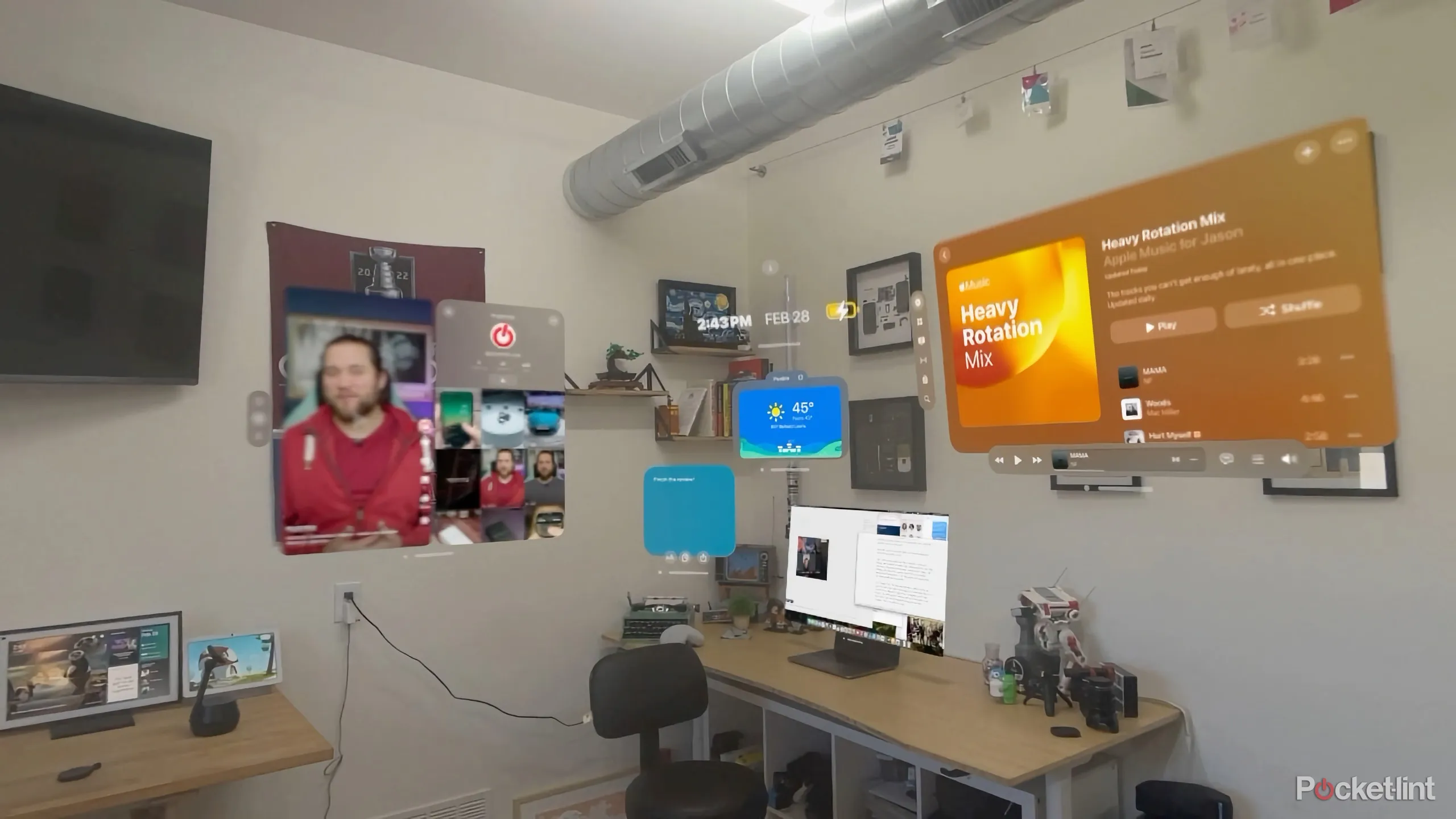
visionOS allows for unlimited window arrangements in your physical space
Multitasking reaches new heights with visionOS. I regularly work with 5-6 apps open simultaneously, arranged around my home office. My email floats to the left, Slack hovers on the right, whilst a massive Safari window takes centre stage for research. It's like having an infinitely large, curved monitor that follows you everywhere. The ability to scale windows to cinema-screen proportions is particularly impressive—watching a film on a 100-foot virtual screen whilst lying in bed is an experience that never gets old.
App compatibility is broader than expected at launch. Most iPad apps work out of the box, appearing as floating windows that you can interact with using eye tracking and gestures. Native visionOS apps, however, truly shine. Apps like Juno for YouTube, Mindnode for mind mapping, and djay for DJing showcase what's possible when developers embrace spatial computing. The level of immersion and interactivity in these native apps hints at the platform's enormous potential.
Real-World Performance: Putting Vision Pro Through Its Paces
Performance testing the Apple Vision Pro reveals just how capable the M2 chip is in this new context. Whether I'm pushing the device with multiple 4K video streams, complex 3D modelling applications, or graphics-intensive games, the experience remains fluid and responsive. The combination of raw processing power and intelligent optimisations creates a user experience that feels effortless.
Gaming on the Vision Pro showcases the M2's GPU capabilities beautifully. Apple Arcade titles like "Synth Riders" and "What the Golf?" run at a locked 90Hz with all visual settings maxed out. More demanding experiences like "Demeo" and "Rec Room" maintain smooth frame rates even during chaotic multiplayer sessions. The lack of traditional PC VR titles is noticeable, but the quality of available games is impressive.
Productivity workflows benefit enormously from the M2's performance headroom. I've edited 4K videos in Final Cut Pro, manipulated complex spreadsheets in Numbers, and created presentations in Keynote—all without a hint of lag. The ability to have multiple resource-intensive apps running simultaneously without performance degradation is a testament to Apple's optimisation efforts.
The Vision Pro intelligently manages thermals by distributing heat across the entire headset chassis. During my testing, the device became warm but never uncomfortably hot, even during extended gaming sessions.
One area where performance truly shines is in the passthrough mode. The real-time processing required to capture, process, and display your environment with minimal latency is computationally intensive. Yet the Vision Pro manages this whilst running apps, tracking your hands and eyes, and processing spatial audio—all without stuttering. It's a remarkable technical achievement that sets a new benchmark for mixed reality devices.
Gaming performance remains smooth even in graphically intensive titles
Comfort and Ergonomics: The Wearability Factor
Let's address the elephant in the room: the Apple Vision Pro is heavy. At approximately 600-650 grams depending on your band configuration, it's noticeably weightier than competitors like the Meta Quest 3 (515g) or PICO 4 (586g). However, weight alone doesn't tell the full story—distribution and adjustability play crucial roles in real-world comfort.
Comfort Pros
- Premium materials feel soft against skin
- Excellent weight distribution with Dual Loop Band
- Breathable fabrics reduce sweating
- Quick-release magnetic Light Seal
- Multiple size options ensure proper fit
Comfort Cons
- Noticeable weight after 60+ minutes
- Pressure points on cheekbones
- Solo Knit Band inadequate for long sessions
- External battery pack cable can be annoying
- Can mess up hairstyles
During my testing, comfort varied significantly based on usage patterns and band choice. The Solo Knit Band, whilst sleek and minimal, proved inadequate for sessions longer than 30-45 minutes. The weight pressing down on my cheekbones and forehead became increasingly uncomfortable. Switching to the Dual Loop Band dramatically improved the experience by better distributing weight across the top of my head.
For one-hour sessions, the Vision Pro remains reasonably comfortable with proper adjustment. I regularly use it for focused work sessions, virtual meetings, and media consumption without significant discomfort. The key is taking time to properly adjust the bands and ensuring the Light Seal creates an even pressure distribution around your face.
Two-hour sessions push the boundaries of comfort. By the 90-minute mark, I typically need to readjust the headset or take a brief break. The pressure points become more noticeable, and the weight starts to strain neck muscles. It's manageable but not ideal for marathon usage sessions.
Extended sessions beyond two hours require strategic breaks. During all-day testing, I found myself removing the headset every 60-90 minutes for a 5-10 minute break. This isn't necessarily a dealbreaker—even traditional computer work benefits from regular breaks—but it does impact the device's viability as an all-day computing solution.
Content Ecosystem: Apps, Games, and Experiences
The success of any platform hinges on its content ecosystem, and the Vision Pro launches with a surprisingly robust library. Apple has clearly learned from previous platform launches, ensuring a strong day-one lineup whilst building tools that make porting existing apps relatively straightforward.
Immersive Video Content
Apple TV+ offers exclusive 180-degree immersive videos including sports, documentaries, and concerts. The quality is stunning—you feel like you're actually there.
Gaming Library
Over 250 games at launch, including 100+ Apple Arcade titles. Standouts include Demeo, Synth Riders, and What the Golf?
Productivity Apps
Microsoft Office, Zoom, Webex, and countless iPad apps work seamlessly. Native apps like Craft and MindNode showcase spatial computing's potential.
Creative Tools
Adobe Lightroom, Procreate Dreams, and djay offer professional-grade creative capabilities with intuitive spatial interfaces.
The immersive video content on Apple TV+ deserves special praise. Watching Alicia Keys perform in a 180-degree video feels remarkably intimate—you're transported to a private concert where every detail is captured in stunning clarity. Sports content is equally impressive; sitting courtside at an NBA game or trackside at Formula 1 showcases the potential for immersive broadcasting.
Content Discovery Tip
The Encounter Dinosaurs experience is a must-try showcase of the Vision Pro's capabilities. The photorealistic dinosaurs that appear in your living room demonstrate the device's spatial tracking and rendering capabilities beautifully.
iPad app compatibility provides instant access to thousands of applications. Whilst these apps don't take full advantage of spatial computing, they work surprisingly well. Netflix, YouTube (via third-party apps like Juno), and other streaming services deliver cinema-quality viewing experiences. Productivity apps like Notion, Todoist, and Fantastical translate well to the spatial environment.
Native visionOS apps showcase the true potential of spatial computing
Gaming represents both a strength and weakness of the current ecosystem. The available games are polished and showcase the platform's capabilities well, but the library lacks the depth of PC VR platforms. There's no Beat Saber, no Half-Life: Alyx, and no access to the vast SteamVR catalogue. Apple Arcade helps fill the gap with quality titles, but hardcore VR gamers may find the selection limiting.
Investment Analysis: Pricing and Value Proposition
At £3,499 for the base model, the Apple Vision Pro commands a premium that puts it firmly in luxury territory. This isn't an impulse purchase—it's a considered investment that requires careful evaluation of your needs, budget, and tolerance for first-generation technology.
256GB Model
Entry-level storage
512GB Model
Recommended for most users
1TB Model
For power users
Additional costs quickly mount up. If you wear glasses, you'll need Zeiss Optical Inserts at £99—these magnetic prescription lenses are essential for clear vision. AppleCare+ at £499 provides peace of mind for such an expensive device, covering accidental damage and extending warranty coverage. Travel cases, additional bands, and extra battery packs further increase the total investment.
| Device | Starting Price | Display Quality | Ecosystem | Target Audience |
|---|---|---|---|---|
| Apple Vision Pro | £3,499 | Best in class | Apple ecosystem | Prosumers/Enterprise |
| Meta Quest Pro (discontinued) | £1,199 | Good | Meta/PC VR | Professionals |
| Meta Quest 3 | £479 | Good | Meta/PC VR | Consumers |
| PICO 4 | £379 | Adequate | PICO/PC VR | Budget conscious |
| HoloLens 2 (discontinued) | £4,395 | Adequate | Microsoft | Enterprise only |
Value proposition varies dramatically based on use case. For creative professionals working in video production, 3D design, or architectural visualisation, the Vision Pro's capabilities could justify the investment through improved workflows and new creative possibilities. The ability to preview 3D models at actual scale or edit video on a virtual 100-inch timeline provides tangible productivity benefits.
The premium price reflects cutting-edge technology and build quality
For general consumers, the value equation is more challenging. At seven times the price of a Meta Quest 3, you're paying a substantial premium for superior display quality, better build materials, and tighter ecosystem integration. Whether those benefits justify the cost depends entirely on your financial situation and how much you value being on the cutting edge of technology.
The Verdict: Revolutionary or Evolutionary?
After three weeks of intensive testing, I can confidently say the Apple Vision Pro is both revolutionary and evolutionary. It's revolutionary in its approach to spatial computing, display technology, and user interaction. It's evolutionary in that it builds upon decades of VR/AR development whilst pushing every aspect forward significantly.
The standout features that justify the premium price include the unparalleled display quality, seamless ecosystem integration, and intuitive spatial computing interface. On visual fidelity nothing else we have tried comes close, and the user experience feels a generation ahead of the headsets we have compared it against. For users deeply embedded in the Apple ecosystem, the Vision Pro feels like a natural extension of their existing devices.
Final Verdict
The Apple Vision Pro is an extraordinary piece of technology that delivers on its promise of spatial computing. However, its high price, limited battery life, and first-generation limitations make it a device for early adopters and specific professional use cases rather than mainstream consumers. If you have the budget and a clear use case, it's a glimpse into the future worth experiencing.
Current limitations are impossible to ignore. The two-hour battery life feels restrictive, especially given the tethered battery pack design. The weight and comfort issues limit extended use sessions. The app ecosystem, whilst impressive for a launch, lacks the depth of established VR platforms. And then there's the price—at £3,499, it costs more than a high-spec MacBook Pro.
Yet despite these limitations, I find myself reaching for the Vision Pro daily. Whether it's for focused work sessions, immersive media consumption, or simply exploring what's possible with spatial computing, it consistently delivers experiences that feel magical. It's not perfect, but it's the most exciting piece of technology I've used in years.
The Vision Pro represents Apple's vision for the future of computing
Who Should Consider Apple Vision Pro?
The Apple Vision Pro isn't for everyone—at least not in its current iteration. Understanding whether you're the target audience requires honest assessment of your needs, budget, and tolerance for early-adopter friction. Let me break down the specific user groups who would benefit most from this investment.
Creative Professionals
Video editors, 3D artists, architects, and designers will find genuine productivity benefits. The ability to work with virtual displays of any size, preview 3D models at true scale, and collaborate in shared spatial environments justifies the investment for many creative workflows.
Apple Ecosystem Enthusiasts
If you're already invested in the Apple ecosystem with a Mac, iPhone, iPad, and Apple Watch, the Vision Pro integrates seamlessly. Features like Universal Control, Handoff, and iCloud sync create a cohesive experience across all your devices.
Enterprise Users
Companies exploring AR/VR for training, visualisation, or remote collaboration will find the Vision Pro's capabilities compelling. The enterprise-grade build quality and security features make it suitable for professional deployment.
Early Technology Adopters
If you've consistently been first to adopt new platforms and enjoy exploring cutting-edge technology despite its limitations, the Vision Pro offers an unparalleled glimpse into the future of computing.
For those on the fence, I'd recommend trying the Vision Pro at an Apple Store before committing. The 30-minute demos provide enough time to experience the interface, test comfort, and understand whether spatial computing resonates with you. Many people are blown away by the experience; others find it impressive but not £3,499 impressive.
Looking ahead, the Vision Pro's success will depend on three factors: developer adoption, price reduction, and hardware refinement. If Apple can maintain developer momentum whilst bringing costs down and reducing weight in future generations, spatial computing could indeed become the next major computing platform. For now, it remains an expensive glimpse into an exciting but uncertain future.
The Apple Vision Pro is simultaneously the most exciting and frustrating product Apple has released in years. It showcases incredible technology and offers genuinely new experiences, but asks users to pay a premium price for a first-generation product with notable limitations. If you have the means and a clear use case, it's a worthwhile investment in the future of computing. For everyone else, watching this space as the technology matures might be the wiser choice.